Google Apps



Update (3:24 ET): I’m back online. are you?
Wait, the Drive icon on the Apps Status Dashboard changed again! What does this one mean? pic.twitter.com/eMcd5bTZXK
— Gabe Rivera (@gaberivera) May 10, 2013
If you are having issues with Google Drive, you aren’t alone. We’ve just lost our access to our online documents though our local sync seems to be working fine. Google’s Apps status page just went code orange indicating they are investigating the issue. Now let’s start talking about how safe your documents are in the Cloud.

Google just announced a nice bit of API code that will allow developers to to make it easy for readers of websites to download files to their Google Drive account.
Adding a Save to Drive button on your website is easy. You simply have to include the script and HTML tag below:
<script src="https://apis.google.com/js/plusone.js"></script>
<div
 data-filename="My Statement.pdf"
 data-sitename="My Company Name"
 data-src="/path/to/myfile.pdf">
</div>
It isn’t hard to see how this could come in handy.

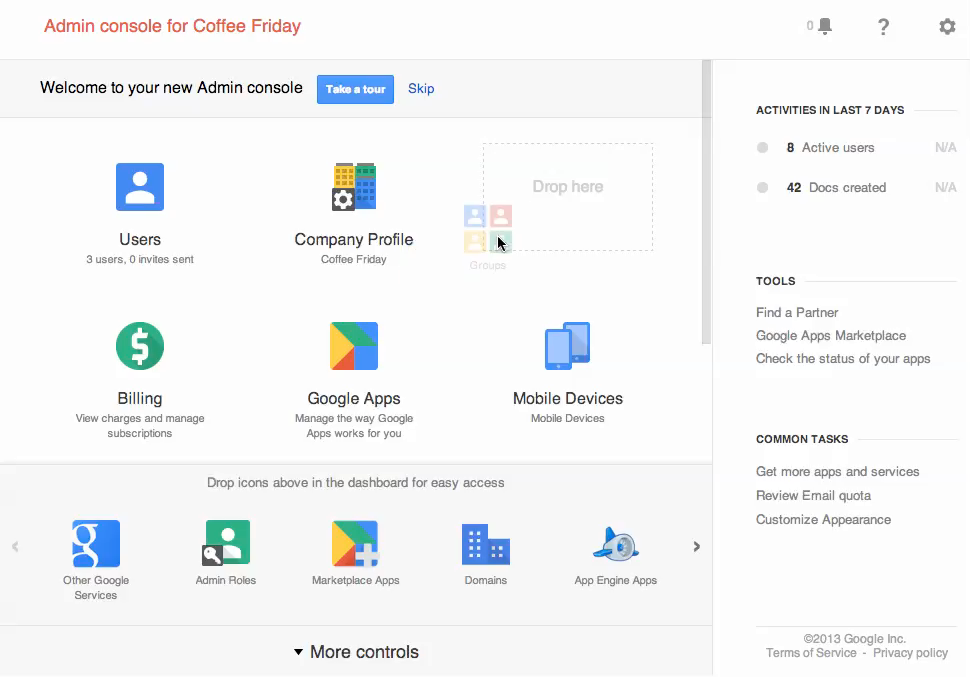
Google introduced an update today to its Google Admin console for managers of Google Apps like Gmail, Calendar, and the like.
Businesses, governments, and schools should appreciate the changes to Google’s admin console.
The new features include improved navigation, more customization, and a more accessible domain.

Google announced on its blog today that it is adding support for 5 new languages in Google Translate that combined are spoken by over 183 million people worldwide. The new languages, which include Bosnian, Cebuano, Hmong, Javanese, and Marathi bring Google Translate up to a total of more than 70 languages.
The five new languages are still in alpha (apart from Bosnian) but Google promised to “to test and improve them over time.”
-Bosnian is an official language in Bosnia and Herzegovina that’s also spoken in regions of neighboring countries and by diaspora communities around the world.
-Cebuano is one of the languages spoken in the Philippines, predominantly in the middle (Visayas) and southern (Mindanao) regions of the nation.
You can hear the Hmong language spoken in many countries across the world, including China, Vietnam, Laos, Thailand and throughout the United States.
-Javanese is the second most-spoken language in Indonesia (behind Indonesian), with 83 million native speakers.
-Marathi is spoken in India and has 73 million native speakers. Google Translate already supports several other Indian languages: Bengali, Gujarati, Hindi, Kannada, Tamil, Telugu and Urdu.
Google is beginning to roll out a new feature in Gmail today that will allow users to quickly and easily create or add an event to Google Calendar without ever leaving their inbox. Once the feature has been enabled, users will be able to click the date and time within emails to add or create an Google Calendar entry using the data from the email (as pictured above). The calendar entry can be edited before added and will also automatically include a link back to the original email for reference:
When you click on one of these underlined dates, you’ll be able to preview your schedule for the day and change the title, date or time of the event. Clicking “Add to Calendar” will do exactly that — add the event to your calendar, and for extra convenience, the calendar event will include a link back to the original email.
Keep an eye out for the new feature rolling out to everyone using the English (US) language setting over the next week.
Earlier today Google officially pushed out an update to its existing Google Search app for iPhone enabling the Google Now service with weather and traffic conditions, updates on breaking news and sports, and more. Some users logging into Google Search through a Google Apps account might have noticed that using the features would prompt an error that “your administrator hasn’t enabled Google Now for your domain.” Hanselman.com shares instructions on enabling the feature which aren’t exactly obvious since the setting is buried in “Android settings”.
Google Apps for Business, Education, and Government: Google Now needs to be turned on by an administrator before it can be used.
If you are an administrator, you can enable Google Now for users in your organization by following these steps:
Previously only available to Chromebook users, Google announced today on its Chrome blog that Mac and Windows users will now have the ability to open Microsoft Office files directly within Chrome. The functionality works for users running the latest Chrome Beta and requires installation of the Chrome Office Viewer (Beta) extension.
In addition to saving you time, the Chrome Office Viewer also protects you from malware delivered via Office files. Just like with web pages and PDFs, we’ve added a specialized sandbox to impede attackers who use compromised Office files to try to steal private information or monitor your activities.
On top of rolling out some new features to Google Drive earlier this morning including profile pictures and one-click group chat, Google also just announced some new additions to Drive’s offline mode.
When using Google Drive in offline mode, users will no longer have to worry about what files have been made available offline. Google will now automatically make Google Docs, Sheets, and Slides available offline as long as you have enough storage. Users will also now be able to create and edit drawings in offline mode.
The new offline features will be available to users in the coming days alongside the new group-chat and profile pictures features.
Google announced some new handy features for Drive on its official Google Drive Blog today. To make it even easier to quickly see who you are collaborating with inside a file in Drive, Google has added profile pictures in addition to names at the top of the web app. Hovering over the new profile pics will let you see details and add users to circles on Google+:
Now when you open a file in Drive, you’ll see the profile pictures of other viewers at the top instead of just their names, making it easy for you to do a quick scan of who else is in the file. You can hover over a photo to see details about the viewer and add them to your circles on Google+ — all without ever leaving Drive.
Google is also providing easy, one click access to starting group chats with both new features rolling out to users in the next couple of days. Google also confirmed it will be adding support for new files types soon, such as Google Sheets.

Google launched its Google Fiber TV for iPad app today allowing Google Fiber customers to transform their iPads into QWERTY keyboard, TV guide yielding TV remotes.
For the past month, our Fiber TV customers have been able to control their TVs with any recent Android device. Using the Fiber TV app from the Google Play Store, they can search for programming, browse listings, and select shows or recordings with just the touch or swipe of a finger. Now, iPad users can enjoy this simple, intuitive experience, too.
This should come as great news to tablet owners in Kansas City, Austin, and Provo.
Google Fiber TV for iPad is available for free in the App Store.
(Source: Google)
Update: 10:52 AM EST – Google’s status website reports that Gmail should be back online for everyone
The problem with Google Mail should be resolved. We apologize for the inconvenience and thank you for your patience and continued support. Please rest assured that system reliability is a top priority at Google, and we are making continuous improvements to make our systems better.
Update: 9:01 AM EST – Google’s status website also reports issues with Google Docs
As of 8:58 AM EST, Google has acknowledged a service disruption with Google Mail as well as Google Drive.
Google is also reporting a complete outage of its admin control panel/API.
While the outage does not seem to reach everyone, my work Gmail account has been telling me that my password is wrong all morning.
Notably, Google Calendar and Talk seem to be unaffected.
Is anyone else having trouble accessing their Gmail on their iPhones?
— J(enna) Wortham (@jennydeluxe) April 17, 2013


Google’s Evernote competitor, Google keep, has been updated, with minor updates. The changelog still says allow audio notes, photo attachments, checkable lists and more …
Expand
Expanding
Close
Google today is launching a new feature for Google account holders that will allow them decide how they want Google to handle their data when they die. The feature, dubbed “Inactive Account Manager”, will allow you to specify when you want your data to be deleted or select a trusted friend to handle the data for you:
For example, you can choose to have your data deleted — after three, six, nine or 12 months of inactivity. Or you can select trusted contacts to receive data from some or all of the following services: +1s; Blogger; Contacts and Circles; Drive; Gmail; Google+ Profiles, Pages and Streams; Picasa Web Albums; Google Voice and YouTube. Before our systems take any action, we’ll first warn you by sending a text message to your cellphone and email to the secondary address you’ve provided.
You can access the Inactive Account Manager now to select how to want messages for Gmail and data for a number of other Google applications to be stored when you pass or your accounts become inactive.
We have been seeing more leaks surrounding Google’s much rumored unified chat service that most are calling “Babel”. On Monday we got a look at some pretty legit looking screenshots of Babel inside of Gmail that apparently came straight from a Google engineer testing the service, and today we get even more details about Babel.
A new report from Droid-life claims to have additional details about the service including a feature list from sources close to the project.
Google Babel as a product is a collaboration of work by the Google+, Android, Chrome and Apps teams. Through their combined efforts, as was previously reported by us, we’ll see this unified service launch in Gmail and as Android, iOS, and Chrome apps. What’s particularly interesting, is that Google is talking about the iOS app as being the first time they have built a “first class iOS experience” when it comes to a messaging service.
On top of a “first class iOS experience,” the report also says that Google Voice will eventually be integrated alongside Talk, Hangouts, and Messenger, but not initially at launch. Other features apparently coming to the yet to launch service include: notification syncing across devices, an updated messaging UI, group conversations, 800+ emoji, and some other expected features. Head below for the full list:
Gmail is officially turning nine years old this month after originating as a project created on an employee’s spare “20% time” and launching on April 1st as an invite only beta in 2004. To celebrate, Google has put together the info graphic below showing some of the milestones for its massively popular email service:
While hundreds of millions of Spanish speakers around the globe have had the option to use Gmail in Latin America Spanish since last year, a number of other popular Google services didn’t offer the Español language setting. Now, Google has announced on its Official Gmail Blog that it is expanding support for its Latin American Spanish language option to Google Calendar:
If you’re new to Calendar but already using Gmail in Latin American Spanish, just visit google.com/calendar and language settings will be ready to go. If you’ve used Calendar in the past, you’ll need to update your language settings by clicking on the gear icon in the mid-upper right of Calendar, then selecting Settings: Once in General Settings, Language you can select Español (Latinoamérica).
You’ll also be able to access the Español (Latinoamérica) setting for Calendar on Android devices through your device’s “Language Settings” within Settings.

Rumors of an upcoming messaging service from Google dubbed “Babel” have been steadily popping up in recent months. We first heard back in March that the service would unify Google’s chat services such as Google Talk, Chat for Drive, Google+ Hangouts, etc, and since got a look at two different sets of screenshots showing variations of what tipsters both alleged were an Android app for the rumored service.
After a small hint at Gmail integration for Babel this morning, we now get yet another set of photos, this time reportedly showing what the service will look like inside of Gmail. TechRadar posted the images above that apparently come from an anonymous Google employee currently testing Babel.
From the screenshots we see a slightly tweaked text layout, new emoticons and the expected Google+ integration, but not much else.
Expand
Expanding
Close
A message reported by a Google+ users suggests that Google’s rumored Babel integrated messaging service may be close to launch:
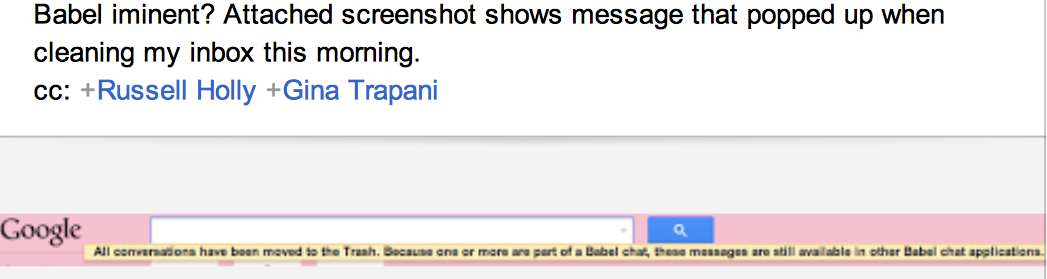
The screengrab posted by Patrick Dhawaan shows the message All conversations have been moved to the Trash. Because one or more are part of a Babel chat, these messages are still available in other Babel chat applications …
Expand
Expanding
Close

Twilio, a voice and messaging API solution, announced a partnership with Google’s Cloud Platform today.
Twilio is the first of its kind to integrate with Google App Engine and give developers voice and messaging services for their apps with just a few lines of code, and its APIs are priced on a pay-per-use scale, as first noted by TechCrunch. Voice services like making calls, for instance, start at 2 cents per minute, and the ability to receive calls costs just $1 per phone number and 1 cent per minute.
“We’re very excited to partner with Google to be the first voice and messaging platform integrated with Google Cloud Platform,” explained Twilio on its blog, while also listing step-by-step instructions on how to register with Google App Engine, build a messaging app, etc.
Twilio’s SDK notably includes one-to-one voice and messaging, SIP support, in-app conference calling, group texting, two-factor authentication, phone numbers, and mobile app distribution. Hipmunk, for instance, uses Twilio’s distribution feature to supply users with a text message and link to download its app.
The two most popular non-game apps downloaded from Apple’s iOS App Store so far this year were both Google ones: YouTube and Google Maps, according to data from App Annie (via The Next Web).
Google Maps was originally installed as standard on iPhones and iPads until Apple struck out on its own with the rather ill-fated Apple Maps. Though Apple has since fixed many of the embarrassing errors in the launch version, demand for Google’s version has seemingly increased rather than decreased.
In an ironic turnabout, Google lost the top slot on its own Google Play store to Facebook.
Google announced today on its Official Gmail Blog that it has released an update to the Android app for Gmail that brings new features, faster search, and other enhancements for certain users. Perhaps the most notable new feature is the ability to reply, archive, and delete from notifications with one tap—rather than having to open the app to sort and reply to mail:
You can combine this with existing notification features like the ability to customize which messages you receive notifications for and set up different sounds for individual labels. So if you filter and label all the messages from your mom, you could set a ringtone to let you know you received a new mail from her and then quickly reply (because we know what can happen when you ignore your mother!).
The feature is available to users running Android 4.1 and up, but Google is also rolling out faster search, bug fixes, and performance enhancements for Android 4.0 and up. Users on Android 2.2 and up will now have access to a “New Labels API for 3rd-party app developers” and the usual performance improvements.
The updated Gmail app for Android is available from Google Play now.
Expand
Expanding
Close
Google has updated its apps status page this morning to reflect an investigation into reports of issues with Google Drive. Google doesn’t go into detail about what specific issues are being reported, but users online have reported problems connecting to the service mainly through the web app. The apps status page lists the problem as a service disruption, indicating not all users are unable to access to the service. The service disruptions seem to be hitting a large amount of users, and Google confirmed it would provide more information soon. We’ll update this post when Google provides us with an update.
There were hints late last month that Google was planning on adding new features to Google Translate and today the company announced a new feature for the service called Phrasebook. Rather than having to translate the same words and phrases time and time again, Phrasebook allows users to save a set of translations for quick and easy access. Google explained how the features works:
It’s easy to start using Phrasebook. Simply click the star under the translated text to save the translation in your Phrasebook. To view your Phrasebook, simply click the Phrasebook icon above the upper-right corner of the box containing the translation.
Click any phrase in your Phrasebook to load it back in the translation area. Using the Phrasebook controls, you can filter your phrases by language pair or search for a specific phrase. You can also easily listen to each phrase by hovering over the entry and selecting the text-to-speech icons.
Google could soon be adding more features to Translate as last month hints were discovered that Google is working on an option to select a dialect for certain languages in its text-to-speech feature within Google Translate. There were also additional dictionary features that have yet to be implemented.
Google announced today that it updated the mobile web app for Gmail and the Gmail Offline Chrome app with a refreshed UI and new features similar to recent enhancements to its iOS apps. On top of the redesigned visuals, Google also included improvements to search and Google Calendar integration:
Today we’re rolling out a similar refreshed look to the Gmail mobile web app as well as Gmail Offline (http://goo.gl/0f1ae) that includes many of these same changes. Try it out at gmail.com in the browser of your Android, iOS, Blackberry or Kindle Fire device.
Google noted it decided to implement a design for its web apps similar to its iOS offerings after receiving positive feedback since first launching the new iOS design in December.