

Gemini has been a powerful addition to Google Workspace, allowing users to enhance how they interact with productivity tools like Docs or Sheets. Google Drive is the latest to see a new Gemini feature that will summarize Google Drive folders before you open them on the web app.
Google has been pushing Gemini to be more useful with some exciting success. The company just announced Gemini 2.0, which marks a new step towards that goal and Gemini 1.5 is a prime example of how well it can integrate itself into tools we already use, like Google Drive.
In addition to its slew of abilities, Google Drive for web just added a new Gemini feature that can summarize entire folders. This can be done in cases when large folders are present, but the user doesn’t want to dig through all of it quite yet.
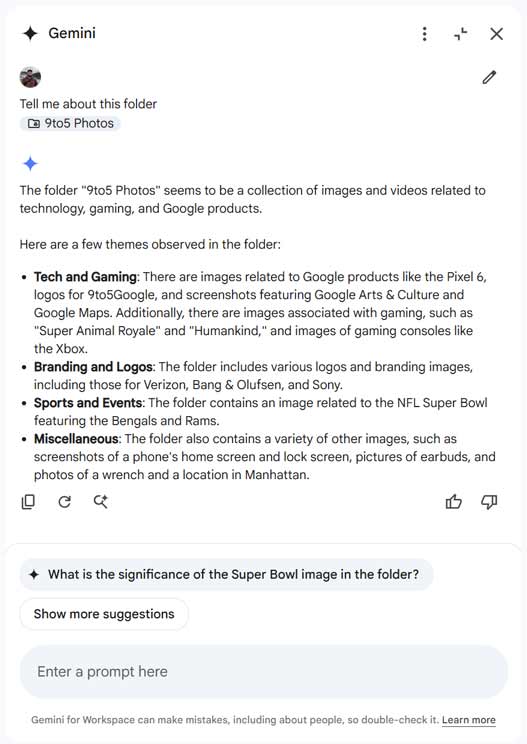
By right-clicking on the folder and hitting “Summarize this folder,” Gemini will open the side panel and list all of the perceived contents of the folder in a short summary. Users can also drag the folder into the Gemini side panel to get Google’s AI to do a deep dive.
In our testing, the tool works accurately to give a quick rundown of what’s in the folder. That includes folders that are full of PDFs, text documents, spreadsheets, and presentations, according to Google. In our case,it was able to identify images in a folder. When asked to summarize our folder of pictures, Gemini listed the content of the images, including known logos and branding.
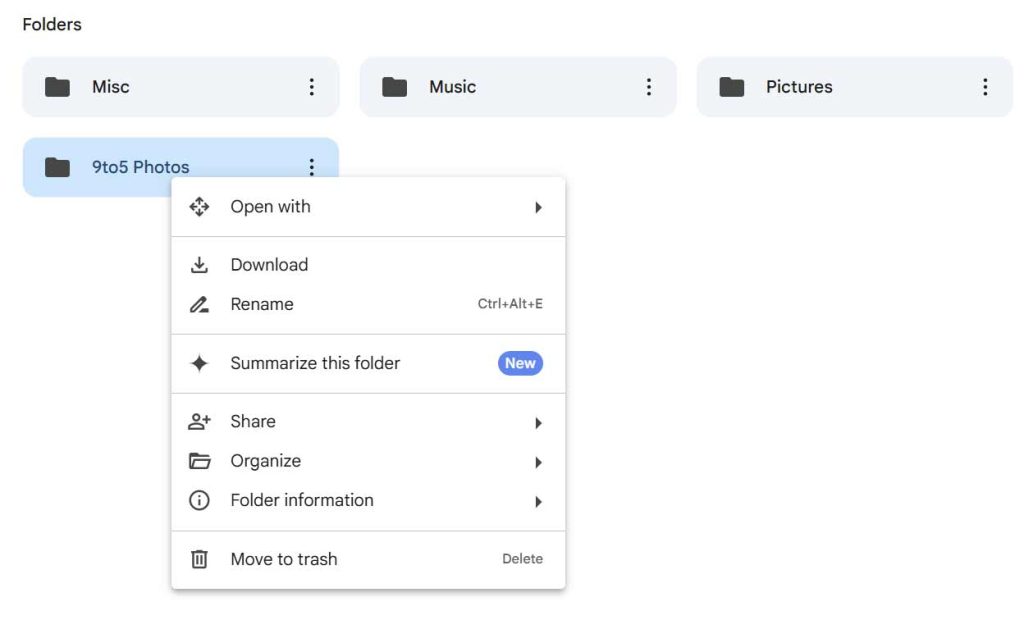
Google says the feature will be released gradually beginning yesterday, December 11. That will include Google One AI Premium accounts, and Gemini Business, Enterprise, Education, and Education Premium accounts, and users should see the new feature in two weeks or less.
More on Gemini:
- How to test Gemini in Google Assistant on Nest Mini, Audio
- Gemini Advanced rolling out first agentic feature: ‘Deep Research’
- Google details Gemini 2.0 Project Astra capabilities, ‘Mariner’ browser agent


FTC: We use income earning auto affiliate links. More.





Comments