

Google is working on a new design language for Android 16, and a new leak showcases how the updated battery icons in the update will work.
While the Android 16 we know today in beta doesn’t feel all that new, Google clearly has something big in the pipeline as countless recent leaks have shown. Beyond that, “Material 3 Expressive” is a new design language that has leaked through one of Google’s own official blog posts.
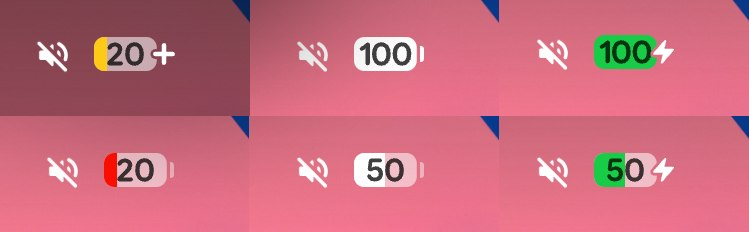
Through those leaks, we’ve seen a peek at a redesigned battery icon for Android 16, but now another leak shows that in more detail.
Mystic Leaks on Telegram shared images of the new battery icon in Android 16 which is now oriented horizontally. The roudned corners of the icon alone are a fresh design – one that feels a lot like One UI 7 and iOS – but we also see the influence of Material 3 Expressive when certain conditions are met. When the battery hits 20%, it turns either red or yellow, the latter indicating battery saver mode with a “+” icon to the right side. Similarly, it turns green when the device is charging, and shows an icon to represent electricity off to the right.
It’s a considerable departure from the style we’ve had in Android for a while now (as pictured above), but it’s certainly in line with the changes Google is planning for its new design language.
What do you think of this change?
More on Android 16:
- Android 16’s redesign seems to be full of new, subtle animations
- All the leaked Android 16 features not yet available on Pixel [Video]
- Here’s everything new in Android 16 Beta 4 [Gallery]
Follow Ben: Twitter/X, Threads, Bluesky, and Instagram


FTC: We use income earning auto affiliate links. More.


Comments