

US-based Galaxy Watch users are going to be able to track blood pressure after the feature has been regionally locked for years. Blood pressure monitoring will begin rolling out for users in the US, but it needs a Galaxy phone to work.
Blood Pressure monitoring will be available through the Samsung Health Monitor app for users in the United States, as with ECG readings. The rollout won’t be limited to any specific Galaxy Watch model, either, making this a win for the Galaxy Watch 4 and later – all the way to the Galaxy Watch 8.
Top comment by Red Hagar
Don't get too excited. It doesn't work. It forces you to "calibrate" with a real machine and then just always gives you some average of those readings. But after a lot of testing, it does not reflect my actual blood pressure. It doesn't work.
Samsung states that blood pressure readings are not intended to prevent or diagnose high blood pressure, but they should be used to add additional insight to overall health measurements. Galaxy Watch wearers will need to initiate a reading, similar to an ECG test. Heart rate and blood pressure figures will appear on the watch once completed, and that data will be stored in the companion app.
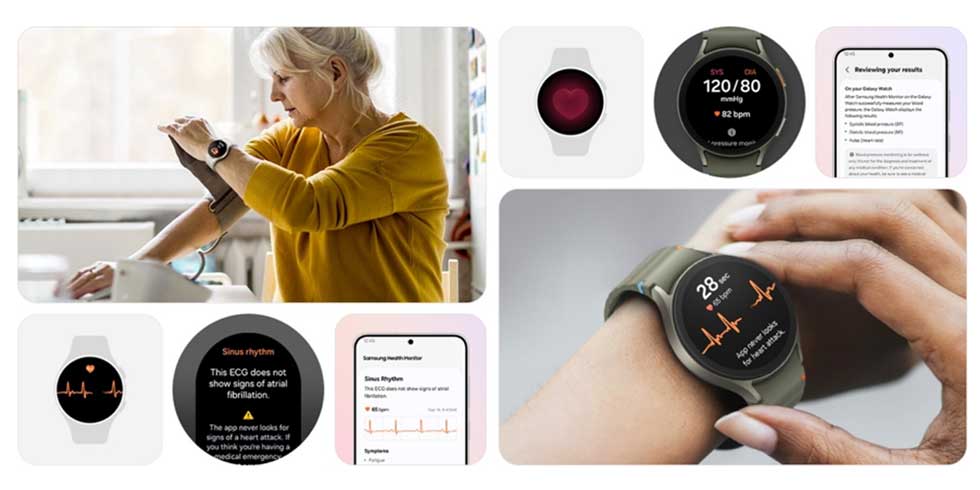
Since the tool is dependent on the Samsung Health Monitor app, official use will be limited to watches paired with Galaxy phones. The feature is also seemingly dependent on calibration using a traditional upper arm cuff. The press release notes that calibration will be needed every 28 days.
To ensure accuracy, users are required to calibrate their Galaxy watch using an upper arm cuff (sold separately) every 28 days. Compatible Galaxy Watches measure systolic and diastolic blood pressure along with your heart rate using the internal heart rate monitoring sensors.
Blood pressure tracking has been famously left out of the Galaxy Watch’s bag of tricks in the US since its arrival on the Galaxy Watch Active 2 in 2020, while other regions have enjoyed the feature and a fuller arsenal of health monitoring tools. With this news, it seems regulations in the US have changed, and Samsung is free to begin rolling out once-limited tools.
An update should begin rolling out today, and with the paired Samsung Health Monitor app, Galaxy Watch users should begin seeing availability.


FTC: We use income earning auto affiliate links. More.






Comments