Google Labs

See All Stories

Google Maps for Android now features offline maps

Site default logo image

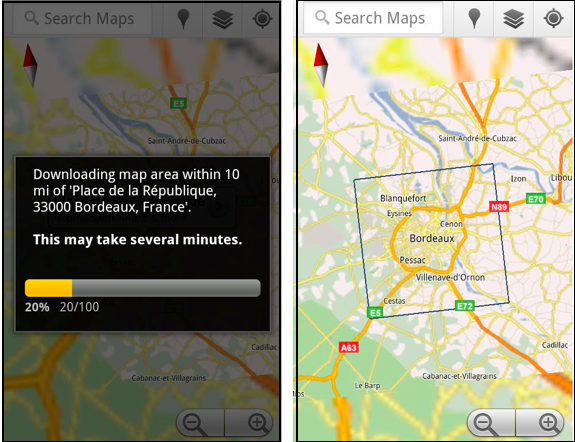
Android users who downloaded the updated  Maps application today got a nice surprise.  Google Maps for Android now features offline viewing. To enable the new feature, simply navigate to the Labs section of the Maps application and enable the Download Map Area option. After this is enabled, each time you want to download maps for offline viewing you will need to visit a Place page, click the more button, and then select the option to store locally. Maps will then store a 10 mile radius, locally to your device.

Offline viewing is available for Android because of the way it displays the maps. Android uses a vector-based system for displaying map tiles, where the iPhone uses an image based. This means Android can pull maps using about 1/100th of the data the iPhone would. Maybe we’ll see a change to the iPhone’s Google Maps soon.

via TechCrunch

Google experimenting with web tool that converts Flash files to HTML5

Site default logo image

Well, this is interesting… Google is advertising on its Google Labs page an experimental tool which aims to liberate web developers from the confines of Adobe’s Flash platform. They are calling it Swiffy (sweet) and its sole purpose is to convert Flash SWF files to HTML5. But make no mistake about it – this is about Apple’s iOS gadgets. Google itself says Swiffy lets you “reuse Flash content on devices without a Flash player (such as iPhones and iPads)”. Interesting Apple’s frenemy all of a sudden took it upon themselves to help port Flash content to Apple’s devices.

It’s a web-based tool and we’ve tried it on several relatively simple Flash animations, the ones usually seen running as annoying adverts on web sites. Surprisingly, Swiffy did quite a good job converting sample SWFs to HTML5, sans custom fonts that didn’t translate well into HTML5. Just don’t expect the latest Flash games and heavy project with lots of interactive features to port smoothly or at all. In fact, the search company is downplaying the importance of Swiffy, saying you shouldn’t expect miracles. “Swiffy currently supports a subset of SWF 8 and ActionScript 2.0, and the output works in all Webkit browsers such as Chrome and Mobile Safari,” the company noted.


Expand
Expanding
Close