
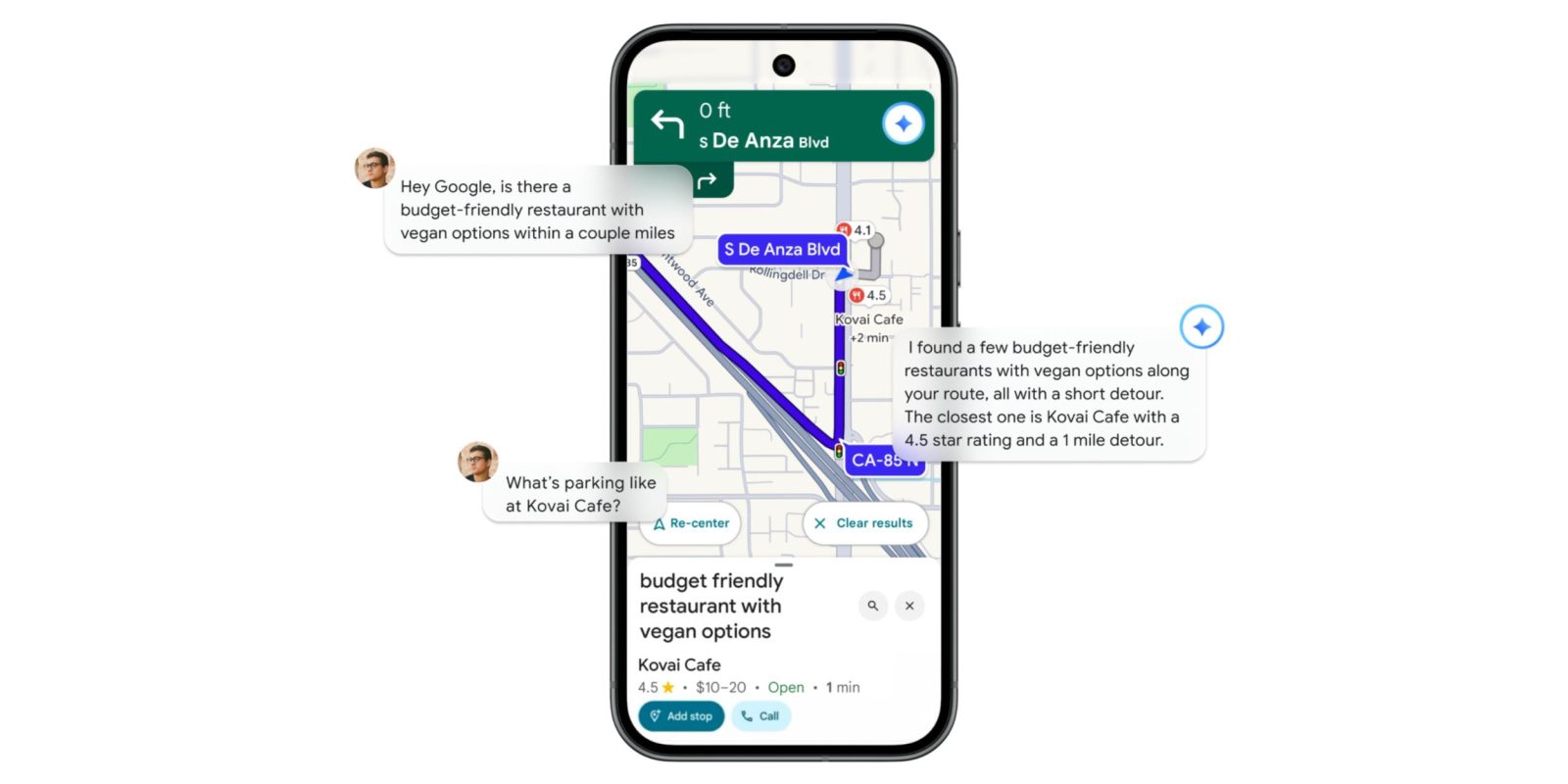
Following the announcement at the start of November, Google Maps is beginning to roll out navigation with Gemini. It joins availability in place listings, which is getting an update, and is coming soon to Lens.
From a visual perspective, the four-color microphone in the top-right corner gets placed by the Gemini spark. This is the blue variant rather than the gradient design, though there’s a brief four-color ring upon activation that turns blue after a moment.
Replacing Google Assistant entirely, it works when using any form of navigation — including public transport, walking, and cycling in our testing today, with the support article confirming — not just driving. You can continue to use the “Hey Google” hotword to activate.
On the navigation front, available commands include:
Basic navigation controls:
- “Navigate home”
- “Stop navigating”
- “Add stop”
- “Mute guidance”
- “Avoid tolls”
- “Show alternative routes”


Basic route answers: Get information about your route.
- “What’s my next turn?”
- “When will I arrive?”
- “What’s the weather like at my destination?”
- “What’s my next stop?”
Search & Place answers:
- “Find me a cafe near my destination that serves
- “What’s the most popular dish on the menu?”
- “When does {Place Name} close?”
Notably, your prompts can involve multiple steps, like:
“Is there a budget-friendly restaurant with vegan options along my route, something within a couple miles? … What’s parking like there?” Followed by, “OK, let’s go there.” You can even ask “Oh, by the way, can you also add a calendar event for soccer practice tomorrow for 5 p.m.?”
Top comment by Arthur
Two days ago I noticed the Assistant microphone icon to the far right when I was actively using Maps wasn't there and when I said the Hey Google hotword, Gemini appeared instead of the Assistant which hadn't happened before. I was thinking is it cause Gemini has rolled out already but the icon was missing?
Using Maps this morning, the regular Assistant icon was still there and I just checked again now, hasn't rolled out to me yet.
You can use Gemini to conversationally report issues that you encounter:
- “There’s traffic on the road.”
- “There’s construction up ahead.”
- “There’s a car breakdown that’s causing congestion.”
Other common voice actions (on Android) include:
- “Call Mom.”
- “Send a text to Larry” or “Send an SMS to Sergey.”
- “Play some jazz” or “Stop playing music.”
Meanwhile, this is the full Gemini assistant experience, so you can access your apps/extensions:
- “Summarize my latest emails.”
- “When’s my next meeting?”
- “Play music with Spotify.”
At the start of this month, Google said Gemini for Maps navigation is rolling out “in the coming weeks” for Android and iOS. As of today, we’re just seeing it on one device/account.


FTC: We use income earning auto affiliate links. More.




Comments