

While the focus has very much shifted to Google TV, the older Android TV experience is still getting updates from time to time, with the latest addition being a “Free” content tab that replaces the current design’s namesake.
Back in 2021, Google launched the “Discover” redesign of the Android TV homescreen, bringing its older platform a bit more in line with the Google TV experience. As a part of that, a dedicated “Discover” tab would showcase content personalized to your viewing habits.
Now, it seems that tab is going away, replaced with something new.
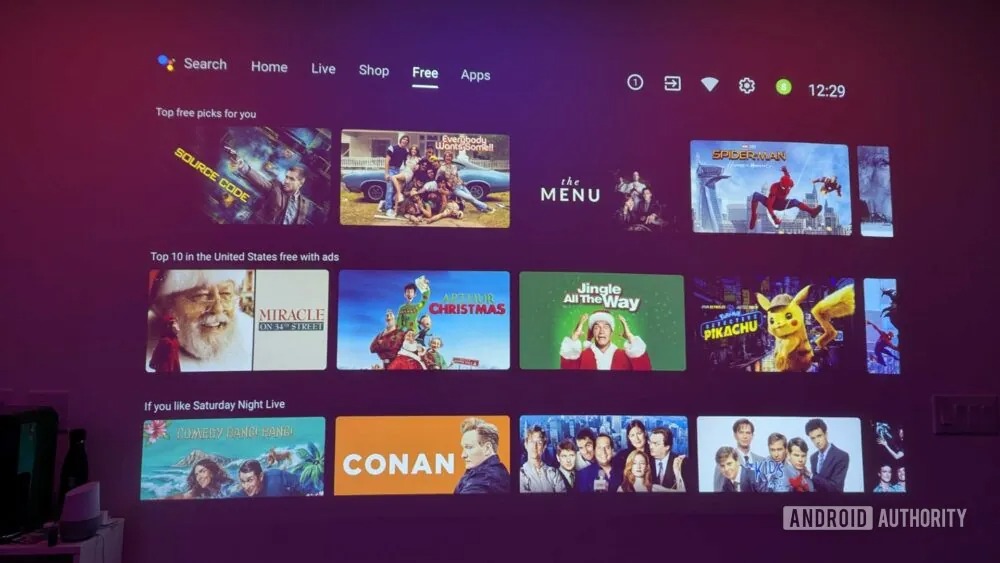
Stephen Schenck over at Android Authority (a recent guest on our podcast, The Sideload) noticed an older Android TV projector being updated to add a “Free” tab to the homescreen in place of “Discover.” A full-screen pop-up explains that the tab lets users “find all the free movies, shows, and channels on Android TV, all in one place.”
A look at the actual page shows “Top free picks for you,” “Top 10 in the United States free with ads,” and “If you like Saturday Night Live” sections, but these presumably vary wildly from user to user.

It’s unclear when this started rolling out or if it’s widely available, in part because there simply aren’t as many Android TV devices in active use anymore. For some who are still on that older experience, such as Shield TV owners, replacement launchers have also seemingly been popular, and many with TVs running this experience are probably using HDMI devices more than the built-in software at this point. So it’s a little hard to gauge where this one lands. If you’re seeing this, let us know in the comments below.
Earlier this year, we spotted another Android TV change where recommended content that would have appeared on the “Discover” tab showed up on the main home page. This latest change seems to be in line with that.
More on Android TV:
- Google TV Freeplay now has over 250 free channels, including more local news
- Google rolls out Android TV homescreen update with promoted content in ‘Play Next’
- Nvidia Shield TV gets yet another update with quality-of-life improvements
Follow Ben: Twitter/X, Threads, Bluesky, and Instagram


FTC: We use income earning auto affiliate links. More.


Comments