
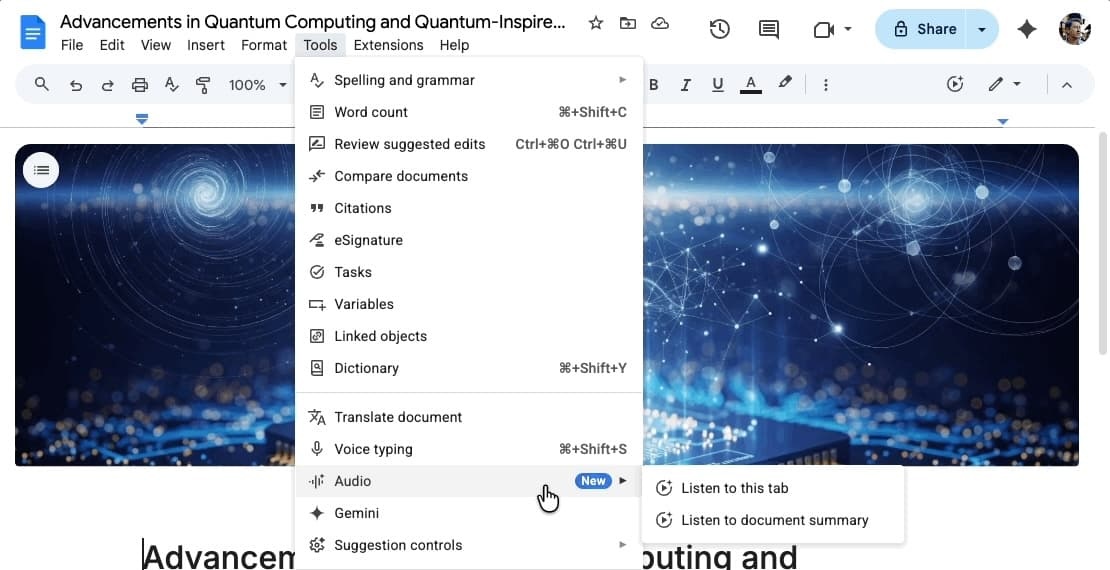
After introducing text-to-speech in August, Google Docs is now rolling out audio summaries.
On the web, go to Tools > Audio where you’ll find “Listen to this tab” joined by a new “Listen to document summary.”
This brings up the audio player with a timeline scrubber and playback speed controls (0.5x to 2x). There’s also the ability to choose a different voice: narrator, persuader, coach, etc.
Powered by Gemini, these summaries “provide a short verbal synopsis of the contents in your document, including multiple tabs.” They are “typically under a few minutes long, and use a natural speaking style to help you catch up quickly and efficiently.”

For example, you can quickly catch up on notes before a meeting, or summarize a long report and get the highlights in only a few minutes.
Rolling out over the coming weeks, audio summaries in the Google Docs web app are available for the following subscribers:
- Business Standard and Plus
- Enterprise Standard and Plus
- Google AI Ultra for Business add-on
- Google AI Pro for Education add-on
- Google AI Pro and Ultra
More on Google Docs:
- You can now use Google Sans in Google Docs
- Google Drive regains full Material 3 Expressive redesign
- Google Docs for Android rolls out Material 3 Expressive redesign


FTC: We use income earning auto affiliate links. More.




Comments