
Google today announced “Gemini Intelligence” as the overarching name for a new series of AI features on premium Android devices.
Gemini Intelligence starts with a design language that builds upon Material 3 Expressive. It’s meant to subtly indicate when Gemini is listening, thinking, and working across these new features.
This visual system is not only beautiful but also functional, animating with purpose to reduce distractions and allow you to focus on the task at hand.
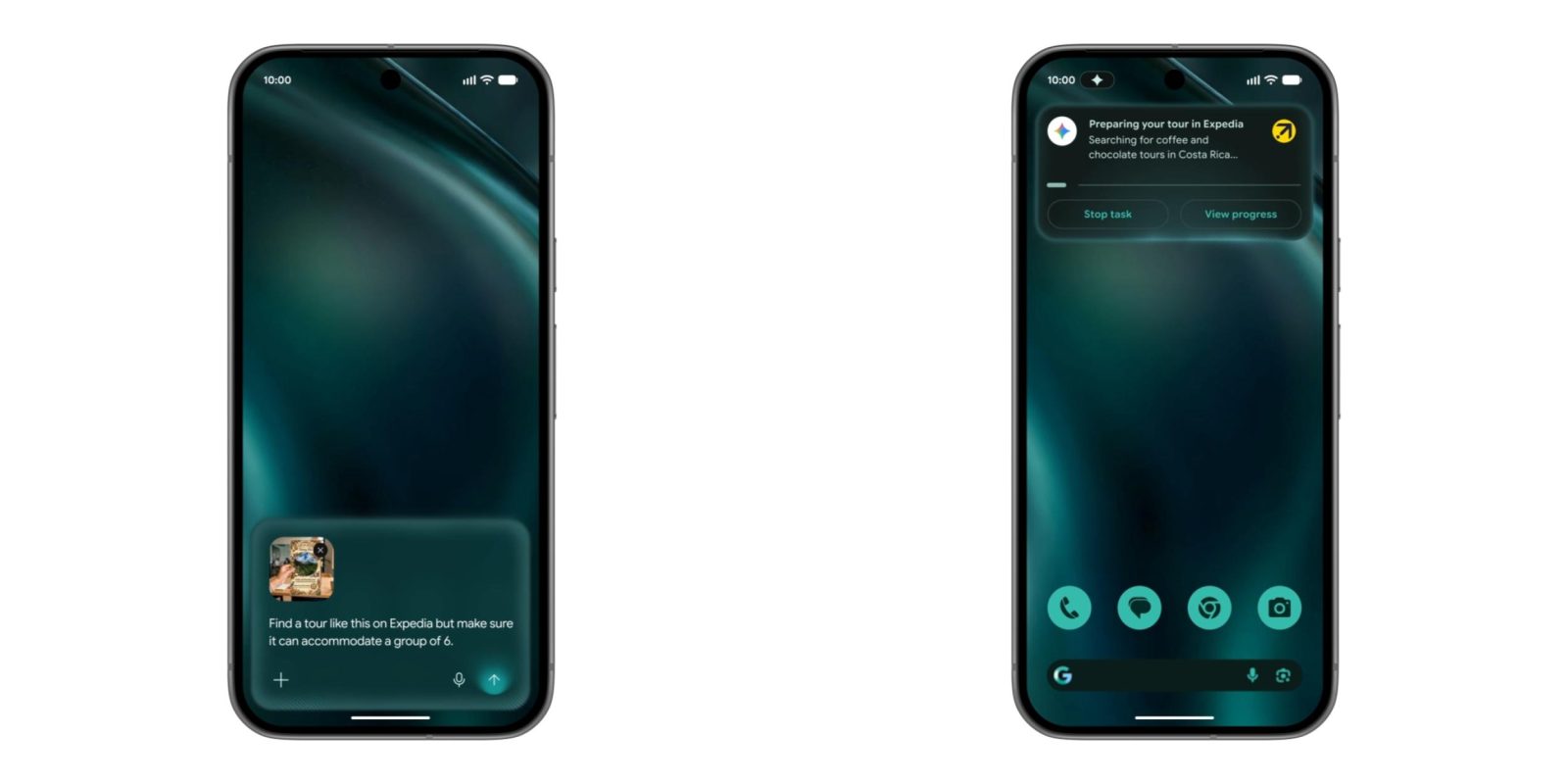
Gemini task automation rolled out in March to the Galaxy S26 and Pixel 10. Devices with Gemini Intelligence can take action in more apps, while Google says “automation is even more powerful when you add screen or image context.”
- Instead of manually switching between apps and copying data, Gemini can turn visual context into instant action. Imagine you have a long grocery list on your notes app. Just long press the power button over the list and ask Gemini to build a shopping cart with all of the items for delivery.
- Or, if you see a travel brochure in a hotel lobby that piques your interest, you can simply snap a photo of it and say: “Find a tour like this on Expedia for a group of six.”
Google is introducing a more intelligent autofill in Android apps and Chrome that leverages Gemini’s Personal Intelligence. Supporting more forms and fields, it will appear in Gboard’s suggestion strip and be badged by a spark. Connecting Gemini to Autofill with Google requires an explicit opt-in.
Gboard voice input is being upgraded with what Google calls “Rambler.” Gemini is leveraged to account for self-corrections, repetition, pauses, and filler words. It goes beyond word-for-word dictation and lets you transcribe naturally.
It can distill the important parts of the message, like when you change your mind. For example, you’re dictating a shopping list with apples, bananas, and oranges, but then no longer want the first item. Just tell Gboard that you “no longer want apples,” and the final list will exclude it.
Responses can be edited and polished in real time using Rambler, while Gemini’s multilingual support allows you to change languages in a single message.
Top comment by DiamondMaster115
If the widget generation is as good as it looks, this is going to be gamechanging. Especially since you can prompt it with whatever, as opposed to the locked down AI Icon packs they introduced a while ago.
You’ll see the Gemini Intelligence design language leveraged here with a waveform that occupies the entire width of your keyboard.
The final aspect of Gemini Intelligence is generative user interfaces, starting with widgets on both phones and Wear OS (Tiles). “Create My Widget” lets you describe what you want to be kept up-to-date about:
- …if you’re a meal prepper, just ask Create My Widget to “Suggest three high-protein meal prep recipes every week,” and watch as it builds a custom dashboard you can add and resize right on your home screen.
- …if you’re a cyclist who only cares about wind speed and rain, you can create a weather widget that surfaces those exact stats.
From the Widgets picker, tap the new “Create” button to get a guided experience or enter a prompt directly. Categories include:
- Combo: Combine different or similar themed topics
- Weather alerts: UV Conditions, Tide times, Wind forecast
- My world clock: Timezones, Daylight savings countdown
- Daily Brief: Horoscopes, Daily recipes, Facts, Affirmations
- Important dates: Countdown to birthdays, holidays, & anniversaries
- Markets: Stocks, Crypto, Exchange rates
The first wave of Gemini Intelligence features is rolling out to the “latest” Pixel and Samsung Galaxy devices this summer. Later this year, Gemini Intelligence will be available on watches, cars, glasses, and laptops. You can expect more features soon after.


FTC: We use income earning auto affiliate links. More.


Comments