
Google appears to be working on a new tap-based gesture for Quick Share that utilizes NFC to trigger file sharing, with the new feature having appeared in a leaked build of Samsung’s Android 17 update, One UI 9.
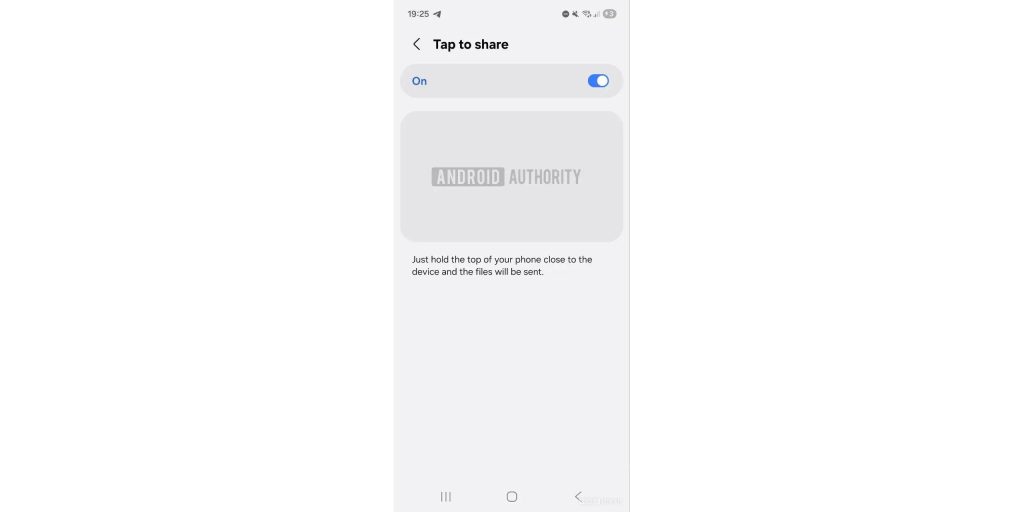
Samsung’s One UI 9 update has been leaking over the past few weeks, with the Android 17 update packing a handful of smaller UI changes. The folks at Android Authority dug into the update, finding a new “Tap to Share” gesture in the Settings menu.
Another description says:
Just hold the top of your phone close to the device, and the files will be sent.
It’s not functional yet, but strings show that the new gesture is tied to Quick Share, with users told to “Tap your phone with someone” to share files and other information, similar to Android’s legacy “Beam” as well as Apple’s contact-sharing NameDrop feature. Prior leaks suggest this could be available on Android phones beyond the Galaxy ecosystem, while file-sharing animations were seen back in One UI 8.5 leaks.
9to5Google can corroborate some early tidbits around this feature outside of Galaxy phones, with the feature possibly tied in part to the Android share sheet and Google setting some foundation within Play Services. Samsung’s implementation in One UI 9, though, seems a good ways ahead of what Google has been preparing at least in terms of what we can actually see. Behind closed doors, it’s obvious the two companies are working together on this.
It’s way too early to say much for sure, as is very often the case with these early software leaks and manually enabled features.
It’s unclear when this might roll out, but it would certainly be a nice addition to Quick Share on Android.
More on Samsung:
- Galaxy Buds 4 Pro are reportedly a hit because they actually deserve to be
- AirDrop on the Galaxy S26 is just as quick and easy as I hoped [Gallery]
- Samsung’s next big update, One UI 8.5, is now in beta on these older Galaxy devices
Follow Ben: Twitter/X, Threads, Bluesky, and Instagram


FTC: We use income earning auto affiliate links. More.



Comments