
WhatsApp has started rolling out, to a limited number of users, the ability to use a username in the app, finally ditching the long-standing requirement to use your phone number.
As spotted by WABetaInfo, WhatsApp has started a “phased rollout” to a “limited” number of users, with the latest beta updates on Android and iOS offering support for the feature. But you’ll need the rollout to hit your account before the feature shows up in the app at all.
You can check if the update is available to you via WhatsApp > Settings > Profile, where a username field will show up. There’s apparently a pop-up, too, as pictured below from the iOS app.
The main benefit of a WhatsApp username is the ability to keep your phone number private, but it appears a phone number is still needed to use the messaging app in the first place, at least for now.
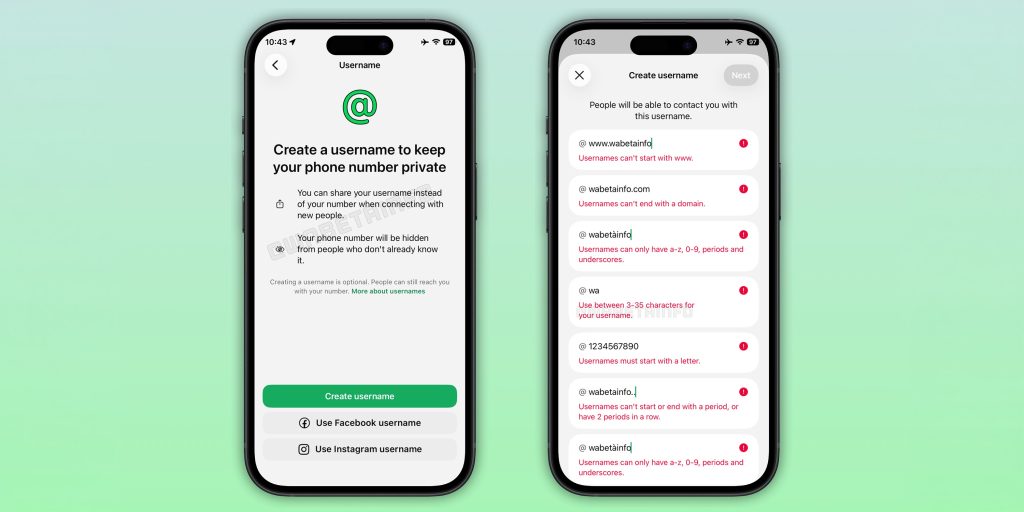
Restrictions on WhatsApp usernames include:
- Usernames can be between 3-35 characters
- Usernames can consist of lowercase letters, numbers, periods, and underscores
- No “www” or domain endings (.com, .net, etc)
- Usernames must include at least one letter character
You can also link your username from Facebook and/or Instagram, and WhatsApp usernames cannot match an existing name used on either of those two platforms.
WhatsApp will also offer a “username key,” which is a 4-digit code needed to send messages to a new username. It’s an optional feature.
Will you use a WhatsApp username?
More on WhatsApp:
Follow Ben: Twitter/X, Threads, Bluesky, and Instagram


FTC: We use income earning auto affiliate links. More.



Comments