
Following months of improvements in early access, Google Home is launching some massive expansions to automations this week, as well as new Nest Cam improvements, both of which are available to all users.
Automations in the Google Home app can do a lot, with users having the abiltiy to set up background actions that automatically apply when lights turn on, sensors trip, and so on. As of this week, Google is expanding the list of starters, conditions, and actions massively, and the possibilities are endless.
The core expansions here include security systems, appliances, lighting, and media. Google has built out quite a few more options for automations here, with examples including the ability to change the color of a light, stop or pause a robot vacuum, check if a door is unlocked or even open, and more.
Here’s the full list, as Google details:
Security & Access Control
- Arm and disarm: Arm security systems, check if the security system is armed
- Door lock monitoring: Checking specific states like locked, unlocked, jammed,
forced open, or ajar.- Binary sensors: Detecting simple true/false states such as contact/no contact,
leak/no leak, or freeze/no freeze.Appliance & Cleaning:
- Appliance state (Start & Stop): Controlling operational states (Start, Stop, Pause,
Resume) for devices like washers, dryers, and coffee machines.- Robot vacuums: Specific commands to dock, pause, or resume vacuum cleaning
sessions.Lighting & Environment Control
- Lighting control: Adjusting brightness levels, toggling On/Off, and managing light
effects.- Colored lights: Change the color of a device (light bulb, LED strip, etc.), change
the color temperature of a device- Window coverings: Opening and closing blinds or checking their specific
position percentage.- Climate: Monitoring relative humidity levels via thermostats.
Media & Entertainment
- Playback control: Monitoring states like playing, paused, or buffering.
- Volume: Checking and managing volume levels on media devices.
Device Health & Inputs
- Power management: Monitoring battery levels and charging status.
- Switch events: Utilizing smart switch inputs, including initial presses, long
presses, and release events
As detailed on a support page full of examples, some of these have been live for some time now, many in the Early Access program. But now everyone can use these new automations. Google says the new triggers and actions will be available first through standard automations, and will arrive for the “Ask Home” and the “Help me create” AI-powered experiences later on.
Beyond that, Google Home is also expanding improvements to Nest Cam to more users.
Starting today, Nest Cam owners can expect to start seeing a redesigned Nest Cam player when seeing event history, zoomed-in and animated previews of events, better timeline navigation, and new filtering options for event history so you can directly find groups of events such as “Package seen.” The app as a whole should feel better, with faster timeline scrolling, 10-second forward and backward shortcuts, improvements to event descriptions, and simplifications to the minefield that is the camera settings menu.
“Familiar Faces” is adding better face library management by excluding face detection examples that are blurry, small, or generally low quality, while also added a quick thumbs up/down feedback shortcut.
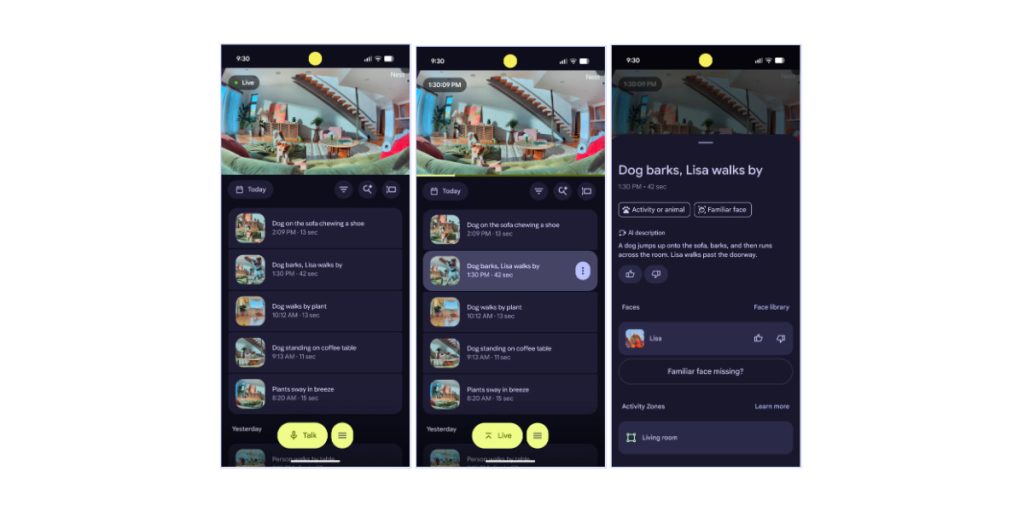
Earlier-generation Nest cameras (pre-2021) will also be getting Gemini event descriptions and zoomed-in previews.
Many of the Nest Cam improvements here still require a subscription to Google Home Premium, but it’s all rolling out now to Home users outside of the public preview program.
More on Google Home:
- Google Home will roll out Gemini upgrades more widely in Europe, Asia-Pacific this week
- Google Home isn’t killing automations, but phone-related actions are going away
- Google redesigning the Fitbit, Home & Nest Community forums
Follow Ben: Twitter/X, Threads, Bluesky, and Instagram


FTC: We use income earning auto affiliate links. More.



Comments