
Google is finally giving users the option to change their Gmail address without deleting their account or making a new one, and it’s so easy to do.
There are plenty of reasons to change an email address, though the most blatant one might be to update an old account name that hasn’t aged with much grace at all – you know who you are.
For as long as Gmail has existed as a Google product, changing an “@gmail.com” email address was impossible without deleting the account or creating a new one. For users who have a Google Account with a third-party email, this has never been an issue. For those who need to change the address itself, the new change will allow for that.
Late last year, Google started rolling out the ability to do just that, and has been accelerating the rollout more recently. The support page that showed this functionality was only appearing in other languages initially, but has since expanded to most regions.
As of March 31, 2026, Google has officially made the process widely accessible, at least in the US. That means most users in that part of North America can change their Gmail address with relative ease.
Google notes that users who change their Gmail address will still retain the previous account address, although it’ll exist as an alias. Both email addresses will receive mail. For instance, if you change your Gmail address and someone emails the old address, received emails will appear in the same account with the new alias.
Google also notes this can only be done once every 12 months, up to 3 times, so make this one count.
How to change your @gmail.com address
The process for changing your Gmail address is new, and Google hasn’t made any promises on how widely the feature will roll out. For now, it appears to be live in India, though the steps below will be the same no matter where the feature expands to.
- On your desktop or mobile device, head to myaccount.google.com/google-account-email
- Click or tap Personal info in the left menu.
- Tap the Email card.
- Under Google Account email, click Change your Google Account email address.
- Enter your new username.
- Select Change email address and confirm.
- Follow the steps to finish the process.

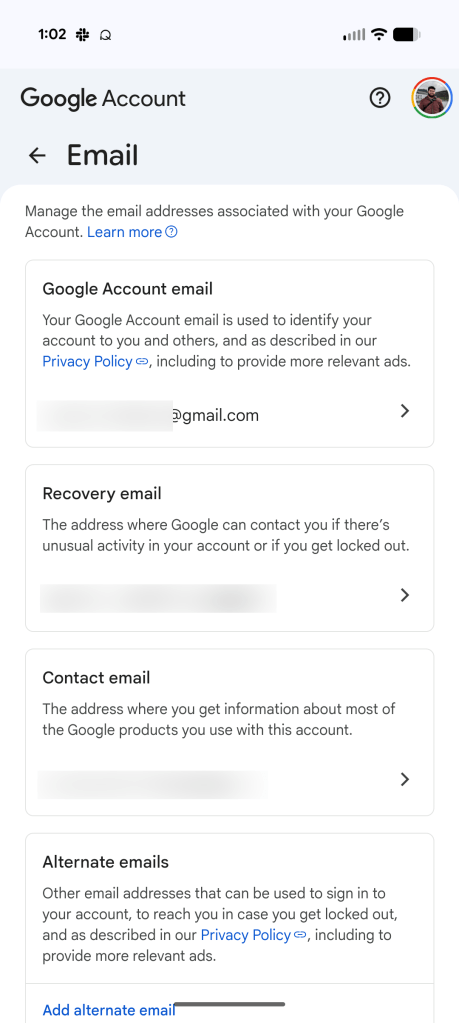


Google mentions potential issues that may occur after changing your Gmail username. For example, some Google app settings may be reset, like the Gmail background selection or a missing chat tab. This is normal and can be adjusted again after the username change.
Some on the 9to5Google team have noted some weird changes, including reset home screen widgets and their account being logged out of on most Google apps. Some of that’s expected, but a pain nonetheless.
Google says that this option is “gradually rolling out to all users,” so if it’s not showing up for your account just yet, it should soon.
More on Gmail:
- Gmail rolling out AI Inbox beta for AI Ultra subscribers
- Gmail for Android finally lets you create new labels
- Gmail for iPhone getting ‘new Google Photos picker’


FTC: We use income earning auto affiliate links. More.






Comments