
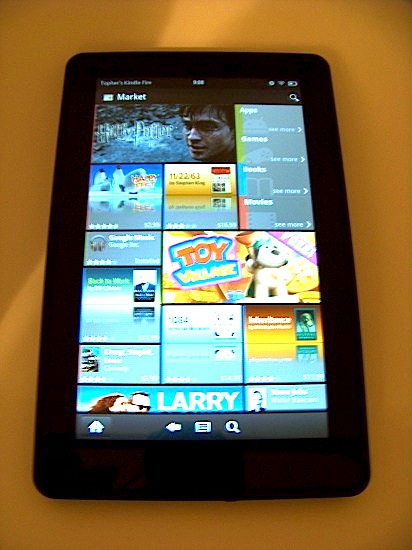
It you want access to all of the apps on the Android platform (including all of Google’s great apps) on your Kindle, you’ll want to get the Android Market on there. Once rooted, it is a pretty straightforward process as outlined in the steps below. Is the Kindle going to replace the Nook as the go-to cheap hacking Android Tablet?
Prerequisites
- Root your Kindle Fire
- Download the following apks (You are on your own finding them, I’d rather not link them here)
- GoogleServicesFramework.apk
- Vending.apk (Latest Version 3.3.11)
- Root Explorer App (or similar that lets you change ro/rw permissions)
- Side Loading Apps activated on Kindle Fire
- On the Kindle Fire Settings screen, go to “Device” and turn On “Allow Installation of Application From Unknown Sources”
Instructions
- Transfer the .apk files to your Kindle Fire via PC / Mac (remember where you put them)
- Open Root Explorer App, and navigate to the transferred .apk files
- Select the GoogleServiceFramework.apk and install
- When complete, click “Done” and return to the file location for Vending.apk
- Long-press Vending.apk and select the “Move” option on pop-up menu
- Navigate to /system/app folder
- Change mount option from RO to RW (read-only to read-write)
- Paste Vending.apk into the /system/app folder
- Long-press Vending.apk and select “Permissions” from pop-up menu
- Change permissions to match all other apps in this folder (rw-r-r-)
- Reboot your Kindle Fire
- Once reboot is complete, select Market App and log-in as usual.
- Enjoy!
Related articles
- Atari Greatest Hits now available on the Android Market for $.99 (9to5google.com)
- Some Google Android Market apps installable on Kindle Fire (9to5google.com)
- Google announces Google Music, features heavy Android Market and Google Plus integration (9to5google.com)
- Flood of cheap Android TVs expected to follow Google TV 2.0 update (9to5google.com)
- Hulu Plus lands in Amazon Appstore, only for Kindle Fire? (9to5google.com)
- Amazon to pay royalties to Microsoft for using Android in the Kindle Fire tablet? (9to5google.com)
- Amazon releases Kindle Fire source code, and here’s a “1-click” root method (9to5google.com)


FTC: We use income earning auto affiliate links. More.
You’re reading 9to5Google — experts who break news about Google and its surrounding ecosystem, day after day. Be sure to check out our homepage for all the latest news, and follow 9to5Google on Twitter, Facebook, and LinkedIn to stay in the loop. Don’t know where to start? Check out our exclusive stories, reviews, how-tos, and subscribe to our YouTube channel



Comments