

Available as a part of Android 17, Google is making wireless debugging a whole lot more reliable with ADB Wi-Fi 2.0.
Wireless debugging has been around in Android for quite some time now, but it’s not always been the most reliable offering. Between more complex pairing and general hiccups in usability, wired has still been the primary choice for many.
Google is aiming to fix that with ADB Wi-Fi 2.0. In a post, Google details what has changed with the new process, explaining three core updates:
- A new server stack (adb): Previously, wireless device connections would sever when network configurations changed or devices were turned off. This meant that connections would drop for common occurrences. With our new mDNS stack, we’ve replaced both Bonjour and legacy mDNS so that your wireless devices more reliably stay connected as you go about your day.
- Smarter network handling (adbd): Previously, the workstation’s mDNS client would sporadically drop services. Now, the daemon automatically turns off ADB Wi-Fi when it detects an untrusted network and re-enables itself once running on a user-allowed network.
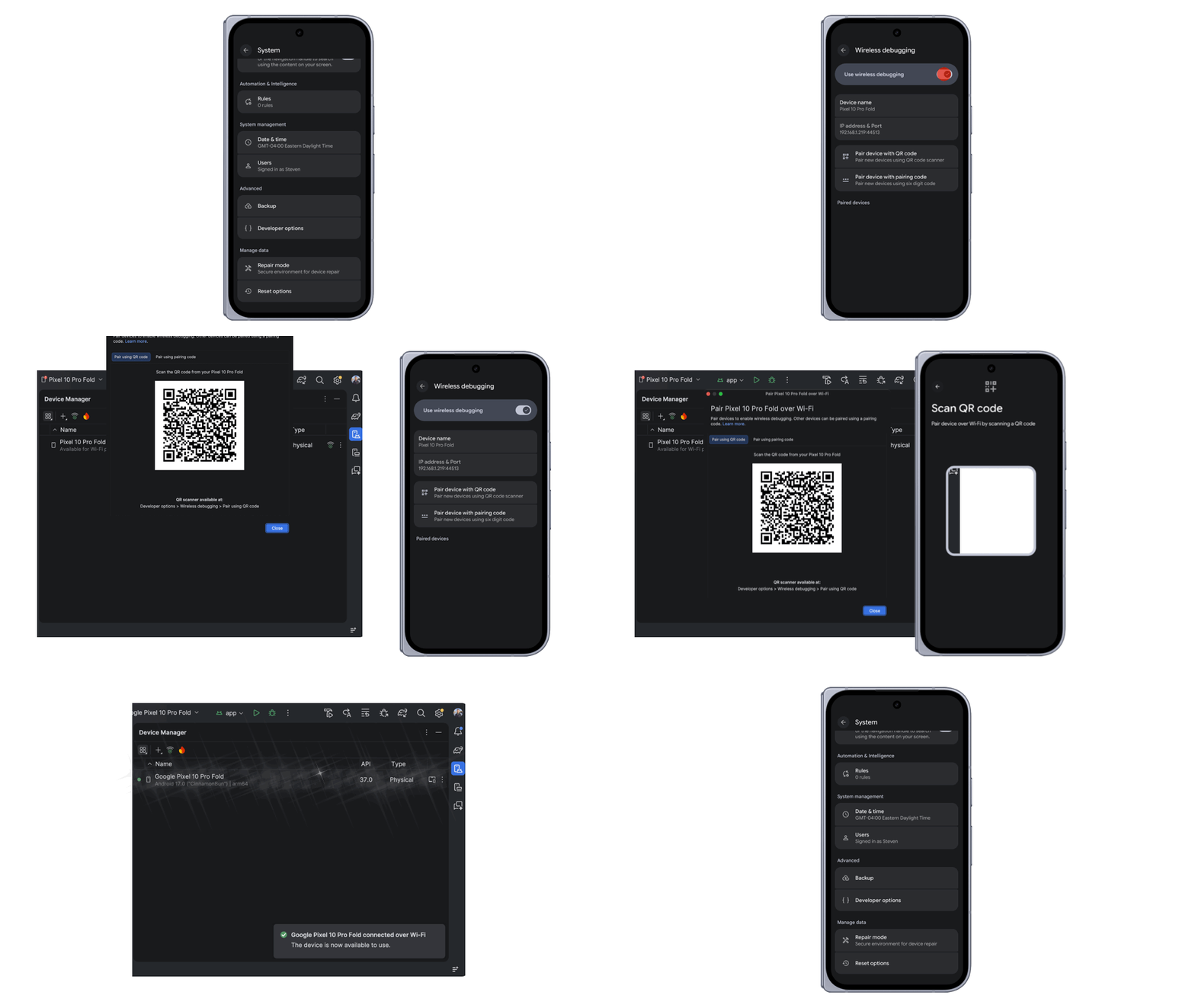
- Improved discoverability in Android Studio: Previously, Wi-Fi pairing was difficult to find. Now, you simply enable wireless debugging on your phone and it will show in Android Studio’s Device Manager.
Google says that these changes have made auto-connect around 32% more reliable, while connections are 66% faster for roughly 90% of connections tested.
For Android Studio, wireless debugging can be used via the “pair over Wi-Fi” button, with a QR code connecting your device to your computer for an ADB connection.
More on Android:
- Android rolling out passkey transfers between password managers
- What’s new in Android’s September 2026 Google System Updates
- How to check if Motion Assist has rolled out to your Android 17 phone
Follow Ben: Twitter/X, Threads, Bluesky, and Instagram


FTC: We use income earning auto affiliate links. More.


Comments