
Spotify might be centered around a lot more than music these days, but it’s still delivering new sorting features on a semi-regular basis. In addition to a handful of new customization options, the music streamer is also bringing new filters to sort your library by more than just genre.
Smart Filters began rolling out to users in select regions late last week. Spotify’s new sorting options aren’t just about swapping between rock, pop, and rap — though, yes, they can do that. The real improvement here comes from the inclusion of activity and mood recommendations, with options for selecting songs that fit into some pre-determined categories. On the activities side, that includes settings like yoga, dinner, or sleeping, while moods include motivation, romantic, and relaxing.
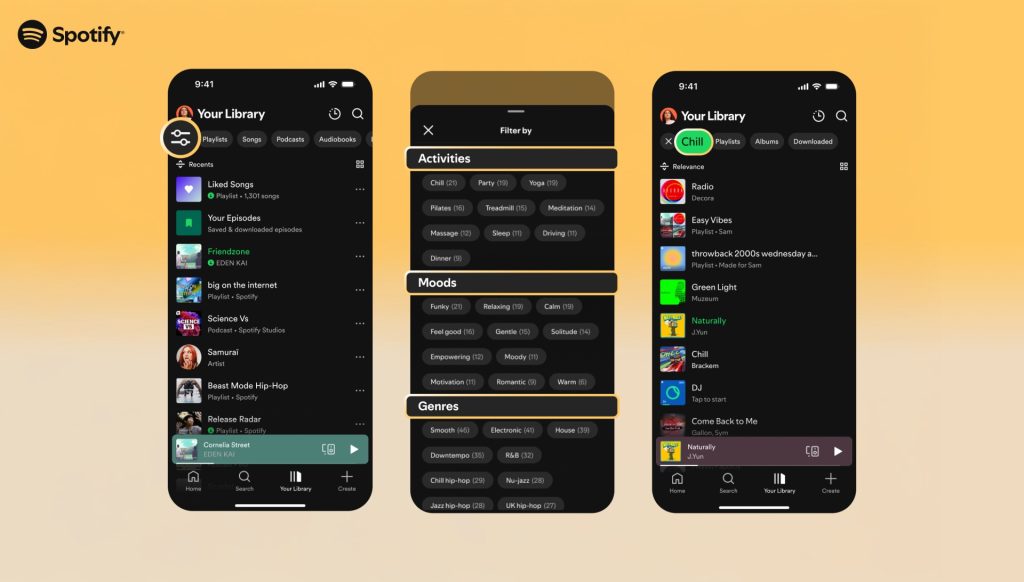
Naturally, it’s not just music included in this, with Spotify also ensuring podcasts and audiobooks can be sorted by these exact same filters. Genres are also included in this menu, with more specific subcategories — UK hip-hop, jazz hip-hop, chill hip-hop — included as part of your library. If you’re a Premium user in Australia, Canada, Ireland, New Zealand, South Africa, the UK, or the US, you’ll be able to find these filters under a settings button in your Spotify library on mobile devices in the coming weeks.
As part of this announcement, Spotify is also highlighting a handful of other new controls worth checking out. Track snoozing — which allows Premium users to hide songs for just 30 days — Discover Weekly genre support for a more specific, granular experience, and a redesigned queue with better shuffle support should keep the app feeling fresh for at least a few months. These changes come as Spotify faces widespread criticism over CEO Daniel Ek’s financial ties to defense companies, the result of which has seen several high profile artists leaving the platform completely.
More on Spotify:
- Spotify brings back direct messages amid global price hikes that ‘make sense’
- Spotify is doubling down on track transitions with new custom options
- Spotify update now lets you turn off the ‘Create’ button – here’s how


FTC: We use income earning auto affiliate links. More.



Comments