

Gboard Rambler is likely the flagship Gemini Intelligence feature on the Pixel 11 series, but it’s not the real-time transcription you expect.
Like before, you launch Rambler from the microphone icon in the top-right corner of Gboard that is now badged with Gemini’s spark icon. When active, Rambler takes over Gboard’s entire suggestion strip with a neat waveform.
Top comment by TurboFool
I don't know how much I'll use this, as I rarely use speech-to-text currently, but I'm fairly excited about it because I feel like a key reason I don't use it that much is how much I have to refocus my thoughts to put together the kind of sentence I want to write. Spoken word processes very differently for me than how I write. This could cut through that disconnect.
Once you’re done speaking, you have to tap the checkmark icon and close the session before transcription occurs. A live preview does not appear in real time. It ends up feeling more like a prompt to or conversation with the Gemini app.

This allows Rambler to capture your intent, as well as filter out run-on sentences and filler words, like “umm” or “ah.” You can ask Gboard to change the style, expand text, and add emoji.
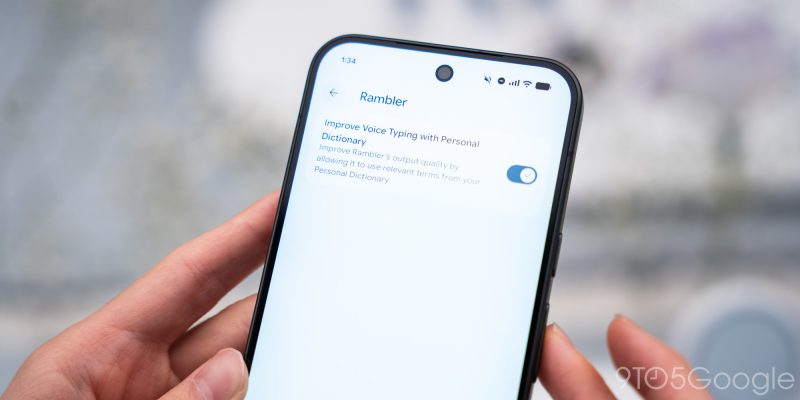
To edit or add to what was previously transcribed, tap the microphone again. A setting lets you “Improve Rambler’s output quality by allowing it to use relevant terms from your Personal Dictionary.”
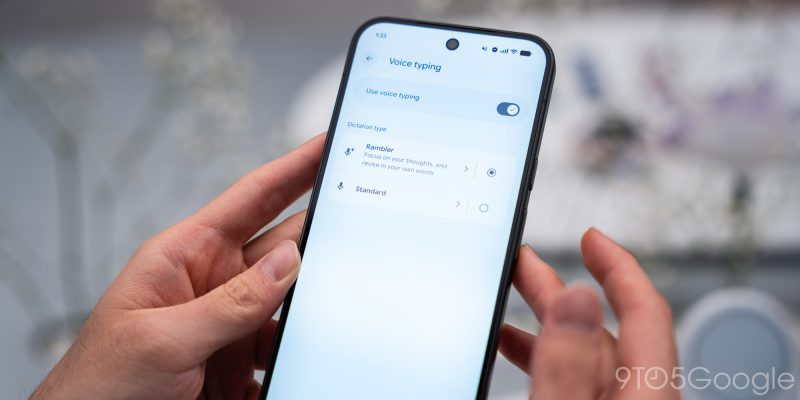
In our brief hands-on time, Rambler was a bit of an adjustment, but the ability to transform text could be powerful. Google also provides the option in Gboard settings to use the previous speech-to-text system called “Standard.” In comparison, Rambler lets you “Focus on your thoughts, and revise in your own words.”
- Pixel 11: Google Store | Amazon | Best Buy
- Pixel 11 Pro: Google Store | Amazon | Best Buy
- Pixel 11 Pro XL: Google Store | Amazon | Best Buy
- Pixel 11 Pro Fold: Google Store | Amazon | Best Buy
- Pixel Watch 5: Google Store | Amazon | Best Buy


FTC: We use income earning auto affiliate links. More.




Comments