
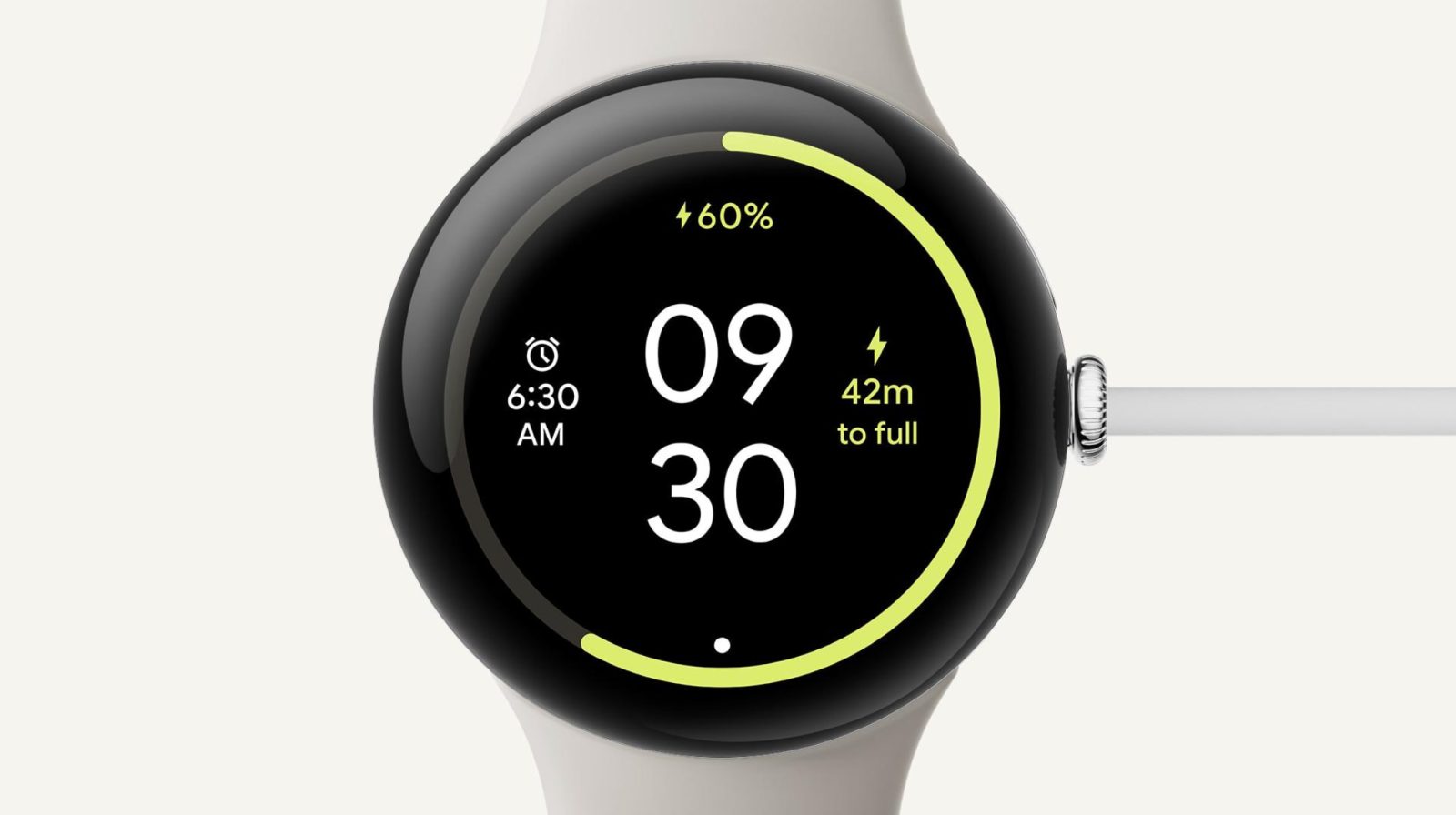
With the Pixel Watch 3, Google introduced a new charging screen that is now rolling out to older wearables.
The original screen had a more elaborate green animation that ended with a two-line clock. The day and date appear at the bottom, while the percentage is noted above along with a ring.
This new design skips the animation, and leverages a yellow accent for the ring and some other elements. The time is now white.
Top comment by Justin Landis
Sounds weird but I've always wished the watch would orient it's charging screen to the direction of how the watch was charging. So that when it's charging you get an alarm clock mode that could be read normally without turning your head sideways.
While we're here, I'd also like the aod on my pixel phone to be able to do the same.
On the Pixel Watch 3, this new charging screen shows a time-to-full estimate, which appears at the right. There’s a brief loading animation when you activate the screen as it calculates. The Pixel Watch and Pixel Watch 2 attempt to do so, but it currently fails. It’s possible that a future update will address that.
Old vs. new


Instead, you get the date/day (which has been flipped) in its place, while your next timer is shown at the left. If you don’t have a timer set, you get date/day on the left and month on the right.
We’re seeing this new charging screen on Pixel Watch devices updated to Wear OS 5. If you’re not seeing it, make sure all apps are updated and restart your wearable.
More on Pixel Watch:
- Bellroy’s Pixel Watch Strap is now available for pre-order
- Google rolls out ‘Pixel Watch fully charged’ notification
- Google has paused the Pixel Watch Wear OS 5 update
- What a Pixel Watch Pro/Ultra line would let Google do


FTC: We use income earning auto affiliate links. More.


Comments