
The latest batch of Google Home app updates are now rolling out, including new “Suggested Automations” to make it easier to automate your smart home.
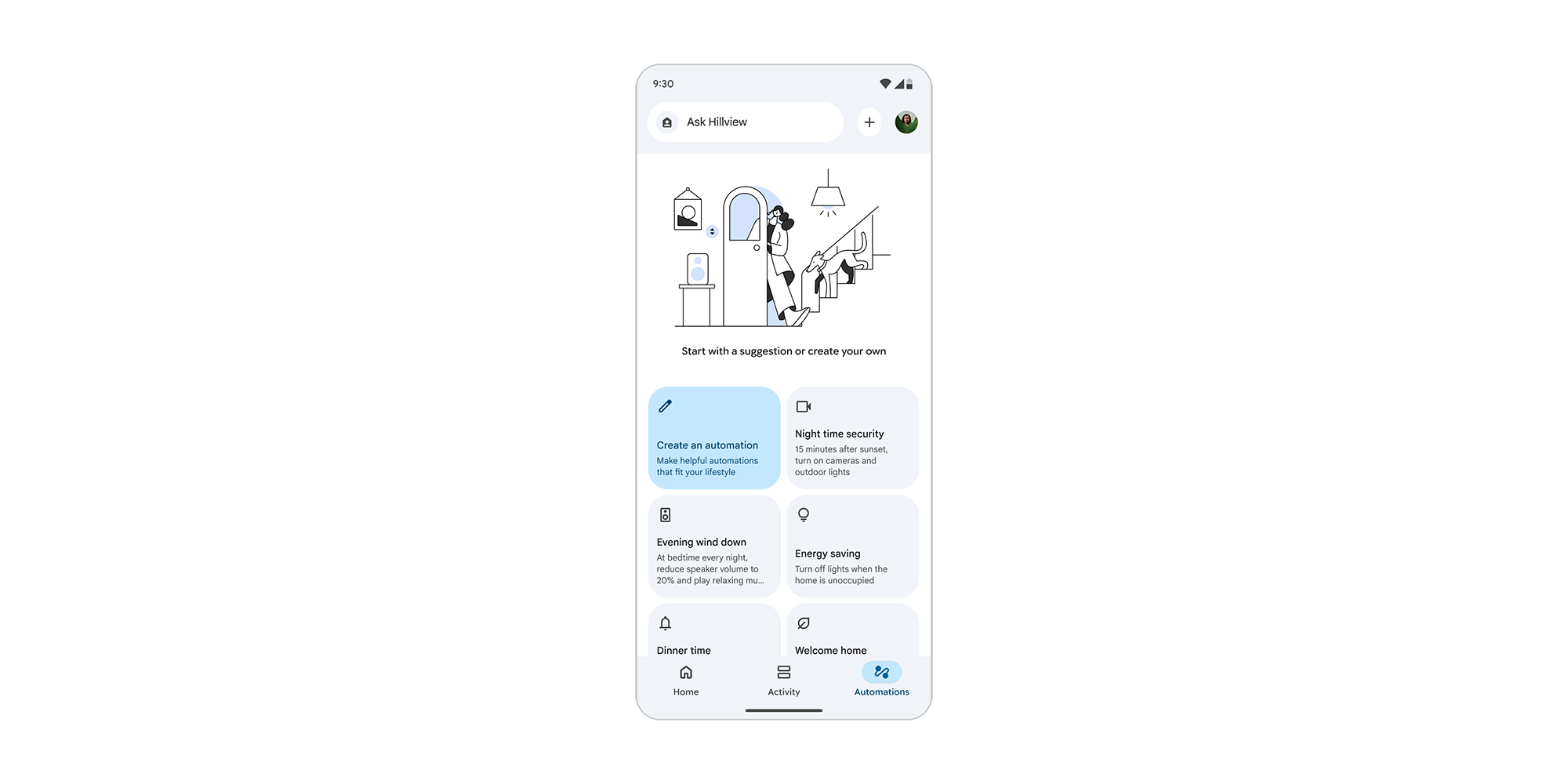
Rolling out with Google Home v4.20, Google is delivering a pretty big update to automations. New “Suggested Automations” will appear in the app, giving users a jumping-off-point for creating new systems within their smart home. Google’s examples for this include actions such as turning on cameras at night, automatically turning off lights when Home detects no one is at home, or automatically playing music at a certain time.
Google explains:
Suggested automations: Get inspired or kickstart your home automation journey with suggested automations. Instead of starting from a blank canvas, you’ll now see ready-made automations tailored to real-life tasks, like home security, morning routines, or energy savings. Look for the new suggestions section at the top of your Automations tab or below your scheduled automations. Rolling out globally to all Google Home app users on Android and iOS over the coming weeks.
You can use these suggestions as a starting point, customizing them to best fit your needs. The idea is really just to give users a place to begin that’s not just a fully blank canvas.
This latest update also delivers some upgrades to cameras in the Google Home app – specifically the ones sold by Walmart. The retailer’s new Onn Outdoor and Onn Floodlight cameras both have built-in lights, and the Home app now has a dedicated button to let you interact with the light or adjust brightness. There’s no mention of whether or not the Nest Cam with Floodlight is supported.
Top comment by OliveStrawberry
It's still extremely unreliable. The amount of times I tell it to play music and it responds saying it doesn't have that capability is unreal.
Camera setup should also now be faster, while and assortment of bug fixes include optimizing live view for longer viewing sessions and making live view as a whole more reliable to start.
Google says:
- More reliable camera live streaming: We’ve resolved a problem that could cause your camera live stream to fail to refresh or resume after unlocking your mobile device. This ensures your live feed is always instantly ready and reliable when you check in.
- Optimized camera live view: We’ve optimized the camera live view to prevent slow performance during extended viewing sessions.
- Prevent accidental lock states: We’ve corrected the status display of smart door locks to ensure they are never shown with incorrect offline icons. This gives you accurate visibility into your home’s security status.
- Face Match setup reliability: We’ve corrected an issue where the Face Match setup flow could abruptly exit during brief network interruptions. This ensures a more reliable and frustration-free setup experience.
- Flicker-free fan controls: We’ve resolved a fan control flickering issue when manually toggling your thermostat fan on and off.
- Stable favorites reordering views: We’ve resolved a crash that could occur when rotating your screen while organizing your favorite tiles. This prevents unexpected app exits while customizing your favorites layout.
- Polished Google TV previews: We’ve resolved a visual issue where offline doorbell camera previews showed an unintended black border on Google TV.
These updates are rolling out, and early access members can also look for new visual cards on Nest Hub as well as continued Gemini for Home upgrades.
More on Google Home:
- What should a ‘Google Home Display’ be now that Google Home Speaker has set the stage?
- Google has stopped selling the Nest x Yale Lock as it goes all-in on its replacement
- Google Home finally has a plan to fix Nest Cam ‘Familiar Faces’ – I hope it works
Follow Ben: Twitter/X, Threads, Bluesky, and Instagram


FTC: We use income earning auto affiliate links. More.


Comments