

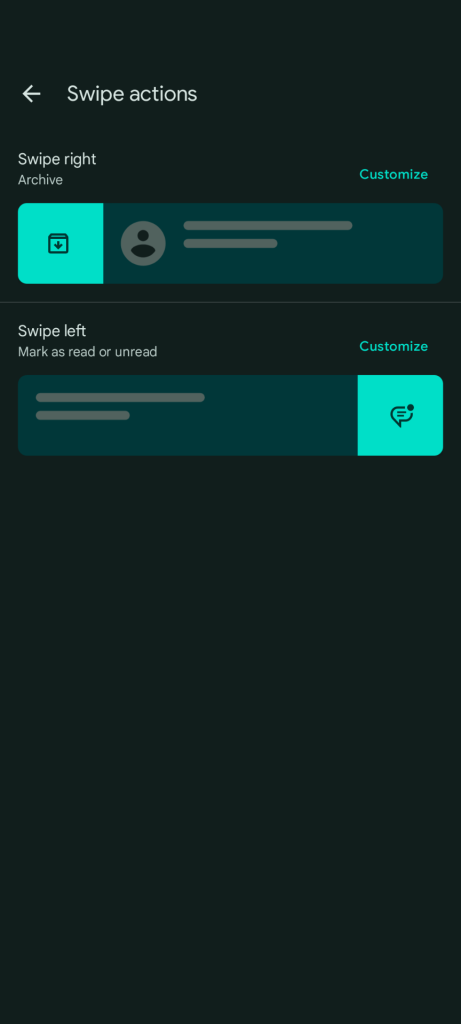
As we wait for Magic Compose, Google Messages is getting a small quality-of-life addition that lets you quickly mark as read/unread by swiping in the main conversation list.
Top comment by matteventu
So happy they're introducing this!
I'm on stable and hope to see it asap.
By the way,
The ability to mark read or unread is not new but previously required long-pressing a conversation and opening an overflow menu.
not sure if I'm the only one, but I never had and I definitely don't currently have any option for setting a conversation as unread. Not in long-press menus, not in overflow menus, nor anywhere else.
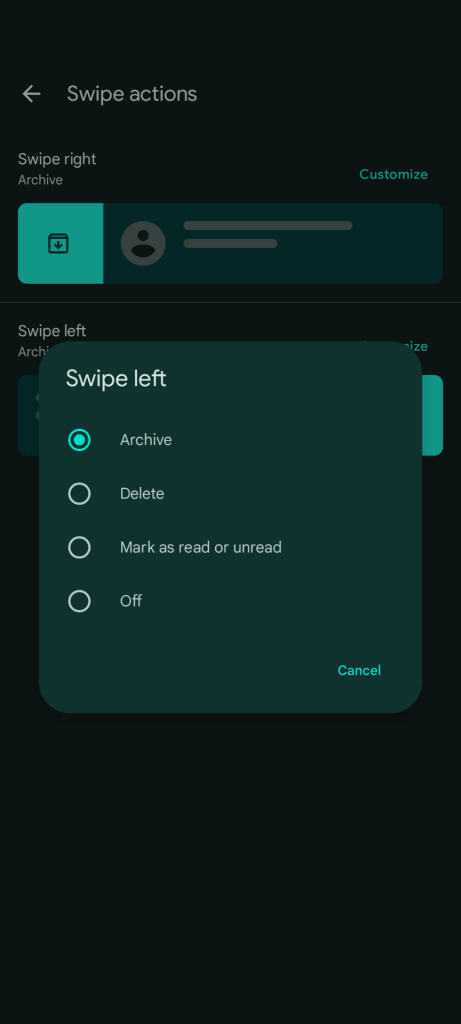
Previously, the two available swipe actions let you archive or delete, which always felt a bit too easy from the app’s homescreen but was great for spam. You could also disable swiping entirely.
With beta version 20230515_01_RC00 (via Android Police), some Google Messages users are now seeing a “Mark as read or unread” option that lets them quickly triage their inbox. The ability to mark read or unread is not new but previously required long-pressing a conversation and opening an overflow menu.
This is much more convenient and joins “Mark as read” in the Android notification sheet. As always, both swipe directions can be set to the same action. We’re seeing the new swipe action on several Pixel devices running the Messages beta today.
More on Google Messages:
- Here’s how Google Messages shrinks photos with ‘Send photos faster’
- Google Messages ‘Magic Compose’ AI can reply to friends – or write them a song
- Messages showing read receipts in the conversation list
- You can use Messages RCS to check-in and save Google Wallet boarding passes


FTC: We use income earning auto affiliate links. More.



Comments