Gmail

See All Stories

Announced on April 1, 2004 with an unprecedented 1GB of user storage, many assumed that Gmail was just one of Google’s April Fools’ pranks. For comparison, competing services only had 2 to 4MB for users to store email messages and attachments. Currently, Gmail storage is combined with that of other Google products with 15GB available for free.

Gmail was released in beta with an invite system and was not open to the general public until February 2007. In July of 2009, it finally dropped its beta status. As of February 2016, Gmail is the most widely used web email provider with 1 billion active users worldwide.

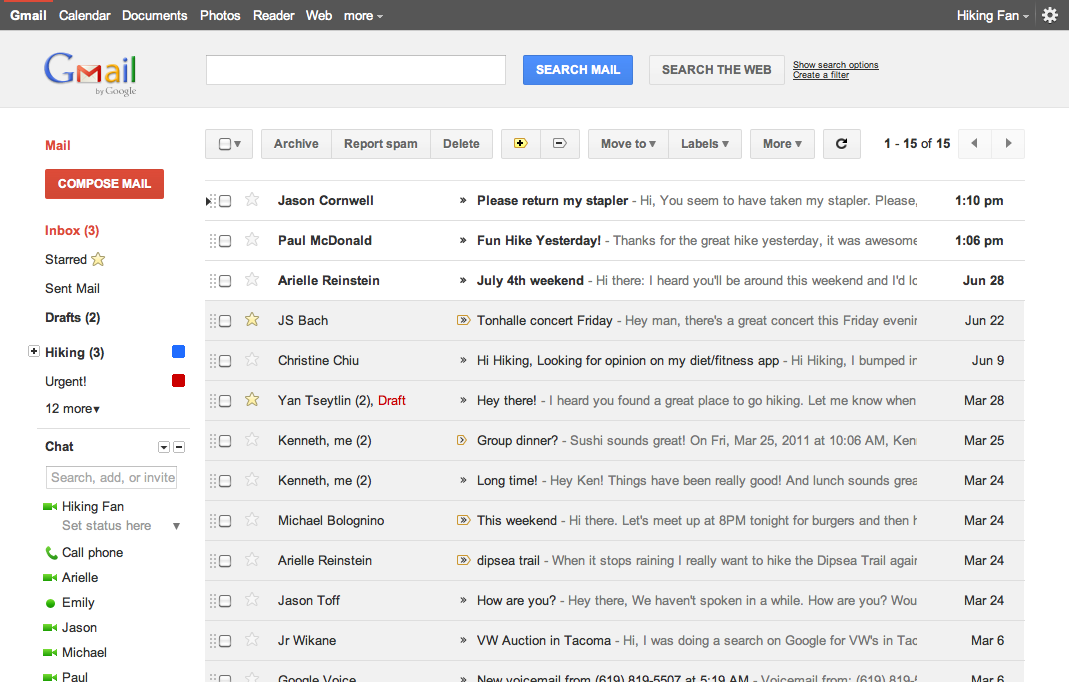
Besides email, Gmail has a number of features, including integration with Google Drive for sending large attachments and choosing images from Google Photos. Users can fully search their email with advanced spam filtering and labels to manage messages. Google also scans emails to show context-related advertisements.

Since launch, the email service has gone through a number of redesigns. Apps are available for Android, iOS, and the mobile web.


In Microsoft’s latest ad against Google, the Gmail man is reading your mail

Site default logo image

[youtube=”http://www.youtube.com/watch?v=OrkAuwaoFGg”]

ZDNet has posted a video of an internal Microsoft ad, reportedly shown at the Microsoft Exchange Conference, comparing Office 365 to Gmail. As you could imagine, Microsoft bashes Gmail pretty bad with the concept of Google reading people’s mail to serve up better ads.

Except Google Apps for Enterprise doesn’t do ads.

This video is obviously trying to sell Office 365 over Google Apps. Microsoft told ZDNet the video isn’t theirs, but we wonder who else can make such awesomely bad videos.

Meet Dr. Richard Muscat, Email Intervention Specialist with Google

Site default logo image

Gmail is admittedly the world’s most popular web-based email service, but it’s still ranked third as both Microsoft Live Mail (formerly known as Hotmail) and Yahoo! Mail command larger user bases. As of November 2010, Gmail had 193.3 million monthly users, according to Wikipedia. So to help you initiate the uninitiated, Google has created a new mini-site called Email Intervention, accompanied by a nifty little video included above. A notice on the website says:

You’ve probably already improved the lives of your friends and family members by helping them switch to Gmail, but what about that one friend who still hasn’t made the switch? It’s time to take a stand and stage an intervention.

Email Intervention is basically a simple web site where you select people from your address book and have them receive a nicely formatted email message (see below) asking them to jump on the Gmail bandwagon. The message includes Google’s intervention video featuring Dr. Richarc Muscat, Intervention Specialist, but you can replace it with your own footage. Of course, only Gmail users can send glorified invitations to Gmail using the website tools. The Gmail blog is even more straightforward in attempts to convince folks to make a switch:

On the Gmail team, we affectionately refer to them as “email interventions.” We hear about them all the time: the cousin who finally switched from an embarassing address like hottie6elliot1977 to a more professional elliot.d.smith@gmail.com, a co-worker who helped his dentist switch after he heard her grumble about having to pay for IMAP access, etc.

[youtube=http://www.youtube.com/watch?v=PE1il5znICA]

Expand
Expanding
Close

Experian Hitwise: Google+ sees 3% traffic decrease this past week

Site default logo image

According to a report from Experian Hitwise, Google+ has seen a 3% decrease in traffic over the past week. But don’t let this worry you, as Google+ has seen a 9% traffic increase from Gmail. Maybe Google+’s hype has worn off, but it’s great to see Google+’s integration across their services is paying off. We obviously expect numbers to go back up again when the service goes public — whenever that may be.

via ReadWriteWeb
Expand
Expanding
Close

Google introduces multiple calls in Gmail

Site default logo image

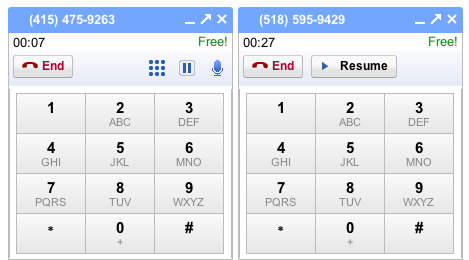
Google has released an update to their calling feature inside of Gmail, allowing users to make multiple calls. If you’re on a call and make another call, the current call will be put on hold and you can switch between the calls with the resume button. Even better, when getting an incoming call while on another you can put the current call on hold.

This new feature works on voice, video, and phone calls. If a call is placed to a physical phone number there can only be two calls at once. How long until you can conference calls and do everything else a phone can do?  Bye bye telephone!

GTools+ customizes Google+ to your liking

Site default logo image

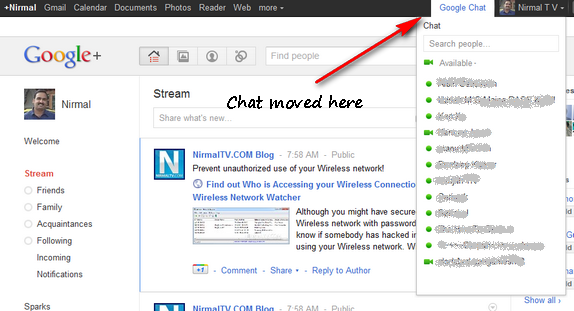
A new Chrome Extension called GTools+ allows you to customize Google+ to your liking. The extension features many customizations — like moving Chat to the Google Bar, adding an unread counter for Gmail and Reader, language translation for posts from your foreign friends, and the ability to keep the Google Bar at the top of the page when you scroll down. GTools+ is available on the Chrome Web Store. All of GTools+’s features:

- Unified Google bar, your personalized menu is possible on all Google services!
- Stick the Google+ bar always on top when you scrolling
- Prevent open in new tab or window when you click on link inside the Google+ bar
- Change the position of the chat for put in the Google+ Bar
- Change the color of the notification bubble in the Google+ bar
- Right click on the extension icon for go to the options page fastest
- Add a translation link in the context menu (auto detect the post language)
- Add notification for Gmail and Reader in the Google Bar.
- Edit the color of any notification bubble.

via Nirmal TV
Expand
Expanding
Close

Blogger sporting new look, resembles Gmail

Site default logo image

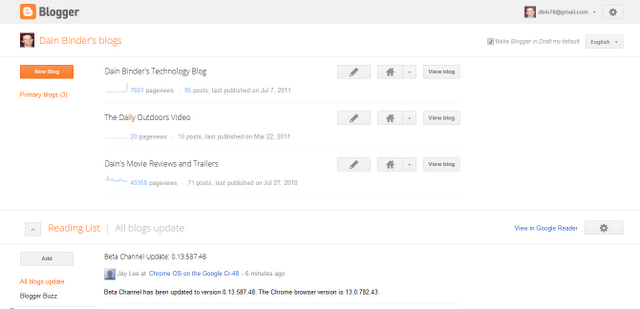
As spotted by Dain Binder on Google+, Blogger is receiving a redesign just like the rest of Google’s products. The new redesign resembles Gmail’s new look, sporting new buttons and an overall touchup. Currently, the new design can only be viewed in the draft section of Blogger, but we’d bet this is coming to the full site soon. More images after the break.

via The Next Web


Expand
Expanding
Close

Along with the rest of Google, Gmail receives redesign

Site default logo image

Matching Google+, redesigned Maps, Search, and Calendar, Google has released a redesign for Gmail. The theme of this redesign is to remove the clutter, something some of you might think Gmail suffered from. F0r now, we notice new colors and an overall buffer of the page. To get your hands on these new designs select the ‘Preview’ or ‘Preview Dense’ theme from the settings.
Expand
Expanding
Close

Google testing new inbox styles in Gmail

Site default logo image

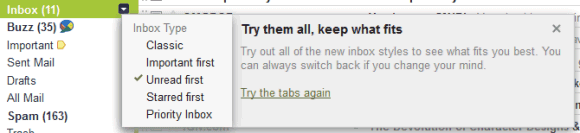
Google Operating System is reporting that Google is testing five new inbox styles in Gmail, on a select group of users. The new inbox styles include classic, important first, unread first, starred first, and Priority Inbox.

This new feature is most likely to help users get introduced to Priority Inbox. All of these features could be accessed by going to Priority Inbox settings, but Google makes it easier with their  first tabs interface inside Gmail. As we all know, Google likes to do these select testings a lot. Today we reported that they’re testing a new black navigation bar on top of their search pages. Are you seeing this new feature in your Gmail?

Passing screenshots got easier with clipboard image support in Chrome

Site default logo image

Google is leveraging Chrome’s extensive support for the latest HTML5 spec to roll out interesting new features that are available first on their own browser first, like dropping file attachments directly onto the Gmail compose window. The latest version of Chrome has enabled another nice perk, the ability to paste images from your system clipboard into the Gmail compose window.

Just copy an image from your favorite image editing program, a web page, another email message or any other source and paste it right into your Gmail message using the standard CTRL + V shortcut (Command + V on Macs). You’ll need to wait a while until the image uploads, depending on your screen resolution. Daniel Cheng, a Google software engineer wrote in a blog post that the new feature is especially handy for passing screenshots…


Expand
Expanding
Close

Survey: Students love their Gmail and Chat, Sites not so much

Site default logo image


Gmail was the most widely used Google Apps service for Brown University (above), but Chat tops the customer satisfaction charts (below)

Brown University conducted a telling survey in May, asking some 1,100 students and faculty/staff members to evaluate Brown’s migration to Google Apps for Education eighteen months ago. Like everywhere, Gmail was the service of choice for a whopping 98 percent of the respondents, but satisfaction index for Chat – used by two-thirds of the respondents – topped the charts: 99 percent for Chat versus Gmail’s 90 percent. Nearly five out of five undergraduate, graduate and professional student respondents were “Very Satisfied” or “Satisfied” with Google’s web-based email.

Google Sites was less popular, having been used by one in three respondents. Docs and Calendar were used by the respectable 85 percent and 79 percent of the respondents, respectively. Most frequently used apps on a daily basis? Gmail (97 percent), Calendar (60 percent), Chat (33 percent), Documents (29 percent) and Sites (eight percent). And when issues rose, nearly half the respondents sought answers on Google’s official help pages and Google search.

More food for thought and four additional pretty charts bellow.


Expand
Expanding
Close