Google Calendar



On its Official Apps blog, Google has just announced that within the next few months, it will be revamping the sign-in page for Google Apps accounts. The interface will now be consistent between all Apps services, including Gmail, Calendar, Drive, and any other tools. Google says that it is doing this to improve security and make it easier for users to switch accounts.
Early next year, the sign-in page for all Google Apps customers will be updated to be consistent across all Google Apps services. In other words, the sign-in page for Gmail will now be identical to the sign-in page for Google Calendar, Google Drive, or any other Google Apps service. This change will improve security and make it easier for users to switch between accounts.
Details are scarce at this point, but Google says more information will come in the next few months.


Google today announced its XE11 update for Google Glass and highlighted a few of the new features on its Google+ page for the wearable. New for Google Glass is the ability to search Google Calendar with commands like “my agenda” and “what am I doing in November?” Google noted that “Calendar search works for Google Calendar users with Gmail and private search enabled.”
The update also includes a highly requested feature from users in the XE11 update: the ability to get directions home or to work with voice commands:
It’s even easier to find your way home. Tell Google Maps where you live and work and you can refer to their locations by “home” or “work” on Glass. It’s part of Google’s personalized search so when you ask Glass for directions home, it’ll know what you mean. To get started, insert your home and work address in Google Maps or Google Now (iOS instructions) and then try it out on Glass. From the home screen, say “ok glass, get directions to home.
New Glass users will notice a redesigned Glass setup tutorial in XE11 (pictured above) that Google says will show users how to swipe and connect Glass to the companion smartphone app. You’ll also now see a “Start screencast” shortcut in the notification drawer of your connected Android device making it easier to quickly start screencasting Glass to your smartphone.
Lastly, Google has removed a feature from Glass with XE11. You’ll no longer be able to activate Google Search with a long press of the touchpad because many users were apparently triggering it accidentally:
Expand
Expanding
Close
Google is beginning to roll out a new feature in Gmail today that will allow users to quickly and easily create or add an event to Google Calendar without ever leaving their inbox. Once the feature has been enabled, users will be able to click the date and time within emails to add or create an Google Calendar entry using the data from the email (as pictured above). The calendar entry can be edited before added and will also automatically include a link back to the original email for reference:
When you click on one of these underlined dates, you’ll be able to preview your schedule for the day and change the title, date or time of the event. Clicking “Add to Calendar” will do exactly that — add the event to your calendar, and for extra convenience, the calendar event will include a link back to the original email.
Keep an eye out for the new feature rolling out to everyone using the English (US) language setting over the next week.
Google announced today on its Google+ page that it is expanding its Gmail Search Field Trial. It’s a program that lets users let upcoming features, and users who have signed up to preview new features will now be able to access Calendar results alongside Gmail and Google Drive results:
With all that you juggle every day, its easy to lose track of appointments, plans, and reminders. With today’s expansion of our Gmail Search Field Trial (http://goo.gl/dQGNs), we’ve added Calendar results to your Gmail and Drive results.
Google explained users would be able to quickly call up upcoming events from their Google Calendars by searching for [what is on my calendar today], while they’ll also be able to search for specific calendar entries with phrases such as [when am i meeting bryan]. You can sign up to access the latest and upcoming search features from Google on its Gmail Field Trial page.
After first introducing its Hangouts feature in Gmail as a replacement for the old video chat feature in July, Google announced today it is finally bringing the feature to users in India. Not only can users do the usual 1:1 video chat they are used to, but they will also now be able to chat with up to nine people and access more of the Hangouts features we are familiar with from Google+.
Over the last few months, we’ve been rolling out updates to Google+ Hangouts to make it easy for you to connect with friends and family no matter where you are. Today we’re excited to bring Hangouts to all of our Gmail users in India… To give Hangouts a try, just click on the hangout button at the top of your chat list in Gmail. You can also schedule a hangout with Google Calendar, and use the Google+ app for Android and iOS to hang out while you’re on the go.
Google also announced (via TechCrunch) that it is rolling out a bandwidth slider for users with slow Internet connections and an audio-only mode:
1) Bandwidth slider. At the top right of every hangout is a new slider that lets you adjust your bandwidth preferences in real-time. This makes it easier to keep hangouts going, even in areas with poor connectivity.
2) Audio-only mode. Choose this mode to send and receive audio only, and thus, significantly reduce your bandwidth requirements. Other participants will only see your profile picture, but they’ll hear you loud and clear.
Those that updated to Android 4.2 might have noticed a bug that prevents users from selecting December for events like birthdays inside of the People app. Google has now officially addressed the issue in a post on the Android Google+ page by confirming that it plans to fix the bug before December:
We discovered a bug in the Android 4.2 update, which makes it impossible to enter December events in optional fields of the People app (this bug did not affect Calendar). Rest assured, this will be fixed soon so that those of you with December birthdays and anniversaries won’t be forgotten by your friends and family.


Use Google Calendar to mange your day-to-day? You’re in luck, as Google has released an official Google Calendar for Android app on Google Play this evening, allowing users to keep track of their calendar right from their Android device. The app (which at one time was exclusive to the Galaxy Nexus and Nexus S) features that ability to create, edit, and delete events, view calendars (including non-Google) in one spot, and quickly email related people to event with a customizable message. Google Calendar is available for Android 4.0.3 devices or higher. Google does warn that there are some issues with HTC devices: [Google Play via Official Android]
Google has opened its Google search+ Gmail result beta further this afternoon so more users can get Gmail results in their main Google Search. The feature was first introduced in a limited beta in August. For those who do not know about the feature, relevant Gmail conversations will appear in Google Search (as you can see in the image above). Just search “Paris” and emails that you have sent talking about “Paris” will then appear. If you think about it, expanded search makes a lot of sense.
Furthermore, the folks at Google announced this afternoon that Google Drive, Google Calendar and more will now appear when searching in Gmail:
[tweet https://twitter.com/Scobleizer/status/218486102720393216]
When Google announced some updates to Google+ during its I/O keynote this week, perhaps apart from the new iPad compatible tablet version, the most talked about new feature was the Facebook-like invitations called “Events.” While Google calendar integration in the Events feature was supposed to be a big selling point, Google unfortunately did not provide users with control over which invites were added to their calendars. The issue led to massive amounts of spam in the form of notifications and calendar entries—most notably for Google+ users with large followings. Robert Scoble outlined the problem in a Google+ post:
As noted by Scoble, another avid Google+ user, Will Wheaton, highlighted the issue and received a response from Google’s Senior Vice President of Engineering Vic Gundotra:
Expand
Expanding
Close
Google updated its Google Search iPhone app to version 2.0.0 today, which introduced a completely redesigned app that focuses on improvements to speed and full screen browsing features. Among the new features are an auto full screen mode that hides controls when scrolling down and reveals when scrolling up, and a new full-screen image search view.
The updated app also includes “major speed improvements,” a built-in text finder for webpages, and quick links to Gmail, Calendar, Docs, and search options such as images, places, and news. The iPad did not receive the same update, but both the iPhone and iPad will now be able to save images to the iOS camera roll.
A full list of features is below, while the updated app is available on the App Store now.
Stanford University in Palo Alto, Calif., is moving from VM Ware’s Zimbra to Google Apps for its entire staff and student-body, according to The Stanford Daily. Stanford has given Google Apps a trial for the past year and is finally ready to open it up campus-wide. Stanford will roll out Google Apps this spring with undergraduate students able to move to Gmail when they choose. Google Docs will then roll out in the summer. The full roll out of Google Apps across the campus cannot happen until Google enters into a Business Associate Agreement with the university.
Stanford is making the switch to Google Apps from Zimbra, an open source email software made available from VM Ware. Stanford’s Matthew Ricks said, “In delivering Google Apps to Stanford, we’re responding to the desires of the majority of our community,” which indicated Zimbra was not meeting the campus’ needs.
Google Apps will offer Stanford document creation from Google Docs through Gmail, management through Google Calendar, and more. Many other schools and organizations have also made the move to Google Apps while citing it to be the most affective. Thanks for spotting the title error, Dane!
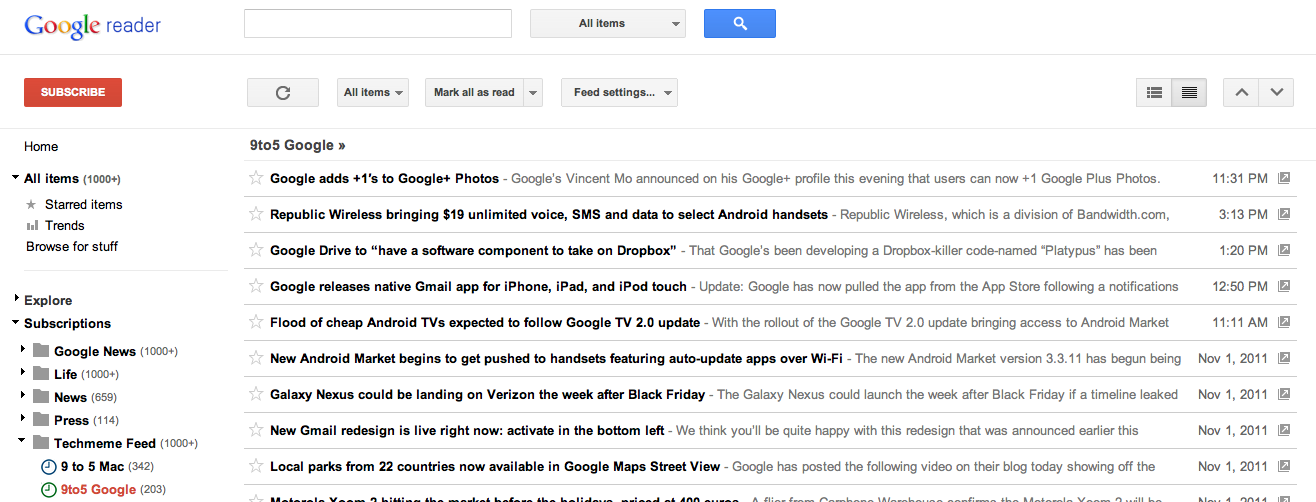
Kevin Fox, a former lead designer for Google Reader, has made an offer to Google on his blog. Kevin offers that he will sign a three month contract to come back to Google to help restore the Reader product after this week’s changes — which he isn’t a fan of by any means. In fact, most people aren’t happy with Google getting rid of old social features to implement Google+.
Kevin says that he will keep with the design changes that Google is making across all products, but will restore and enhance Google Reader to the product it should be. Here’s to the best Kevin.
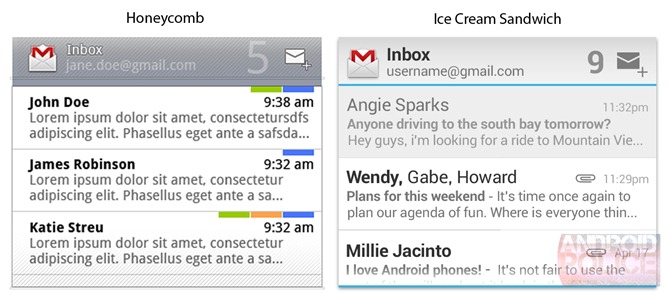
Android Police has gotten exclusive screenshots of the Gmail, Calendar, and Email widgets for the upcoming Android 4.0, Ice Cream Sandwich. As you can see with the Gmail widget above, the Ice Cream Sandwich version features a slightly upgraded UI, but is missing Labels. Below is calendars
Expand
Expanding
Close


Strangely enough, offline mode in Gmail is a standalone web app (pictured above) rather than being baked into Gmail directly. Click for larger.
Google announced in a post over at the official Gmail blog that it is bringing offline functionality back to Gmail, Calendar and Docs. The feature had initially been enabled in select Google services via Gears, the company’s proprietary browser extension that was later retired in favor of HTML5. It took longer than expected to re-write the offline functionality in HTML5, though. This was in part because Google had to wait until the World Wide Web Consortium ratified new HTML5 features that allow for local browser storage and other technologies that make it possible for developers to write web apps which sync seamlessly between offline and always-on modes of operation.
Gmail offline will be available today, Google said, and offline for Google Calendar and Google Docs will be rolling out over the next week, starting today. In the case of Gmail, offline functionality is enabled via a Chrome Web Store app dubbed Offline Google Mail. As for Calendar and Docs, clicking the gear icon at the top right corner and choosing the Offline mode lets you view events from your calendars and RSVP to appointments while offline, as well as view your Google documents and spreadsheets. Offline Docs editing isn’t supported yet, but Google is “working hard to make it a reality”.
The question is, will you care about working offline now that mobile/broadband Internet and wireless hotspots have become ubiquitous? (YES!)
Google engineer Ido Green just made comment on This week in Google that offline mode for Gmail and Calendar are on their way by the end of the summer. There was talk of these features at this year’s Google I/O, but it’s nice to know offline mode is still on track. Besides Gmail and Calendar, Green also said there are a few more offline features coming.