Google Maps



[youtube=”http://www.youtube.com/watch?feature=player_embedded&v=Hhgfz0zPmH4″]
Google released updates today to three of its popular Android apps: Google Maps, Goggles, and Listen.
Google Maps was updated with a small new feature called “night mode” that will help you better navigate through tunnels. There is not much word on how exactly this feature will work, but it sounds cool nonetheless.
Google Goggles was updated to version 1.7.1 with a long list of updates. Goggles will no longer store inaccurate locations for queries in search history and it will not crash when loading large bitmaps. The app also features the usual performance enhancements and will now show the description field for user-submitted results.
Lastly, Listen’s update is small. It fixes an issue where Listen would improperly take audio focus from other apps while in the background. You can download these updates from the Android Market. (via Android Central)

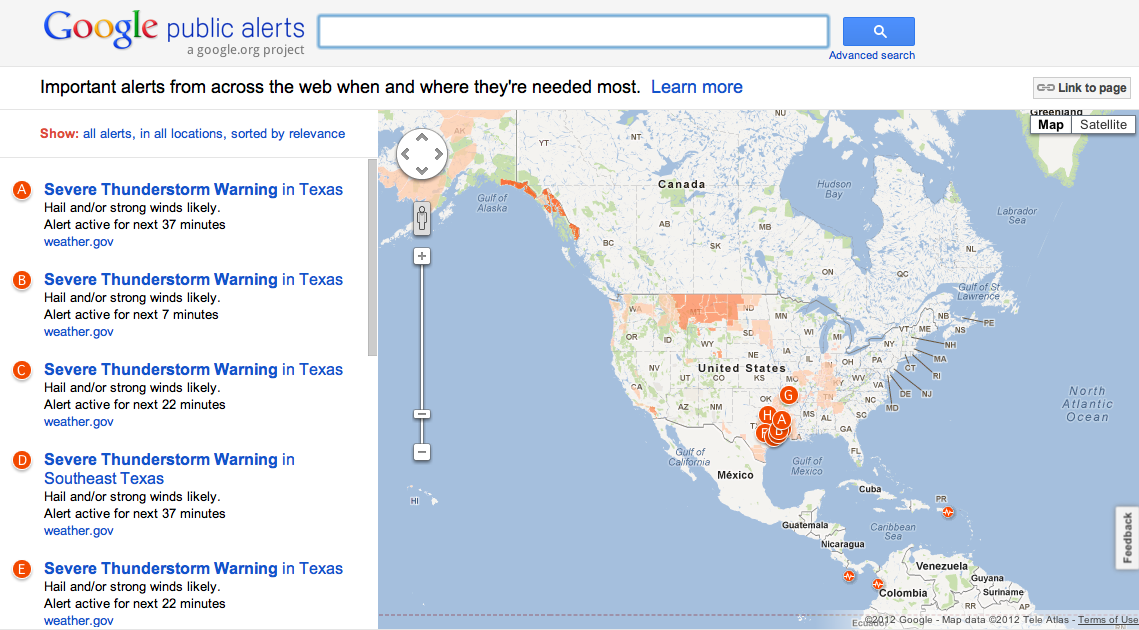
Folks seeking information on natural disasters or other global emergencies can now access Google Maps for the latest details through a new Google Crisis Response project.
The Mountain View, Calif.-based search giant launched a Google Public Alerts system today to keep users informed of disaster alerts regarding tornadoes, floods, winter and tropical storms, and other hazards menacing throughout the world.
“With today’s launch of Public Alerts on Google Maps, relevant weather, public safety, and earthquake alerts from US National Oceanic and Atmospheric Administration (NOAA), the National Weather Service, and the US Geological Survey (USGS) will be accessible when you search on Google Maps,” announced Google in a blog post.
More information is available below.

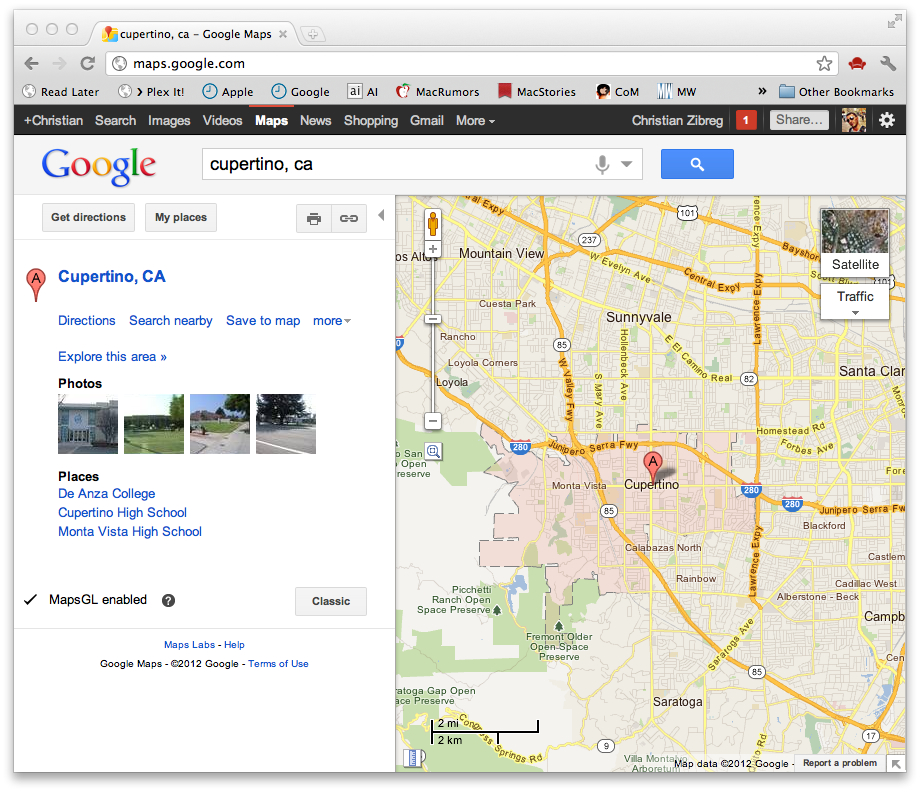
A tipster over at the Google Operating System blog pointed out a small —but welcomed— tweak in Google Maps that lets you highlight areas of interest based on upon search queries:
When you search for a city or a county or a ZIP Code, Google Maps now highlights the boundaries of what you searched for. If you are zoomed out, the whole area is shaded pink. If you zoom in a bit, it has just a big pink border with grey shading. Zoom in even more and it’s a dashed boundary with grey shading.
In the above screenshot, I searched for Cupertino, Calif., and Google Maps automatically highlighted the city’s area inside the map view, allowing me to visually grasp the size of Cupertino. Note that the highlighting feature does not work in other Maps views, such as satellite.
Expand
Expanding
Close

Google just revamped the look of Latitude, its location-aware service akin to Foursquare. According to a post by Google’s community manager for Google Maps, Danial Mabasa, the new Google Latitude interface can be now accessed on desktop browsers at www.google.com/latitude. As you can see from the above screenshot, it is not much different from Google+. However, upon remembering how the old website looked, it is definitely a major makeover that helps achieve consistent user experience across Google’s key properties.
You can now easily access your friends’ list in the left-hand column or click the wrench icon to customize your personal location history and location settings. Whenever you want to manually update your location, just hit the Update button next to your name and approve your browser’s location sharing prompt. Another cool feature lets you playback your location history (should you choose to preserve it) from a select range of dates by pressing the Play button on the bottom left-hand corner of the map.
[youtube=”http://www.youtube.com/watch?v=TVum3HsmZ6M&feature=player_embedded”]
Launching on the Google+ Games platform, Google is showing off a new game involving its Google Maps product. The game, as you can see demonstrated in the video above, involves rolling a blue ball around a map. The game is set to launch sometime in February.

Google Maps is making headlines in a variety of ways this week.
A Jan. 10 update to the Android application made noise at the 2012 Consumer Electronics Show yesterday. The Google Maps upgrade claimed to increase battery life while improving location tracking within Google Latitude.
The latest version Google Maps also improved Transit Navigation and more closely estimates location position when GPS signal is lost. The update even increased the number of possible transit routes from three to four.
The final update includes indoor maps that can —well— navigate around various indoor venues in the United States. In this particular update, maps for CES in the Las Vegas area were included (hence all the commotion).
“We hope that these indoor maps will come in handy when finding your way through the slots and to the shops,” announced Google on its LatLong blog. “And for those of you who catch gadget-fever with CES in town, we’ve also partnered with a number of Best Buy stores in the Las Vegas area.”
[youtube=http://www.youtube.com/watch?feature=player_embedded&v=OPR1ZGSXLOs]
More information on the updates are available below.

Google has kept it promise and released an updated Street View imagery documenting the aftermath of the March 11 earthquake and tsunami that had partially destroyed or completelly wiped out large parts of Northeastern Japan. The search company described in a blog post how starting inland and venturing out toward the coast “you’ll see the idyllic countryside change dramatically, becoming cluttered with mountains of rubble and debris as you get closer to the ocean”.
They also added a timestamp to the bottom left corner of each image helping you to contextualize what you’re seeing. This new timestamp feature is now available on Street View imagery worldwide, Google noted. The street-level imagery of the affected areas are truly shocking to those of us lucky enough not to experience a natural disaster of such magnitude.
As people were sifting through wreckage caused by the devastating quake-tsunami combination, Google sent out Street View cars to capture the 360-degree panoramic imagery of the scene some nine months later. An even more horrifying depiction can be found at Google’s newly set up site called Build the Memory that has the ‘before’ and ‘after’ photos.
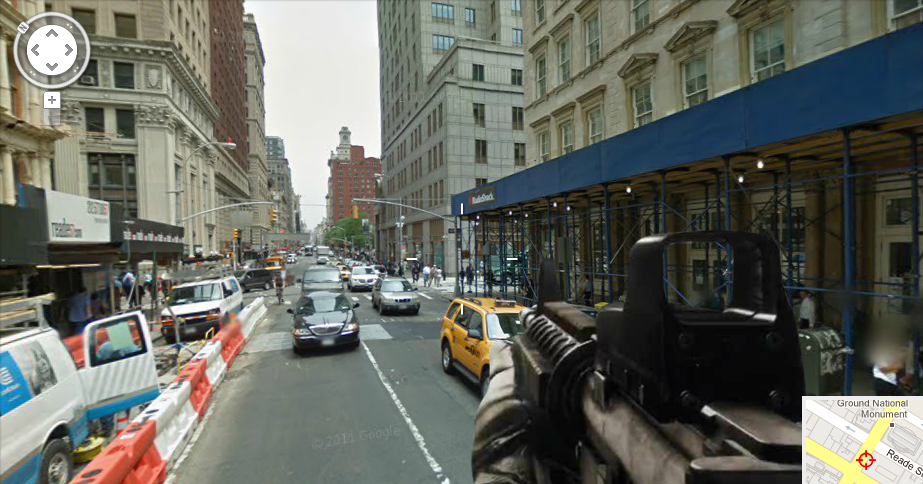
UPDATE [Tuesday, December 13, 2011 at 9:58am ET]: Ouch! Google has killed Google Shoot View.
A Dutch advertising agency called Pool Worldwide has turned Google Maps into a first-person shooter. The website is called Google Shoot View, and simply puts a first-person M16 overlay on top of Google Maps Street View — and quite frankly that’s really it. There’s no blood, running, or screaming, but just the fun of simply shooting at whatever appears on Google Maps. While it won’t replace your midnight Call of Duty rampage, it’s a fun little game to play while sitting at your desk. Check out the promotional video after the break. (via Business Insider)


Silicon Filter grabbed some pertinent quotes from Marissa Mayer’s interview today at LeWeb on Mobile, Local, Social (SoLoMo). We’ll have the video up when it becomes available. Notables:
[youtube=http://www.youtube.com/watch?feature=player_embedded&v=2YcNm6eVGlg]
Google has posted the following video on their blog today showing off the new Street View feature inside of Google Maps that allows users to view local parks. Google has traveled across the world to add parks from 22 countries. You can check out the full list of parks here.
Do you see your local park on there?

[youtube=http://www.youtube.com/watch?feature=player_embedded&v=BPeWJTuD7G8]
Canadians are getting a little bit of love today from Google as Google Map Maker for Canada officially goes live. The project has been available in the U.S. since earlier this year and elsewhere since 2008, but now Canadians too can add local geographic data to Google Maps.
By heading over to www.google.ca/mapmaker, you can now start adding points of interest (adding/naming buildings, restaurants, schools, etc.), rivers, trails and roads, or update existing landmarks to make them more accurate. Of course all of your edits will first have to be approved for accuracy by Google engineers before being displayed on Google Maps.
The tool isn’t too difficult to use. You can easily select a route for a bike path or newly constructed road, drop a familiar red pin to add a point of interest, or draw a shape to add a building or landmark. You’ll already notice a lot of edits and additions to the Canada map, as Canadian Google employees have been testing out the tool in preparation of today’s launch.
Expand
Expanding
Close
Noticed by the guys over at The Handheld Blog (via Android Community), Nokia has been rolling out some pretty significant updates to their HTML5 maps web app for Android (and iOS) accessible at m.maps.nokia.com. This brings the web app a lot closer to the quality maps experience exclusive to the N9 and other Nokia devices.
If you haven’t checked it out recently, you will now notice the ability to download maps over WiFi for offline use, allowing you to bypass the need for a data connection when on the go. The update also brings a few other goodies including public transit routes and directions (which adds to the driving and walking navigation introduced in past updates), local area guides, and new point of interest (POI) landmarks showing local retailers, gas stations, etc.

A few members of the Google Maps team answered some pretty interesting questions on Reddit about the platform, from the community. Business Insider posted some of the highlights from the thread:
[youtube=http://www.youtube.com/?v=X3EO_zehMkM]
What do you get by marrying Google Maps to WebGL, a software library that extends the capability of the JavaScript programming language to allow it to generate interactive 3D graphics within any compatible web browser such as Google’s Chrome 14 or Firefox Beta? Pure awesomeness, that’s what. They are calling to Google MapsGL and it enables “far richer visuals and animations”, the search company wrote in a blog post this morning:
WebGL is a new technology that brings hardware-accelerated 3D graphics to the browser without additional installed software. With WebGL your maps experience is much better with 3D buildings, smoother transitions between imagery and the ability to instantly “swoop” into Street View without a plugin.
Just visit maps.google.com and click “Try it now” to take hardware-accelerated Maps for a spin. We wrote in the past about WebGL-based Chrome experiments worth checking out, including a remarkable water simulation and interactive music video.
As noted by The Next Web, Google’s VP of Product Bradley Horowitz, told Wired in an interview that Google+ will soon be Google. “Be Google?”, you’re probably thinking. What he means is that Google+ will soon not be its own product, but rather tied into almost every service offered by Google. You may remember when Google+ was sort-of tied into YouTube, but Horowitz says it will go deeper than that.
“Until now, every single Google property acted like a separate company. Due to the way we grew, through various acquisitions and the fierce independence of each division within Google, each product sort of veered off in its own direction.
… But Google+ is Google itself. We’re extending it across all that we do—search, ads, Chrome, Android, Maps, YouTube—so that each of those services contributes to our understanding of who you are.”
Google+ will soon be tied into ads (which has already happened), Chrome, Android, Maps, and more. This will begin to make a definitive Google product, leaving Google+ no longer acting as a separate company. This should make it easier on the non-technical folk, unlike you or me.
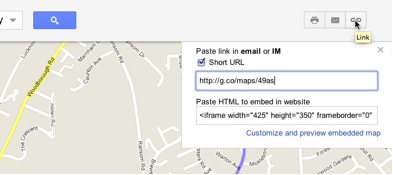
Google purchased g.co with the mindset of using it as a short URL for their services. The goog.gl short URL remains with users, but today Google has put their g.co URL to work. In Maps, users can now generate a short link when they go to share a location. The link generated will follow the lines of: g.co/maps/xxxx. Expect this to be rolled out to more Google products. (via RCR Unplugged)
[youtube=http://www.youtube.com/watch?v=PvIYjsRwt5A&feature=player_embedded]
Google has just launched a nifty new weather layer for Google Maps that provides you with current weather conditions from around the globe generated by the U.S. Naval Research Lab. This will definitely save you the frustration of jumping from Maps to your current weather app of choice when planning your next excursion.
You can click the icon for any given city to get a four-day forecast and more detailed data including wind and humidity conditions. In the left-hand pane, you can select temperature(F/C) defaults, wind speed (km/h, mph, or m/s), and optionally “hide clouds”.
Click here to start using the new weather layer now. You can also enable the weather layer at any time from the menu in the upper right corner (image below).
Expand
Expanding
Close
[youtube=http://www.youtube.com/watch?v=FdT3eKdto4w&feature=player_embedded]
Historypin, a user-generated map displaying historical data of nearby locations (previously only available on Android devices), is now available as an iOS app for iPhone, iPad, and iPod touch. Created in partnership with Google by not-for-profit We Are What We Do, the app allows users to add their own historical photos by pinning them to a map, capturing historic moments as they happen, and creating replicas of historical images. The images are then shared with users requesting data for a specific location….
Historypin uses Google Maps and Street View technology to reveal the user-generated photos and data related to historical events that happened close to your current location. It does this by “overlaying them onto the live camera view”…essentially aiming to give you a live snapshot of what your surroundings looked like in the past.
Simply holding your phone up in the street will provide you with relevant nearby images. Selecting one of the images allows it to be overlaid onto the iPhone’s camera view. You can then fade between the image and your live shot for comparison, as well as pull up stories and data related to the image and your current location.
Full list of features and some shots of the app in action after the break…
Expand
Expanding
Close
Stunning 45-degree views are now available in Maps for more places in the US and abroad.
Never content with resting on its laurels, Google have been iterating their products at a pace faster than ever before. Here’s a quick overview of some of the noteworthy changes we spotted in Google’s popular services, such as Docs, Tasks, Chrome Web Store, Blogger and Maps. The latter now features breathtaking 45° imagery for many more US cities (full list here), including international locales, such as Córdoba, Spain. If you haven’t yet seen highly detailed aerial photography in action, definitely give it a try now by checking out the Córdoba, William P. Hobby Airport or the Houston Ship Channel 45° views from all four directions.
Chrome Web Store, the Google-ran online repository of web apps, now supports more markets, having added sixteen new countries for 31 countries in total. In-app payments in web apps distributed on Chrome Web Store are also a go-go: Google confirmed paid transactions in web apps will be available to users in twenty countries “later this year”. Zyngas of this world will love it, that’s for sure. More features in other services right below the fold.
[youtube=http://www.youtube.com/watch?v=9EEOWbIqQdE]
Photo credit: Lasse Engelbracht on Flickr
Google’s been steadily improving its mapping application for Android and the web. Over the past 30 days, Google updated Maps with ‘My Places’ tab and added offline maps and stop-by-stop public transit navigation to Google Maps for Android. Starting today, the search giant wrote in a blog post, public transport directions are available for the London Underground in both web and Android apps, including all Underground, bus, tram and Docklands Light Railway (DLR) lines:
Let’s say you’re at Trafalgar Square, and you want to visit Madame Tussauds. With a simple directions search, you’ll see all the possible public transport connections. In Maps, click “Get directions” in the left-hand panel, and then the train icon to see public transport directions. Enter your departure location next to A, and your destination next to B. These can be either street addresses or names of popular places, businesses or restaurants. When you’re done, click the “Get directions” button and suggestions for your trip will appear below.
Mobile Maps utilize your phone’s location in order to figure out an optimal rout to your destination, but you’ll also have be presented with multiple alternatives. On Android devices public transport directions are available with Transit Navigation (Beta) in Google Maps, meaning your phone can even alert you when it’s time to get off the tube at your destination.

Google has updated Google Maps for Android to version 5.8, which sheds focus on Places. Users can now upload pictures of Places and add new Places that aren’t yet listed. Most interestingly, Maps now gives you the ability to favorite places in the My Places tab. Go ahead and grab it in the Market now.
What’s in this version:
- Personalize Place pages by uploading pictures from your visit
- Manage your starred and recently visited Places in the ‘My Places’ tab
- See descriptive terms for Places in search results and Places pages
- Add a new place to Places when checking in
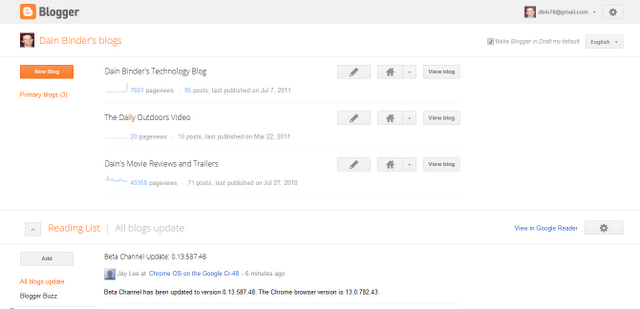
As spotted by Dain Binder on Google+, Blogger is receiving a redesign just like the rest of Google’s products. The new redesign resembles Gmail’s new look, sporting new buttons and an overall touchup. Currently, the new design can only be viewed in the draft section of Blogger, but we’d bet this is coming to the full site soon. More images after the break.
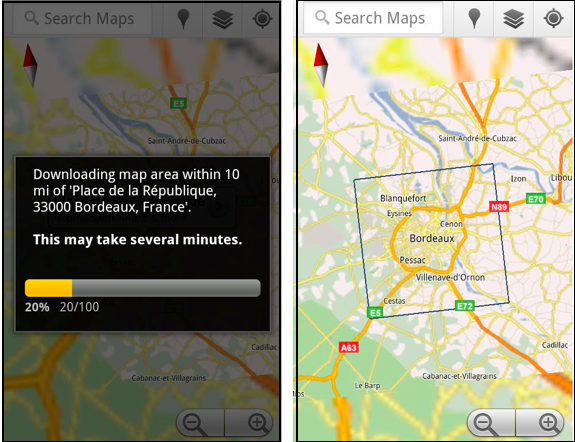
Android users who downloaded the updated Maps application today got a nice surprise. Google Maps for Android now features offline viewing. To enable the new feature, simply navigate to the Labs section of the Maps application and enable the Download Map Area option. After this is enabled, each time you want to download maps for offline viewing you will need to visit a Place page, click the more button, and then select the option to store locally. Maps will then store a 10 mile radius, locally to your device.
Offline viewing is available for Android because of the way it displays the maps. Android uses a vector-based system for displaying map tiles, where the iPhone uses an image based. This means Android can pull maps using about 1/100th of the data the iPhone would. Maybe we’ll see a change to the iPhone’s Google Maps soon.
Constant checking of your location is annoying when using public transportation in a foreign city. This will become a thing of the past with the new Google Maps for Android which now features something called Transit Navigation (currently in beta). Basically, this taps Google’s vast mapping database, your phone’s GPS location and real-time public transportation data to figure out where exactly along the route you currently are. The system then alerts you on time when it’s time to hop off the buss, Google explains in a blog post:
Using your location along the route, Transit Navigation will alert you when its time to get off at your destination or to make a transfer. This is particularly helpful if you’re in a city where you don’t speak the language and can’t read the route maps or understand the announcements.
The best bit? It runs in background so you’ll continue receiving progress reports as subtle Android notifications while checking your email or playing a game. It will even vibrate the device when it’s time to get off at next stop. Other improvements include the navigation interface with big icons and built-in picture viewer for Places pages. The new Google Maps 5.7 for Android with Transit Navigation (BETA) can be downloaded now from Android Market on smartphones that run at least Android 2.1. Transit Navigation arrives with support four hundred major cities around the world and Google will probably add more towns in the future.
[youtube=http://www.youtube.com/watch?v=1NTXkd0dguQ]
Expand
Expanding
Close