Google app


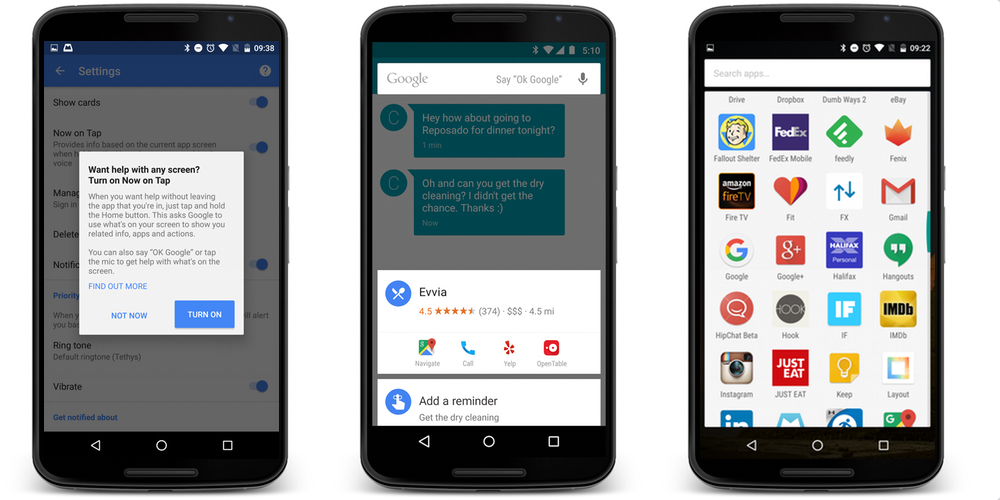
Google is rolling out an update to its self-titled app for Android, bringing it up to version 5.3. It’s available to download for free for anyone running Android 4.4 or later, bringing a fresh look to the standard Google Launcher. For those running Android ‘M’ Dev Preview 3, the update also brings one of Marshmallow‘s most exciting features: Now on Tap…
Expand
Expanding
Close



In addition to unveiling its all new logo today, Google has announced some changes coming to its Search experience on mobile devices and its Google Now homepage on Android. Google notes that it’s made the search results page for mobile devices easier to navigate with a new swipeable and tappable UI. Google offered a look at the new UI for images, videos and news stories in the video below.
Expand
Expanding
Close



via <a href="http://www.androidpolice.com/2015/05/18/google-app-v4-6-enables-translucent-status-and-navigation-bars-for-google-now-screen-on-custom-launchers-apk-download/">Android Police</a>
With Google I/O right around the corner, the company is prepping its apps with minor updates ahead of the expected larger changes to come later this month. This evening, the Google App on Android received a minor update with a few visual changes. For users of custom launchers, the update enables full screen mode for Google Now.

Google announced today that it’s adding new cards to Google Now, those context-aware notifications that pop up in the Google app for Android, using information sourced from other Android apps. That means rather than opening various apps to check out the latest updates in each, you’ll be able to view updates directly in the Google Now feed.
Expand
Expanding
Close

Android TV’s voice search capabilities aren’t too shabby, but there’s definitely some room for improvement. Aware of this, Google has added its standalone app to the Play Store making it accessible to people who purchase third-party media boxes outside of its Nexus Player.
[youtube=http://www.youtube.com/watch?feature=player_embedded&v=wZd_hIln1-I]
Google officially rolled out a new service to Apps customers in March, called “Google Vault“, that helps users securely preserve and manage important data. The service has since launched to new and recent customers, and Google announced today that Vault is being made accessible directly from the Google Apps Control Panel:
Starting today, Apps customers can purchase Google Apps Vault online directly from the Control Panel…Google Apps Vault can be added to your Google Apps account for an additional $5 per user per month… Google Apps Vault is available for new and recent Google Apps for Business and Education customers. We’re working to enable Vault for existing customers, and we’ll announce availability when it is ready.

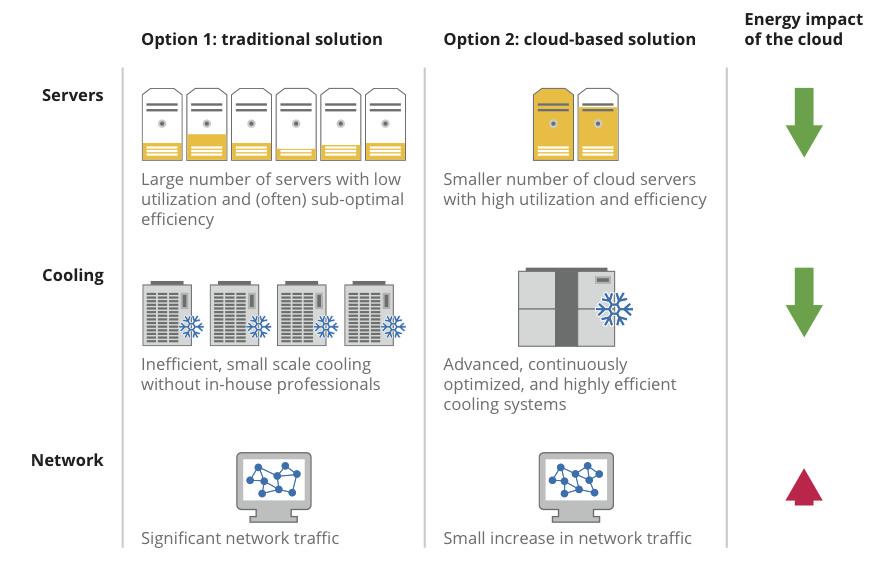
Google’s reduction of energy use for servers and server cooling.
Google wants businesses to make Google Apps their primary productivity suite, so the company is recruiting at full swing today with a new blog post that discloses a few stats about its energy efficiency.
Google Apps is a Google service that features several Web applications like traditional office suites. The services vary per edition but generally include Docs, Gmail, Calendar, Talk, Sites, Groups, Video, and Marketplace. Its popularity among businesses and academicians is rapidly increasing due to enhanced sharing features, accessibility, and cost.
According to Senior Vice President for Technical Infrastructure Urs Hoelzle on the Official Google Blog:
At Google, we’re obsessed with building energy efficient data centers that enable cloud computing. Besides helping you be more productive, cloud-based services like Google Apps can reduce energy use, lower carbon emissions and save you money in the process. Last year, we crunched the numbers and found that Gmail is up to 80 times more energy-efficient than running traditional in-house email. We’ve sharpened our pencils again to see how Google Apps as a whole—documents, spreadsheets, email and other applications—stacks up against the standard model of locally hosted services. Our results show that a typical organization can achieve energy savings of about 65-85% by migrating to Google Apps.
Hoelzle further explained how lower energy use equals less carbon pollution. The executive supported this statement with an anecdote about the U.S. General Administration. It switched to Google Apps for Government to save $285,000 annually at a 93 percent cost reduction, and it reduced energy consumption by 90-percent and carbon emissions by 85-percent.
Following an update to Gmail last week that brought improved search results and integration of contact information and Google+ Circles, today Google announced on the Official Gmail Blog that it is now including autocomplete predictions when searching from within your Gmail inbox.
Much like Google Web search and many of its other services, when beginning to type in the search bar from within Gmail, you will now see suggestions or autocomplete predictions matching content within your emails. Google explained:
Now when you type something into the Gmail search box, the autocomplete predictions will be tailored to the content in your email, so you can save time and get the information you want faster than ever before. For example, you might now get lax reservation or lax united as predictions after typing “lax” if you have received an email with a flight confirmation for your trip to Los Angeles in your inbox recently.
The new feature will roll out to English Gmail users over the next few days, but Google noted support for additional languages would roll out over the coming months. The feature is also not yet available to Google Apps users.
Google+ always allowed you to receive notification emails for specific activity from the network, such as comments on your posts and when another user mentions or shares with you. Today, Google is making the experience even better for Gmail users by making those notification emails interactive. In Gmail, you can now “view, comment on, and +1 posts” directly from within your inbox. Google noted, “Comments appear in the Google+ stream in real-time, and responses from others instantly appear in Gmail, as part of the notification message.”
Google explained replying to the notification emails is now possible from your mobile device through a “Reply to this email” prompt (pictured, right):
Tap reply, send your comment, and we’ll automatically add it to the ongoing Google+ conversation. Even if you don’t use Gmail, you can still reply by email from many different services.
Google will make these new features available to Gmail/Google+ users over the coming week, and you can always manage your Google+ notifications in settings here.
Expand
Expanding
Close
[youtube=http://youtu.be/ZooybMt9sRQ]
Google released Gmail Meter today, which is a tool for analyzing your inbox that is similar to the Google Account Activity feature launched last month.
The Google Team announced Gmail Meter on the Official Gmail Blog. Google Apps Script Top Contributor Romain Vialard developed the Google Apps Script-powered feature after looking at his sent mail one day and noticing there were many things he wanted to know about his email habits.
The video above explains the tool, but here is a quick run-down: Gmail Meter sends an email on the first day of every month containing statistics about an Inbox for detailing a user’s emailing habits. Some of the data measured regards volume statistics, daily traffic, traffic patterns, email categories, times before first response, word count, thread lengths, and top senders and recipients.
A screenshot for each data measurement is below.

LATEST UPDATE: Google’s App Status Dashboard, an official website that offers performance information for Google Apps services, claimed earlier today that Gmail’s status went down, but the problem is now resolved less than an hour later.
“Please rest assured that system reliability is a top priority at Google, and we are making continuous improvements to make our systems better,” contended Google.
The service interruption only affected 2 percent of Gmail’s user-base. DownRightNow, a universal monitoring service for the Web that is similar to Google’s Dashboard, described the outage as a “widespread service disruption” that started somewhere between 12:40 p.m. and 12:59 p.m. EST. The service interruption did not seem to affect mail pushing to third-party clients.
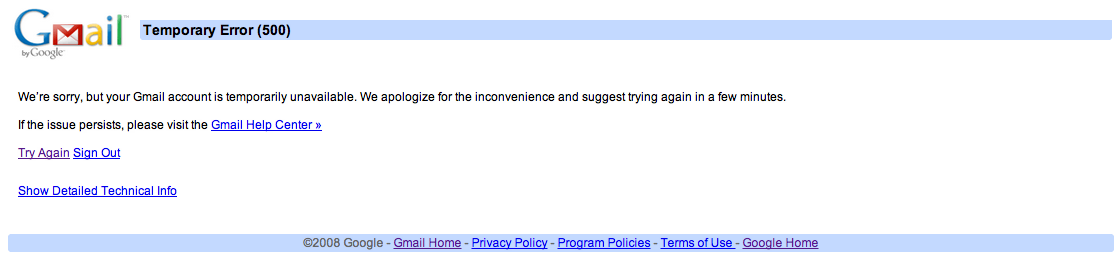
Those who tried to access Gmail.com directly found the following “Temporary Error (500)” notice with a “93” numeric technical code:
 Google’s cloud-based email service has been available to Germans over for seven years, but they are just now getting the official Gmail domain.
A local businessperson previously held the domain, which forced Google to provide “googlemail.de” addresses to users in Germany. However, according to a recent story by The Financial Times (translated), the Gmail trademark and domain were effectively transferred to Google earlier this month.
There are no further details regarding the settlement.
[youtube=http://youtu.be/vT503jUG4Y4]
A leaked video suggests Microsoft’s world-renowned productivity suite will soon feature cloud-like options in an effort to curb Google Apps’ growing market share with its alternate offering.
The 30-second promo above is hosted on YouTube by Within Windows. It emphasizes “Office 15” as the suite’s newly re-branded name. It also focuses on the accessibility of the next iteration through remote access to documents, which is enabled by a normal sign-in procedure. The cloud options will tracks and store all of a user’s virtual papers in Microsoft’s cloud-based Sky Drive service.
Microsoft Office is dueling many cloud-based productivity suites, such as Google Apps, and it is steadily losing market share. The downward spiral even caused the once-great Word processing giant to embark on a smear campaign against Google, where it lambasted the Mountain View, Calif.-based Company as a shady advertiser with alternative motives.
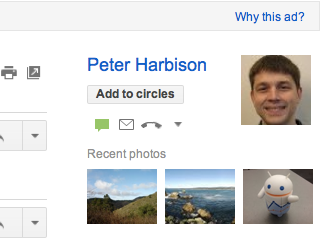 Gmail updated its people widget to include three photos from recent emails for a showcased person (example to the right).
“The next time you look at the people widget, you might see up to 3 photos from recent emails from that person. Not only does this remind you of photos they’ve sent to you, but it also gives you one click access to the emails with those photos,” announced Gmail on Google+.
The Gmail people widget is located on the right-hand side of messages and displays users’ contextual information about people their interacting with in the email service.
Princeton University’s Office of Information Technology recently polled 150 students who tested Google Apps’ Gmail and Microsoft Office 365 and results showed only two preferred the latter.
According to The Daily Princetonian, the undergraduate student government is collaborating with OIT to move the student body from its current email server Webmail to either Google Apps or Microsoft Office 365.
Google Apps is a cloud-based productivity suite that features several Web application user-interfaces similar to traditional office suites—like Microsoft Office 365. The services vary per edition but generally include Docs, Gmail, Calendar, Talk, Sites, Groups, Video, and Marketplace. Its popularity among students and educational institutions is rapidly increasing due to enhanced sharing features, accessibility, and cost.
Google Apps for Education is just one edition that offers 25 GB of storage space per user for free through K-12 schools, colleges, and universities with up to 30,000 users. Forty-million active users currently use Google Apps, and according to US News & World Report, 61 of the Top 100 schools have switched to the educational service.
USG IT Committee Chair Josh Chen said the University’s polled students prefer Gmail due to its “many benefits and no drawbacks.” Meanwhile, U-Councilor Lily Alberts said the poll’s results likely attribute to the student’s prior familiarity with Gmail during pilot testing. The group of 150 students piloted the two options, and those students came from a pool that replied to an earlier campus-wide email.

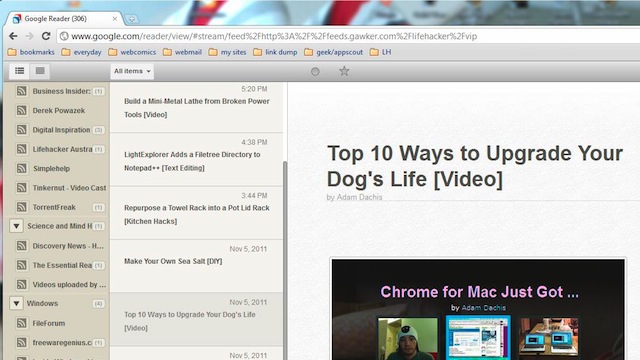
With the recent changes to the design of Google Reader, some of you may be delighted to hear about a new plugin called Reeder for Chrome. Reeder for Chrome uses inspiration from the Reader Mac and iOS apps (not the same developer) to give Google Reader a nice, new, slick look.
The plugin is almost exactly like the Reader apps. It has an All Items tab, Starred Items tab, and a section showing all of your groups. When you click a story you’re brought to how much of the content the source provides, and then you can click the link to open a new tab. Of course you can also add feeds. Sadly, it doesn’t load the story inside of the Reader window like Reeder for Mac does. Download here.


