Google Maps




Gif courtesy of <a href="http://www.gizmodo.co.uk/2014/04/google-maps-stays-neutral-by-only-showing-your-side-in-border-disputes/">Gizmodo</a>
You can’t please all of the people all of the time – but when it comes to disputed borders, Google Maps gives it a very good try.
According to this wikipedia page, there are more than 200 disputed borders in the world – territories that are claimed by more than one country. Even the USA and Canada argue about who owns two islands, three straits and one sea. That’s more than 200 opportunities for Google Maps to cause offence …
Expand
Expanding
Close

[youtube https://www.youtube.com/watch?v=rnK3Swwv08k]
Google has added a whole host of new Street View images to its Maps service today of the Angkor Wat region in the Cambodian capital of Siem Reap. This includes the exterior, interior, and even close-ups of the carvings on over one hundred temples. Google says it has added over 90,000 new images to its database of the Angkor temples.
From the Google Maps blog:

[youtube=https://www.youtube.com/watch?v=4YMD6xELI_k]
It looks like Google’s usual April Fools festivities have just kicked off as we officially roll into April 1st in Japan. Google’s first gag is the recruiting video above looking for a qualified “Pokemon Master” for the Google Maps team and comes alongside a mini-game easter egg in the Google Maps app for iOS and Android.
While the video above showing some type of augmented reality style Pokemon game integrated with Google Maps is almost certainly just for a bit of April Fools fun, an easter egg already live in the Google Maps app on iOS and Android actually lets users play a Pokemon mini-game:

As you can see in the screenshots above, small Pokemon characters are appearing scattered throughout the Google Maps app. You can tap the characters to catch them and also a view a detailed Pokedex that shows artwork, character details, and the Pokemon you still have to catch.
Those that catch all the Pokemon between now and April 2nd will go on to Google for a final challenge to crown the true Pokemon Master for the Google Maps team. To turn on the mini-game, tap the search bar in the Google Maps app followed by “Press Start.”
Expand
Expanding
Close
[youtube=https://www.youtube.com/watch?v=IdVXrVxziXc]
Senior Vice President of Conservation at American Rivers Chris Williams announced today on the Google Maps blog that the organization has partnered with Google to add high-resolution imagery of the Colorado River running through the Grand Canyon to Street View:
Start at an iconic spot like Deer Creek Falls or North Canyon, or climb up to the Nankoweap Granaries. Geology fans will enjoy formations like Hermit Shale and Tapeats Sandstone. On your journey, look out for wildlife like big horn sheep and signs of a volcanic dam that naturally occurred centuries ago.
The project was an important one, as Google noted in its blog post, the Colorado River has long been at risk:
While you admire its grandeur, remember that the river is also at risk. One of the United States’ most important resources, the Colorado River provides drinking water for 36 million people from Denver to Los Angeles, supports a $26 billion recreation industry, and irrigates nearly 4 million acres of land that grow 15 percent of our nation’s crops. But it’s also one of the most endangered, dammed, diverted and plumbed rivers in the world, thanks to a century of management policies and practices that have promoted the use of Colorado River water at an unsustainable rate. By the time it reaches the Gulf of California in Mexico, the river is barely a trickle—a ghost of its once magnificent self. You can see evidence of the river’s decline In Street View, like the high water mark (showing 1950s driftwood on top of the rock), or sedimentation along the river’s edge down by Lake Mead.
Google has a new collection of imagery from the Colorado River here and a new webpage taking you behind the scenes of the project here.
The Malaysian Star (via the Huffington Post) reports that it has had calls from readers who have been looking for the missing Malaysian Airlines flight MH370 … on Google Maps. Spotting static images of aircraft in flight, they have been reporting them as downed aircraft.
With the search entering its fourth day on Tuesday, several concerned citizens called The Star, believing that they have discovered the missing airplane after scrolling through the Google Maps satellite images.
While Google Maps images are of course typically months to years old, surprisingly it is possible for Internet users to help search for the plane in contemporary satellite images …
Expand
Expanding
Close

It’s not just fictitious towns you have to look out for on Google Maps: Microsoft engineer and former Marine Bryan Seely demonstrated to ValleyWag how he was able to exploit the open nature of the product to intercept phone calls to both the FBI and Secret Service.
[soundcloud url=”https://api.soundcloud.com/tracks/136881011″ params=”color=ff5500″ width=”100%” height=”166″ iframe=”true” /]
The technique Seely used was incredibly simple … 
Expand
Expanding
Close
Search for Agloe, NY, in Google Maps and the small town will duly appear. Which is odd, as Agloe doesn’t exist, and never has.
BigThink reports that Agloe was one of a number of ‘paper towns,’ places that were invented by early map-makers back in the 1930s in order to catch out rival companies who stole their work.
How do you prove someone stole your map, if that map accurately reflects reality? The answer: add fantasy! Mapmakers had been able to take their competitors to court by pointing out fake places (a.k.a. paper towns) on their maps that were copied from their original work! For this reason, fictitious roads are often called trap streets: because they entrap the company copying them onto their own maps …
Expand
Expanding
Close

Google first introduced us to the new Google Maps back in May during Google I/O and since then users have been able to opt-in to a preview of the redesigned desktop Maps experience. Today, Google announced on its Maps blog that its officially bringing the redesigned app out of beta and making it available to all worldwide. Google said the new app will roll out over the coming weeks for all users.
Apart from a redesigned, streamlined UI, Google notes that the new Maps web app for desktop users includes smarter results for points of interest, improved directions with time and distance, real-time traffic reports, Street View previews, and a new “carousel” view for browsing 3D and Street View imagery.
If you had not previously opted into the Google Maps preview, you should start to see the new experience over the coming weeks.
An interesting story from the BBC goes behind the scenes with the satellites that are used to take imagery of earth that eventually land in Google Maps and Google Earth.
Behind a long rectangular window, in a high white room tended by ghostly figures in masks and hats, a new satellite is taking shape. Once in orbit later this year, WorldView-3 will be one of the most powerful Earth observation satellites ever sent into space by a private company. Spinning around the planet some 600 kilometres (370 miles) above us, it will cover every part of the Earth’s surface every couple of days.
Google gets the majority of its imagery from DigitalGlobe and Ball Aerospace is currently constructing new satellites for the company, as highlighted in the BBC report. The new WorldView-3 satellite will be capable of capturing objects 25cm (10 inches) across, but the report notes Google and customers other than the government only get access to “images with a resolution of 50cm (20 inches).” It’s likely much of the updated imagery you see on Google Maps and Earth over the next year will come from the new satellite once in orbit. The whole article is worth a read if you’re interested in learning more about how the satellites are built and capture imagery once in space.
While technology hasn’t quite reached the stage of allowing us to watch the Winter Olympics from within Google Street View, you can now take a virtual wander through the host city of Sochi. The games are scheduled to take place there from 7th to 23rd February.
Street View coverage in Russia also now includes Vladivostok, Irkutsk and Yakutsk – though you may want to put on your coat for the latter: as the city with the greatest seasonal temperature swings on Earth, the lowest recorded winter temperature was a bracing -83.9F (-64.4C).
Google also added its first imagery in Slovenia, making the central European nation the 56th country to be added to Street View.
Check out some other cool (not all of them quite so literally) places you can visit on Street View with our roundup here.
[youtube=http://www.youtube.com/watch?v=vi-ljpuEGnA]
The latest area to be added to Google Street View is the test track from the original British version of Top Gear, with the imagery featuring The Stig challenging the Google car to a race in a Mercedes-Benz SLS AMG …
Expand
Expanding
Close
Exploring cities in Google Maps or Google Earth can be a great way to get a sense of a place leading up to a planned trip, as well as a way to enjoy a vicarious visit to places you’re never likely to visit in person. Exploring Tokyo in Google Maps just got a whole lot more interesting thanks to 3D imagery just added by Google …
Expand
Expanding
Close


Have you wondered how Google calculates those sometimes kinda/sorta/maybe accurate estimated time of arrival quotes on Google Maps? Of course you have, I know I have and thanks to Quora and former ex-Google engineer Matt Laroche (via BGR), we have something of an answer:
[protected-iframe id=”60a30b9933c6686433e0c945eab5e1c8-22427743-8994189″ info=”https://maps.google.com/maps?layer=c&panoid=qJpgXDHQUQMAAAQJODvovw&ie=UTF8&source=embed&output=svembed&cbp=13%2C376.3716%2C%2C0%2C-1″ width=”560″ height=”315″ frameborder=”0″ scrolling=”no”]
Google Street View has taken us to some pretty funky places, including the world’s tallest skyscraper, the Eiffel Tower, a Bond villain’s lair, a trek up to the top of Mount Fuji , animal park tours, a Venice Gondola ride and visits inside Dr Who’s TARDIS, CERN’s Large Hadron Collider and a submarine.
But there are still some places Street View doesn’t yet reach, so if you have a favourite hike, cycle ride or rock climb you want to share with others, you can now create your own Street View style tours through Google’s Views community.
Have you ever tried to convey the feeling of walking through your favorite park? Or have you wanted to create a virtual tour of your business to attract customers? Well, starting today, it’s now possible for you to build your own Street View experiences to do just that. Using a new feature in our Views community, you can easily connect your photo spheres to create 360º virtual tours of the places you love, then share them with the world on Google Maps …
Google announced a couple of welcomed improvements to Google Calendar on the desktop today. Perhaps the most notable new feature is autocomplete for addresses powered by Google Maps:
Calendar will autocomplete addresses as you type so you can quickly and accurately add locations to your events. Your friends can then simply click on the “map” link to make sure you all end up at the right place.
The update also brings suggestions for instant relevant events as you type. Now, when searching Calendar you’ll see instant suggestions pop up for events and contacts relevant to your search query. Like the autocomplete feature, instant suggestions for events and contacts aim to make it easier to quickly input entries into your calendar.
Lastly, Google Calendar will now automatically update event guest lists for Google Groups as members leave or join the group:
Expand
Expanding
Close
Google has been adding a ton of new features to its new Google Maps preview on the desktop ahead of a broader roll out. It recently added real-time incident reporting from Waze in new countries and also added a new 3D Earth Tours alongside a revamped StreetView. However, up until now, we’ve still had to deal with the old Google Maps embed that allows us to interact with small embedded Maps on websites and elsewhere. Good news: Today Google announced it’s rolling out a brand new Google Maps embed that users can embed via an HTML snippet from the new Google Maps preview.
Expand
Expanding
Close

Shortly after a Street View tour of London’s Gatwick Airport, Google has expanded its transit program to encompass 15 other airports, more than 50 train & metro stations – and even allows your virtual trips to take you right onto an airliner at Dubhai.
Google’s blog shows off a small selection of the new locations, including check-in at Madrid airport, arrivals at Tokyo airport, a walk though London’s Waterloo train station and locating your seat on board an Emirates A380 airliner.
The split view, showing both terminal map and Street View walk-thru, is particularly helpful for familiarising yourself with a transit airport in advance of a tight connection …
Expand
Expanding
Close
We just released version 1.6 of the Google Maps SDK for iOS with 64 bit support, marker opacity, and min/max zoom http://t.co/o0MrnJfxPE
— Google Maps Platform (@GMapsPlatform) November 19, 2013
Developers that are using Google’s Maps APIs to build iOS apps will be pleased with Google’s latest update to its Google Maps SDK for iOS today. Version 1.6 of the SDK brings one notable new feature for developers that are transitioning their apps to iOS 7’s new 64 bit architecture available for devices running Apple’s new A7 processor.
The SDK now fully supports 64-bit architectures with both the 32 and 64 bit binaries built into a single updated GoogleMaps framework. Google notes that “The correct binary will be selected by Xcode based on your build settings.”
Version 1.6 of the new Google Maps SDK for iOS also includes a few other new features including enhanced marker opacity and min/max zoom settings. A full list of what’s new and fixed is below:
Download version 1.6.
Features
CGFloat to either a float or double where it was more appropriate.GMSMapView. (Issue 5882)GMSTileLayer and GMSMarker.GMSMapView now requires model values to be setResolved issues:
GMSMapView is no longer clamped to its bounds (useful if setting padding on an initially zero-sized map). (Issue 5864)GMSMapView size or padding.GMSMarker is removed from a GMSMapView. (Issue 5856)GMSMapView and GMSPanoramaView.
I sometimes wonder whether future generations will do most of their travel sat at their PCs, as Google’s Trekker backpack takes us to more and more interesting places. Latest on the list is the romantic Italian city Venice, built on a set of more than 100 small islands, connected by a network of canals and bridges …
Expand
Expanding
Close
[tweet https://twitter.com/googlemaps/status/399942508399976448]
The benefits of Google’s acquisition of mapping app Waze back in June first popped up when it added real-time incident reporting to Google Maps on iOS and Android back in August. However, the feature was initially limited to users in Argentina, Brazil, Chile, Colombia, Ecuador, France, Germany, Mexico, Panama, Peru, Switzerland, UK and the US. Today Google announced that it’s adding incident reporting in 46 new countries & territories on both the desktop and mobile.
Google hasn’t revealed the full list of countries (we’ll update if they do), but we can see Italy has been added from the screenshot attached to its tweet above.
Last week Google also added the real-time traffic and incident reporting from Waze to its new Google Maps desktop preview that it expects to roll out more broadly in the coming weeks.
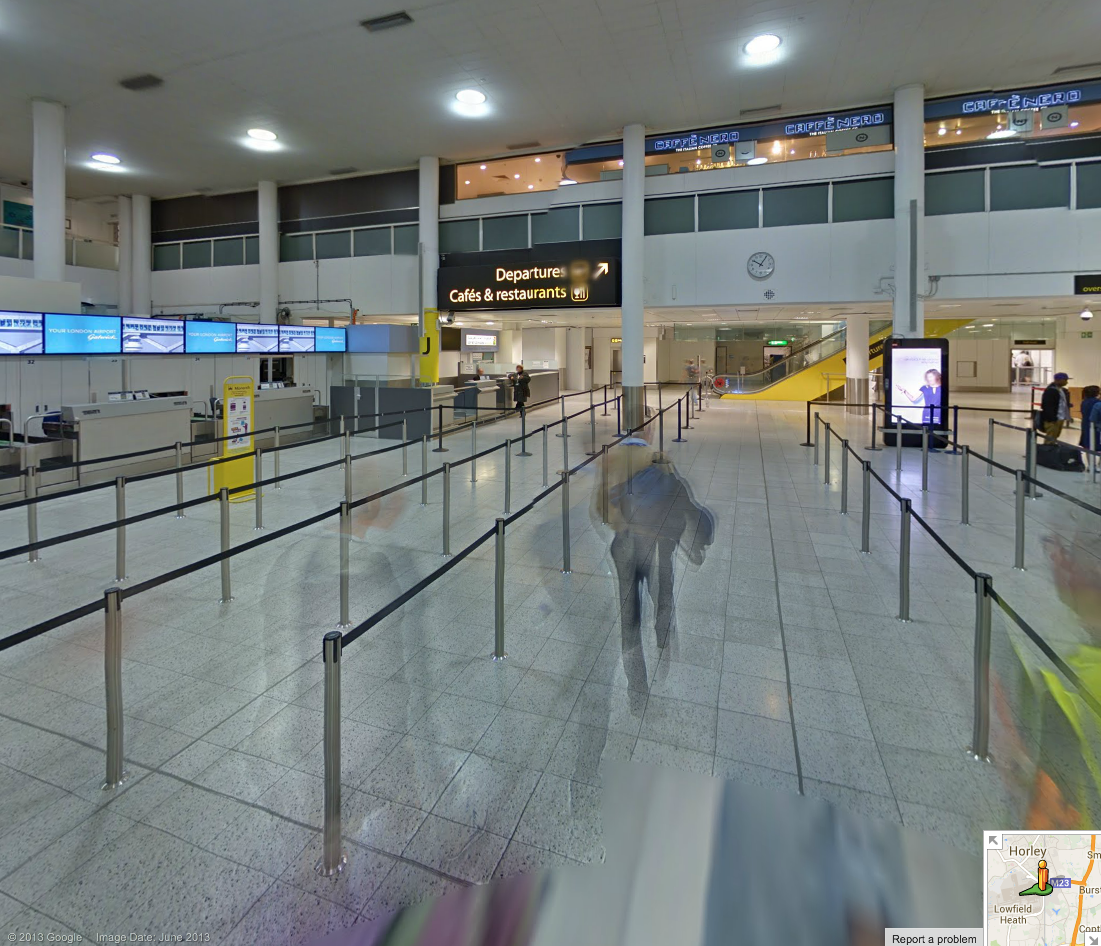
Not sure I’ve ever seen it quite this empty …
Finding your way around large airport terminals can be one of life’s more frustrating experiences, especially when you’re in a hurry and for no reason any human being can understand, gates 22-24 are not between gates 21 and 25.
Google is helping lost travellers find their way around London’s second-largest airport, with full Street View imagery of both North and South terminals.
Take your virtual visit here.
Other Street View tours created with Google’s Trekker backpack includes the River Thames, the world’s tallest skyscraper, the Eiffel Tower, a Bond villain’s lair, a trek up to the top of Mount Fuji , animal park tours, a look around the inside of Dr Who’s TARDIS, CERN’s Large Hadron Collider and a submarine.
Google just announced a few updates rolling out to the new Google Maps desktop app today. Users will now be able to highlight StreetView imagery, user-uploaded photos, and PhotoSpheres on the map by clicking a new pegman icon in the lower right corner of their screen (pictured above). StreetView imagery will be highlighted in light blue, Photo Spheres as darker blue circles, and indoor imagery as yellow circles.
In addition, the update brings a touch of Google Earth over to the Maps desktop app with new bird’s-eye view 3D Earth Tours for all WebGL-enabled browsers.
Explore beautiful, 3D imagery of buildings and terrain for thousands of locations from above with Earth Tours available right in your browser.* Wherever you see the Earth Tour icon, you can click, sit back, and get a virtual tour from a soaring angle. Dive into Boston or circle the Alps.
Google is also rolling out a new preview UI for directions. Now, when viewing individual steps for directions you’ll see StreetView imagery on each step where available, allowing you to get a better sense of your surroundings for an upcoming turn or exit. Google also notes that it has integrated real time traffic incident reports from its Waze acquisition like it recently did in its mobile Google Maps apps.
The new Google Maps desktop app is rolling out to all that opted into the new Google Maps preview today and to everyone else in teh coming weeks. Google also just released a video preview for the new Google Maps desktop experience that shows off some of the new features in today’s update:
Expand
Expanding
Close
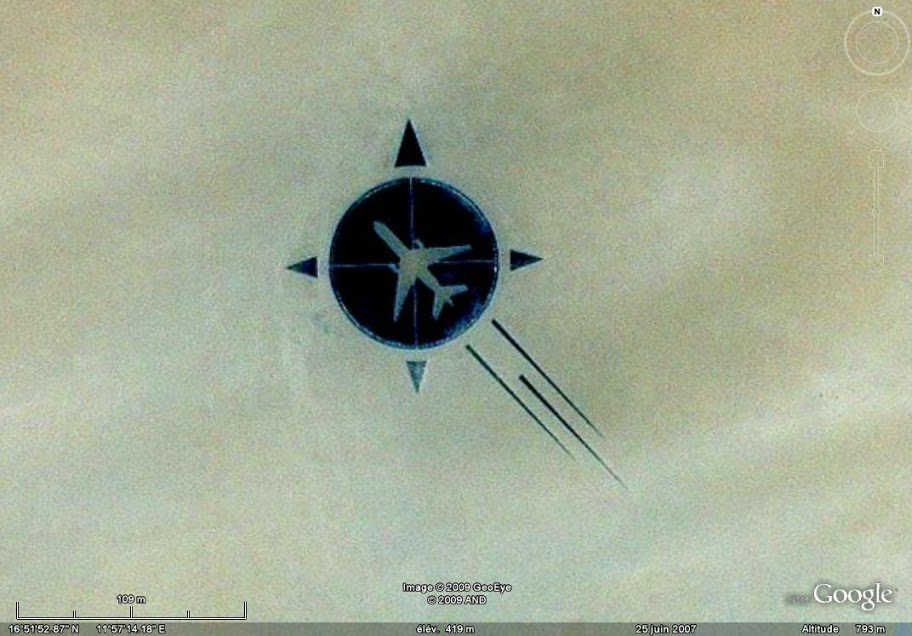
What you’re looking at is not a graphic, but a memorial built by relatives and friends of a DC-10 airliner brought down by a bomb in 1989, killing all 155 passengers and 15 crew on board. The memorial was constructed some eighteen years after the tragedy.
Flight UTA 722 was flying from the People’s Republic of Congo to Paris, France, when an explosion caused it to break up over the Sahara Desert. An investigation found that the cause of the explosion was a bomb in the forward cargo hold …
Expand
Expanding
Close
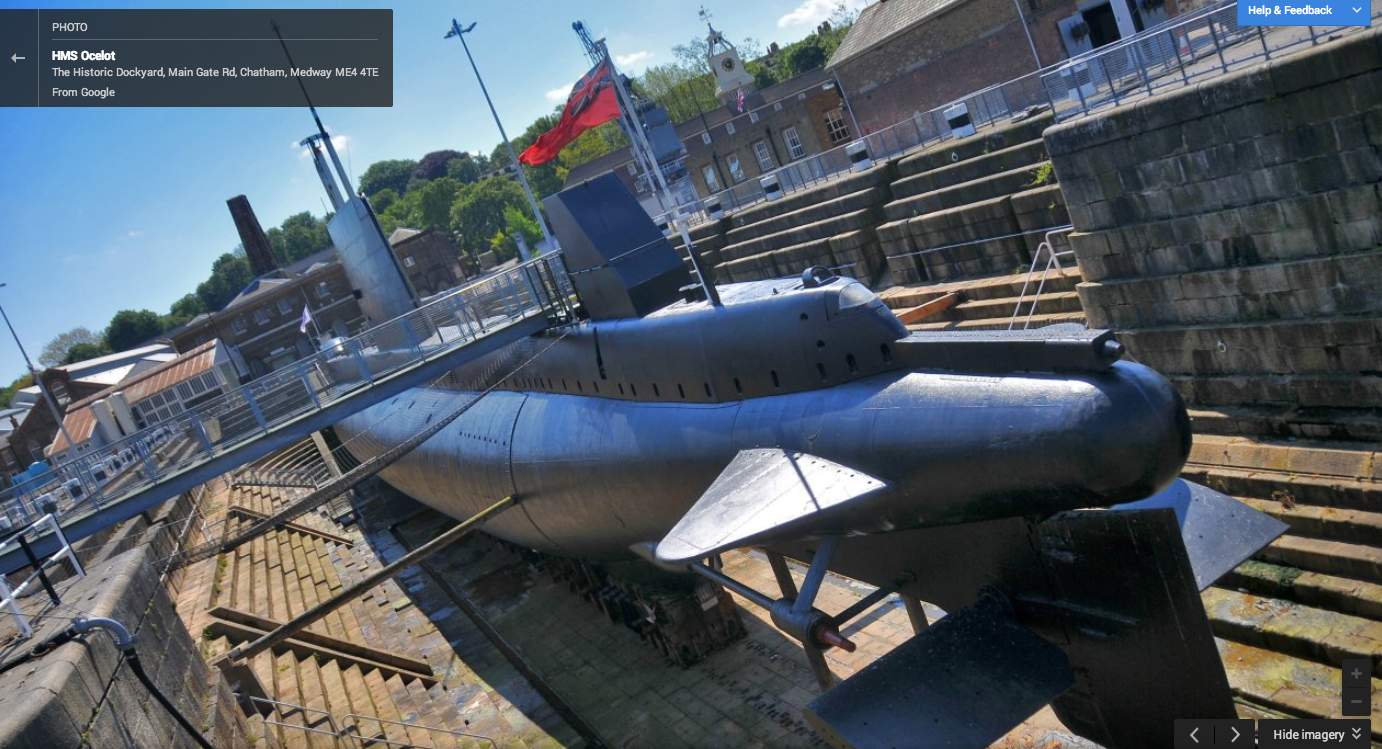
The HMS Ocelot, a 50-year-old British submarine has the distinct honor of being the first submersible to be offered up on Google’s street view. The Register reports the company mapped-out the control room, sleeping quarters and even some of the torpedo tubes, which are obviously out of service. There’s also a tour of the dockyard which launched the submarine and a set of 20 images of the exterior of the boat. I mean, this is a freaking submarine on Google street view, does it really get any better? Well, I suppose you might get more of a kick out of the Large Hadron Collider if you’re into that sort of thing, but for me, it’s a freaking submarine!
You can view the whole collection of images here.