Google Maps




German prosecutors investigating the Street View Wi-Fi data-cropping scandal just announced they are no longer going after Google.
Bloomberg reported this morning that the public prosecutors office in Germany apparently could not find any criminal violations during its two-year-long probe into the Street View matter:
German prosecutors will drop a criminal probe into whether Google Inc. illegally gathered wireless-network data for its Street View mapping service, two people familiar with the issue said.
Prosecutors in the city of Hamburg didn’t find criminal violations, according to the people, who declined to be identified because the matter hasn’t formally ended.
Google’s Street View is a service highlighted in Google Maps and Google Earth that offers panoramic views of streets, but the global plotting venture ran into hot water when complaints surfaced in 2010 that it allegedly poached unencrypted Internet data from wireless networks for roughly three years.
A privacy complaint was subsequently filed in Germany in 2010, but Google has now reportedly sidestepped any fault in that particular country. It has, however, run into penalties across the world for its handling of inquiries.
The Federal Communications Commission, for instance, found the search engine did not break any laws, but it slapped the Mountain View, Calif.-based company with a $25,000 fine earlier this year for obstructing its investigation.
Get the full report at Bloomberg.
Product Marketing Manager Megan Stevenson revealed on her Google+ profile yesterday that Google is beginning to downplay the Zagat rating system on Google+ Local and other Google products in favor of a more simplified, standard metric.
“Today it’s easier than ever to write accurate, useful reviews on Google+ Local, thanks to the updated rating scale we rolled out,” explained Stevenson. “If you want to rate the food at a restaurant, or the quality of a mechanic, just choose “poor – fair,” “good,” “very good,” or “excellent”. Behind the scenes, we will convert your ratings into numbers and factor them into the business’ precise 30-point score that shows up in Google+, Search and Maps. ”
SearchEngineLand’s Matt McGee said the change is “a good thing,” because “no one understands” Zagat scores. I beg to differ. The Zagat Survey once included over 70 cities, with roughly 250,000 reviewers since it began in 1979. In Manhattan, for example, practically every restaurant, nightclub, and business features a Zagat rating sticker out front next to its required health-grade notice. They primarily act as a guide-to-life for metro-dwellers, so I had mixed emotions when Google plucked up the revered company in 2011.
McGee said Google took “a big risk when it converted its entire local search/review system to a largely unfamiliar 30-point rating scale,” as “consumers are familiar with five-point (or five-star) rating scales.” I will agree the five-point scale is more common; however, I do not think McGee should write off the entire world when he claims nobody understands the Zagat scoring system.
With that said, Google’s use of phrases—like “Very Good” or “Excellent”—to describe a business is very fool-proof. It requires less thinking and gets to the point rather quickly. So, while I do not wish to see Google ditch Zagat scores all together, I will concede that the new direction seems like a more user-friendly approach.
While still taking its sweet time building a Maps app for iOS, Google is making sure to take care of its own business today by launching the biggest update ever for Street View.
Street View is a five-year-old feature in Google Maps and Google Earth that provides panoramic views of many streets in the world, and its latest update adds over 250,000 miles of roads from around the globe. Google’s Street View team elaborated on the service’s expansion in a post on the official Lat Long blog:
We’re increasing Street View coverage in Macau, Singapore, Sweden, the U.S., Thailand, Taiwan, Italy, Great Britain, Denmark, Norway and Canada. And we’re launching special collections in South Africa, Japan, Spain, France, Brazil and Mexico, among others.

Google’s map offerings build in the human intelligence on the front end, and that’s what allows its computers to tell you the best route from San Francisco to Boston.
In an exclusive story by the Senior Editor at The Atlantic, Alexis C. Madrigal, Google for the first time gives us a look at “Ground Truth”. It is a project described by Madrigal as a secretive, complex internal map that contains data, such as “no-left-turns and freeway on-ramps, speed limits and traffic conditions,” necessary to help users navigate through Google Maps:
I was slated to meet with Gupta and the engineering ringleader on his team, former NASA engineer Michael Weiss-Malik, who’d spent his 20 percent time working on Google Mars, and Nick Volmar, an “operator” who actually massages map data.
“So you want to make a map,” Weiss-Malik tells me as we sit down in front of a massive monitor. “There are a couple of steps. You acquire data through partners. You do a bunch of engineering on that data to get it into the right format and conflate it with other sources of data, and then you do a bunch of operations, which is what this tool is about, to hand massage the data. And out the other end pops something that is higher quality than the sum of its parts.”
Describing Ground Truth to be an elaborate internal Map Maker of sorts, perhaps the most interesting aspect of the story is just how much human input goes into making the Google Maps experience accurate. In the story, Madrigal noted the Ground Truth Geo team aims to address most of the fixable problems reported by users (thousands daily) within minutes:
Expand
Expanding
Close
[youtube=http://www.youtube.com/watch?v=UrS9AVPUMFQ&feature=youtu.be]
Today on the Official Google Blog, VP of Google Maps and Earth Brian McClendon announced Google is expanding Google Maps to new locations across the globe with the addition of new turn-by-turn navigation with traffic condition data, biking directions, as well as StreetView and Map Maker imagery. The first big addition goes to a number of towns across indian cities such as Bangalore and Delhi:
First, we’re expanding Google Maps Navigation (Beta) with voice guided, turn-by-turn directions in thousands of towns across India. Navigation is one of the most frequently requested features in this region and can be especially helpful when driving in densely populated cities like Delhi or Bangalore. We’re also adding live traffic conditions for major roads with estimated travel times to help you save time and to reduce stress on the road.
New Zealanders are also getting new access within Google Maps with the roll out of both Map Maker and Biking directions in the region. However, perhaps the biggest update today comes with new Street View imagery being released this afternoon for over 150 new university campuses around the world. Google noted a few of the more recognizable additions including UCLA and Royce Hall at the University of California in the U.S, Sophia University in Japan, Pembroke College in the U.K, and McGill University in Quebec.
Expand
Expanding
Close

Google just launched biking navigation and directions for the Android version of Google Maps in 10 countries.
The countries —Australia, Austria, Belgium, Denmark, Finland, the Netherlands, Norway, Sweden, Switzerland and the United Kingdom— also got desktop biking directions last month. Today’s rollout specifically includes voice-guided Google Maps Navigation (beta) for turn-by-turn directions across a half-gigameter of biking lanes.
Google Maps Software Engineer Larry Powelson elaborated:
Today, there are more than 330,000 miles (equal to more than 530,000 kilometers, or half a gigameter) of green biking lines in Google Maps. Dark green lines on the map show dedicated bike trails and paths with no motor vehicles, light green lines show streets with bike lanes and dashed green lines show other streets recommended for cycling. Biking navigation even helps you avoid steep hills.
Check out the official Google Lat Long Blog for more information.

Google announced today on the Lat Long Blog that it added even more Street View imagery to Google Maps; this time for Brazil and pre-hispanic Mexican cities. While there was already Street View imagery available for the locations, the latest additions include panoramic imagery for 70+ cities throughout Brazil including “colonial cities like Fortaleza, architecturally compelling cities like Brasilia and coastal landmarks like Recife, Natal and Salvador.”
You can even virtually travel to the west side of Brazil and visit Foz de Iguaçu, or if you’re planning an upcoming trip, preview the the area around your hotel as well as nearby shopping malls, historic monuments, restaurants and more. With so many upcoming events, like the 2014 World Cup and the 2016 Olympics, we’re excited to share the riches of Brazil’s cities not only with tourists from around the world, but also with locals who might want to visit a city, neighborhood or landmark they’ve not yet experienced.
Also included in today’s update is 30 Mesoamerican archaeological areas in Mexico, including the 1,100-year-old Kukulkan’s Temple pyramid, and other sites such as Teotihuacan, Chichen Itza, and Tulum.

Google — Left: Mobile map with all modes of public transit shown; Right: Transit Lines layer in Subway mode
Google Maps now offers schedules for over 1 million public transportation stops in nearly 500 cities worldwide, while its Android counterpart updated today to make the abundance of new transit data more convenient.
Christopher Van Der Westhuizen, a Google Maps software engineer, announced version 6.10 of the Google Maps for Android app on the Official Google Blog:
We’ve made some changes to the Transit Lines layer, so that you can select a specific mode of public transportation (train, bus, tram or subway) to display on the mobile map, hiding the other modes. This is helpful in areas where there is a tight concentration of several types of public transit.
Google offers a list of supported cities at its Transit page.

Mercedes-Benz Superdome
My, how time flies. It has been nearly seven years since Hurricane Katrina wreaked havoc on Louisiana, but a fresh look through Google’s Street View imagery shows New Orleans and the surrounding area has come a long way.
“The Street View imagery in Google Maps, which has just been updated today, more accurately reflects the major construction and renewal that’s underway,” announced New Orleans Mayor Mitch Landrieu on the official Google Lat Long blog.
A few of the important, renewed locations in New Orleans now available via Google Maps include a special collection of Tulane University, as well as Woldenberg Park, Audubon Park, Louis Armstrong Park, Mercedes-Benz Superdome, and Lafayette Square. The Louisiana cities of Baton Rouge and Lafayette also feature “refreshed, more accurate Street View imagery.”
Go to Google Lat Long for more information.
Google announced on the Official Lat Long Blog today that it is expanding the Google Maps live traffic feature first launched in 2008 to cover 130 smaller U.S. cities and the capitals of Panama, Costa Rica, and Colombia. On top of travel time estimates and real-time traffic conditions for the new cities, Google also improved its traffic coverage in a list of other locations including parts of Brazil, Canada, China, Czech Republic, France, Germany, Italy, Mexico, Russia, Spain, Sweden, and the United Kingdom. A tutorial of the feature is presented in the demo video below, and Google has a full overview of supported cities here.
Now the streets of Bogotá, San José, and Panama City and the arterial roads in Kalamazoo (Michigan), Portland (Maine), Tuscaloosa (Alabama) and many more cities will include real-time current traffic conditions as well as estimated travel times. Whether you’re online on your home computer ensuring no unexpected snarls await your drive to the airport or you’ve been stuck behind a line of cars for a few minutes and can ask your friend in the passenger seat to check whether it’ll clear up just around the bend, we hope these updates save you time and stress when getting to your destination.
Expand
Expanding
Close
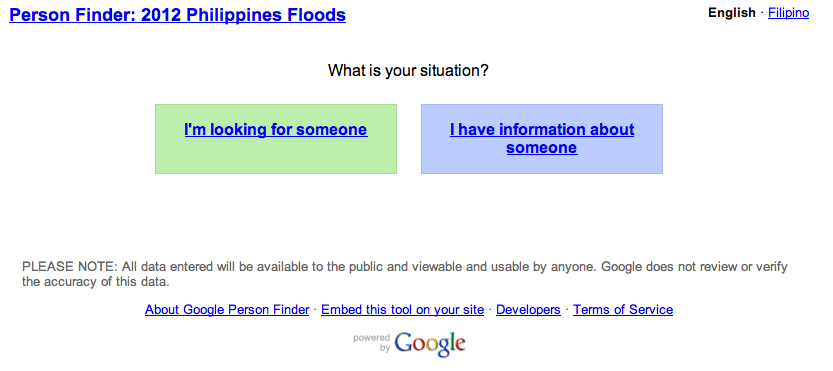
Google Person Finder launched to help track loved ones in the Philippines. Embeddable, available in Filipino goo.gl/5S411
#phalerts— Google Maps (@googlemaps) August 7, 2012
Over a dozen people were killed in floodwaters caused by torrential rains that swept across the Philippine island of Luzon, according to Bloomberg, which brought the city of Manila to its knees and forced 130,000 to leave their homes yesterday.
Google Person Finder, an open source web application created by volunteer Google engineers in response to the 2010 Haiti earthquake, provides a forum and registry for survivors and those affected by natural disasters. Google now offers the people-tracking tool to folks in the Philippines to help find loved ones or to post and search for related information. As Google noted, the tool is embeddable and available in Filipino.
Check it out: Finder — 2012 Philippines Floods
[youtube=http://www.youtube.com/watch?v=Ezn1ne2Fj6Y&feature=player_embedded]
Google just took to its official Lat Long blog to wish Landsat a “Happy 40th Birthday” and make its surface imagery live for the entire world to enjoy.
The revered satellite program essentially collects continuous images of the Earth to help smart folks, like scientists and researchers, make knowledgeable decisions on the economy and environment. Google Earth Engine has made Landsat’s data available to such experts anywhere in the world, but now it wants to give the public access.
Googler Eric Nguyen explained:
- We’re working with the USGS and Carnegie Mellon University, to make parts of this enormous collection of imagery available to the public in timelapse videos of the Earth’s surface. With them you can travel through time, from 1999-2011, to see the transformation of our planet. Whether it’s deforestation in the Amazon, urban growth in Las Vegas or the difference in snow coverage between the seasons.
- […] In 2008, the USGS opened access to the entire Landsat archive for free. Google Earth Engine makes it possible for this data to be accessed and used by scientists and others no matter where they are in the world.
A highlighted timelapse video is below:
[youtube=http://www.youtube.com/watch?v=g7VzVTNN6DA&feature=player_embedded]
Almost two years after launching Street View imagery of the Antarctic, Google is now adding breathtaking, panoramic views of historic locations.
According to the official Google Blog:
- In the winter of 1913, a British newspaper ran an advertisement to promote the latest imperial expedition to Antarctica, apparently placed by polar explorer Ernest Shackleton. It read, “Men wanted for hazardous journey. Low wages, bitter cold, long hours of complete darkness. Safe return doubtful. Honour and recognition in event of success.” While the ad appears apocryphal, the dangerous nature of the journey to the South Pole is certainly not—as explorers like Roald Amundsen, Robert Falcon Scott and Shackleton himself discovered as they tried to become the first men to reach it.
Google joined forces with the Polar Geospatial Center at the University of Minnesota and the New Zealand Antarctic Heritage Trust to capture 360-imagery—including interior, exterior, and landscape shots—of the explorers’ preserved camp sites.
The South Pole Telescope, Shackleton’s hut, Scott’s hut, Cape Royds Adélie Penguin Rookery, and the Ceremonial South Pole are now on Google Maps in stunning, high-resolution photography.
Check out a few screenshots below.
[youtube=http://www.youtube.com/watch?v=1bFdNFTq8Vw&feature=player_embedded]
Sustrans, a British charity promoting sustainable transport, just announced that it partnered with Google to bring cycling routes to United Kingdom-based Google Maps users.
Greener-minded Americans are quite familiar with the biking icon and its bevy of alternative transit routes, but now U.K. fans of the popular mapping app can plan their cycling trips, navigate bike lanes, and time routes on both smartphones and computers. For those unfamiliar, Google Maps offers worldwide mapping technology, directions and local business information to mobile and desktop users by way of satellite and street-level imagery and user-contributed content.
“We know how popular cycling is in London and the rest of the UK, especially ahead of a busy summer, which is why we are thrilled to bring cycling directions to Google Maps. Thanks to Sustrans, we now have thousands of miles of trails and routes, as well as bike lanes and recommended streets for cities across the country,” said Google UK Geospatial Technologist Ed Parsons.
“We’ll continue to add new trail information and urge commuters to swap their car for a bike as they can now find a convenient route that makes use of dedicated bike tracks and avoid hills whenever possible, Parsons added.
The new feature goes live today, and Sustrans is celebrating the launch with its own video, called “Lucy’s Cycling Treasure Hunt” (above).
The press release is below.
Google is adding more indoor maps to the Google Maps app for Android devices with indoor maps and walking directions for over 20 museums in the United States. Among the new maps is the de Young Museum in San Francisco, the American Museum of Natural History, the Philadelphia Museum of Art, and 17 Smithsonian museums.
To access the floor plans, simply open Google Maps on your Android phone or tablet and zoom in on the museum of interest. To find the museum, either search for it by name using the magnifying glass icon or, if you’re already there, use the “My location” feature to orient yourself. With the “My location” feature enabled you can even get indoor walking directions.
Google noted that it plans to add even more museums to Maps in the near future, including the National WWII Museum in New Orleans and the SFMOMA. A full list of museums added today is below:
Expand
Expanding
Close
[youtube=http://www.youtube.com/watch?v=Ujh0_61uYuk&feature=player_embedded]
Both the Google Earth and Google Maps for Android apps were updated with several new features. Google outlined the new features available in the latest release of Maps on its Lat Long Blog. A couple of the notables include offline maps for more than 150 countries and a new Compass Mode for Street View:
Today we’re also releasing a smoother and faster Compass Mode for Street View within Google Maps for Android. It’s the next best thing to being there, because your device becomes a window into a 360-degree, panoramic view of the outdoor or interior location through Business Photos. To experience the improved qualities of this feature you need a device with Google Maps for Android, Android 3.0 or higher and a gyroscope sensor plus version 1.8.1 of Street View on Google Maps.
As for Google Earth, Engadget noted version 7.0, available on Google Play now, implemented the new 3D tech that Google showed off at its Maps event a few weeks ago.
Although the official introduction video for Google’s new Nexus 7 tablet leaked before the announcement, the company just unveiled the 7-inch device on-stage at its Google I/O keynote. While announcing the device’s specs (listed below), the company gave a number of demos for the Nexus 7’s UI, including a content recommendation page, Gmail, YouTube, Chrome (first device to ship with Chrome as default, stock browser), and a full-featured Google Maps with offline mode. Google also gave a demo of the 12-core GPU in action with some impressive 3D games, as pictured above.
Pre-orders start on Google Play today for $199 (8GB) or $249 (16GB), with the device shipping to the United States and Canada in mid-July alongside Jelly Bean.
[youtube=http://www.youtube.com/watch?feature=player_embedded&v=yBrbIQ-1g80]
Google just updated its Maps for Android app to version 6.7 by adding a number of notable new features like integration of Google offers, indoor walking directions, and new 360-degree Street View-like panoramic views for the insides of certain buildings.
As for Google Offers integration, Google will launch the feature only in the United States and provide access to the deals through a new “Offers” option within the app’s “Maps” drop-down menu. The app will also let you opt-in to receive notifications for nearby deals. The feature is limited to the Android app, but we are likely to see Offers integration across all Google Maps products in the near future.
Another new feature rolling out to both U.S. and Japanese users is the ability to get indoor walking directions, but this is in addition to the indoor floor plans launched earlier this year in version 6.0 and will only rollout to select buildings initially.
Taking advantage of its Street View technology, Google is introducing 360-degree panoramic views in version 6.7. To access the feature, Google noted to keep an eye out for the “‘See Inside’ section on the Place page of select businesses.”
Google Maps 6.7 for Android is already available to download from Google Play here.
[youtube=http://www.youtube.com/watch?feature=player_embedded&v=uOFsYp7AtUs]
Google introduced photo tours today—a new feature of Google Maps that allows users to watch 3D photomontages of worldwide landmarks by virtue of user-contributed content.
The tours are now available for more than 15,000 locations, and they include popular tourist spots like Italy’s St. Mark’s Basilica or Yosemite’s Half Dome. The new feature is accessible when a user searches for a place, and then the left-hand panel will display any live photo tours. Just click the thumbnail or link to embark on the photo tour. Indications for photo tours also appear when browsing Google Maps. In this instance, just click a landmark’s label to find an available photo tour.
Earlier today, Walmart published a press release on its corporate website announcing that Google’s Vice President of Local, Maps and Location services Marissa A. Mayer has been nominated for the company’s Board of Directors. In addition to an announcement claiming she’s “very excited” about the nomination on her Google+ page, Mayer made a full statement in the press release:
“I am very excited to be nominated for the Walmart board… I have long been a customer and admirer of the company. Walmart is an amazing story of entrepreneurship and, as one of the world’s most powerful brands, touches millions of lives every day. I look forward to contributing to Walmart’s continued growth, success, and innovation in the years to come.”
Walmart will vote to elect Mayer at its Annual Shareholders’ meeting June 1. The company’s full press release is below:
Expand
Expanding
Close

OpenStreetMap on "Wikipedia for Android" app
Wikipedia updated its Android and iOS apps today, but the noteworthy feature is that the online encyclopedia-like website dumped Google Maps for OpenStreetMap, which marks a growing trend for technology firms preferring an alternative mapping solution.
The company just announced its Android counterpart witnessed 2.25 million installs in less than two months since its birth, while netting over 23 million Wikipedia page views per month. Despite the success with Google’s mobile OS, Wikipedia updated its apps with Open StreetMap data in favor of the service’s “nearby view” feature.
Wikipedia further explained the reasoning behind the switch:
Previous versions of our application used Google Maps for the nearby view. This has now been replaced with OpenStreetMaps – an open and free source of Map Data that has been referred to as ‘Wikipedia for Maps.’ This closely aligns with our goal of making knowledge available in a free and open manner to everyone. This also means we no longer have to use proprietary Google APIs in our code, which helps it run on the millions of cheap Android handsets that are purely open source and do not have the proprietary Google applications. OpenStreetMaps is used in both iOS and Android, thanks to the amazing Leaflet.js library. We are currently using Mapquest’s map tiles for our application, but plan on switching to our own tile servers in the near future.
In the last couple of months alone, both Apple and Foursquare also shifted to OpenStreetMap. It is worth mentioning that Yahoo implemented OpenStreetMap data within Flickr in 2009 for a plethora of worldwide cities, such as Baghdad, Beijing, Kabul, Santiago, Sydney, and Tokyo.
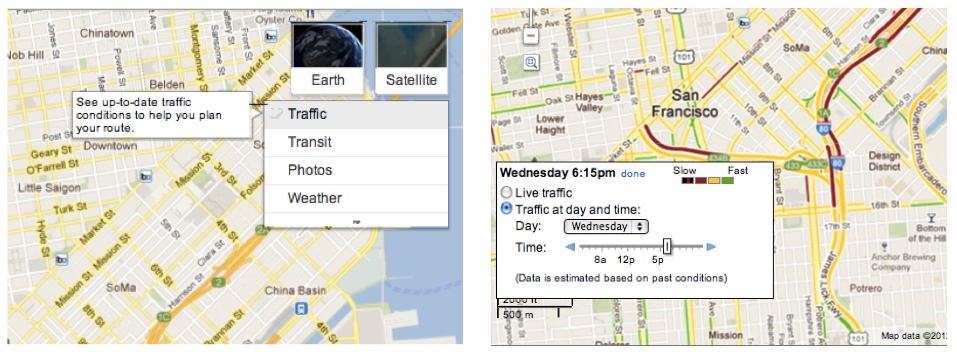
Google announced today that its live traffic pattern service will now include roads, not just highways.
“Starting today, if you’re planning a trip for which you anticipate traffic, you can find out what typical traffic is like on these arterial roads, rather than just on highways,” explained Google Maps Software Engineer Szabolcs Payrits on the official Google Lat-Long blog.
Drivers can type their starting and ending points into Google Maps to get directions, but they must enable the traffic layer in the upper right-hand corner, and then click “change” in in the legend to view Typical Traffic on regular roads.
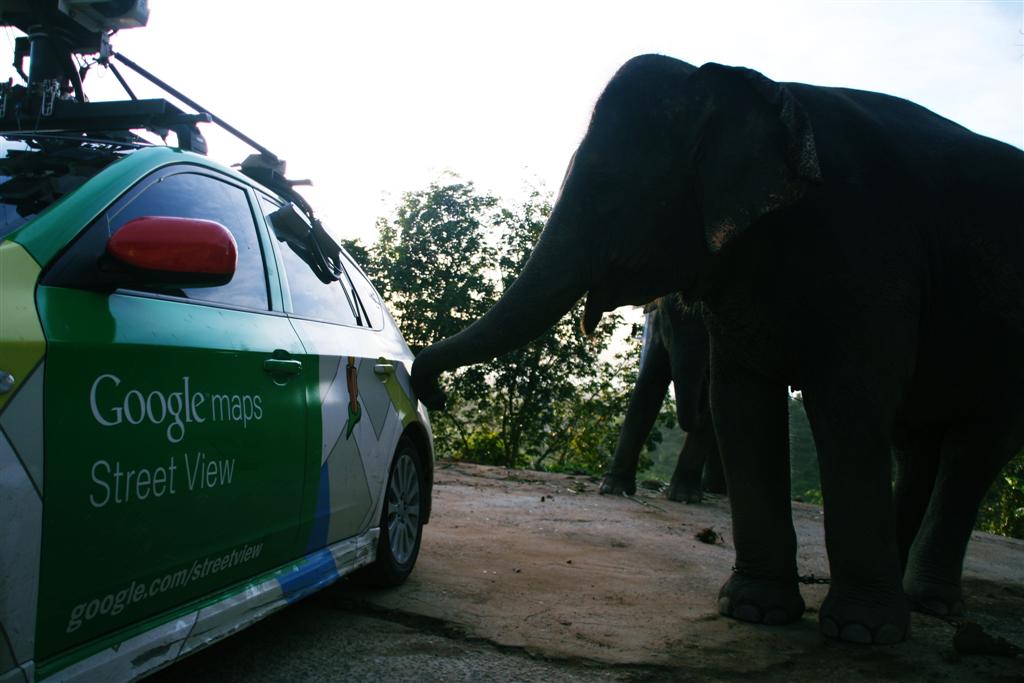
Google launched its Street View galleries this past week for Amazon and Thailand without a hiccup, but the Internet giant was not-so lucky elsewhere, as it has faced many obstacles over its mapping applications throughout the globe—especially in Asia.
Reuters published a lengthy reported today detailing how Google often meets hurdles worldwide, such as the recent debacle on its privacy policy, and it fully described the Mountain View, Calif.-based Company’s tenacious attempts to chart the streets and landscapes of Asia while consistently meeting privacy, political, and cultural barriers.
For those that live under a rock: Google Street View is a service highlighted in Google Maps and Google Earth that offers panoramic views of streets. It launched in 2007 in the United States and has expanded to many cities and rural areas worldwide.
A round up of Asia’s criticisms is below.

Detailed street-level imagery of landmark spots in Russian cities of Moscow and St. Petersburg is now available in Google Maps, Google’s Russia Product Manager Boris Khvostichenko announced in a blog post yesterday. Among other places, mapping aficionados can now tour Red Square, Moscow Kremlin, great palaces and parks, such as Tsaritsino, Peterhof, Kuskovo, the Oranienbaum, Alexandria, plus The Peter and Paul Fortress and the entire historical center of St. Petersburg (a UNESCO Heritage Site). St. Petersburg is Russia’s former capitol—now the country’s second largest city and northernmost megapolis. As for Google Earth enhancements…