Gmail

See All Stories

Announced on April 1, 2004 with an unprecedented 1GB of user storage, many assumed that Gmail was just one of Google’s April Fools’ pranks. For comparison, competing services only had 2 to 4MB for users to store email messages and attachments. Currently, Gmail storage is combined with that of other Google products with 15GB available for free.

Gmail was released in beta with an invite system and was not open to the general public until February 2007. In July of 2009, it finally dropped its beta status. As of February 2016, Gmail is the most widely used web email provider with 1 billion active users worldwide.

Besides email, Gmail has a number of features, including integration with Google Drive for sending large attachments and choosing images from Google Photos. Users can fully search their email with advanced spam filtering and labels to manage messages. Google also scans emails to show context-related advertisements.

Since launch, the email service has gone through a number of redesigns. Apps are available for Android, iOS, and the mobile web.

Report: Google developing new ‘Hera’ service to further unify Chrome, Search, and Android

Site default logo image

Android Police is reporting that Google is planning a new feature, known as Hera, for the next major version of Android. Hera is reportedly the company’s latest attempt to unify the experience that users have within all major Google services, including Android, Chrome, and Search on Android-powered devices. Hera looks to be based on a special Chromium build that is meant to run on Android and execute certain tasks though the web, as opposed to within an app.


Expand
Expanding
Close

Google plans significant overhaul of many of its native and web apps in ‘Google 2.0’/wearable push

Site default logo image

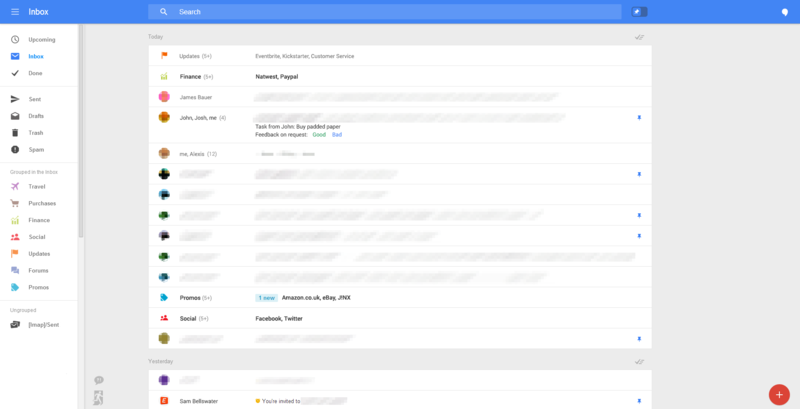
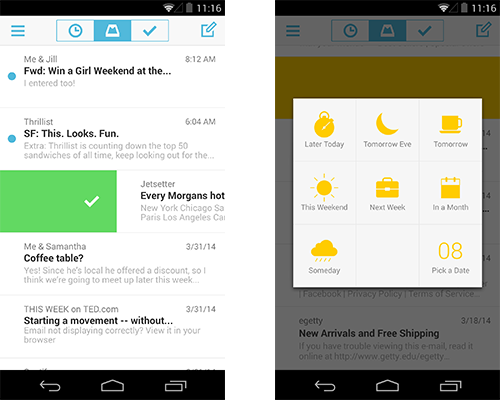
Yesterday we got a look at a beta version of the upcoming Gmail app for Android which includes new Travel, Purchases, and Finance categories in addition to the Social, Promotions, Updates and Forums categories currently available. Also present is a pinning feature for making emails of your choosing remain at the top of your inbox as well as a “snoozing” feature that allows you to delay an email for a set amount of time much like hitting snooze on your alarm clock. Within a slightly tweaked UI you’ll also notice a new toggle at the top of your inbox that allows you to switch between showing pinned emails and having them return to chronological order.

Our sources had previously told us about this update but without confirmation. We sat on the story. Now that we have some confirmation that this is coming, we can discuss the whole of what we’ve heard.
Expand
Expanding
Close

Google testing new Gmail for Android app that lets you pin and snooze emails

Site default logo image

Google might be preparing to release a new Gmail app for at least Android devices that will introduce a few new notable features.

Geek.com got its hands on the screenshots above that is apparently a version of Gmail for Android that Google is currently testing. It includes new Travel, Purchases, and Finance categories in addition to the Social, Promotions, Updates and Forums categories currently available. Also present is a pinning feature for making emails of your choosing remain at the top of your inbox as well as a “snoozing” feature that allows you to delay an email for a set amount of time much like hitting snooze on your alarm clock. Within a slightly tweaked UI you’ll also notice a new toggle at the top of your inbox that allows you to switch between showing pinned emails and haven them return to chronological order.

There’s always a chance the features above will never make it out of testing, but there’s also a possibility Google could be planning to roll them out to users in a future update. As always, we’ll keep you updated as we learn more. 
Expand
Expanding
Close

Gmail’s “Shelfies” April Fools joke will live on as new custom theme sharing feature

Site default logo image

Google continued its April Fools tradition with a long list of pranks yesterday, one of which included announcing a new “Shelfies” feature for Gmail that let users snap and share selfies to use as background in Gmail. The feature, which was completely functional within Gmail yesterday, was clearly just a bit of fun for April Fools day, but Google announced today that it will actually stick around as a new custom theme sharing feature.

While Gmail has allowed users to create custom themes since 2012, it will now provide an option to “Share your theme” within settings. The Gmail team will also be sharing some of its favorite themes shared by the community through its Google+ page. Here’s how it works:
Expand
Expanding
Close

Google testing new grid interface for promotions tab within Gmail

Site default logo image

In a blog post on the official Gmail blog, Google has just unveiled a new design for the promotions tab within the web Gmail interface. The promotion tab was originally introduced last year when Google switched to a categorical tabbed design. Currently, the promotions section looks the same as the other categories within Gmail, but with this change, the design will switch from being list-based to a grid. instead of just subject lines, the grid view will pull in images from the email and make it easier to see exactly what the message is promoting. The grid view also makes it easier to scroll through a lot of messages by introducing infinite scrolling.

Promotional mail has a lot of images, from pictures of snazzy new shoes to photos of that rock-climbing gym you’ve been wanting to try. But right now, those images are buried inside your messages—and with only subject lines to go on, it can be a challenge to quickly pick out the deals and offers that interest you most. To help you find what you’re looking for faster, you can now sign up for a new field trial for Gmail that lets you view the Promotions tab in a more visual way.

To sign up for the grid view, head to g.co/gmailfieldtrial and if you’re selected, you’ll have the option to switch between the grid a list views with ease.

Google will force Gmail to always use encrypted HTTPS connections from now on

Site default logo image

Google announced today on its blog that to make Gmail even more secure it will from now on force its web based email service to use an encrypted HTTPS connection at all times.

While Google doesn’t specifically mention the countless reports of surveillance by government agencies in recent months, it does say the change means “no one can listen in on your messages as they go back and forth between you and Gmail’s servers—no matter if you’re using public WiFi or logging in from your computer, phone or tablet.”
Expand
Expanding
Close

Google drops price of all monthly Google Drive plans to $2/100GB, $10/1TB, $100/10TB

Site default logo image

Google announced today on its blog that it’s lowering the monthly pricing plans it offers for users buying extra storage on Google Drive. Google attributes the changes to “recent infrastructure improvements” that is allowing it to offer more affordable storage options. Google reminds us that, as always, Drive storage purchased through the new plans counts towards storage for Drive, Gmail and Google+ Photos.

The new plans begin at just $1.99 for 100GB down from the previous $4.99 for the same amount of storage. There is also a new $10 plan for 1TB (down from $50 previously), and a 10TB and up option that starts at $99.99. Google will also continue offering the free 15GB option that comes with your Google account for Drive, Gmail and Google+.

How big is a terabyte anyway? Well, that’s enough storage for you to take a selfie twice a day for the next 200 years and still have room left over for… shall we say… less important things. Like before, storage continues to work across Drive, Gmail and Google+ Photos. And, of course, the 15GB plan remains free.

The new pricing plans for Google Drive are available now through www.google.com/settings/storage. Users that are already signed up for a monthly plan will be automatically switched to the new, better plans. 
Expand
Expanding
Close

Google Wallet adds “Orders” feature to track online purchases using receipts from Gmail

Site default logo image

Google announced today on its Google Commerce blog that it’s rolling out an update for the Google Wallet mobile apps that includes a new “Orders” feature for tracking online purchases. Google says the feature will let you stay on top of your online orders (including past purchases) as well as get notifications for status updates regarding deliveries. How will Google know what you’ve purchased? In order to track your recent online orders, the feature pulls receipts out of your Gmail account :

Once you activate Orders in Google Wallet, you’ll be able to see any receipts sent to your Gmail right in the Google Wallet app. We’ve also worked with primary package carriers in the US so that when your order status is updated, you’ll get notified of the update through Wallet. So whether your order is shipped, out for delivery, or delayed, you’ll never wonder about the status of your order.

The app also includes “products you’ve ordered, merchant contact information, and shipping details in the app” for your purchases and links to quickly contact retailers.

Google said the feature is rolling out to Android and iOS users in the US this week. You can activate Orders by tapping “Activate” under “Track your orders” or by tapping “Orders” in the app’s main menu.

Google Apps paying $15 to acquire each new customer through new referral program

Site default logo image

Google announced today on its Enterprise blog that it’s introducing a new Google apps referral program that will see the company payout $15 for each new customer referred through the program.

Many of the millions of Google Apps customers learned about tools like Hangouts, Drive and Gmail for business from their customers, friends and networks. To help continue the momentum, we’re launching the Google Apps Referral Program. The referral program makes it easy to share Google Apps with your network and show them how they too can use these tools at work. To show our appreciation, we’re offering a $15 referral bonus for each new Google Apps user you refer.

Those interested in joining the referral program will need a valid taxpayer ID number and bank account for direct deposits. Google also says it will provide email and website templates that can be used to send a unique referral link to potential customers.Google Apps users in the US and Canada that are interested in joining the referral program can do so here.

Update: We had a quick Q&A with Google pasted below:

  • Are you phasing out the $5/user/year you guys give to IT service providers or is that staying? This program does not impact the amount provided to Google Apps Resellers.
  • Is it an affilaite program?   After joining the program, members will receive $15 for every user that signs up from their recommendations. In order to receive the incentive, referrals must be Google Apps customers for at least 4 months. Then we’ll make a direct deposit to the referee’s bank account every month for the amount they’ve earned. 
  • How long do people have to stay in the program for a payout? I’m assuming the $15 comes with a year program signup. In order to receive the incentive, referrals must be Google Apps customers for at least 4 months. Then we’ll make a direct deposit to the referee’s bank account every month for the amount they’ve earned. 
  • Will Google be expanding this to include $ on apps or Android apps or hardware/Nexus products? (Hope so!) We’re excited about today’s launch of the Google Apps Referral Program, but have nothing else to announce.

The fine print from Google is below:
Expand
Expanding
Close

Gmail to automatically add unsubscribe button to spammy marketing messages

Site default logo image


Gmail is about to get a new feature that should help users cut down on the spammy mass emails in their inboxes. Coming this week, PC World reports that Google will be automatically adding a big, beautiful “unsubscribe” button to the headers of such emails, allowing you to quickly opt-out of these types of unwanted messages.

Google hopes this will cut down on something we’re all probably guilty of at some point or another: users who sign up for a mailing list or service, then decide they don’t want the messages. Instead of unsubscribing, many users are marking these emails as spam to quickly block them from showing up in the inbox.


Expand
Expanding
Close

Review: LG’s Flex – There is no reason to curve this otherwise OK phablet

Site default logo image

Android phone makers are running out of ways to differentiate their devices from the crowd.  It’s all coming down to a rectangular screen, as little chrome around the edges as possible and a curved round back.  Pretty much every smartphone looks the same at this point with slight varying dimensions.

So that’s why LG’s curved Flex is an interesting newcomer. The LG Flex actually makes a somewhat flexible 6-inch display that defaults to a slight curve.  What are the supposed benefits of that?

  • It contours to your leg, sort of, in your pocket.
  • It reduces glare, sort of, outside
  • The curved phone is supposed to make calling feel more natural
  • Reading is a bit easier, not really
  • It is a cool party trick, good for 20-30 seconds of amusement

I’m a huge fan of the Nexus 5 and G2 and even AT&T’s 4G LTE network of late so I was genuinely looking forward to see what this could do…
Expand
Expanding
Close

Site default logo image

Gmail bug means users may have accidentally deleted mail, says Google

gmail

Gmail bug affecting mobile browsers, the offline version of Gmail and the iOS app may have resulted in users deleting or spam-marking the wrong emails, says Google.

The bug may have affected emails received between 15th and 22nd January. Google is encouraging users to check their spam and trash folders for email that does not belong there.

Via The Verge

Site default logo image

Gmail now lets you star Google Contacts that sync w/ Android Favorites

Google just announced a nice new feature for Gmail users that will make it easier to keep track of contacts across devices. The same way Gmail allows users to add emails to a “starred” list for easy access, you can now do the same for Google Contacts from with in Gmail on the desktop or mobile devices. Android users also get the added benefit of having starred contacts sync with the Favorites section for contacts on their Android device.

Boston adopts Google Apps for 76,000 city officials, teachers, and students

Site default logo image

In an announcement shared on Google’s Enterprise blog by Boston’s chief information officer, the city has announced it will officially migrate some 76,000 city employees, police officers, teachers, and students to using Google Apps and email services from a variety of alternative systems including Microsoft Exchange.

The Boston official noted the city’s success in adopting Google Apps, particularly for boston.gov email addresses for every city official, due to the minimal effort in maintaining the system thanks to Google’s existing and scaling infrastructure.
Expand
Expanding
Close

9to5Google readers, what do you want to see from Google in 2014?

Site default logo image

As Google’s Chairman Eric Schmidt makes his own predictions for 2014, I’m turning the subject over to you…the 9to5Google reader. There’s absolutely no shortage of topics to cover or “what ifs” for Google in 2014. Given the various branch directions that Android, Chrome OS and the company itself can go, it’s a loaded question. With recent reports indicating Chrome OS is on the rise, could we see Microsoft running scared in 2014 against the impending threat of low-cost hardware with an operating system that costs manufacturers absolutely nothing?


Expand
Expanding
Close

Gmail drops “display images below” message, previews all pictures automatically

Site default logo image

Perhaps one of the most annoying though security-laden features inside of Gmail is the ever-familiar “dis play images below” link. Gmail has always provided this message in order to protect its users against compromising the security of the device or computer. Well, no more as Google has announced some changes across the board for its Gmail app. 


Expand
Expanding
Close

Google adds vacation responders, new attachment types to Gmail on Android

Site default logo image

Just in time for the holidays and peak travel season, Google is adding some awesome features to Gmail on Android. Just announced via Google+, Gmail on Android now includes a vacation responder, attachment support for any file type and print capability for hard copies of emails for users on Android 4.4 KitKat.


Expand
Expanding
Close

Google rolling out support for Gmail and Google Calendar data export

Site default logo image

Google is rolling out support to its take out service for exporting email and appointment data from its Gmail and Google Calendar services, the company announced today.

While Google often supports data exporting when sunsetting a service, the company says in this instance it’s simply allowing users the ability to better archive personal data and switch to other services with less friction.
Expand
Expanding
Close

Site default logo image

Google to introduce new Google Apps sign-in page next year

On its Official Apps blog, Google has just announced that within the next few months, it will be revamping the sign-in page for Google Apps accounts. The interface will now be consistent between all Apps services, including Gmail, Calendar, Drive, and any other tools. Google says that it is doing this to improve security and make it easier for users to switch accounts.

Early next year, the sign-in page for all Google Apps customers will be updated to be consistent across all Google Apps services. In other words, the sign-in page for Gmail will now be identical to the sign-in page for Google Calendar, Google Drive, or any other Google Apps service. This change will improve security and make it easier for users to switch between accounts.

Details are scarce at this point, but Google says more information will come in the next few months.

Is Google under Larry Page on the decline? Here’s one editorial that makes an interesting argument

Site default logo image

There’s been a lot of discussion about the “new” Google under Larry Page and whether they are a stronger company, a leaner company, or a company finding new direction. As is usually the case with the Twittersphere, a retweet brought a link to Erik McClure’s blog post where he discusses Google and its “decline.”


Expand
Expanding
Close

Site default logo image

Google testing new attachment experience for Gmail

Google Operating System blog, which has a good track record for leaking upcoming features for Google products, today posted a screenshot that shows a redesigned attachments UI for Gmail being tested internally. In the image above we can see the text “Dogfood confidential – submit feedback on the new attachments experience,” along with what looks to be a simplified interface for attachments in emails.

This is what attachments currently look like in emails:

And this is the new attachment interface:

The report speculates that Google could be dropping the “View” and “Download” options and instead just sending users to Google Drive when clicking an attachment.

Gmail adds action buttons for Offers, restaurant reviews, & YouTube, Dropbox, & Drive uploads

Site default logo image

Back in May Google rolled out new contextual quick action buttons in Gmail that appeared next to messages in your inbox allowing users to, for example, quickly RSVP to an invitation or check-in to flights. Today Google announced on its Gmail blog that it’s rolling out even more quick action buttons in Gmail. One of the new buttons will allow users to rate and review restaurants and save Google Offers with a single click:

For example, you can rate and review restaurants you ordered from on Seamless and even modify OpenTable reservations—all without opening an email. And for the deal lovers out there, you can conveniently save a promotion from Google Offers with one click, making it easy to find and buy it when you’re ready.

Another new quick action button will allow YouTube and Vimeo uploaders to click a “View video” button next to emails in their inbox to jump right to viewing their finished uploads (pictured below). The same button will also appear for Dropbox, Google Docs, Sheets, and Slides. 
Expand
Expanding
Close

Site default logo image

Microsoft’s sleazy “Scroogled” campaign continues with “email privacy” microsite

Microsoft’s continued attempts to make itself look like the good guy against Google continue with a microsite called keepyouremailprivate.com.

In a blatant attempt to liken Google’s automated scanning of email keywords to generate targeted advertising to the NSA scandal, Microsoft refers to it as an ‘invasion of your privacy.’

Google goes through every Gmail that’s sent or received, looking for keywords so they can target Gmail users with paid ads. And there’s no way to opt out of this invasion of your privacy.

Microsoft has reportedly spent a seven-figure sum on its Scroogled campaign. Perhaps if it had invested a bit more cash on modernizing its offerings a few years ago, it wouldn’t need to be spending so much on this embarrassing nonsense today …