Gmail

See All Stories

Announced on April 1, 2004 with an unprecedented 1GB of user storage, many assumed that Gmail was just one of Google’s April Fools’ pranks. For comparison, competing services only had 2 to 4MB for users to store email messages and attachments. Currently, Gmail storage is combined with that of other Google products with 15GB available for free.

Gmail was released in beta with an invite system and was not open to the general public until February 2007. In July of 2009, it finally dropped its beta status. As of February 2016, Gmail is the most widely used web email provider with 1 billion active users worldwide.

Besides email, Gmail has a number of features, including integration with Google Drive for sending large attachments and choosing images from Google Photos. Users can fully search their email with advanced spam filtering and labels to manage messages. Google also scans emails to show context-related advertisements.

Since launch, the email service has gone through a number of redesigns. Apps are available for Android, iOS, and the mobile web.


Google follows an email’s epic journey with ‘The Story of Send’ [Video]

Site default logo image

[youtube=http://youtu.be/5Be2YnlRIg8]

Google released an animated video today that explores what happens to an email once the “send” button is clicked in Gmail.

The cartoon visually depicts a digital message’s journey as it travels past servers, cables, hard drives, even underground pathways equipped with vampires, from a user’s inbox to another’s mobile device.

The interactive timeline, dubbed “The Story of Send,” is meant to detail Google’s safety, security, and low energy footprint within its data centers as they handle billions of emails each day. While the HTML 5-based documentary provides an illustrated, advertised view of the process, visitors can get a more in-depth look by clicking on the informational tidbits, promotional videos, and photos embedded within the animation.

Check out the feature’s advertisement reel above, or just visit the website. You can even take a peak at 9to5Google’s video screen capture below.


Expand
Expanding
Close

Gmail introduces interactive Google+ notifications; view, comment, and +1 from your inbox

Site default logo image

Google+ always allowed you to receive notification emails for specific activity from the network, such as comments on your posts and when another user mentions or shares with you. Today, Google is making the experience even better for Gmail users by making those notification emails interactive. In Gmail, you can now “view, comment on, and +1 posts” directly from within your inbox. Google noted, “Comments appear in the Google+ stream in real-time, and responses from others instantly appear in Gmail, as part of the notification message.”

Google explained replying to the notification emails is now possible from your mobile device through a “Reply to this email” prompt (pictured, right):

Tap reply, send your comment, and we’ll automatically add it to the ongoing Google+ conversation. Even if you don’t use Gmail, you can still reply by email from many different services.

Google will make these new features available to Gmail/Google+ users over the coming week, and you can always manage your Google+ notifications in settings here.

Expand
Expanding
Close

Learn a new language with Google’s Language Immersion Chrome extension

Site default logo image

[youtube=http://www.youtube.com/watch?feature=player_embedded&v=FrEzKtjKVio]

There are more than a few tools online to help you learn a new language, but none are as effective as immersing yourself in another country’s language by actually traveling there. Since we all do not have the time to do so, Google’s Creative Lab is providing a similar immersive experience through a new Chrome extension that employs the Google Translate API for translating certain text on any given webpage.

Available through the Google Chrome store, Google teamed up Use All Five to create the “Language Immersion for Chrome” extension and to currently provide options for translating a page into a mix of “Frenglish, Spanglish or even Tagaloglish.” However, all 64 languages supported by Google Translate are available. You can also roll over words to hear them pronounced, or click them to translate to English.

Within the extension, you will be able to filter the level of immersion with a sliding scale going from “Novice” to “Fluent” as you become more comfortable with any given language. A video demo of the extension in action is above.

Expand
Expanding
Close

Gmail update adds automatic translation, smart mute, and tab title tweaks

Site default logo image

Gmail just received three handy improvements, while killing off some aging features, but the most notable update is automatic message translation.

According to the Official Gmail Blog, Google pushed Gmail Labs’ automatic message translation to everyone today after receiving overwhelming positive feedback on the feature from Google Apps for Business users:

We heard immediately from Google Apps for Business users that this was a killer feature for working with local teams across the world. […] Since message translation was one of the most popular labs, we decided it was time to graduate from Gmail Labs and move into the real world. Over the next few days, everyone who uses Gmail will be getting the convenience of translation added to their email.


Expand
Expanding
Close

Google launches ‘Gmail Meter’: Monthly insight reports based on email habits

Site default logo image

[youtube=http://youtu.be/ZooybMt9sRQ]

Google released Gmail Meter today, which is a tool for analyzing your inbox that is similar to the Google Account Activity feature launched last month.

The Google Team announced Gmail Meter on the Official Gmail Blog. Google Apps Script Top Contributor Romain Vialard developed the Google Apps Script-powered feature after looking at his sent mail one day and noticing there were many things he wanted to know about his email habits.

The video above explains the tool, but here is a quick run-down: Gmail Meter sends an email on the first day of every month containing statistics about an Inbox for detailing a user’s emailing habits. Some of the data measured regards volume statistics, daily traffic, traffic patterns, email categories, times before first response, word count, thread lengths, and top senders and recipients.

A screenshot for each data measurement is below.


Expand
Expanding
Close

Rolling Gmail outages affecting many (update)

Site default logo image

LATEST UPDATE: Google’s App Status Dashboard, an official website that offers performance information for Google Apps services, claimed earlier today that Gmail’s status went down, but the problem is now resolved less than an hour later.

“Please rest assured that system reliability is a top priority at Google, and we are making continuous improvements to make our systems better,” contended Google.

The service interruption only affected 2 percent of Gmail’s user-base. DownRightNow, a universal monitoring service for the Web that is similar to Google’s Dashboard, described the outage as a “widespread service disruption” that started somewhere between 12:40 p.m. and 12:59 p.m. EST. The service interruption did not seem to affect mail pushing to third-party clients.

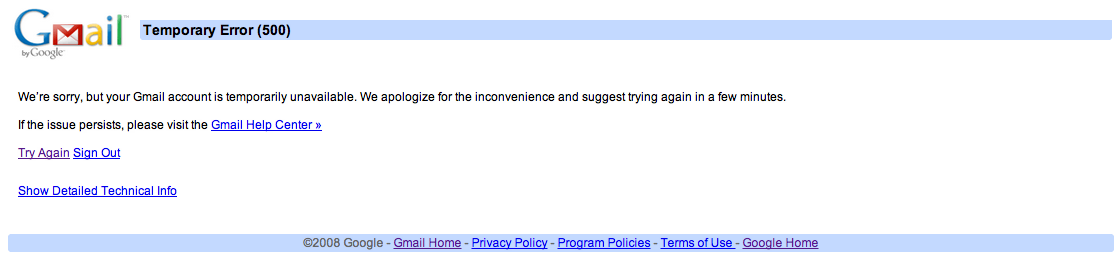
Those who tried to access Gmail.com directly found the following “Temporary Error (500)” notice with a “93” numeric technical code:


Expand
Expanding
Close

Site default logo image

Google settles Gmail domain dispute in Germany

Google’s cloud-based email service has been available to Germans over for seven years, but they are just now getting the official Gmail domain.

A local businessperson previously held the domain, which forced Google to provide “googlemail.de” addresses to users in Germany. However, according to a recent story by The Financial Times (translated), the Gmail trademark and domain were effectively transferred to Google earlier this month.

There are no further details regarding the settlement.


Expand
Expanding
Close

Gmail now displays recent photos in the people widget

Site default logo image

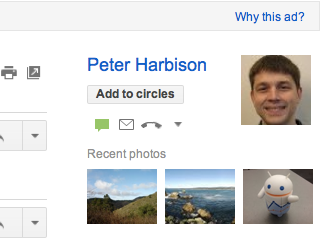
Gmail updated its people widget to include three photos from recent emails for a showcased person (example to the right).

“The next time you look at the people widget, you might see up to 3 photos from recent emails from that person. Not only does this remind you of photos they’ve sent to you, but it also gives you one click access to the emails with those photos,” announced Gmail on Google+.

The Gmail people widget is located on the right-hand side of messages and displays users’ contextual information about people their interacting with in the email service.


Expand
Expanding
Close

Sprint FINALLY updates Nexus S 4G to Ice Cream Sandwich

Site default logo image

[tweet https://twitter.com/sprint/status/188003634016030720]

It looks like Google and Sprint finally got around to updating the NExus S 4G to Ice Cream Sandwich.  The update, certainly expected for awhile, is detailled below.

4/5 – Nexus S Software Update – IMM76D (Android 4.0 – Ice Cream Sandwich)

Nexus S Software Update – IMM76D  (Android 4.0 –  Ice Cream Sandwich)

Enhancements/Fixes:
Expand
Expanding
Close

Google updates Gmail, Street View, and Google Books for Android

Site default logo image

Google just rolled out updates to a few of its Android apps, the biggest of which brings a ton of new features to “Gmail for Android” 3.2 (Honeycomb) users. Previously, only Android 4.0 Ice Cream Sandwich users had access to features like swiping between conversations, custom notifications for labels, and the ability to sync messages for the last 30 days. All of those features and the rest of the Ice Cream Sandwich Gmail experience are now being implemented for Honeycomb users. The updated app is available on Google Play now, and a full list of the features is below:


Expand
Expanding
Close

Google launches ‘Account Activity’: Monthly insight reports based on Web interaction

Site default logo image

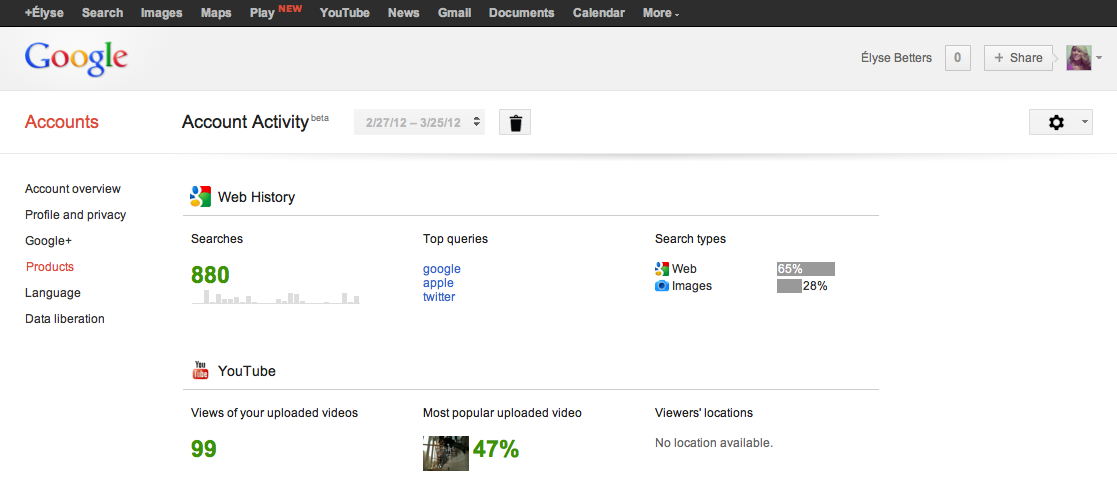
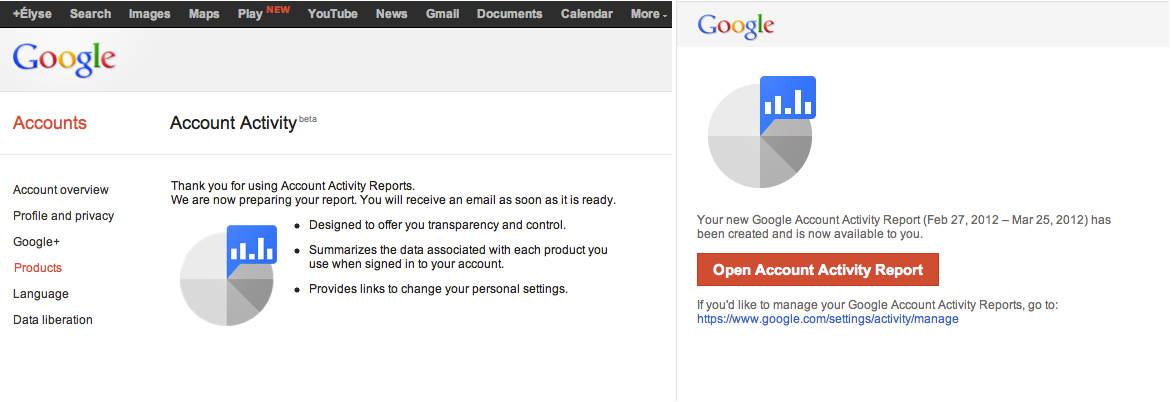
Google just launched a new feature called “Account Activity” that sends account-holders monthly encrypted reports about their signed-in frittering across the Web and Google services.

Once a user opts-in to the feature, Google will confirm and then send the first monthly report (see image below). The full-report gives Account information, such as locations, browsers, and platforms employed while Internet surfing.

The report also gives Gmail specifics, like most contacted addresses and to-and-fro message counts, and it breaks-down other Google services’ particulars, including Web history with users’ top searches, types, and queries, and a personal YouTube report on uploaded video activity and viewers’ location data. Users can also delete old reports or browse previous months as they begin to pile up.


Expand
Expanding
Close

150 Princeton students offered choice of Google Apps or Office 365, 2 of them chose Office 365

Site default logo image

Princeton University’s Office of Information Technology recently polled 150 students who tested Google Apps’ Gmail and Microsoft Office 365 and results showed only two preferred the latter.

According to The Daily Princetonian, the undergraduate student government is collaborating with OIT to move the student body from its current email server Webmail to either Google Apps or Microsoft Office 365.

Google Apps is a cloud-based productivity suite that features several Web application user-interfaces similar to traditional office suites—like Microsoft Office 365. The services vary per edition but generally include Docs, Gmail, Calendar, Talk, Sites, Groups, Video, and Marketplace. Its popularity among students and educational institutions is rapidly increasing due to enhanced sharing features, accessibility, and cost.

Google Apps for Education is just one edition that offers 25 GB of storage space per user for free through K-12 schools, colleges, and universities with up to 30,000 users. Forty-million active users currently use Google Apps, and according to US News & World Report, 61 of the Top 100 schools have switched to the educational service.

USG IT Committee Chair Josh Chen said the University’s polled students prefer Gmail due to its “many benefits and no drawbacks.” Meanwhile, U-Councilor Lily Alberts said the poll’s results likely attribute to the student’s prior familiarity with Gmail during pilot testing. The group of 150 students piloted the two options, and those students came from a pool that replied to an earlier campus-wide email.


Expand
Expanding
Close

Google Apps for Education welcomes Ivy League Penn to Gmail

Site default logo image

Google can now check the University of Pennsylvania off its ever-growing list of ivy leaguers wielding Google Apps for Education, because the school just announced a recent move from Microsoft’s Windows Live Hotmail to Gmail.

The Philadelphia-based private university ranks No. 5 in National Universities, according to U.S. News and World Report, and it joins over 60 other leading institutions from the nation’s top 100 to use Google Apps. Harvard College, Yale, and Brown University are a few of the more prominent schools to top Google’s list.

Penn changed services after studying student email trends:

“We just saw more than 50 percent of students forward emails from their Hotmail to Gmail accounts and thought it would be more convenient this way,” said Director of Social Sciences Computing and Student Technology Chris Mustazza to The Daily Pennsylvanian.

More information is available below.


Expand
Expanding
Close

Fluent is a Sparrow-like UI for Gmail making the ‘future of email’, web-based service runs on all browsers

Site default logo image

[youtube=http://www.youtube.com/watch?v=Z07MnBf9QNY]

Fluent is a web-based workflow stream that works with existing Gmail accounts to bring a Sparrow-like user interface to email.

Users can stream email threads and replies, preview aggregated attachments in a tab, quickly reply or compose inline, archive messages, and even add a to-do list with the new design concept that claims to run on any web browser.

Sparrow is a great success as a Mac-only application, and now Fluent hopes to balance the playing field and snag users whom are in dire need of a new Gmail look and functionality. Fluent’s website specifically praises its workflow ability, multiple accounts options, and “blazing” fast search-as-you-type filter.

The streaming email UI is the work of three former Googlers who quit the Mountain View, Calif.-based Company. BusinessInsider said Cameron Adams, Dhanji Prasanna, and Jochen Bekmann left because designers were “less valuable” than engineers at Google, and they felt disconnected from Google’s culture while operating from across the world in Sydney, Australia…


Expand
Expanding
Close

Stanford University moving to Google Apps for entire staff and student-body

Site default logo image

Stanford University in Palo Alto, Calif., is moving from VM Ware’s Zimbra to Google Apps for its entire staff and student-body, according to The Stanford Daily. Stanford has given Google Apps a trial for the past year and is finally ready to open it up campus-wide. Stanford will roll out Google Apps this spring with undergraduate students able to move to Gmail when they choose. Google Docs will then roll out in the summer. The full roll out of Google Apps across the campus cannot happen until Google enters into a Business Associate Agreement with the university.

Stanford is making the switch to Google Apps from Zimbra, an open source email software made available from VM Ware. Stanford’s Matthew Ricks said, “In delivering Google Apps to Stanford, we’re responding to the desires of the majority of our community,” which indicated Zimbra was not meeting the campus’ needs.

Google Apps will offer Stanford document creation from Google Docs through Gmail, management through Google Calendar, and more. Many other schools and organizations have also made the move to Google Apps while citing it to be the most affective. Thanks for spotting the title error, Dane!


Expand
Expanding
Close

Google replaces Reader ads in empty Gmail inbox with Google+

Site default logo image

If you ever happen to have no messages in your Gmail inbox, you might notice Google’s subtle way of promoting Google Reader with the small ad for Google Reader (below). Now, Google has removed the “Try Google Reader” link and replaced it with a new message promoting Google+ (via Google Operating System blog). The message now reads, “No new mail! See what people are talking about on Google+” (pictured above). Within the new message is a link to the “What’s Hot” stream of Google+.

With the launch Google+, and its incredible growth (about 750,000 new users a day), many warned the growth was attributable to Google’s ability to pull in Google+ users. So, what happens when it runs out of Gmail users to bring in? Google may have already thought that through with a recent update to the Google account creation process requiring users to both create a Gmail account and automatically create a profile and Google+ account. In other words, not only is the company pulling in Gmail users, but also anyone that wants or needs a Google account for other services.


Expand
Expanding
Close

Jon Stewart pokes fun at Google Plus

Site default logo image

[vodpod id=Video.16032223&w=650&h=420&fv=]

Poking fun at Barak Obama’s recent Google hangout and the greater Google Plus, late night comedian Jon Stewart called Google Plus “that thing on top of Gmail that you can’t make go away”.

Google plus, even if it is “that annoying thing on top of Gmail” for some is becoming quite popular it seems.  Google Plus also won a Crunchie last night.
Expand
Expanding
Close

New business features arriving to Gmail

Site default logo image

Google recently enhanced the Gmail offline Chrome app and integrated the webmail service with Google+ filters for circles, auto-sync for contacts and sharing features. Today, new capabilities rolled out to Google Apps for Business, Google Apps for Government and Google Apps for Education editions, managed via the Google Apps control panel. Administrators can now take advantage of improved email compliance footers, approved/blocked sender lists and file attachment policies, the search firm wrote in a blog post.

Previously, users had to resort to Google Message Security to use these capabilities. Google said it improved upon these features and “designed them specifically to meet the needs of our Apps customers.” Last September, Google brought out contacts manager from consumer Gmail to Google Apps.


Expand
Expanding
Close

Google rolls out improvements to Gmail offline Chrome app

Site default logo image

After being introduced in August, Google just announced improvements to its Gmail offline Chrome app. The first improvement, which the Chrome team called their favorite, is the ability to choose whether you want to synchronize 7, 14 or 31 days worth of mail. The second improvement includes attachment support, keyboard shortcuts, and enhancements when it comes to performance. You can download the Gmail offline Chrome application in the Chrome Web Store.


Expand
Expanding
Close

Google signs biggest deal yet for enterprise cloud services, Spanish bank BBVA switches to Google Apps

Site default logo image

Google just signed its biggest deal yet with a single company to offer cloud services with 110,000 employees in 26 countries of Spanish bank BBVA switching to Google apps.  The bank will use apps like Gmail, Calendar, Chat, Docs, and it will have employees’ access video chats and other collaboration tools. According to BBVA, the deal is the “largest global agreement for the adoption of Google Apps, Google Enterprise suite.”

Through this solution, BBVA seeks to increase its efficiency by providing employees the tools of advanced communication and collaboration. In addition, Google Apps will facilitate collaboration among professionals from the bank, regardless of geographic area in which they are. This is essential to drive innovation in a financial group as global as BBVA. 

According to a report from BBC, who talked with BBVA, the move was largely driven by an increasing number of the bank’s staff utilizing smartphones and tablets as their main computer. The bank already moved 35,000 employees to Google Apps and it expects it to roll out to 110,000 staff members during 2012.

Director of innovation for BBVA Carmen Herranz confirmed to BBC that all customer data would remain on the bank’s servers with the move to Google services only applying to communication among staff. The bank had previously rolled out a successful pilot project with around 7,000 staff, and plans to “closely monitor for any increases in network load.” Herranz said their biggest concern is video conferencing.

Vice President of Google Enterprise EMEA Sebastien Marotte gave a statement in BBVA’s press release highlighting the importance of the announcement and growth of Google Apps:


Expand
Expanding
Close

Many schools abandon Microsoft Office for Google Apps to save money; Google Docs added 100 new features in 2011

Site default logo image


Google Apps is a Google service that features several Web applications similar to traditional office suites. The services vary per edition but generally include Docs, Gmail, Calendar, Talk, Sites, Groups, Video, and Marketplace. Its popularity among students and educational institutions is rapidly increasing due to enhanced sharing features, accessibility and cost.

Google Apps for Education is just one edition that offers 25 GB of storage space per user for free through K-12 schools, colleges, and universities with up to 30,000 users. Forty-million active users currently use Google Apps, and according to US News & World Report, 61 of the Top 100 schools have switched to the educational service.

“Google Apps offers simple, powerful communication and collaboration tools for educational institutions of any size – all hosted by Google to minimize maintenance and reduce IT costs,” said Google Apps for Education on its website. “Google Apps is provided to educational institutions at no charge, and is hosted on the same enterprise-class infrastructure used by corporate and government customers.”

UC Berkeley announced Dec. 21 that they planned to make Google Apps for Education their new campus calendar and email system. “Operation Excellence” is a cost cutting initiative designed by the university to save $75 million annually. UC Berkeley currently offers their campus faculty, students and staff access to Microsoft software and Adobe Creative Suite free of charge. However, campus officials agreed to convert to Google Apps for Education in January 2012.


Expand
Expanding
Close

Google counts only the devices it can count

Site default logo image

In a clearing up the “confusion” around Andy Rubin’s recent numbers releases (here and here), the Verge spoke to a Google source on what constitutes an “Android device activation.”

We’ve now gotten some additional clarification from trusted sources on what Google considers an “Android device” for the purposes of counting activations (which would presumably apply to every activation count Google has released in the past). It’s actually really simple: you need to activate Google services on the device. In all likelihood, Google’s counter actually jumps the moment you sign into your Google account on the phone or tablet, whether that be the first time you turn it on or when you’re prompted after jumping into something like Gmail or the Android Market. And as Rubin says on Google+, it only happens once per physical device.

It turns out that Google is only counting activations it activates (I know!). It is not counting devices that use Android code, because it does not have control over -or no way of- counting like the Kindle Fire or Barnes and Noble Nook (I know!).

Perhaps Amazon, who is very transparent with its Kindle numbers, could help Google out there.


Expand
Expanding
Close