Google Search




You may already be aware that Google search provides a calculator that offers answers to queries, such as 2+2 directly, from the main search results page. As pointed out by a reader, Google recently updated the calculator search functionality, and it now provides a full HTML5 scientific calculator for these types of search queries. The features work with voice—except for on mobile devices, as they do not have access to the full scientific calculator presented on desktops.
Earlier this month, Google started to roll out a similar widget on its search page for unit conversions, like inches to centimeters. Now, unit conversion queries are presented with the live unit conversion tool (pictured below) that allows you to switch between units of measurements for temperature, length, mass, speed, digital storage, and much more.
In a blog post on his Google+ page, Google+ Product Manager Ronald Ho announced a new tool to transfer circles from one account to another that is now available through Google Takeout. In an overview of the long-requested feature, Google explained the tool would migrate “circle names, circle members, “your circles” settings, and people and pages you’ve blocked or ignored.” However, Google noted there is a 7-day waiting period before a transfer is initiated, and both profiles will have limited functionality until the transfer is complete:
-There’s a 7 day waiting period before your transfer begins.
-To cancel the transfer before it starts, sign in to either account on Google+. Then click Cancel transfer at the bottom of the page. Note that you cannot cancel using a mobile interface.
-If the source or destination accounts are managed by an organization, the account administrator may restrict your ability to transfer your connections and/or use Google+.
-You won’t be able to use this tool with these accounts again for 6 months.
-Once the transfer begins, it cannot be cancelled or undone.
As for limited functionality, both accounts will not be able to share content on Google+ during the transfer—nor can they add, remove, block, or ignore people in circles and elsewhere. Google continued by explaining the result of a transfer once complete:

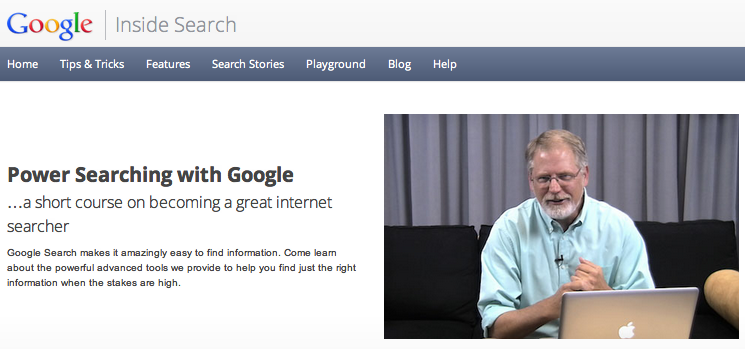
Google just introduced a new online course for those interesting in “power searching” with its search engine.
The free course offers:
“Google Search makes it amazingly easy to find information. Come learn about the powerful advanced tools we provide to help you find just the right information when the stakes are high,” explained Google Senior Research Scientist Daniel Russell on the registration page.
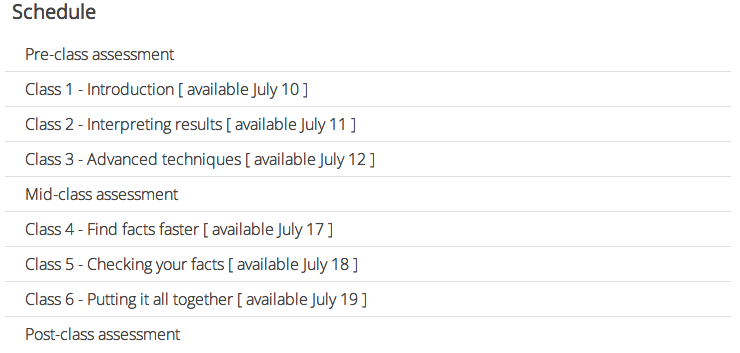
Course registration opens today and closes July 16, but the first class starts July 10. New classes begin Tuesday, Wednesday, and Thursday, and all course-related activities end July 23.
Check out the schedule below:
For more information about becoming a “great Internet searcher,” visit the course page at Google Insights.
Google updated its Google Search iPhone app to version 2.0.0 today, which introduced a completely redesigned app that focuses on improvements to speed and full screen browsing features. Among the new features are an auto full screen mode that hides controls when scrolling down and reveals when scrolling up, and a new full-screen image search view.
The updated app also includes “major speed improvements,” a built-in text finder for webpages, and quick links to Gmail, Calendar, Docs, and search options such as images, places, and news. The iPad did not receive the same update, but both the iPhone and iPad will now be able to save images to the iOS camera roll.
A full list of features is below, while the updated app is available on the App Store now.
Following an update to Gmail last week that brought improved search results and integration of contact information and Google+ Circles, today Google announced on the Official Gmail Blog that it is now including autocomplete predictions when searching from within your Gmail inbox.
Much like Google Web search and many of its other services, when beginning to type in the search bar from within Gmail, you will now see suggestions or autocomplete predictions matching content within your emails. Google explained:
Now when you type something into the Gmail search box, the autocomplete predictions will be tailored to the content in your email, so you can save time and get the information you want faster than ever before. For example, you might now get lax reservation or lax united as predictions after typing “lax” if you have received an email with a flight confirmation for your trip to Los Angeles in your inbox recently.
The new feature will roll out to English Gmail users over the next few days, but Google noted support for additional languages would roll out over the coming months. The feature is also not yet available to Google Apps users.
A new report from The Next Web claimed a “source close to the product’s development” confirmed Google has a new commenting system in the works. With continued integration of Google+ into the rest of the company’s web services, the report claimed Google will likely aim to take on Facebook and its third-party commenting platform. The report explained:
Expand
Expanding
Close
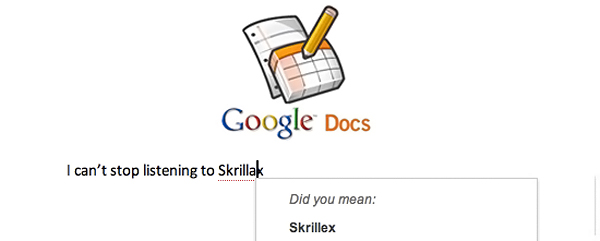
Google Docs can now spell check threw through the Web.
Software Engineer Yew Jin Lim took to the official Google Docs blog this afternoon to explain how the Internet is helping Google Docs get smarter. The ambiguous and ever-adapting Googlebot is able to crawl cyberspace and adapt to words. The resulting action enables Google to improve suggestions during misspelled queries in Google Search. Well now, the same process is applied to Google Docs…

[youtube=http://www.youtube.com/watch?v=SAIEamakLoY]
For the eleventh year in a row, Google publishes its annual overview of the fastest-growing search terms of the past year, providing a pretty accurate overview of search trends on the Google.com search engine. Called Zeitgeist, it “sorts billions of Google searches to capture the year’s ten fastest-rising global queries and the rest of the spirit of 2011”, says the official Zeitgeist site. We find the initiative pretty interesting. Not only does it offer a valuable insight into what searches revealed about the interests of users, it also reveals the issues that have troubled the world throughout the year.
A couple interesting highlights, per Google’s blog post:
• Rebecca Black was the #1 fastest rising query globally and Google’s own Google+ social thing is ranked second
• Adele made the fastest rising lists in over 15 countries
• Apple’s late co-founder Steve Jobs made the list (mark 1:50 in the above clip), as did reality star Ryan Dunn and defendant Casey Anthony
• iPad 3 and iPhone 5 were among the often-searched terms (no surprises here)
• Devotees turned to Google following the April 4 passing of Sai Baba, an Indian guru, spiritual figure, mystic, philanthropist, and educator
• cupcakes made top food lists in over a dozen countries
• Hurricane Irene in the U.S. and earthquakes in Christchurch and Japan also topped the charts as thousands of people affected by those natural disasters turned to Google.com to seek information about their loved ones
These are just a few of the many noteworthy findings of Zeitgeist 2011. Make sure to check out the official site, they’ve really upped the ante in the visualization department. We especially like detailed infographics and the tools allowing visitors to mine whatever data interests them most, and even compare terms across categories.
Twitter and Yahoo did a similar thing so you may wanna have a look at Twitter’s Year in Review and Yahoo’s Top Searches of 2011.

 Have you ever been curious to find out who spends the most money advertising on Google Search? AdAge has put together a list of Google’s top ad-spot buyers. If you’re a frequent Google Search-er you’re probably familiar with a lot of them, and probably have clicked on their ads before.
The media company IAC has earned the top-spot, spending $174,000 from January 2011 – September 2011. IAC owns popular online media properties like Match.com, Dictionary.com, Excite, and more. Amazon holds the second spot, with $118,000 spent within the same time period. It’s worth noting, pointed out by AdAge, that the fourth quarter is typically the most busiest time for advertising. These numbers will be much higher for 2011 as a whole.
Search still proves to be Google’s number one source of income. You might be thinking Android would, with 500,000 activations a day, but you have to remember Google makes Android open-source for all to use. All Android does for Google is draw traffic to their web products, which in turn could drive revenue through ads — Search being an example. Curious to see who else made the list? Check it out after the break.
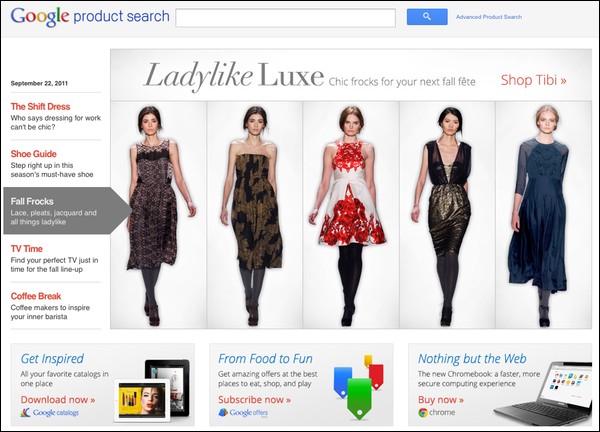
As noted by Search Engine Land, Google has released a new Product Search page — that actually looks pretty good. The main part of the website is dominated by an oversized image that lists promoted products. Besides the promoted products, the search functionality looks fairly familiar and lists prices and stores to buy from.
The new Product Search is taking the place of Google’s recently released Boutique. Google will be closing Boutique October 12th, and will redirect it to the new Product Search. Google also has implemented a new dress search category (seen after the break) that lets you to select color, price, and brand.
Looks stylish, Google.
Goggles, a visual search technology from Google available on Android and iOS devices, is great for researching products, buildings and other objects simply by snapping them with your phone camera. Google announced in a blog post that a new version is available which lets you opt-in to have your camera roll automatically uploaded to the Google cloud. It’s similar to how the instant upload feature in the Google+ mobile app uploads photos and videos to a private album as you take them. They call it camera search and you can enable it in Goggles version 1.6 by checking Search from Camera in Menu > Settings.
Once up in the cloud, Google will auto-analyze your snaps and notify you when it recognizes something . For example, you may have taken a bunch of shots of historic buildings on your vacation. By allowing Goggles to upload your snaps, you can get search results for, say, recognized landmarks almost instantly. This lets you explore more information about the city, such as its history, and learn something new right on the spot. We like it a lot and if you’re fan of Goggles, update the app and give it a try.
Google’s been rolling out a series of product updates lately in an effort to unify its many services in terms of both looks and features departments. For example, the company is working towards bringing the encrypted and regular search pages on par. Today, the Google Operating System blog spotted that the advanced image search interface has been re-worked to function more like the corresponding web search page. In addition, the new interface provides access to the features that were previously only available in the sidebar. You’d want to tap the advanced search page (by clicking the “Advanced Image Search” link on images.google.com) in order to narrow down your search results to a domain or a country, a certain filetype or list only Creative Commons images.
Google’s art department’s not been standing still either. Ever since Larry Page took over Google’s reins and pledged his company would put great design front and center, we’ve seen the search behemoth revamp its many properties. It started with the appealing Circles interface in Google+ and continued with the little tweaks that have freshened up the overly simplistic and geeky appearance of Google’s many web properties, bringing them on par with the Google+ theme. Latest examples include the Google Account sign-in page and the Blogger interface, both updated with the new look. Google hired renowned designer who worked on the original Macintosh, Andy Hertzfeld, to create the Circles user interface.
Have you been redirected to the encrypted Google search page this morning? Worry not, you should be honored for having participated in “an experiment”, the Google Operating System blog reports. The search monster is sending “some percentage of Chrome 14 users” to the more secure, SSL-enabled search page, which is still in beta. The reason?
They are testing out the new functionality of the SSL page, which now sports nearly all of the features of its non-SSL counterpart. Previously, encrypted search lacked many features of the regular search page, such as Image Search, Google Instant and Instant Preview. The encrypted search page still lacks navigation links and Google Maps doesn’t support SSL yet.
As Google works to bring feature parity between SSL and non-SSL search pages, eventually users might just tick a check box in their search settings to opt-in to SSL search. SSL, a secure communications protocol, ensures that anything that gets sent between your browser and Google’s servers (such as your query and search results) is encrypted to prevent eavesdropping.
[youtube=http://www.youtube.com/watch?v=J5RZOU6vK4Q]
Google’s been tight-lipped about the intricate, intertwined algorithms that make their search machine tick and we can only speculate how they rank web pages beyond the commonly known guidelines for web developers. A whole cottage industry is thriving out there, built on the presumption that one can reverse-engineer parts of the Google code so to affect search results and ensure the best possible placement. While Googlers aren’t about to spill the beans on the industry’s most closely-kept secret, they did reveal a couple of tidbits in a video published over at the official Google blog.
“While an improvement to the algorithm may start with a creative idea, it always goes through a process of rigorous scientific testing”, the company wrote in the post. “Simply put”, Google explains, “if the data from our experiments doesn’t show that we’re helping users, we won’t launch the change”. For example, did you know that the Google search algorithm is made up of several hundred different “signals” that collectively determine the results? Surprisingly, just last year Google perfected its search engine with more than five hundred algorithm changes, most of them rolled out quietly. More tidbits in that YouTube video, embedded above.
In its never-ending battle against annoying spammers who pollute our search results, the Dublin, Ireland arm of the Internet search giant published job openings for spam fighters who are fluent speakers of Arabic, German, Russian and Spanish, indicating the rising spam threat in those markets. The job listing requires would-be candidates to have BA/BS degree, “preferred with a strong academic record”, excellent web research and analytical skills and experience with HTML and working for an Internet company.
If terms such as ‘WHOIS’ or ‘DNS’ mean nothing, don’t even apply as understanding of firewalls, IP addresses and name servers is a must as you’ll be directly impacting the quality of Google’s search results through search quality evaluation. Here’s from Google:
You will be working on the cutting edge of search and the forefront of the web ensuring quality information is provided to millions of internet users, and you will be expected to keep pace with constant change in a fast-paced work environment, bringing innovative ideas to improve access to relevant information on the web. You are a web-savvy individual who is a take-charge team player, as well as a quick learner and strongly interested in providing a better search experience for Google users.
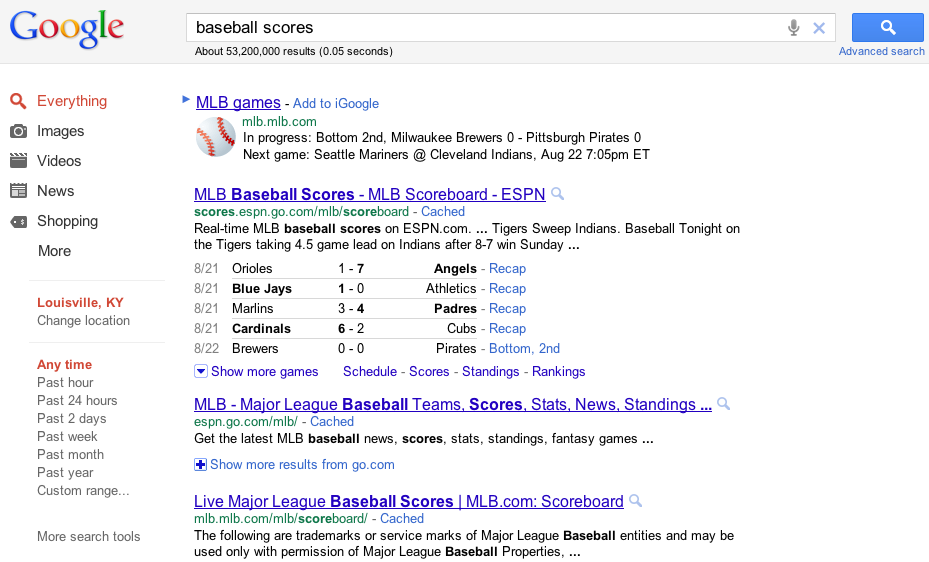
Google and ESPN have announced they are now offering sports scores, presented through microdata, straight into Google Search results. For now, Google and ESPN will only be offering Baseball, but more sports will be following very soon. A simple search of “Baseball Scores” returned the following results.
Besides making the obvious search, you can also search specifically for teams, players, and scores. The results include up-to-date game scores and statistics, and link off to content on ESPN.
Expand
Expanding
Close

We already showed you how to give Google’s new search UI a try, but yesterday The Next Web discovered that you can also give Google’s new sign-in page a try. The new sign-in page goes along with the rest of Google’s general new design we’ve been seeing spring up across products, ever since the launch of Google Plus. Enabling the new design is much easier than what we showed you yesterday. You could just go and click the option to preview the new sign-in page, but here’s the link to make things easy.
While there isn’t much of a change, we do like the new colors and general spacing.

Google has been on a role rolling out new designs across all of their products, including Google Search. Techno-Net (via Google Operating System) has discovered that with a small cookie change you can try the latest version of Search. The new version features a less uncluttered look, but we’ve read it isn’t as fast as the version you know and love. Head on past the break to see how it’s done.
[youtube=”http://www.youtube.com/watch?v=Grr1arPxX0E”]
To go along with their new expanded sitelinks, Google is testing infinite scrolling in Google Search. This new feature will allow you to view all of your search results on one page, but you do have to click a “more results” button. Google has already announced this feature in Images, so there is a chance this could stick around in Search. Google told Search Engine Land, “Google is constantly experimenting with new features.” (Waebo via The Next Web)
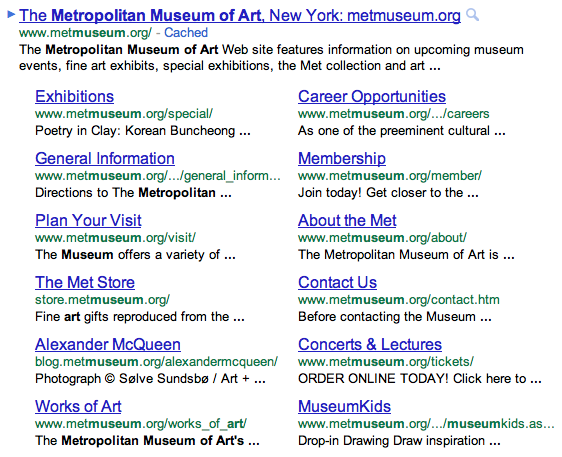
Today on their Search Blog, Google announced a new layout for sitelinks under Search results. The new update brings an expanded look for sitelinks — showing the title, URL, and a snippet of text from the site. Instead of eight sitelink results, a site can now have twelve.
Sitelinks will now be full-size links with a URL and one line of snippet text—similar to regular results—making it even easier to find the section of the site you want. We’re also increasing the maximum number of sitelinks per query from eight to 12.
Sitelinks will also be using a similar algorithm to regular search results, to provide a higher-quality list of links. The update will be rolling out to users over the next couple of days.

Social postings from Twitter, Youtube, and Flickr have appeared in Google Search for quite awhile, and with the launch of Google+ it was only a matter of time until public Google+ posts were appearing too (as seen above). Google announced via their blog Friday that public Google+ posts are now available in Search.
Note, ONLY public posts will be appearing — private posts will not. To see this feature you will need to have a Google+ account and be logged in to your Google account.
Expand
Expanding
Close
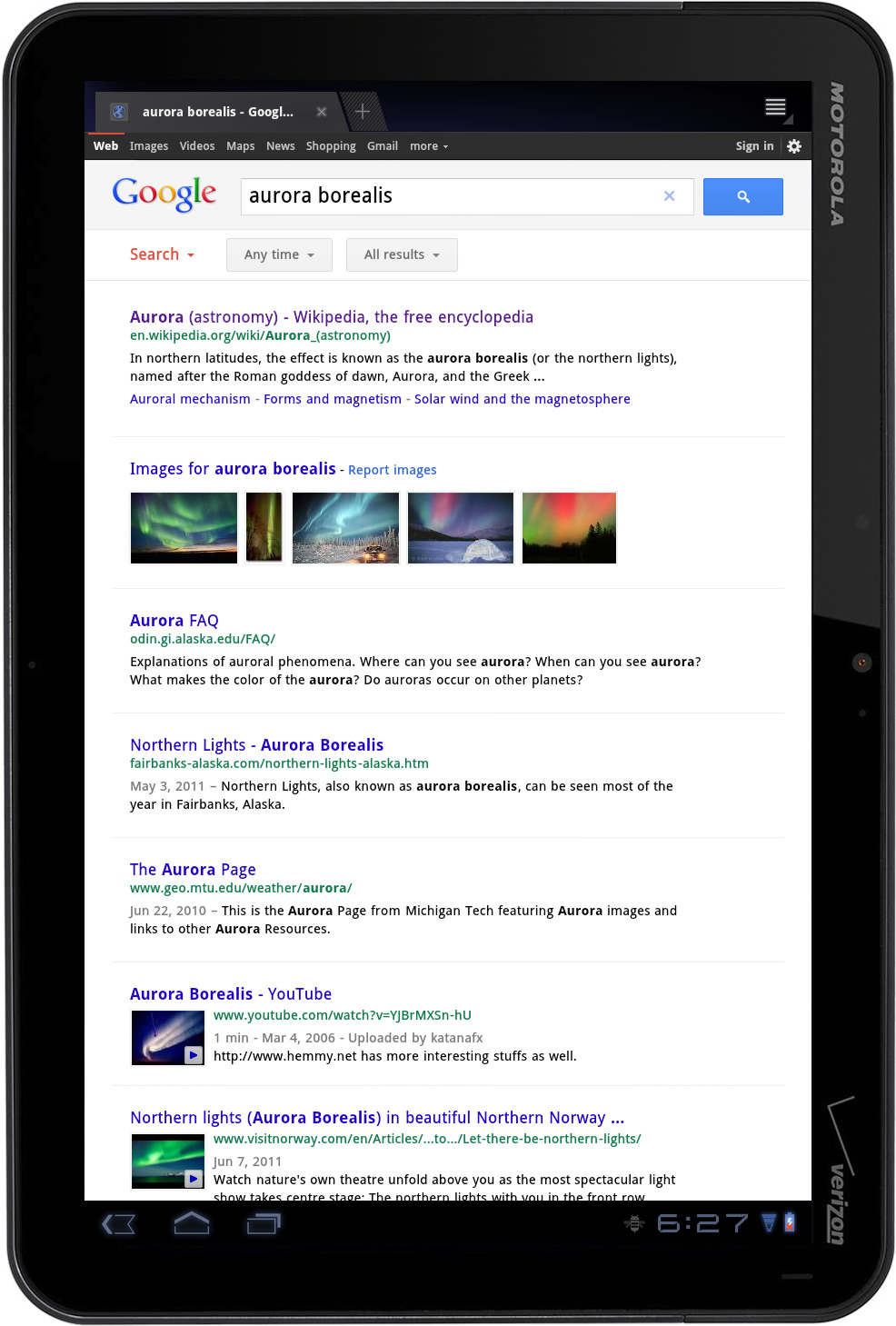
The new search layout on the Motorola Xoom. Web (left) and image (right) results. Click for larger.
Google last month announced a bunch of enhancements to its search engine and today the company confirmed via a blog post an overhauled layout on tablets, which the blog Digital Inspirations leaked two days ago. From now, searching on your tablet by visiting the main Google search takes you to an overhauled search results page. It’s surprising it took Google so much time to optimize the search experience on slates, really. You can tell the new layout is easier on the eyes and we are love in love with the bigger buttons. Now you can finally hit the controls on smaller tablets without having to sand down your finger first.
Our favorite: The big, unobtrusive buttons right below the search box for quick access to specific search silos, such as web, images, news and so forth. Also noteworthy, the image search results page now appears way more attractive due to larger previews and continuous scroll – just go to the bottom and a new batch of images loads automatically. The new layout will be available on iPad and Android Honeycomb 3.1 tablets and in 36 languages “in the coming days”, everyone’s favorite search monster noted.
Digital Inspiration reports Google is testing out a new search page design created specifically for tablets, but likely to make its way onto desktops as well. The new tablet-optimized search home page puts forth a cleaner layout with new visual features recently applied to Gmail, Calendar and their other properties. Old graphics is gone and replaced with a Google+-like appearance, along with the black Google navigation bar at the top that recently appeared on desktop.
A brand new thing: The top row of icons for filtering down search results by type (images, news, web, etc.) has been replaced with the traditional lefthand column with search tools, still present on desktop. Does this change signal the new design for search silos across desktop and mobile? If Google’s recent focus on consistency in design is an indication, than the answer should be a resounding ‘yes’. Google has not officially rolled out the new design, but we’re expecting them to make an announcement soon. Another screenshot right below the fold.
Expand
Expanding
Close
 .
.
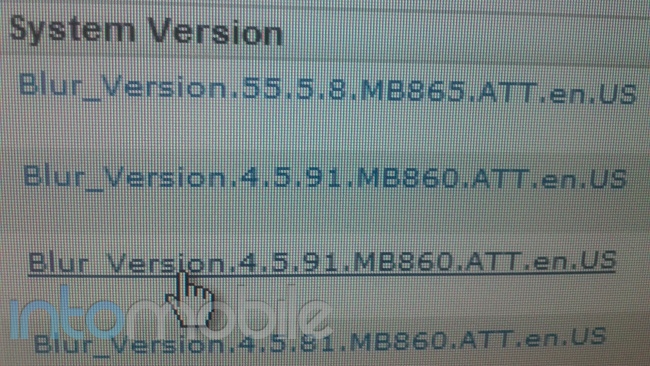
IntoMobile is reporting an AT&T varient of the Verizon Droid Bionic might just be on its way. If you don’t know what you’re looking for the above image doesn’t exactly tell you much. IntoMobile explains:
The small code following the version number is what to look for. You can see three mentions of the MB860 and one of the MB865. Well, a quick Google search for MB865 will return results for the Motorola Atrix 4G but if you do a search for MB865, you’ll get results for the Droid Bionic.
The GSM Bionic will likely be a slightly bigger version of AT&T’s popular Atrix. The Atrix already has the qHD display and dual core processor. It also got a Gingerbread update this weekend.