Google+ rolling out new features for better control over Circles

Google Product Manager Austin Chang made an announcement on his Google+ today highlighting some new features rolling out on Google+ (via TNW). In addition to the “sliders” the service rolled out last year, allowing you to filter what you read and share on Google+, Google is rolling out three new features today that provide even more control. The new features allow you to control notifications from specific circles, opt to send emails for important news you are sharing, and mute notifications from a specific contact within a circle. Chang explained:

Read more

Huffington Post debuts new HuffPost Live streaming news network, with Google Hangouts at its core

AOL-owned news network Huffington Post debuted its new HuffPost live streaming network this morning with cofounder Arianna Huffington introducing it as the stream fired up at 10 a.m. EST. The network will stream live from New York for eight hours a day and live from Los Angeles for four hours a day on weekdays. Highlights will air on the weekend. With a total of 10 hosts and help from Huffington Post bloggers and editors, the network has a focus on audience participation with user’s being able to call-in via webcam.

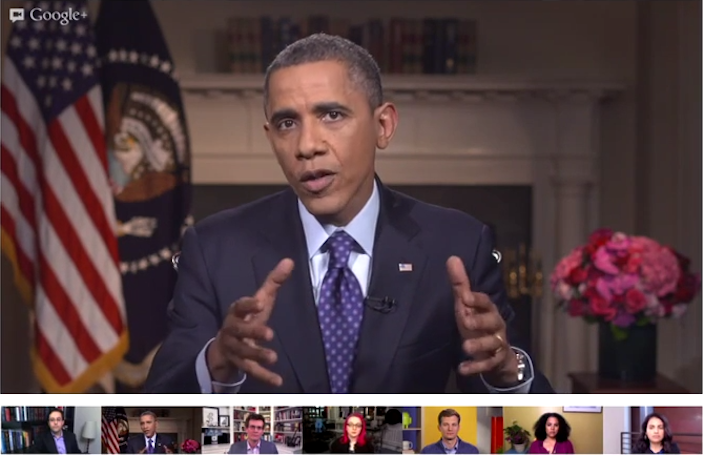
AOL is using its own technology for audience participation. However, I noticed while watching the stream this morning that Huffington Post is opting to use Google+ Hangouts for roundtables with its bloggers, editors, and guests. We already saw how many times Google+ Hangouts has been adopted by politicians, public figures, and more to communicate with fans. The NFL even uses it for its fantasy football league.

Google+ Hangouts ease of use and reliability may be why the folks at HuffPost opted to use it rather than another solution like Skype. Hangouts offers great features. For instance, it automatically highlights the person that is talking, which is something that a talk show could certainly benefit from. It is also very easy to get guests on Hangouts through quick invites via email.

Read more

Google releases migration tool for Google+ circles and connections

In a blog post on his Google+ page, Google+ Product Manager Ronald Ho announced a new tool to transfer circles from one account to another that is now available through Google Takeout. In an overview of the long-requested feature, Google explained the tool would migrate “circle names, circle members, “your circles” settings, and people and pages you’ve blocked or ignored.” However, Google noted there is a 7-day waiting period before a transfer is initiated, and both profiles will have limited functionality until the transfer is complete:

-There’s a 7 day waiting period before your transfer begins.

-To cancel the transfer before it starts, sign in to either account on Google+. Then click Cancel transfer at the bottom of the page. Note that you cannot cancel using a mobile interface.

-If the source or destination accounts are managed by an organization, the account administrator may restrict your ability to transfer your connections and/or use Google+.

-You won’t be able to use this tool with these accounts again for 6 months.

-Once the transfer begins, it cannot be cancelled or undone.

As for limited functionality, both accounts will not be able to share content on Google+ during the transfer—nor can they add, remove, block, or ignore people in circles and elsewhere. Google continued by explaining the result of a transfer once complete:

Read more

Google fixing spam from Google+ Events feature following complaints

When Google announced some updates to Google+ during its I/O keynote this week, perhaps apart from the new iPad compatible tablet version, the most talked about new feature was the Facebook-like invitations called “Events.” While Google calendar integration in the Events feature was supposed to be a big selling point, Google unfortunately did not provide users with control over which invites were added to their calendars. The issue led to massive amounts of spam in the form of notifications and calendar entries—most notably for Google+ users with large followings. Robert Scoble outlined the problem in a Google+ post:

Hey, +Vic Gundotra the way you rolled out the new Google+ events feature was — by far — the worst social launch ever… Not only did it spam the crap out of my notifications and my Google+ events page but it added events — hundreds of them — onto my calendar…My calendar is MINE. Not yours. You should NEVER put anything on it that I don’t approve of… I have turned down every event and they are still on my calendar so now I have to delete them one-by-one… By the way, I’ve been asking for noise controls since day one and you guys simply aren’t getting it. Amazingly bad service here folks.

As noted by Scoble, another avid Google+ user, Will Wheaton, highlighted the issue and received a response from Google’s Senior Vice President of Engineering Vic Gundotra: Read more

Google working on merging Hangouts, Talk, and Messenger into a unified service

Google makes Hangouts, Talk, and Messenger available to its users to keep up communication with friends and colleagues. With as much as Google has pushed its new group video chat service Google Hangouts, one might wonder why the company has two other communication services lying around. When asked that very question today at an I/O session on Hangouts this afternoon, Google Product Manager Nikhyl Singhal had answers. GigaOm noted that Singhal said: “We have done an incredibly poor job servicing our users here.” The Google employee also noted that while the company does not have anything to announce yet, it is working to join its communication platform together into one platform, which would allow users to do text chats, one-on-one video chats, and group video chats simultaneously. In my opinion, it is a smart move. It would definitely go along with Google’s recent move to cut-down on a slew of services and just focus on one product.

Interestingly, another Google employee shared that the Google staff does a whopping “10,000 hangouts every day.” As for more Hangout features, the only bit revealed during the session is that the team hopes to bring all features to every supported device. That sounds lovely! (via GigaOm)

Read more

Google rolls out YouTube app for Google+ Hangouts

Hangouts on Google+ are often touted as one of the social networks flagship features, which is why it is not too surprising that Google has now integrated YouTube into the feature. Available through a “YouTube” link at the top of the Hangouts screen, after users have allowed access to the app, members of the hangout can add videos for everyone to view in a familiar YouTube playlist on the right. The playing video airs in the large part of the screen above the active members, while everyone sees and can edit the same videos or playlist. Google explained:

Everyone can add videos in the Hangout through a search tool in the app, or remove the videos you don’t like. All your friends in the Hangout can drag and drop videos to sort the order in the playlist, or skip forward or backward to play the next one. Click the “Push to talk” button to chat with the group to give props to the best curator, or to hand out reprimands to the friend who keeps adding the 10-hour Nyan Cat video.

Read more