update

See All Stories

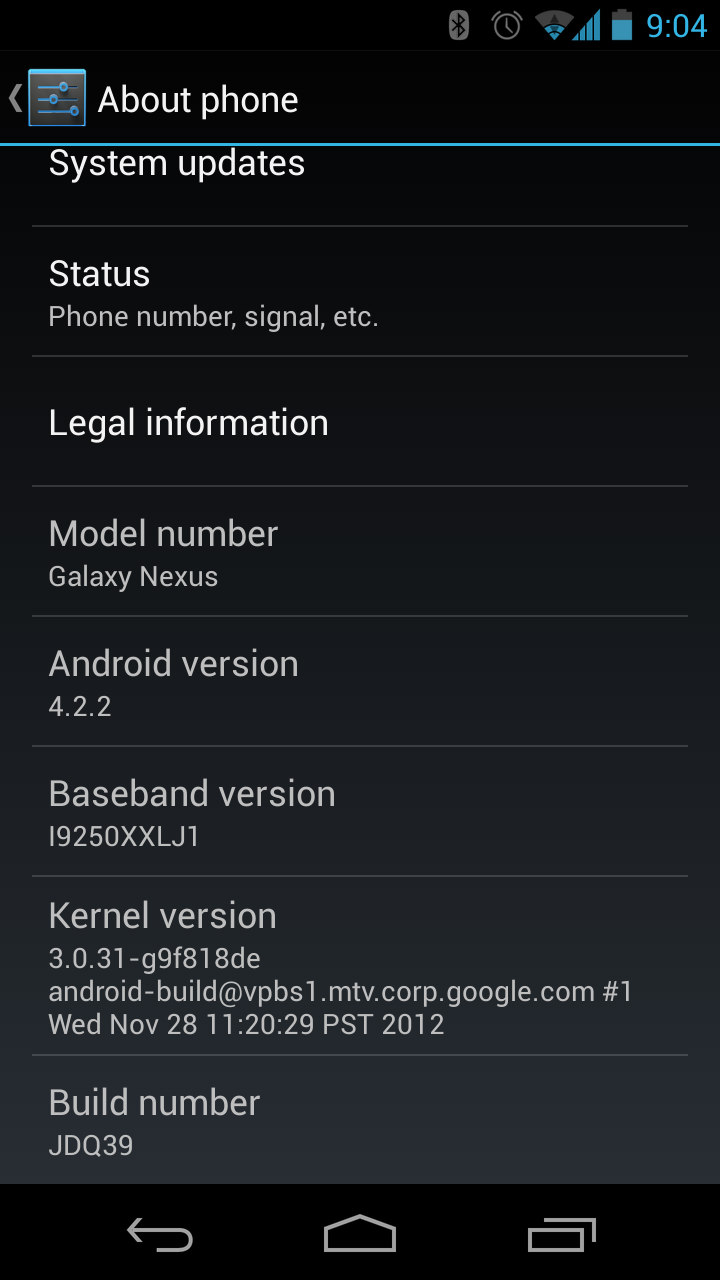
Android 4.2.2 released to Nexus devices only


Site default logo image

WeeManFoo, a user on the popular Internet board site Reddit, claimed his Galaxy Nexus received a OTA update of Android 4.2.2 this morning. Judging by the comments, it seems the update was only rolling out to GSM Galaxy Nexus’, but download links and a screenshot from a Google+ user seems to put the kibosh on the rumor. While there’s no word on what the update holds, because it’s an x.x.1 update, it’s probably a mix of bug fixes and minor improvements. More on what the update holds as information comes in. In the meantime, get downloading!


Site default logo image

Facebook joins the local discovery and sharing game with updated Nearby feature (video)

[youtube=http://www.youtube.com/watch?v=FqocJOQMVwQ&feature=youtu.be]

Facebook just announced an update to Facebook for Android and iOS that helps users discover new places their friends like.

The latest version of the popular app features a refreshed Nearby tab, which, according to a post on the Facebook Newsroom website, now shows recommendations from friends:

From the app menu, open the tab to find local spots your friends have recommended, checked into, or liked. If you’re looking for a place to eat, choose a category like Restaurants to see what’s nearby. When you find a place that looks interesting, tap to see info like friends who’ve been there and business hours.

The new Facebook for Android and iOS further allows users to share their own opinions by rating or recommending places. Facebook warned the update is an early release, however, and “there’s lots more to do.” So, results will improve the more people use Nearby.

“We also plan to add places info from third party services in the near future,” Facebook explained.


Expand
Expanding
Close

Google updates Google Drive app with spreadsheet editing and more productivity tweaks

Site default logo image

Google just updated the Google Drive app for Android and iOS.

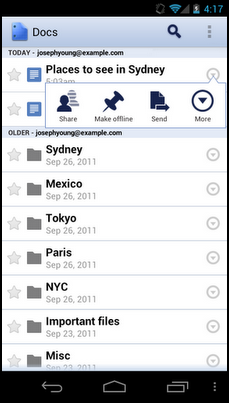
The app’s most noteworthy new feature is the ability to edit spreadsheets, just like Google Docs. The Drive Team elaborated on the latest update via the official Google Drive blog:

From the Drive app on your iPhone, iPad or Android device, you can create a new spreadsheet or edit an existing one. You can switch fonts, resize columns, sort data, and more. And just like on your computer, you’ll be able to see other people’s edits in real time as they’re made.

The newest version also boasts improved text formatting when pasting, while Android users can exclusively edit text within tables in documents and add a homescreen shortcut to any file in Drive.

The full changelog (on Google Play):

  • Edit Google spreadsheets in new native editor
  • Edit contents of tables in Google Docs editor
  • Formatting is maintained when copy/pasting within Google Docs
  • Single tap to enter edit mode in Google Docs editor
  • Add a shortcut to Drive files/folders to your homescreen for quick access
  • Send Link now supports copying link to clipboard


Expand
Expanding
Close

Updated Google Translate Android app translates text from images, includes instant results as you type

Site default logo image

Google updated its Google Translate Android app today to version 2.5, and it added a number of notable features including the ability to translate text from images. When snapping an image of a street sign or anything else containing text and highlighting the text within the image using your finger, Google Translate will instantly provide a translation for devices running Android 2.3 and above (as shown in the screenshot to the right).

Other features added in the update for all users include instant translation results while typing, the ability to select a dialect preference for speech input, and support for multiple characters at once for Japanese handwriting. Google also noted it added “access network state permission to check network availability when sending requests.”

As always, the updated Google Translate app is available on Google Play now.

Expand
Expanding
Close

Site default logo image

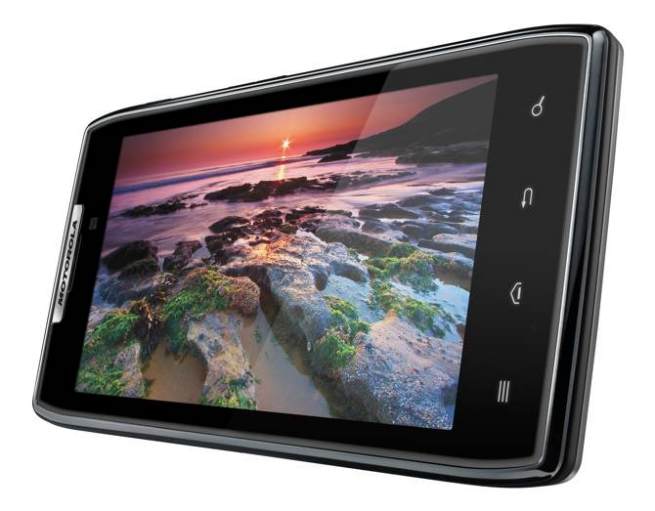
Ice Cream Sandwich now available to Verizon’s Droid Razr and Razr Maxx

[tweet https://twitter.com/vzwnews/status/220216437745266689]

Verizon just confirmed on its Twitter that customers of the Motorola’s Droid Razr and Droid Razr Maxx finally have access to Ice Cream Sandwich through a manual update.

 DROID RAZR and DROID RAZR MAXXX customers can now manually download the Android 4.0 Ice Cream Sandwich operating system. Here’s how: on your RAZR smartphone, go to Settings, then select About Phone, then select System Updates.

Google fixing spam from Google+ Events feature following complaints

Site default logo image

[tweet https://twitter.com/Scobleizer/status/218486102720393216]

When Google announced some updates to Google+ during its I/O keynote this week, perhaps apart from the new iPad compatible tablet version, the most talked about new feature was the Facebook-like invitations called “Events.” While Google calendar integration in the Events feature was supposed to be a big selling point, Google unfortunately did not provide users with control over which invites were added to their calendars. The issue led to massive amounts of spam in the form of notifications and calendar entries—most notably for Google+ users with large followings. Robert Scoble outlined the problem in a Google+ post:

Hey, +Vic Gundotra the way you rolled out the new Google+ events feature was — by far — the worst social launch ever… Not only did it spam the crap out of my notifications and my Google+ events page but it added events — hundreds of them — onto my calendar…My calendar is MINE. Not yours. You should NEVER put anything on it that I don’t approve of… I have turned down every event and they are still on my calendar so now I have to delete them one-by-one… By the way, I’ve been asking for noise controls since day one and you guys simply aren’t getting it. Amazingly bad service here folks.

As noted by Scoble, another avid Google+ user, Will Wheaton, highlighted the issue and received a response from Google’s Senior Vice President of Engineering Vic Gundotra:
Expand
Expanding
Close

Google Search iPhone app completely redesigned for speed and full screen searching

Site default logo image

Google updated its Google Search iPhone app to version 2.0.0 today, which introduced a completely redesigned app that focuses on improvements to speed and full screen browsing features. Among the new features are an auto full screen mode that hides controls when scrolling down and reveals when scrolling up, and a new full-screen image search view.

The updated app also includes “major speed improvements,” a built-in text finder for webpages, and quick links to Gmail, Calendar, Docs, and search options such as images, places, and news. The iPad did not receive the same update, but both the iPhone and iPad will now be able to save images to the iOS camera roll.

A full list of features is below, while the updated app is available on the App Store now.


Expand
Expanding
Close

Google rolls out autocomplete predictions to Gmail search

Site default logo image

Following an update to Gmail last week that brought improved search results and integration of contact information and Google+ Circles, today Google announced on the Official Gmail Blog that it is now including autocomplete predictions when searching from within your Gmail inbox.

Much like Google Web search and many of its other services, when beginning to type in the search bar from within Gmail, you will now see suggestions or autocomplete predictions matching content within your emails. Google explained:

Now when you type something into the Gmail search box, the autocomplete predictions will be tailored to the content in your email, so you can save time and get the information you want faster than ever before. For example, you might now get lax reservation or lax united as predictions after typing “lax” if you have received an email with a flight confirmation for your trip to Los Angeles in your inbox recently.

The new feature will roll out to English Gmail users over the next few days, but Google noted support for additional languages would roll out over the coming months. The feature is also not yet available to Google Apps users.


Expand
Expanding
Close

Facebook Messenger app updated with read receipts and personal typing indicators

Site default logo image

(early beta of the functionality, above)

Update: The app is now live on the App Store. A full list of new features is below.

Alongside the Facebook Messenger for iPad app and updated iPhone app with video chat that we revealed earlier this week, we have also been beta testing a new “read receipts” feature. Today, Facebook is apparently rolling out the new feature to its existing iOS Messenger app, which gives you the ability to see when someone received and read your message.

While the update is not live, TechCrunch confirmed with FaceBook’s Peter Deng that the update is coming to the current iOS Facebook Messenger client and Android’s counterpart. According to the report, the feature will appear as “Seen by username” under the message itself, but our build of the app used checkmarks—as seen in the image above.

As noted by TechCrunch, the update will include the name of the location when the message was sent, if the user has enabled location services. It also replaces the three-dot typing indicator with the name of the person typing.

The updated Facebook Messenger iOS app is available here.


Expand
Expanding
Close

Twitter for Android updated with enhancements to search and notifications

Site default logo image

Twitter just announced on its blog that its Android client will get an update today with enhancements made to “discover, search and notifications.” The update does not appear to be live, but it will be available here when it is.

Included in the update is a new “Activity” stream within the Discover tab. The blog post explained:

With this update, you can see Activity on Twitter for iPhone and Twitter for Android. Activity is a stream of updates that shows which Tweets are favorited or retweeted by the people you follow and which accounts those people follow or add to lists… Activity appears below the redesigned stories in Discover. Now you can tap any story once to see Tweets about a particular trend or news article. You can then read the entire story or join the conversation by replying, retweeting or favoriting related Tweets.

Improvements to search include suggestions for spelling and related terms, and autocomplete for first and last names in the Connect tab.

The update also brings push notifications for Interactions like retweets, favorites, and follows, and settings to manage them. You will be able to get all these new features when the update lands on Google Play shortly.
Expand
Expanding
Close

‘Chrome for Android Beta’ updated with features, languages, and countries

Site default logo image

[tweet https://twitter.com/benjrubenstein/status/192310507179483137]

Google announced on the Google Chrome Blog today an updated version of the “Chrome for Android Beta” app that includes support for 31 additional languages and a few new features highly requested by users. The beta is now available to users in all countries with access to Google Play.

Among the new features is the ability to view the desktop version of a website, add bookmarks to your home screen as shortcuts, select default apps for opening links, and use Chrome with the system proxy for Wi-Fi.

As always, “Chrome for Android Beta” is available free through the Google Play store for Android 4.0 devices. Google also released a change log of fixes, changes, and known issues:


Expand
Expanding
Close

DoubleTwist Player Android app updated with Google Music support

Site default logo image

DoubleTwist player, the app that aims to provide the functionality of the iOS iPod in a single Android app, keeps adding features that take it even beyond the functionality of Apple’s iPods. Today, an update to the app adds several welcomed improvements and fixes, and the most notable is support for Google Music. The blog post noted Google Music offline tracks would now appear in the app’s library.

Also included in v1.7.3 are fixes for the latest Apple TV update and downloading album artwork. As always, the app includes several other improvements and bug fixes, and it can be downloaded for free from Google Play. The devs were also able to reduce the size of the app in the update, which is always nice while receiving new functionality in the process.


Expand
Expanding
Close

Google Maps for Android updated with high-res map tiles, new Navigation UI, and preferred transit mode

Site default logo image

[youtube=http://www.youtube.com/watch?feature=player_embedded&v=Y7yN2EK7ahU]

Google just pushed out an update to the “Maps for Android” app that brings new high-resolution map tiles for pixel dense displays, a new look for Navigation on Android 4.0, and the ability to set a preferred mode of transit for directions.

New high-res map on the right, previous map on the left

In addition to a redesigned home screen for the Navigation feature of the app on Android 4.0 devices, the new higher resolution map tiles provide “a crisper, less cluttered map that is easier to read.” Google noted this would allow you to take full advantage of the pixel density of displays on devices like the Galaxy Nexus, Galaxy S II, and Droid Razr.

The high-res tiles will appear when visiting new locations on the map, but you will have to clear the cache in Map settings for previously visited locations. Google explained the benefits:


Expand
Expanding
Close

Google+ updated with album organizer for sorting, moving and batch deleting photos

Site default logo image

Earlier today, we told you Google Docs is now integrated into Google+ for all users, and now the social network is getting another update from the Google+ Photos team. A new album organizer is rolling out today that allows you to sort, reorder, move, copy, and batch-delete photos from within your Google+ account. You can access the new features by clicking “Organize album” from the Options menu of an album.

Go past the fold for the full breakdown from Google.


Expand
Expanding
Close

Verizon rolls out updates for Droid RAZR, RAZR Maxx, XOOM LTE and XYBOARD tablet

Site default logo image

Verizon Wireless began to roll out updates today for a slew of its devices. Motorola’s Droid RAZR, RAZR Maxx, and XOOM LTE users are witnessing a mass update to version 6.12.73 that includes improved data stability on hotspot, V CAST app preloaded, and more. Both versions of Motorola’s XYBOARD tablet are also experiencing an update today. The update “1.6.0M_279” is almost the same, except for a stylus improvements that affect the 10.1 version. Like always, if you are not seeing the update, simply go to “Settings>About phone>System” to push them through.

Official release notes are available after the break (via Droid Life):


Expand
Expanding
Close

Google releases Google+ for Android update: Speed increase, ‘What’s Hot,’ and more

Site default logo image

Google released its latest update for Google+ for Android, bringing an array of new improvements. The update brings an overall speed increase that will make for a much more enjoyable experience, and the Google+ team added a ‘What’s Hot’ section to the app to see the latest buzz from friends. In the app, users can also see who +1’d posts and more. The full changelog is below.

  1. Massive performance improvements across the app
  2. What’s Hot!
  3. View who +1′d a post or comment
  4. Stream posts shortened to fit more per scroll
  5. Infinite photos feed in ‘From your circles’
  6. Stream no longer jumps to the top for an automatic refresh

You can download the update on the Android Market.


Expand
Expanding
Close

Google Docs for Android updated with offline access and improvements to tablet experience

Site default logo image

Google just announced on the Android Google+ page that Google Docs for Android was updated with a few highly requested features. First off, the app now provides the ability to save documents for offline viewing through a “make it available offline” option and even updates the files automatically when connected to Wi-Fi. Offline documents can also be updated manually from within the new “Offline” section of the app.

Another new improvement included in the update is new features for tablet users including high-resolution versions of documents, the ability to swipe right and left between pages, and a slider at the bottom of docs to jump to a specific page.

The new Google Docs for Android is available from the Market now. You can learn everything you need to know about working with offline Docs here.


Expand
Expanding
Close

Amazon releases version 6.2.2 for Kindle Fire, featuring full-screen Silk browsing mode

Site default logo image

Amazon just released software version 6.2.2 for the Kindle Fire. While Amazon has yet to release an official change log, users are reporting it on the Kindle Fire support forums, and it can be found as an over-the-air download. The minor software release brings full-screen Silk browsing for your enjoyment. We will keep an eye out for other changes. (via The Verge)


Sprint releases manual Android 3.2 Honeycomb update to HTC EVO View 4G

Site default logo image

Sprint just announced that HTC EVO View 4G users would be able to access a manual Honeycomb update today. The update is available now and full instructions on how to install it are posted below.

Sprint warns that your home screen setup and widgets will return to default, but that is expected due to Honeycomb’s unique layout. Sprint also announced that the update will be available over-the-air sometime in 2012. In addition to Honeycomb, the change log mentions “a new virtual and holographic user interface.” Read below the break for full instructions on how to install the manual update.


Expand
Expanding
Close

Google Map Maker gets redesigned with Google’s new look

Site default logo image

[youtube=http://www.youtube.com/watch?feature=player_embedded&v=qyXTvj-Mm9k]

Following redesigns across the majority of Google services over the past couple of months, the company is rolling out a new version of Google Map Maker today that brings it up to date with the look and feel of the new Gmail, Docs, etc. The new app doesn’t appear to add any new functionality, but aims to make its main features easier to use for the average user.

You may have seen our ongoing efforts to improve the look, feel, and user experience across many other Google products to date. And with Google Map Maker available in the United States, Canada, and more than 180 other regions, it’s time for another makeover. Today, we’re revealing a new version of Google Map Maker to help users map the places they know best and make their hometowns sparkle on Google Maps.

All of the old features are still intact, but the new Map Maker will start with a quick demo showing you where all of the functions are located. You can check out the new Google Map Maker here.

Expand
Expanding
Close

Google+ Android app updated with search, +1s, full res photos, typing indicators, more

Site default logo image

Google has just pushed out an update to their Google+ Android app, bringing it up to date with the iOS app that was recently updated with full resolution photo uploads, enhanced search features, and +1s for photos. On top of those features, the Android app also received +1s for comments, typing and online indicators for Messenger convos, video support for Instant Upload, and the ability to start conversations by typing a phone number.

Another new addition is the ability to open links to posts and profiles within the app and there is also the usual “stability improvements and bug fixes”. As always, you can grab it from the Market here. Google also updated the Google Goggles and Google Maps Android apps today.


Expand
Expanding
Close

Google Goggles for Android updated with continuous mode, improved text recognition, and more

Site default logo image

The Google Goggles Android app has received an update to version 1.7 today, bringing with it a number of performance enhancements and new features including “continuous mode, improved text recognition and contributed results”. You can grab the free updated app here now and check out a break down of the new features below.

The new Continuous Mode allows you to get results for what you’re looking at without having to take a picture. Google Goggles will scan the area automatically looking for books, artwork, or landmarks. Continuous mode searches won’t be stored in your Google Search history, but snapshot is still available. The app also received improved text recognition that will  scan text in, for example, a newspaper or magazine and return a link to an online version of the same article. The app will also now display user submitted results and provides a “Do you have a better suggestion?” option when searching.

Google also today updated the Google Maps Android app to version 6.0.1 with a “bug fixes for certain newer devices”.

Amazon updates app store and orders another million Kindle Fires for November 15th launch

Site default logo image

Yesterday Amazon detailed a selection of apps to be available at launch and mentioned “several thousand more apps” will hit the Amazon App Store in preparation of next week’s Kindle Fire launch. Today they are putting in the groundwork by pushing out an update to the Amazon Appstore for Android app brining it up to version 2.0 and adding a few new features and an overhauled UI.

You’ll notice several UI improvements that bring it in line with the version of the store we’ve got a peek at on the Kindle Fire. Expect shades of grey to replace any hint of white from the previous version, and larger fonts throughout.

New features include in-app purchases and subscriptions, parental controls, and the ability to view any given app’s permissions before installing. Amazon is also promising faster installs and and load times, as well as the usual bug fixes. If you haven’t already, click here to install the Amazon App Store.

DigiTimes is reporting (via All Things D) that Amazon has once again just increased Kindle Fire orders, this time by a million units, to an expected five million units by the end of 2011. This follows the company upping initial orders of 3.5 million to four million units during Q3, as they prep for anticipated demand during the upcoming holidays.

Expand
Expanding
Close