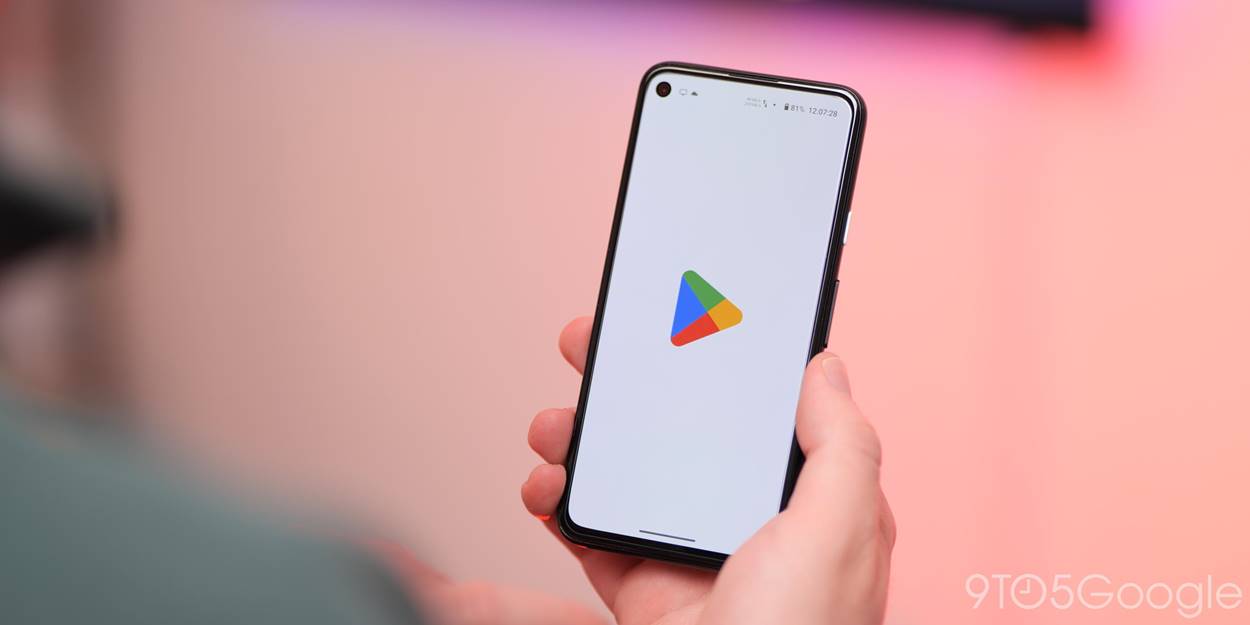
Before the unified Play branding, Google had the Android Market, Google Music, and Google eBookstore. Google decided to merge and rebrand its individual digital offerings into the Play Store in March of 2012.
The Play Store is now the default place to purchase apps, movies & television, music, books, and news subscriptions for all Android devices. The latter four offerings having their individual Android and iOS apps to watch, listen, and read purchased content. Most content can also be accessed through the web.
In April of 2016, the suite of icons were redesigned in a similar style to provide a consistent look across all devices and the web.

When Google unveiled its brand new $9.99/month “All Access” Google Play music streaming service earlier this month at its I/O keynote, we quickly learned that the service would not be coming to iOS initially. Google didn’t get into why, but today developers of the popular gMusic iOS app has unofficially brought support for the service to iPhone and iPad.
The app previously acted as client for songs stored in your Google Music library, but with an update to version 6.0 today the All Access subscription service is now officially available to iOS users. The changelog on iTunes also lists the ability to “Create/play Radio Stations” and “Search, listen, and add music to your library from inside the app.”
As for why Google didn’t make it’s own All Access app for iOS, we’ve heard from sources close to the situation that Google wants to submit an app but is currently in a holding pattern with Apple regarding what they will accept.
Adam Bell (@b3ll), a well-known developer for many software platforms, has figured out a way to route all notifications from an iOS device through Google Glass. The implementation, even in its early stage, seems to work quite well. Bell notes that all notifications, such as iMessages and Tweets automatically are shown via the Google Glass interface. Video and more details below:
The app’s UI has been overhauled and now displays your Drive files in a familiar grid style view:
You can swipe between files to see large previews that let you quickly review and discover the information you’re looking for. And if you want to keep some Drive files on your Android device, you’ll now be able to “download a copy” from the actions menu inside settings.
Another big update included in the latest version of Drive for Android is the ability to ‘scan’ and store physical documents as PDFs. The new scan option will allow users to snap photos of documents and save them within Drive as a PDF. Thanks to Optical Character Recognition, you’ll also be able to search for the scanned docs using keywords.
The update includes a number of other improvements as well including the ability to download a copy of your files in Drive your device’s local storage, improvements to editing features in Google Sheets, and much more: Expand Expanding Close
The updated app, which should be hitting Google Play some time today, will include a number of new photo editing features including the new Auto Awesome effects, auto backup for photos, and other photo editing tools from Snapseed:
Auto Backup, to safely and privately store your photos as you snap them
Auto Highlight, to browse a selection of top shots from every set of photos you add
Auto Enhance, to make subtle improvements to the people and places in your images, automatically
Auto Awesome, to create fun new versions of your pictures (like animations and panoramas) based on the photos in your library
The updated Google+ for Android app will also offer improved location sharing with a new Locations section that lets you view your friends’ current locations on a map.
Lastly, after updating you’ll have the ability to access Google’s new intelligent related hashtags feature:
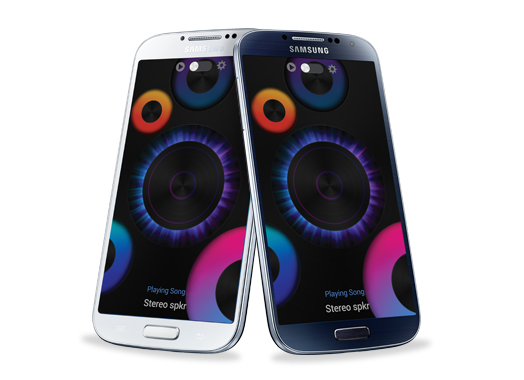
Samsung has proven almost effortlessly that the 5-inch smartphone has its place in the hands of the masses as it is on track to selling 10 million handsets in its first month, The Korea Times reports.
The company has plenty of room for sales to exponentially grow upward, possibly past their own already high expectations, as the smartphone that has taken the Android world by storm has yet to actually launch on Verizon in the States.
Samsung’s co-CEO Shin John-Kyun says the company expects the Galaxy S4 to be the fastest selling smartphone in the company’s history.
“We are confident that we will pass more than 10 million sales of the S4 next week. It is selling much faster than the previous model S3,” Samsung Electronics co-CEO Shin Jong-Kyun told reporters at an industry forum in Seoul, Thursday.
Samsung has received criticism for the amount of storage its flagship Galaxy S4 smartphone allows users to access out of the box, but CNET reports that Samsung may be considering ways it could optimize the operating system and free up more space for users.
Samsung’s Galaxy S4 smartphone runs a custom variant of Android, which allows the company to include features not on other Android phones including Google’s own Nexus phones, but the feature-heavy OS comes at the cost of using half the capacity on a 16GB device.
Following its I/O keynote address today, Google just announced on its commerce blog that it will soon be integrating Google Wallet features into Gmail to allow users to send and receive money. The feature will be available to those with a Google Wallet account and will initially be available to users 18 and older in the US:
Google Wallet is now integrated with Gmail, so you can quickly and securely send money to friends and family directly within Gmail — even if they don’t have a Gmail address. It’s free to send money if your bank account is linked to Google Wallet or using your Google Wallet balance, and low fees apply to send money using your linked credit or debit card.
Google will be adding a new $ icon next to the paperclip icon for attachements that will allow users to “attach money” to messages in Gmail by simply entering the amount and clicking send.
Google noted that the feature will first only be available on the desktop, but that users can also send money through wallet.google.com on mobile devices.
Look for the feature to start rolling out in the coming weeks but earlier access will be granted to those that receive money from others using the feature. You can learn more about sending money with Gmail here.
Google today announced today that Google’s new hangouts service/experience would be available in Gmail:
What does this mean for your Gmail? You now have the option to switch from the current version of chat to Hangouts. Simply click “Try it out” next to your chat list to switch to Hangouts and give your chat an instant facelift (literally!). You’ll now see the profile photos in the order of your most recent conversations. With Hangouts, you’ll also be able to quickly send messages, have video calls with up to ten people at once, and share photos. You can start a conversation with just one friend or even a whole group.
Google today announced that it is revamping the Google voice search feature available in Chrome. While users have always been able to search with their voice through Chrome, Google is attempting to make the service work more like it does through Google Search apps and Google Now on mobile devices.
Chrome will now include “conversational search” with a brand new interface that doesn’t require users to click in order to search with their voice. Like on mobile devices with Google Now, users will now be able to simple say “Google” in order to activate voice search.
Today, we previewed what this conversational experience will look like in Chrome on your desktops and laptops. Soon, you’ll be able to just say, hands-free, “OK Google, will it be sunny in Santa Cruz this weekend?” and get a spoken answer. Then, you’ll be able to continue the conversation and just follow up with “how far is it from here?” if you care about the drive or “how about Monterey?” if you want to check weather somewhere else, and get Google to tell you the answer.
The new interface, as pictured above from Google’s demo of the feature, is much like the voice search interface for Google Now on Android devices.
While not a full blown Google Now experience yet, the feature will allow users to pull up flight information, email, calendar entries and more by taking advantage of Gmail field trial features that some users have already opted in to try.
The new feature will be coming to Macs and PCs through Chrome soon.
Google also briefly showed off some new content coming to Google Now including new cards for Reminders, Music Albums, TV Shows, Books, Public Transit, and Video games rolling out today: Expand Expanding Close
Some pretty incredible new features of Google+ Photos today that will probably be burying Picasa once and for all. Using their algorithms, they will enhance and help sort photos saving time and energy with the net result being incredible photo albums.
Google just announced its much rumored new music service that it is calling Google Play Music “All Access” live on stage at its Google I/O event keynote presentation.
Google execs focused on showing off curated playlists but also made a note of pointing out a “radio” feature that will automatically create an endless radio station based on the song you’re currently listening to. The service will also allow users to search for a particular song or view the “playlist” of a radio station to remove unwanted songs.
The service also includes a feature called “Listen Now” that will provide quick access to recently listened to songs, customized radio stations based on your preferences, and recommendations for new releases from artists you like.
The service will be available on the web, tablets, and phones and cost users $9.99 per month with a 30 day free trial in the US. Those that sign up before the end of June will be able to get the subscription for just $7.99/month and Google said the service will land in other countries soon.
Google today announced new features coming to the Google Play Developer Console that will make it easier for developers to track and optimize apps across markets.
Perhaps one of the biggest features that will soon be available to developers is the ability to manage beta testing and staged rollouts right from within the Developers Console. The tool will allow developers to select a percentage of users for a stage rollout and easily beta test their apps among small amounts of users.
Among the new features, Google will be rolling out a new APK translation feature built into the console that allows developers to purchase translations through various providers directly through the console.
Other features headed to the developer console include optimization tips, referral tracking, and detailed revenue graphs. Check out a full gallery of the new features below: Expand Expanding Close
We knew from leaks in the weeks leading up to I/O that Google was planning some gaming related announcements and today the company has officially announced the service in a press release ahead of its Google I/O keynote taking place now. Not only will the service allow Android developers to build in real-time multiplayer, social features, achievements, and leaderboards while storing game saves and settings in the cloud, the SDK for Google Play game services will also be available to iOS and web developers.
Google noted a few titles for Android have already been updated with the feature including World of Goo, Super Stickman Golf 2, Beach Buggy Blitz, Kingdom Rush, Eternity Warriors 2, and Osmos.
Not surprisingly, the cross-platform gaming service will also build in Google+ integration to track high scores, achievements and more:
-Achievements that increase engagement and promote different styles of play.
-Social and public leaderboards that seamlessly use Google+ circles to track high scores across friends and across the world.
-Cloud saves that provide a simple and streamlined storage API to store game saves and settings. Now players never have to replay Level 1 again.
-Real-time multiplayer for easy addition of cooperative or competitive game play on Android devices. Using G+ Circles a game can have up to 4 simultaneous friends or auto-matched players in a game session together with support for additional players coming soon.
Android Police’s Ron Amadeo has the details on the new syncing, matchmaking, notifications, game invites, achievements, leaderboards, and integration with other Google services that are inside the new Gaming APK that is being rolled out to devices.
Fresh out of Google HQ, we’ve managed to score a copy of the newGoogle Play Services v3.1.36, which is very slowly rolling out to devices right now. For comparison, the current Play Services that most people have is v3.0.27. 3.1 is a massive update – the strings file, for instance, has more than doubled from 300 to 700 entries. This is how Google is pushing out all the shared files for Google Play Games.
To make a long story short, there is a lot of new stuff here and most of it has ties to Google Plus. Shocking, I know.
While there might not be much information surrounding Google’s recent hire of Noah Falstein, the company’s decision to pick up the game design veteran as its “Chief Game Designer” certainly gives the impression Google has something big planned in the way of first party titles. TechCrunch first spotted the job title on Noah’s LinkedIn page and notes that an earlier cache of the page shows his new gig at Google used to be listed as “Chief Game Designer at Android Play Studio.” That’s a pretty good indication that whatever Falstein is working on is likely Android related.
Google of course has its feet into gaming through Google Play and Chrome apps, but it has not been active in developing its own titles for Android or Chrome OS. Falstein has worked as a game designer and producer at a number of studios over the years including LucasARTS Entertainment, DreamWorks Interactive, and the 3DO Company. More recently he has been active in developing the concept of serious games. Expand Expanding Close
Instagram announced today that it is updating its iOS and Android app with a new feature dubbed ‘Photos of You’ making it easier to view and be notified of photos you care about most. The feature will make it easier for users uploading images to add mentions of people or things and also adds a new “Photos of You” section on your profile where tagged photos will gather:
When you upload a photo to Instagram, you’re now able to add the people and things in the photo as easily as you add a location and hashtags. When someone adds you to a photo, you’ll receive a notification and the photo will appear in your “Photos of You” – the new section on your profile where you can curate all of the photos you’ve been added to. Want to make sure you like the photo first? No problem: you can easily adjust your settings so nothing appears on your profile until you approve it.
The feature will be in a sort of beta mode until May 16th at which time the Photos of You section will become visible on users’ public profiles.
Version 3.5 of Instagram with the new Photos of You feature should be hitting Google Play any minute.
You can check out the feature via profiles of a few Instagram employees already using Photos of You:
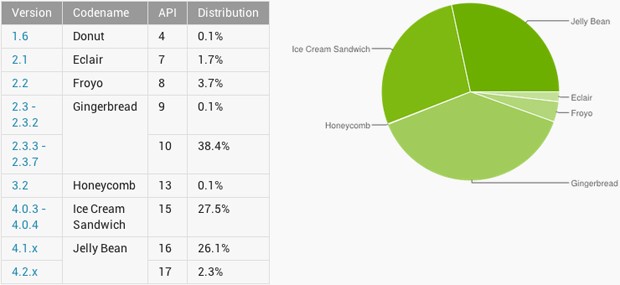
Jelly Bean (Android 4.1 on) has overtaken Ice Cream Sandwich (4.0.x) for the first time, with 28.4 percent of active Android devices now using it against 27.5 percent for ICS … Expand Expanding Close
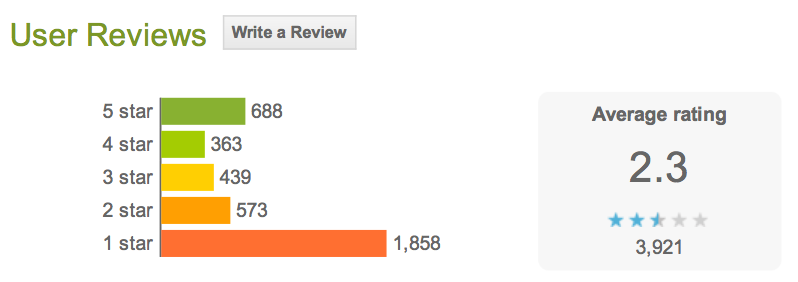
Facebook Home doesn’t seem to have wowed early adopters, with TNW pointing to the fact that by far the most common rating of the app in user reviews on Google Play is just one star out of five … Expand Expanding Close
Facebook Home is the mobile experience that puts your friends at the heart of your phone. From the moment you turn it on, you see a steady stream of friends’ posts and photos on your home screen. Upfront notifications and quick access to your essentials mean you’ll never miss a moment. And when you download Facebook Messenger, you can keep chatting with friends when you’re using other apps.
In addition to the new HTC First, Facebook Home is currently supported on the HTC One X, One X+, Samsung Galaxy S III, Galaxy Note II, and eventually the HTC One and the Galaxy S4.
We’ve written about the Burner iOS app from Ad Hoc Labs in the past on our sister site 9to5Mac– an app that received a lot of attention for its ability to provide temporary numbers for receiving SMS and calls on the iPhone. Today the developers are announcing a major update to the app that introduces a number of new features such a referral program and custom voicemail messages alongside the launch of the Android version of Burner. While temporary burner numbers aren’t free, Ad Hoc Labs is also dropping the $1.99 price tag and making Burner available as a free download starting today.
If you don’t know by now, since early February Microsoft has been running its “Scroogled” smear campaign spending 7 figures on a series of print and online ads attacking various Google services. The ads originally focused on Gmail and how Google displays ads based on the content of user’s emails, but Microsoft’s latest Scroogled ad (above) takes on another Google app– Google Play.
The ad is currently featured on the front page of Microsoft’s Scroogled website and features a warning that Google passes off personal information about users to app makers without consent from users:
When you buy an Android app from the Google app store, they give the app maker your full name, email address and the neighborhood where you live. This occurs without clear warning every single time you buy an app. If you can’t trust Google’s app store, how can you trust them for anything?
We expect Google will be issuing a response to Microsoft’s claims shortly. Another Scroogled ad claiming Google Play sends personal data to app makers below: Expand Expanding Close
Facebook CEO Mark Zuckerberg is live on stage in Menlo Park, Calif., and he just unveiled his company’s new home on Android: called “Home”.
Facebook clarified that it’s not building a phone directly, nor is it building an operating system, instead the company unveiled “Home”. Home is for Android devices, and it is literally the home screen and “soul of your phone,” as Zuckerberg explained. Home is also “family of apps.”
9to5Google posted the first look at “Home” yesterday, but Facebook just gave a quick run down as to what the interface can really do. For instance: Cover feed, a window that replaces the lock screen and home screen, allows users to navigate by flipping through, double tapping, etc.
Users can double-tap to “Like” a post and comment right from the home screen, and they can tap their own face and swipe to get to apps. Users can also swipe up to see their favorite apps in the launcher. There’s even a screen containing all apps, so they can drag their favorite apps to the launcher. Meanwhile, notifications come from people and not apps. Each notification has a person’s face, and users can collect all notifications in a stack and either swipe or save them.
Facebook also announced a new messaging service called “Chat heads” that works with both Facebook messages and SMS. A chat head appears with in the upper right, where users can tap on them, move them, or stack them. Tapping will bring up messages.
Facebook will launch Home via Google Play on April 12, with download availability coming for tablets in a few months. Facebook will maintain Home “just like the regular Facebook app,” and it promises to issue updates at least once a month with new features.
Only a few devices are ready for launch, including: the HTC One X, One X+, Samsung Galaxy S III, Galaxy Note II, and eventually the HTC One and the Galaxy S4. There’s even a “Facebook Home Program” for phone manufacturers, and HTC, AT&T, Samsung, Sony, etc., have all signed up.
Zuckerberg just handed the stage over to HTC executives to unveil the first device that will officially run the platform— the HTC First. More details on Home are in the press release and videos below.
Following releasing the features to Beta channel users, Google announced today that it has started rolling out an update (26.0.1410.58) to all Chrome for Android users. It includes the ability to access saved password and autofill entries.
Users logged into both Chrome on the desktop and Android will now be able to get access to saved autofill entries and passwords when using the Android app:
To try it out, make sure you’re signed in to Chrome on both your desktop and mobile device, and let sync take care of the rest.
Password Sync
Autofill Sync
Fixed issue where blank page would be loaded rather than URL
Performance and stability improvements
The updated Chrome app should be available through Google Play soon, but Google noted it could take a couple of days for the feature to roll out to everybody.
The two most popular non-game apps downloaded from Apple’s iOS App Store so far this year were both Google ones: YouTube and Google Maps, according to data from App Annie (via The Next Web).
Google Maps was originally installed as standard on iPhones and iPads until Apple struck out on its own with the rather ill-fated Apple Maps. Though Apple has since fixed many of the embarrassing errors in the launch version, demand for Google’s version has seemingly increased rather than decreased.
In an ironic turnabout, Google lost the top slot on its own Google Play store to Facebook.