While some of us have been able to get Samsung’s new Gear fitness tracking wearables working with non-Samsung Galaxy devices, Samsung is still only officially supporting 20 Galaxy devices after first launching the wearables with only compatibility for its flagship devices. Samsung today provided details on the exact lineup of compatible devices, which as of yesterday includes 12 Galaxy smartphones and 8 tablets.
As of yesterday, the devices you see in the images above are all compatible with the Samsung Gear 2, Gear 2 Neo, and Gear Fit. Those are the devices that are officially supported through the ‘Gear Manager’ or ‘Gear Fit Manager’ apps, but we managed to get the Gear Fit working with the new HTC One M8.
Google has released KitKat for Glass, following the announcement of the update yesterday. Included in this update are various tweaks to improve battery life and performance, as well as various new features. Notably, Google removed video calls in this update, though other additions to Hangouts were made, such as the ability to send photos.
The KitKat update — known as XE 16 — requires XE 12.1 to be installed, so you’ll have to install both to get the sweet KitKat features. The update rolls out even as Google today offered Glass to anyone interested in shelling out $1,500.
The consumer version of Glass is expected to be released later this year, and the KitKat update is a major step towards bringing the platform in line with Google’s Android efforts. Further announcements are expected at Google I/O 2014.
Google has officially announced via Google+ that Glass will be receiving KitKat later this week. Google is promising improved battery life and enhanced reliability, which will be welcome news to Explorers. Additionally, this update supposedly makes Glass easier to update in the future, which should help the device keep up-to-date with Android releases. Besides these under-the-hood enhancements, Google is adding various new features to the platform in this XE16 KitKat update. Expand Expanding Close
Carrier-specific software updates are typically boring, but when a Nexus device is involved, it’s definitely worth a quick look. Today, Sprint is rolling out a new software bump for its version of the Nexus 5 and along with its share of generic fixes, the update enables Sprint Spark support for Bands 26 and 41. For those of you who are unfamiliar with Spark, it’s the carrier’s latest take on mobile broadband and is capable of data speeds of 50-60Mbps.
Google continued its April Fools tradition with a long list of pranks yesterday, one of which included announcing a new “Shelfies” feature for Gmail that let users snap and share selfies to use as background in Gmail. The feature, which was completely functional within Gmail yesterday, was clearly just a bit of fun for April Fools day, but Google announced today that it will actually stick around as a new custom theme sharing feature.
While Gmail has allowed users to create custom themes since 2012, it will now provide an option to “Share your theme” within settings. The Gmail team will also be sharing some of its favorite themes shared by the community through its Google+ page. Here’s how it works: Expand Expanding Close
According to a report from Engadget, Google is apparently in the process of testing an updated version of the Android camera app that includes a revamped UI and few new features. The report claims that the new camera app would include “a background-blurring effect for portrait shots,” as well as high-resolution Photo Sphere and panorama modes, and a lens blur mode that offers a shallower depth of field. There are also apparently fixes in the works for existing issues with the app: Expand Expanding Close
This season will be the first that Major League Baseball uses a new expanded instant replay system that it first announced back in January. Now, the MLB At Bat app for Android devices has been updated with support for the 2014 season and the new replay system. That means that users of the app will be able to view “every decisive instant replay video clip and review explanation,” the same footage the umpires review, through the app’s Gameday feature.
A little more on the new replay system from the MLB’s announcement: Expand Expanding Close
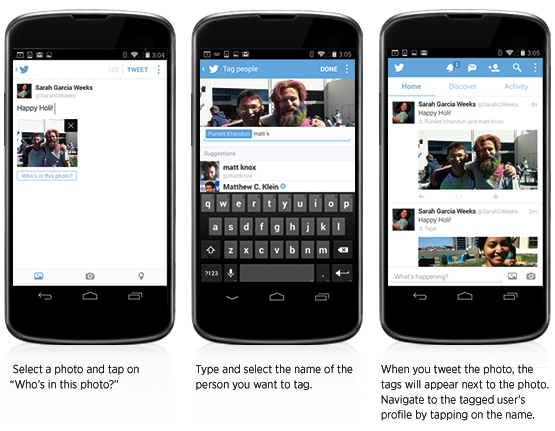
Twitter has announced a few new features for its Android app today. Users with the latest update to the Twitter for Android app will soon see the ability to select up to four photos at a time to upload when composing a tweet. These photos will be displayed as a collage on the tweet’s detail screen.
Along with the multi-photo support, users are also now able to tag other people in their photos. A new “who’s in these photos?” button allows you to add the username of other people in the picture. Photo tags won’t take up any characters in the body of the tweet, so the full character count will be available for composing a message.
Roku this afternoon has released an update for its Android (and iOS) companion remote app. The update includes quite a few tweaks and new features, and bumps the app to version 3.0. First off, the app as new, much cleaner design that Roku says is significantly faster and more easy to use. The update also now lets you control any Roku on your home WiFi network, much like Apple’s Remote app on iOS. You previously had to login into the Roku account associated with each set-top box to control it.
One of the coolest new features is the ability to search within the app for a movie, show, actor, or director. The Roku app will search within all channels and show you where you can watch the content you searched for. The new search feature for now is only supported “on US-based Roku players firmware 5.4 or later” and on all hardware except the Roku 2450x or 2500x.
All New Visual Design – The UI features a new, modern look.
Search on your mobile device – Enter a movie, show, actor, or director, to explore and see what’s available. Choose from the available services and jump right into the Channel, ready to watch.
Control any Roku player on your network – Use the remote control, or play photos, music, or video with Play on Roku.
Bug fixes and other enhancements.
The Roku app for Android is available on the Play Store now.
It looks like Android 4.4.3 will be starting to roll out to devices running KitKat soon, according to Phandroid. The update is said to include a fix for a camera-related bug that can cause the phone’s battery to drain faster than usual. The new version reportedly has a build number of KTU72B.
We’ve also spotted an increasing number of devices running 4.4.3 visiting 9to5Google over the past few days, so it’s safe to say this update is coming quite soon.
Following a minor update to the Search app on Android, Google has just released a significant update to its Keyboard app. The update bumps the app all the way to version 3.0.19373 from version 2.0. The update introduces a few minor interface tweaks. For one, there is now an “ABC” button to easily switch between the emoji keyboard and letter keyboard. There’s also a new settings icon when you long press the microphone button.
The biggest addition, however, is new Personalized Suggestions. This is a new feature that tracks what you type in Google’s suite of apps, such as Gmail, Hangouts, and Search. Google will then use this data to offer improved suggestions and auto-correct within its apps. For obvious security reasons, Google has offered the ability to turn this feature off, by heading into the keyboard’s settings menu and unchecking the box next to “Personalized Suggestions.”
As with most updates nowadays, the Keyboard update is a staged rollout, so it may take a few days to hit your device. Keep your eyes on the Play Store.
Skype has today had updated its Android app with a handful of new features and bug fixes. In a blog post, Skype explains that it was been working diligently over the last year to greatly improve the battery with the app, and that today’s update finally does so. The update introduces “aggressive battery savings” that will make the app have little to no effect on your device’s battery life.
The company says that it in order to improve battery life, it had to completely transform the way the Skype technology works and that this transformation is not entirely complete yet. One instance of this is that for time being, Skype has turned off instant notifications of messages in group chats. The company hopes to release another update soon that re-enable them with little battery impact. For now, however, you can enable them by going to Settings > Notifications > and choosing the “Sync group messages in the background” box. Although, this will impact your battery life.
The update also improves stability on KitKat, in addition to fixing audio and video calling on tablets without BlueTooth.
Workaround for the KitKat bug which caused a runaway process when the camera was synced in the background.
Fix for audio and video calling on tablets that do not have Bluetooth.
Now lists your Windows Live Messenger contacts in the Skype (default) view, not just the All contacts view.
The update is available on the Play Store now and bumps the app to version 4.7.
Google today has announced a pair of expansions for its Play Movies and TV app. First off, the app itself has been updated with support for 40 new languages. The update has also added the ability to download movies in either HD or SD, where as downloading was previously only supported in high-definition. The full change log the app update is below:
Support for over 40 new countries
Get your content offline faster – now HD movies and shows may be downloaded in HD or SD.
Improved video streaming performance for select KitKat devices.
Additional app improvements and bugfixes.
Most notably, however, Google has also announced that its Movies service has expanded to 37 new counties. Those counties include:
That is certainly a significant expansion and brings the service to millions of new people. Sadly, TV show availability remains sparse, being available only in Australia, Japan, the United Kingdom, and the United States.
Finally, Google has also expanded its Play Music and Music All Access services to Greece, Norway, Sweden, And Slovakia.
Pebble announced today that it has updated its Pebble app for Android the smartwatch app store feature that it first rolled out for iOS users last month. The app now lets Android users browse and install apps and watch faces for Pebble: Expand Expanding Close
In a string of app updates today, Google has updated the Play Music app with a useful new feature. The app now supports the ability to start radio stations based on playlists, as opposed to just artists or songs. This feature is a very welcomed addition for those who utilize Play Music’s playlist functionality.
This update bumps the app to version 5.4.1413N and should be available via the Play Store now. Google has rolled out a plethora of new features to its Play Music app recently, such as the ability to save radio stations for offline listening and create playlists based off of genres.
Nvidia announced today that it will be releasing a new version of its Tegra Note 7 tablet that will include its i500 LTE model for 4G LTE cellular connectivity. The non-LTE version hasn’t exactly been a big seller, but it’s a welcomed update on a decent 7-inch tablet option that the company is still marketing as “the world’s fastest 7-inch Android tablet.”
The Tegra NOTE 7 serves up a bundle of cutting-edge mobile technologies – including one of the world’s fastest processors, Tegra 4, a superb stylus, exceptional audio, Android 4.4.2 (KitKat), and, of course, great NVIDIA gaming. And that’s at a starting price of just $199. Now, we’re added lightning-fast mobile data to the mix. Tegra NOTE 7 is available with LTE and HSPA+ mobile connectivity, and it can operate on popular carriers across the world.
The new LTE version will arrive in Q2 for $299 and Nvidia is also rolling out KitKat updates to its entire Note 7 family and releasing the tablets in new markets in Western Europe, Brazil, and Ukraine.
After rolling out the update to Android devices last week, Google today updated its Google Wallet app for iOS with the ability to scan physical loyalty cards. Rather than having to type out your account information to join a new program within the app, scanning a physical loyalty card from a supported retailer will auto-populate your info and automate the process.
The updated app also now includes new notifications for nearby retailers related to loyalty programs you’ve joined. If you’ve joined the Walgreens program, for example, you’ll get notifications reminding you “to shop and earn rewards” when close to a brick and mortar retail location.
Google is going rolling out a new version of the Google Wallet app for Android this week that will bring a couple of new features including the ability to join loyalty programs by scanning physical cards:
Now adding your loyalty cards is even easier. Just scan the card with the camera in your device, and you’re done! Your loyalty program info will auto-populate, so you can add more and type less.
Google is also including new notifications tied to the loyalty programs that it says will remind you “to shop and earn rewards” when in the proximity of a store for one of the programs you’ve joined.
The update doesn’t appear to have hit Google Play just yet, but should land sometime this week for devices running Android 4.0+.
The YouTube app for iOS has been updated with a new design for iOS 7, including the new keyboard and status bar, and a blurred sidebar design like that found in other apps.
The update also includes improved search results that include videos, playlists, and channels all on one screen. Finally, the new version introduces new settings for closed captioning and subtitles.
Years after Android hit store shelves and even after the lengthy and sometimes arduous update process has been detailed, HTC releases a new infographic taking a look at the whole process from beginning to end.
Besides the updated interface, the app includes support for “I’m feeling lucky” radio stations, the ability to search for music and create stations by genre, and auto-playlists.
Google today officially released its latest update for Google Glass, XE12, alongside the news that its MyGlass for iOS app will arriving later this week. The app briefly made an appearance on the App Store today but was quickly removed. The update also includes a number of new features including enhancements to the Google Play music feature it first started rolling out earlier this month, a new screen lock security feature, improved integration with Hangouts and YouTube, and brand new winking gestures.
For those times you might miss a shot, try capturing the moment with a wink. The Wink feature is a exploratory feature that lets you take a picture with a wink. It’s even faster than the camera button or voice action and it even works when the display is off…Wink is a exploratory feature. To use it, you’ll need a device purchased or swapped after October 28th, 2013. If that’s you, give it a shot and tell us what you think in the Explorers Community.
Also new in the update is a new “Listen” action menu for Google Play Music, new YouTube options, the ability to set up a unique pattern as a screen lock much like on Android, and Hangouts Glassware for sending and receiving video calls. Expand Expanding Close
While the majority of Android users might still be a version or two behind despite some impressive upgrade numbers for KitKat, Google appears to be prepping the first update to KitKat with Android 4.4.1. A look at our analytics shows hits from a number of devices running 4.4.1 originating from Google’s home turf in Santa Clara, California. Above we can see a huge increase in hits from 4.4.1 devices over the last week.
Among the devices are both phones and tablets including the Nexus 4, Nexus 5, and Nexus 7: Expand Expanding Close
We hear a lot about adoption of iOS updates vs the fragmentation that Android users are forced to deal with, but just how far behind are the top Android devices compared to iPhone when it comes to getting support? To answer that question, Fidlee.com has updated a chart that it first put together a couple years back in order to see if things have become any better for Android in recent years. It hasn’t.
In the chart above we see that many once flagship Android devices— the Galaxy Note 2, Galaxy S3, LG G2 etc— have still not received the latest Android 4.4 KitKat update and in some cases are even further behind. Most of the devices on the list have been an upgrade or two behind since launch or not long after. In comparison, only the iPhone 3GS fives years after its release doesn’t support iOS 7. We also get a look at how much longer Apple devices generally stay available for sale and continue receiving support, nearly twice as long as Android in most cases.
Not only did Apple claim iOS 7 was “the fastest software upgrade in history” with more than 200 million devices installing the OS less than a week after launch, but analytics firms tracking adoption also noticed adoption was much higher than previous releases. Currently iOS 7 sits at about 77% of users, according to the latest data from Fiksu’s iOS Usage Monitor. While the chart above is only for devices released last year, things aren’t much better for newer Android devices. In comparison to iOS 7 adoption, Google reports that its latest release, Android 4.4 KitKat, is at just 1.1% weeks into launch. The previous release, Android 4.3, is at just 4.2%, while the majority of users remain on Android 4.1 Jelly Bean first released in July 2012. Currently KitKat is only available for Nexus devices and slowly trickling out to Moto X and Google Play Edition devices.
A couple more charts below from Fidlee showing just how bad things are on Android compared to iOS: Expand Expanding Close









 After rolling out the update to Android devices