update

See All Stories

Report: Google prepping XE10 Glass update to officially enable third-party apps


Site default logo image

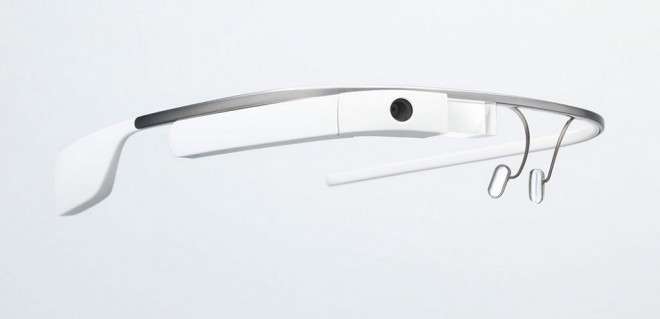
According to a new report from Geek.com, Google is preparing an “XE 10” update for Google Glass next month that will officially enable apps from third-party developers. Details in the report are vague, but the site says Google has been working with devs and providing access to sensors, voice commands, and other features that unofficial third-party apps floating around can’t:

Multiple sources have now confirmed to Geek.com that the update offers developers access to the sensors in Glass for use in motion tracking and development. Developers will also be able to create their own voice commands through Glassware, giving the user the ability to launch the app from the “OK Glass” menu if they so choose.

The site says that Google has been working with developers to ensure Glassware apps will be available at launch, and also says Google will have a launch announcement alongside the XE10 update:
Expand
Expanding
Close

Site default logo image

Google Search for Android updated with improved Google Now cards, related websites based on location, and more

In the continuation of update-everything day, Google has just released an update to its search app for Android. The update adds a handful of new features. For one, the app will now show you recommended websites based on your current location. For example, if Google notices that you are near a restaurant, it may recommend a website with that restaurant’s menu.

Also new are several improvements to Google Now. The sports and flights cards will now update in real-time, whereas they used to update only every 15 minutes. There are also new Smart-TV cards for news and music currently on TV.

The update also adds the ability to automatically tell your friends and family when you are leaving work, based on your GPS data and time. This feature is rolling out gradually, however.

The full change-log follows:

– Related website for current location
– Real-time sports and flight updates, no 15 min delay
– Set reminders from Google searches for album & book releases, tv shows
– Car rental reservations from Gmail
– Event tickets for select websites
– Improved public transit card
– Additional Smart-TV cards for news & music currently on TV
– Ability to tell family & friends when you’ve left work (rolling out gradually)
– Choose calendars and edit reminders

The update is available now on the Play Store.

Site default logo image

AdSense Android app updated w/ resizable widget, translations, improved timezone settings, more

Google has updated its AdSense app for Android with one of the most requested features: a resizable widget that allows you to quickly view your estimate earnings overview from the home screen of your device.

The updated AdSense app also adds a few other new features including improvements for timezone settings, and translations to 24 languages.

A full list of what’s new in version 1.2 is below:

What’s New

v1.2
– Resizable widget showing the estimated earnings overview – our most requested feature!
– AdSense reporting timezone – the figures in the app will now respect your timezone setting, and match the Home tab on the AdSense website
– Lifetime earnings support in all the reports
– Translations to 24 languages
– The notifications counter fix

YouTube 5.0 update begins rolling out to Android devices, features brand new interface, in-app multitasking

Site default logo image

Google has just began rolling out version 5.0.21 of its YouTube app to Android devices (via Android Police). The update is arguably the biggest the app has ever seen and includes a brand new interface, as well as much more. The interface is now entirely based on cards, much like the Google+ app. The slide-out navigation has also been changed, though only slightly. Finally, you can now give videos a thumbs up or thumbs down, or flag it, without having to expand the video description.

Also new is in-app multi-tasking. Now, you can minimize any video to a tiny window in the corner and continue to let it play, even when navigating through other portions of the app. You can bring it back to the forefront by tapping or dragging the window back to the center and dismiss it by swiping away the card. 
Expand
Expanding
Close

Site default logo image

Google Translate for Android updated w/ more languages for camera input translation & handwriting

Google announced today on Google+ that its updating its Google Translate app for Android with additional language support for two features including camera input translation and handwriting.

New languages for camera input translation, which allows users to take translate text capture with the device’s camera, include “Afrikaans, Greek, Hebrew and Serbian.” Google notes that the update brings the total number of supported languages supported for the camera translations feature to 34.

Simply tap the camera button, point at the text you want translated and take the picture, and brush over the text you want with your finger—in an instant you’ll see your translation.

The updated app also includes support handwriting characters in two additional languages: Hindi and Thai. That brings the total number of supported languages to 48.

The new version of Google Translate for Android is available for free on Google Play now.

Google+ Android app adds easy account switching, photos & videos from Drive, & improved location sharing

Site default logo image

A new update for the Google+ Android app rolling out in the coming days will make it easier for users to switch between multiple accounts, improve location sharing controls, and finally get rid of the in-app Messenger to make way for Google’s new Hangouts app.

Google employee Virgil Dobjanschi shared details on the new version of the app, noting that switching accounts will now be as easy as it is with Gmail:

Just like Gmail for Android, you can now switch between multiple Google+ accounts with a couple of taps (vs. signing out and signing in again). And the Google+ pages you manage are likewise in the app menu at all times.

The updated app also brings the ability to view and share photos and videos that are stored in Google Drive, and improved location sharing controls:
Expand
Expanding
Close

Site default logo image

Google investigating “Package File Invalid” error preventing Google Play updates/downloads

It seems an increasing number of users have been experiencing the old “Package File Invalid” error when attempting to update or download apps from Google Play. While it’s not the first time users have experienced the issue, it does appear that more and more users in recent days have been unable to workaround the issue in order to update and download apps. Good news if you’ve been having the problem, AndroidCentral points us to a Google support thread that confirms the company is investigating the errors:

We’ve received reports that some users are getting “Package File Invalid” while trying to download or update apps.

We’re currently investigating a permanent solution, and there are no workarounds at this time.

We’ll continue to update this page with developments, so check back soon.

Twitter for Android updated with login verification improvements, new photo gallery

Site default logo image

Just like it did with its iOS app, Twitter has just released an update to its Android app that adds several new features and enhancements. First off, the login verification process has been improved and made a lot simpler. While SMS verification use to be required, the app now supports login verification from directly within the app. Also new is an improved photo gallery for when you search. You now have the ability to view all photos that relate to a specific search, while before you could only swipe through thumbnails and select images to view full screen.

Here’s what’s new:
Expand
Expanding
Close

Site default logo image

Google TV will support Chromecast in a future update

Sundar Pichai already made it quite clear that Google TV isn’t going anywhere despite its shiny new $35 Chromecast device unveiled during its Android and Chrome event yesterday. However, in case you were wondering whether or not the Chromecast and accompanying SDK would be supported through Google TV devices as well, Googlers have since confirmed that it will indeed support the Chromecast streaming standard in a future update:

With the exciting news about Chromecast we are getting a lot of questions mostly wondering if Google TV is dead.

No, in fact partners are continuing to launch new Google TV-enabled HDTVs and boxes. As we announced at I/O, we are working with partners to bring the latest experience of Android and Chrome to devices later this year. We believe there is ample room for both products to exist and succeed.

Sundar made it quite clear that going forward Google TV and the new Chromecast HDMI stick would be part of one product strategy, so its not surprising Chromecast apps will also be able to stream to Google TVs through the same standard. Chromecast hardware will focus on more casual video streaming on the cheap, while Google TV will continue its mission to bring a full Android experience into the living room.

(via AndroidPolice)

Site default logo image

Twitter for Android update adds new reply composer, ability to share tweets via direct message

Earlier this month, the Android and iOS Twitter clients received an update with a handful of new features, but missing from the Android update was the new reply field that iOS users received. On Wednesday, however, Twitter for Android was updated, making it easy to reply to tweets and share tweets via a direct message.

  • It’s easier to join conversations with a new reply composer
  • The share button now allows you to share a Tweet via direct message

The 4.1.3 update is available on the Play Store now.

Site default logo image

Chrome for iOS adds support for opening links in Google apps, voice & text-to-speech enhancements, fullscreen iPad, & data cost savings

Image (1) chrome-a_512.png for post 72530Google has just issued a big update to its Chrome app for iPhone and iPad that brings new “interoperability with other Google Apps” and a number of other notable features. That means that you’ll now be able to open all links for YouTube, Maps, Google+ and Drive in their native apps instead of in the browser.

The update also brings enhancements to the newly introduced voice search capabilities, including: always visible controls from the toolbar and text-to-speech support for “all variations of English, Spanish, German, Italian, French, Japanese, and Korean.”

Other improvements in today’s update include fullscreen support on iPad, easier access to browser history, and, according to Google, data cost savings:

Reduce data usage and speed up page load times.  View data savings in Bandwidth Management settings. This feature is being rolled out and will be available to all users over time.

Google explained the experimental data cost savings feature in a whitepaper when it was first introduced on Android. Google said its tests showed the feature will reduce data usage by up to 50%:
Expand
Expanding
Close

Chrome Beta for Android updated with speed improvements, WebRTC support

Site default logo image

Google has updated its Chrome Beta Android app today with several small new features. First, the update adds support for WebRTC, which is a web feature that allows for real-time voice and video communications. WebRTC is useful for things like voice calling, video chatting, and peer-to-peer file sharing. The update also improves page loading performance and offers up a handful of bug fixes and general stability improvements.

Full changelog:

  • Support for WebRTC, a web platform feature to enable real-time voice and video communications
  • Faster page loads
  • Lots of under the hood changes for stability and performance

Download it on the Play Store now.

Vine for Android updated with new capture widget, channels, and ability to revine posts

Site default logo image

Vine for Android has just been updated with several new features, which are very similar to what iOS users received last week. The feature that differentiates the Android update from the iOS update, however, is a new capture widget that you can add to your home screen. From there, simply tap it to go right into the recording interface.

In addition to the capture widget, the update also adds the ability to share or “revine” another user’s post, as well as new tools for recording, including a grid, focus enhancements, and more. Finally, Vine for Android also adds channel support, which means that users can now browse specific topics of interest from the Explore screen, such as Sports, Family, Dogs, Cats, and more.

This update to Vine is our biggest yet!

  • CHANNELS
  • Browse or submit your posts to 15 new channels
  • REVINING
  • Share your favorite posts with all your followers on Vine in one tap
  • FAST CAPTURE WIDGET
  • Instantly jump to the Vine camera right from your home screen
  • NEW CAPTURE TOOLS
  • Shoot with style using the new focus, grid, and ghost tools

The update is available in the Play Store now. 
Expand
Expanding
Close

Google Maps update adds new Latitude button, ability to save maps offline

Site default logo image

Earlier this week Google rolled out an update to its Maps app with a new interface and several new features, but the update also removed a several key things, including the ability to save maps offline and the popular Latitude tracking tool. In a post on Google+ this morning, however, the Maps team announced that an update will begin rolling out to Maps users today that adds those two features back to the app.

We’ve been happy to hear so many of you enjoying the interface and features of the new Google Maps app for Android, but we know some of you are missing an easy way to access maps offline. That’s why our engineering team has been working around the clock to add a “Make this map area available offline” card below the search box for easier access. And, if you still want some #thumbercise, typing “ok maps” will work too!

With this update, we’ve also added a “Where’s Latitude?” link at the bottom of the side menu which provides more information about the future of location sharing.

The update will begin rolling out to users today, so be sure to keep an eye on the Play Store for it to hit your device.
Expand
Expanding
Close

Redesigned Google Maps for Android begins rolling out to Android 4.0.3+ users

Site default logo image

As previewed at Google I/O 2013 in May, Google has just begun rolling out the latest version of Google Maps for Android to Android 4.0.3+ users. The update, which is available now for download at Google Play, will provide users with a new design (both on tablets and smartphones), live traffic updates, improved navigation, incident reports, and a new Explore function. This Explore feature is a “new way to browse and discover popular local places to eat, drink, shop, play and sleep,” per Google’s release notes. While the update is out today, the new features will arrive gradually for end-users. Phandroid provides a link for side loading on the complete update today.


Expand
Expanding
Close

Site default logo image

Tumblr for Android updated with new discovery options

Hot on the heels of an iOS update this morning, Tumblr for Android has been updated with some new search and discovery features. You now have the ability to search for tags and blogs, as well as explore trending tags and blogs, and follow recommended blogs. Various bugs have been fixed, as well.

  • Search tags and blogs
  • Explore trending tags and blogs
  • Follow recommended blogs for any tag you search

The update is available now on Google Play.

Site default logo image

YouTube Capture adds support for accounts with multiple channels, performance improvements

Google updated its YouTube Capture app for iPhone and iPad today with support for YouTube account users with multiple channels and a couple other performance enhancements.

Also included in version 1.5 is improved uploading on devices still running iOS 5.

A full list of what’s new below:

What’s New in Version 1.5

– Support for YouTube accounts with multiple channels.
– Better uploading on iOS 5 devices.
– General improvements.

Twitter for Android updated with direct message syncing, more

Site default logo image

Alongside the iOS and Mac update that rolled out earlier this afternoon, Twitter for Android has also been updated with several new features. Most notably, direct messages now sync across all of Twitter’s official apps (Mac, iPad, Web, Tweetdeck, mobile web, Android). Before today, if you read a direct message on your desktop, it would still be marked as unread on your phone.

  • Now when you read a Direct message it will be marked as read in all of your official Twitter apps (including twitter.com, mobile.twitter.com, Twitter for Mac, Twitter for iPad and TweetDeck) and vice versa.
  • As you search you can now see user avatars and clear past searches from the dropdown menu
  • Richer search results indicate when there are new Tweets for your query and show account results with bios and social context

Missing from this update is the new reply field that iOS devices got, but hopefully that feature comes sooner rather than later. 
Expand
Expanding
Close

Google Glass XE7 update includes hidden music player, app store, lock screen, and more

Site default logo image

Earlier this week we reported on the XE7 update rolling out to Google Glass, which included features such as a web browser and improved voice actions, but the update also includes a few more unannounced lab features (via SelfScreens). As first noticed by +Andrew Wiggin on Google+, the XE7 update includes evidence of a music player, video player, Glass app store, a volume screen, and more.

The music player appears to be dedicated to showing what’s “Now Playing,” and given the lack of storage on Glass, it seems like it will be able to interface with an external iPhone or Android device. The update also includes a handful of labs features, which are features not yet meant for primetime and for developers to play with.

First off, there’s a labs feature entitled “VIDEO_PLAYER,” though no one has been able to figure out how it works just yet. It could be that it’s simply a way to playback videos taken with the device, but there’s always the chance of Glass being able to stream video from your phone. There is also a new Volume card that simply allows you to change the volume of your device .
Expand
Expanding
Close

Update rolling out to Google Glass with more voice commands, web browsing

Site default logo image

Via the official Project Glass page on Google+, Google has announced a major software update coming soon to Glass. The update includes things such as more voice commands, improved web browsing, new ways to connect with family and friends, and more.

First off, a host of new voice commands will be available with this update. If you get a text, you can now ask Glass to read it to you by saying  “ok glass, read aloud” or if someone calls you, simply say “ok glass, answer call.” Finally, you can now share pictures right away by saying “ok glass, share with [name].”
Expand
Expanding
Close

Skype passes 100M installs on Android, celebrates by updating app with all-new design

Site default logo image

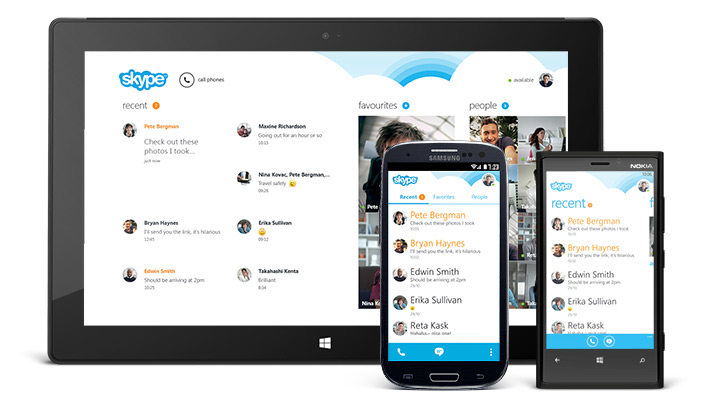
Skype on Monday announced that its Android app has been installed more than 100 million times, and to celebrate, it is pushing out a major update. The 4.0 update for Skype adds a totally new and redesigned interface that is focused on putting conversations first. In addition to the visual changes, the app has been “rebuilt from the ground up” to be faster and more reliable.

We’ve completely redesigned Skype for Android to be faster and easier – especially when you’re trying to fire off a quick message. Everything is at your fingertips. As soon as you open the app, you’ll notice the clean new look listing your recent conversations – just tap on one to catch up and reply. When you tap or swipe over to the Contacts or Favorites tabs, tapping on a person brings you right into a messaging window so you can start a conversation. And from there video calls, voice calls and everything else are just one tap away.


Expand
Expanding
Close

Microsoft releases major update for OneNote app on Android

Site default logo image

http://www.youtube.com/watch?feature=player_embedded&v=vZviDTuaVlA

Mircosoft has just announced a major update to its OneNote app on Android. In a post on the official Office blog, the company announced version two of the app that includes a host of new features.

First off, the update adds a much more rich editing experience. Now, files and formatting look the same across all devices. This includes things such as text, graphs, tables, borders, and more. If you draw on a note with a Windows tablet, the markings are then visible on your other devices, as well. All devices now support the ability to sync notebooks with Office 365 and SharePoint, as well as the ability to share files with other Office users. OneNote also now lets multiple people edit a note at the same time, much like Google Drive.


Expand
Expanding
Close

Site default logo image

Vine for Android adds support for front-facing camera, new upload manager, & speed improvements

Twitter’s Vine has pushed out an update for its Android app today that brings the video app to parity with its iOS counterpart. The update adds front-facing camera support as well as a new upload manager for all compatible devices.

In addition to these two new features, Vine for Android has also gotten some all-around speed improvements and support for more Android devices, although Twitter wouldn’t explicitly specify which ones.

The full Vine 1.2.0 for Android changelog is as follows:

  • Front-facing camera.
  • New upload manager for unsubmitted posts.
  • Improvements to settings.
  • Improvements to camera loading time and support for more devices.
  • Speed improvements overall.
  • Bug fixes and UI improvements.

You can download the new version now directly from Google Play.