Author

Avatar for Jordan Kahn

Jordan Kahn

jordankahn

Senior Editor

9to5Mac / 9to5Google / 9to5Toys / Electrek.co

Jordan writes about all things Apple as Senior Editor of 9to5Mac. He covers Google for 9to5Google.com, the best gadgets and deals on 9to5Toys.com, and delivers a weekly roundup of EV and solar news on Electrek.co. Sometimes he makes weird electronic music as one half of Makamachine.

Contact Jordan with news tips and long-winded complaints:  

Connect with Jordan Kahn

Site default logo image

Just in time for the holidays: Google Shopping Paid Listing Ads in 8 more countries

Google-Shopping

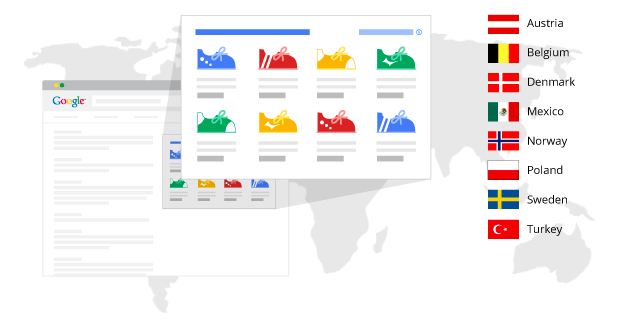
Google just announced that it’s rolling out Google Shopping– a.k.a paid product listing ads that appear in search results– in eight new countries. Starting today, Google users in Austria, Belgium, Denmark, Mexico, Norway, Poland, Sweden and Turkey will be begin seeing what Google says are highly relevant ads that also include “rich product information” like images and pricing.

The Product Listing Ads appear in Google Search results as ‘Sponsored’ listings for queries that include “commercial intent.” But Google notes that it will also show product listings when it has “enough relevant products to match that user’s query.”

Users in the countries mentioned above should begin seeing the ads above text ads on the right side of search results starting today.

Glass XE11 update adds commands to search Google Calendar, get directions home, & more

Site default logo image

Google today announced its XE11 update for Google Glass and highlighted a few of the new features on its Google+ page for the wearable. New for Google Glass is the ability to search Google Calendar with commands like “my agenda” and “what am I doing in November?” Google noted that “Calendar search works for Google Calendar users with Gmail and private search enabled.” 

The update also includes a highly requested feature from users in the XE11 update: the ability to get directions home or to work with voice commands:

It’s even easier to find your way home. Tell Google Maps where you live and work and you can refer to their locations by “home” or “work” on Glass. It’s part of Google’s personalized search so when you ask Glass for directions home, it’ll know what you mean. To get started, insert your home and work address in Google Maps or Google Now (iOS instructions) and then try it out on Glass. From the home screen, say “ok glass, get directions to home.

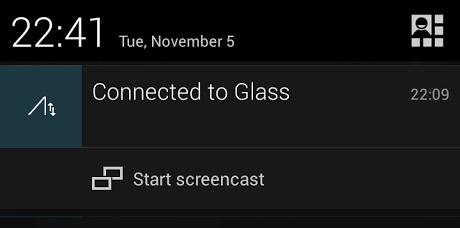
Glass-screencast-shortcutNew Glass users will notice a redesigned Glass setup tutorial in XE11 (pictured above) that Google says will show users how to swipe and connect Glass to the companion smartphone app. You’ll also now see a “Start screencast” shortcut in the notification drawer of your connected Android device making it easier to quickly start screencasting Glass to your smartphone.

Lastly, Google has removed a feature from Glass with XE11. You’ll no longer be able to activate Google Search with a long press of the touchpad because many users were apparently triggering it accidentally:
Expand
Expanding
Close

AT&T to preload ‘Lookout’ antivirus and security app on all compatible Android devices

Site default logo image

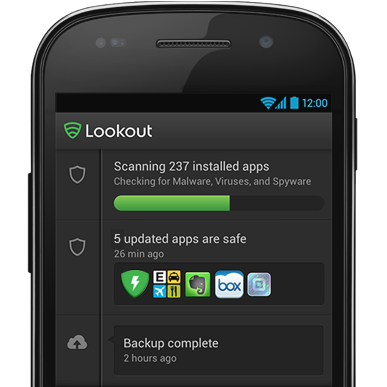
personal-android-phoneLookout, a popular antivirus and security app for Android devices, today announced that it has struck a deal with AT&T to include the app preloaded on all of the carrier’s Android devices starting with the Samsung Galaxy Note 3. Yep, that means you’ll have yet another preloaded app to put up with on your new Android device, and if AT&T’s Lookout app is anything like T-Mob, you won’t be able to easily delete it from your device:

Moving forward, the Lookout app will be installed on all compatible AT&T Android devices (currently installed on the Samsung Note 3). With Lookout, AT&T customers can have the confidence to use their phone to its fullest capability, and rest assured knowing they are protected no matter what they do. Whether its helping to find a lost/stolen phone, managing phone security or backing up precious data, we’re helping AT&T customers with a safer, more secure, mobile experience.

This marks the third of 4 major US carriers to adopt the Lookout antivirus and security app. Sprint already preloads it on some of its Android devices as part of its Sprint Default Configuration and some T-Mobile devices, like the new LG G2, also have the Lookout app preloaded. 
Expand
Expanding
Close

Google Maps desktop app adds 3D ‘Earth Tours’, real time traffic reports, & StreetView improvements

Site default logo image

Find imagery coverage with Pegman

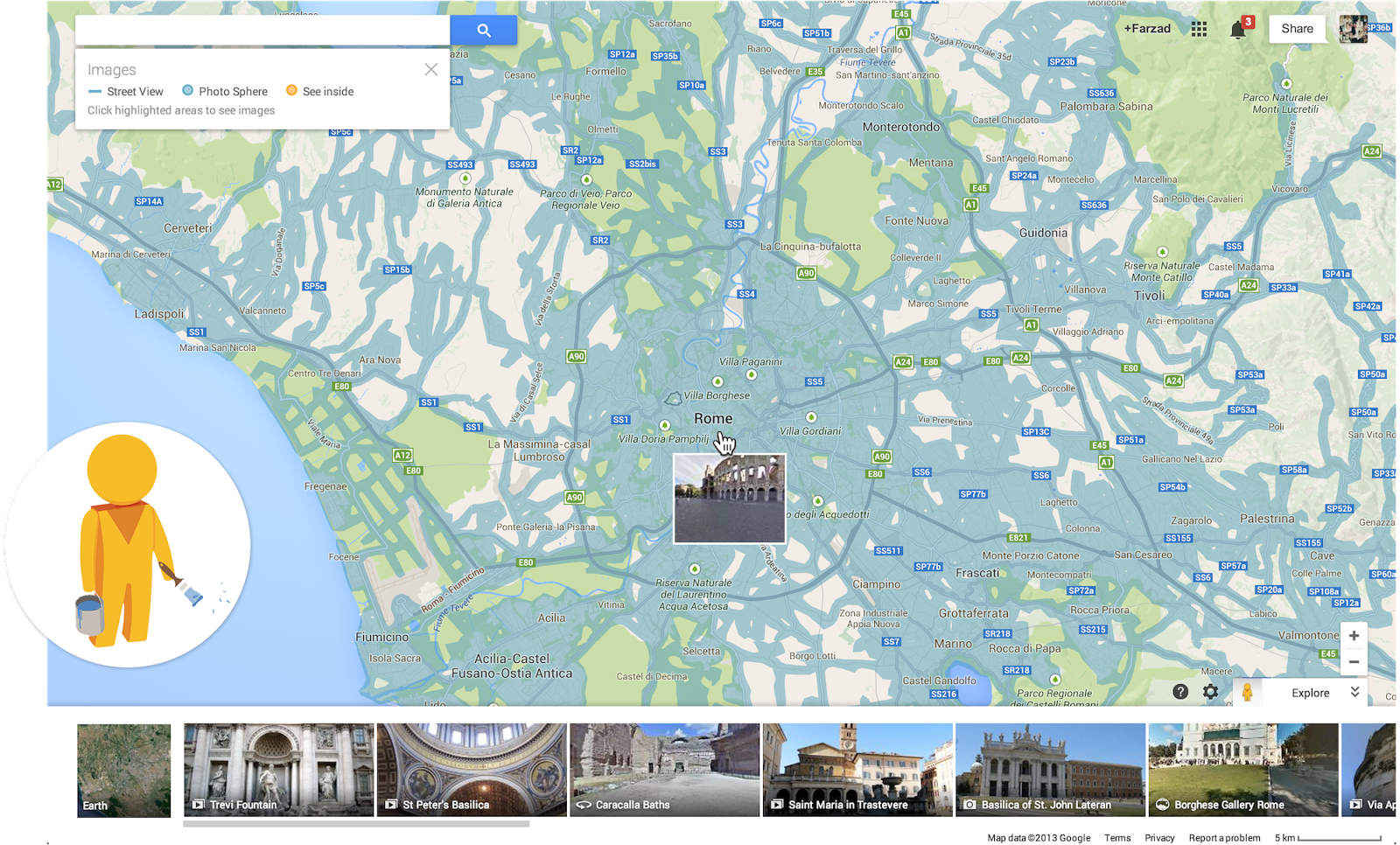
Google just announced a few updates rolling out to the new Google Maps desktop app today. Users will now be able to highlight StreetView imagery, user-uploaded photos, and PhotoSpheres on the map by clicking a new pegman icon in the lower right corner of their screen (pictured above). StreetView imagery will be highlighted in light blue, Photo Spheres as darker blue circles, and indoor imagery as yellow circles.

In addition, the update brings a touch of Google Earth over to the Maps desktop app with new bird’s-eye view 3D Earth Tours for all WebGL-enabled browsers.

Explore beautiful, 3D imagery of buildings and terrain for thousands of locations from above with Earth Tours available right in your browser.* Wherever you see the Earth Tour icon, you can click, sit back, and get a virtual tour from a soaring angle. Dive into Boston or circle the Alps.

Google is also rolling out a new preview UI for directions. Now, when viewing individual steps for directions you’ll see StreetView imagery on each step where available, allowing you to get a better sense of your surroundings for an upcoming turn or exit. Google also notes that it has integrated real time traffic incident reports from its Waze acquisition like it recently did in its mobile Google Maps apps.

The new Google Maps desktop app is rolling out to all that opted into the new Google Maps preview today and to everyone else in teh coming weeks. Google also just released a video preview for the new Google Maps desktop experience that shows off some of the new features in today’s update:
Expand
Expanding
Close

Google engineers less polite than Eric Schmidt over NSA intrusions

Site default logo image

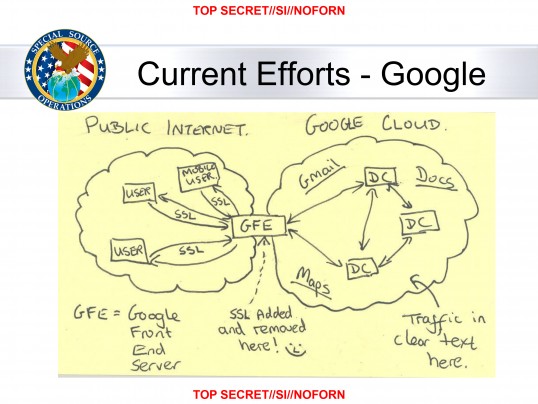
GOOGLE-CLOUD-EXPLOITATION1383148810

Following a report from the Washington Post exposing an NSA program called MUSCULAR that saw the organization secretly tap into Google and Yahoo severs and collect data, Google employees have taken to social media to express their frustration.

GigaOM has gathered comments from a couple Google employees with some being engineers that actually worked to protect the security of Google’s servers. Their comments aren’t exactly as tame as Google Chairman Eric Schmidt’s comments about the situation:

I now join him in issuing a giant Fuck You to the people who made these slides. I am not American, I am a Brit, but it’s no different – GCHQ turns out to be even worse than the NSA.

We designed this system to keep criminals out. There’s no ambiguity here. The warrant system with skeptical judges, paths for appeal, and rules of evidence was built from centuries of hard won experience. When it works, it represents as good a balance as we’ve got between the need to restrain the state and the need to keep crime in check. Bypassing that system is illegal for a good reason.

Unfortunately we live in a world where all too often, laws are for the little people. Nobody at GCHQ or the NSA will ever stand before a judge and answer for this industrial-scale subversion of the judicial process. In the absence of working law enforcement,  we therefore do what internet engineers have always done – build more secure software. The traffic shown in the slides below is now all encrypted and the work the NSA/GCHQ staff did on understanding it, ruined. — Google Engineer Mike Hearn referring to the leaked NSA slide above.

Another comment from Google employee Brandon Downey who says he “spent the last ten years of my life trying to keep Google’s users safe and secure”:
Expand
Expanding
Close

Site default logo image

Google+ adds restricted communities for private conversations between businesses & schools

Restricted Communities 2 - Ink-42

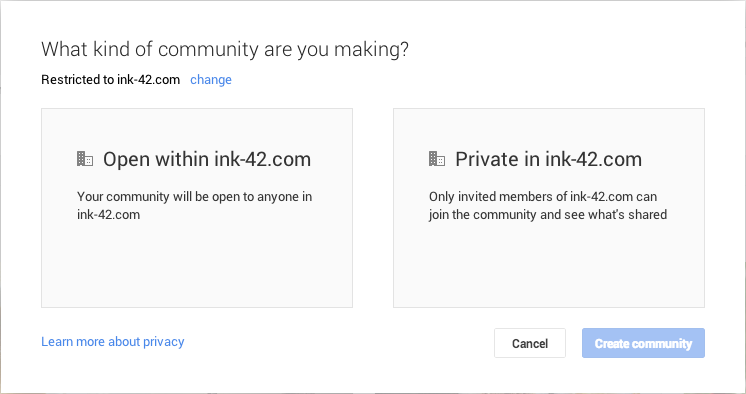
Google today announced an interesting new feature for businesses and schools that want to take advantage of Google+ to have private group conversations within their organization. Starting today, Google is making it possible to allow restricted communities on Google+ that restrict posts to just members of a company or only those that are invited:

You can decide if your restricted community will be open to everyone at your company or private, joinable by invitation only. While administrators can set restricted communities as the default for your organization, you can always choose to create communities open to people outside of your domain, so clients, agencies or business partners can join in the discussion.

Once a community is created, you’ll be able to share files from Google Drive as well as videos, events and photos. Community owners can easily change settings, manage membership or invite other team members to join and jump into the conversation.

You can learn more about creating restricted Google+ communities here.

Google also announced today that Google Groups will now automatically update as people leave and join groups.

Site default logo image

Google adds real time text cursors & improved themes to Slides

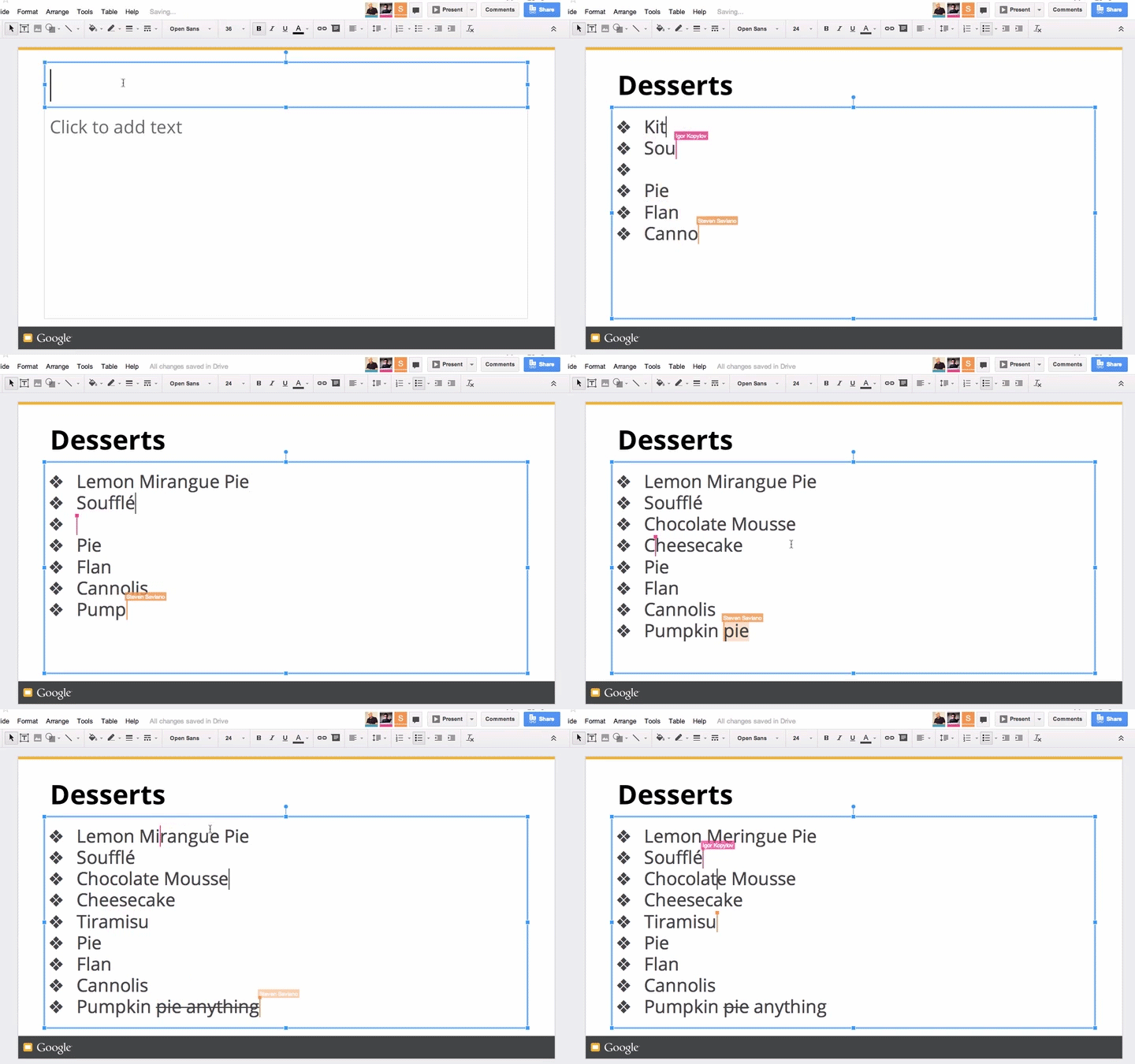
Google is making a few improvements to its Slides presentation tool in Google Drive today. The company announced a few new features for the web app including real-time text cursors and some user requested tweaks for the recently rolled out editable themes feature. 

As you can see in the gif above, much like in Google Docs, you’ll now see contributors’ cursors with names in real-time as they type.

Google is also adding the ability to reuse a theme, add objects to themes and layouts, and update text styles in placeholders:

Reuse custom themes in new presentations 

There may come a time when you want to reuse a theme that you worked hard to create, and now you can—just select “From another presentation…” in the theme chooser.

Add objects to themes and layouts 

While editing a slide, you can now right click on any object and add it to a theme or a specific layout so that the next time you want to use it, it will already be part of the slide template.

Update text styles in placeholders

Let’s say you’re editing a body placeholder, and you change the font of your text (or other style properties, such as bold, color, etc.). You can now easily apply this formatting across slides that use the same layout by right clicking on the placeholder and selecting “Update in theme.”


Site default logo image

Google Search iOS app gets massive update w/ ‘OK Google’ handsfree voice search, notifications, reminders, much more

[youtube=https://www.youtube.com/watch?v=p8Ey0AufD9g]

The Google Search iOS app has received a huge update today that brings a number of new features including the ability to activate voice search handsfree. Users on iPhone 4S or later can now simply say “OK Google” to begin a voice search, much like what users have been able to do with Google Now on Android devices for quite some time.

Version 3.1.0 now includes notifications for upcoming events, flights and public transit. For example, the Google Search app will provide notifications for delayed flights, tell you how long you have to catch the last train, and remind you of upcoming appointments . You can also now set reminders within the app:

Ask Google to remember things for you. Just say
• “Remind me to buy coffee beans at Starbucks,” or
• “Remind me to check out the fair this weekend”
and Google will remind you at the right time or place

In addition, Google says users can now set reminders for when their favorite musicians, tv shows, actors or celebrities are releasing new content or appear in headlines. There are also new cards in the app that display info for movie and event tickets, boarding passes, reservation confirmation for rental cars, public transit and upcoming events.

The massive update also includes a redesigned homepage, new gestures for zooming and moving images, one touch sign-in for other Google apps, and “improved voiceover accessibility”. It’s certainly a big update for the Google Search app that brings it closer to the Google Now equivalent at the heart of Android.

What’s New in Version 3.1.0

Google Now gets even better with:
• Notifications – Get notified when it’s time to go
• Reminders – Never forget to put out the trash
• New cards – See tickets, boarding passes, & more
• Handsfree voice – Just say “OK Google” to search*
* requires iPhone 4s or later

Notifications deliver info before you open the app:
• When to leave for your next appointment or event
• If your flight is running late
• How to catch the last train home

Ask Google to remember things for you. Just say
• “Remind me to buy coffee beans at Starbucks,” or
• “Remind me to check out the fair this weekend”
and Google will remind you at the right time or place.

You can also ask to be reminded when your favorite:
• Musicians release a new album
• TV show has a new episode
• Actors star in a new movie
• Celebrities and politicians make headlines
Just search and press the “remind me” button.

New cards organize the info you care about:
• Tickets for movies, concerts and events
• Boarding passes for your flights
• Reservation confirmations for car rentals
• Warnings when your last train home leaves
• Lists of upcoming local events

And finally, search is better than ever with:
• A redesigned and simplified homepage
• Gestures to zoom or throw away images
• One touch sign in if you use other Google apps
• Improved voiceover accessibility


Google’s new Connected Classrooms program takes students on virtual Google+ Hangout field trips

Site default logo image

Google today announced that its launching a new education initiative that will see students taking “virtual field trips” using Google+ video chat Hangouts. Google explains that it’s now allowing teachers to sign up for the field trips through a program called Connected Classrooms.

Teachers are already using Google+ to make learning more relevant, collaborative and accessible—from exploring a world-class art museum to staging a play to venturing into space. Connected Classrooms aims to make it easier for teachers to access exciting educational content to share with their students. In addition to the virtual field trips, teachers who visit the Connected Classrooms site will have the opportunity to join a Google+ Community with other educators to collaborate on field trips and share best practices for using digital tools in the classroom.

The first locations featured as virtual field trips will include the Seattle Aquarium, the Minnesota Zoo and the Solar Impulse hangar. Google is also partnering with over 20 organizations to that will help organize the field trips, some of which include National Geographic, Matilda the Musical, the Philadelphia Museum of Art. 
Expand
Expanding
Close

AT&T’s Samsung Galaxy S4 Zoom arrives Nov. 8 for $199 on contract w/ free Galaxy Tab 3

Site default logo image

As rumored earlier this month, AT&T announced today that it will become the first U.S. carrier to offer Samsung’s Galaxy S4 Zoom starting November 8 for $199 on contract or $25 a month on AT&T Next instalment plans. AT&T is also throwing in a free Galaxy Tab 3:

For a limited time, Galaxy S 4 zoom customers can take advantage of two amazing promotional offers. Those purchasing the Galaxy S 4 zoom with a two-year contract or on an AT&T Nextsminstallment agreement and qualified voice and data plans can get a Galaxy Tab™3 for free. The Galaxy Tab 3 requires a new qualified 2-year data plan in order to be eligible. Customers won’t have to choose between a phone and tablet. Now they can get both for the price of one. With AT&T Mobile Share, customers can add the Galaxy Tab 3 to an existing Mobile Share plan for $10 more per month. And with Mobile Share, up to 10 devices can share data without needing to purchase separate plans for each one.

The Galaxy S4 Zoom is a hybrid smartphone/point and shoot that packs in a 16 megapixel camera with 10x optical zoom, a manually adjustable zoom ring, dedicated shutter button, and a built in Xenon flash. Other specs include a 4.3” Super AMOLED display, microSD, a 2330mAh battery, 1.5GB(RAM), and 8GB(eMMC). 
Expand
Expanding
Close

Check out the winners and performances from last night’s YouTube Music Awards

Site default logo image

http://www.youtube.com/watch?v=vAVgwA9Gx1A&list=PLbpi6ZahtOH57d6L_q8YzZ0QwZeP_J4Fe&index=1

Following last night’s first ever YouTube Music Awards, YouTube has posted some highlights from the event and below we have a full list of winners for each of the six major categories from the show.

Unfortunately the broadcast, hosted by Jason Schwartzman and Reggie Watts and featuring live music video-like performances from Eminem, Lady Gaga and others, didn’t manage to attract many viewers during its live stream last night. According to Time, YouTube’s award show was able to capture only around 250,000 simultaneous viewers. That’s compared to around 1.9 million for the live YouTube stream of the Coachella festival each year and 10.1 million viewers for MTV’s latest VMAs award show.

Reviews of how the show went seem to be mixed, but we’ll post the full video of the show as soon as its available here. Head below for the full list of winners and hit the playlist above for more videos of last night’s performances:
Expand
Expanding
Close

Black 16GB Nexus 5 sells out in minutes as shipping times slip for other models

Site default logo image

Screen Shot 2013-10-31 at 2.50.21 PM

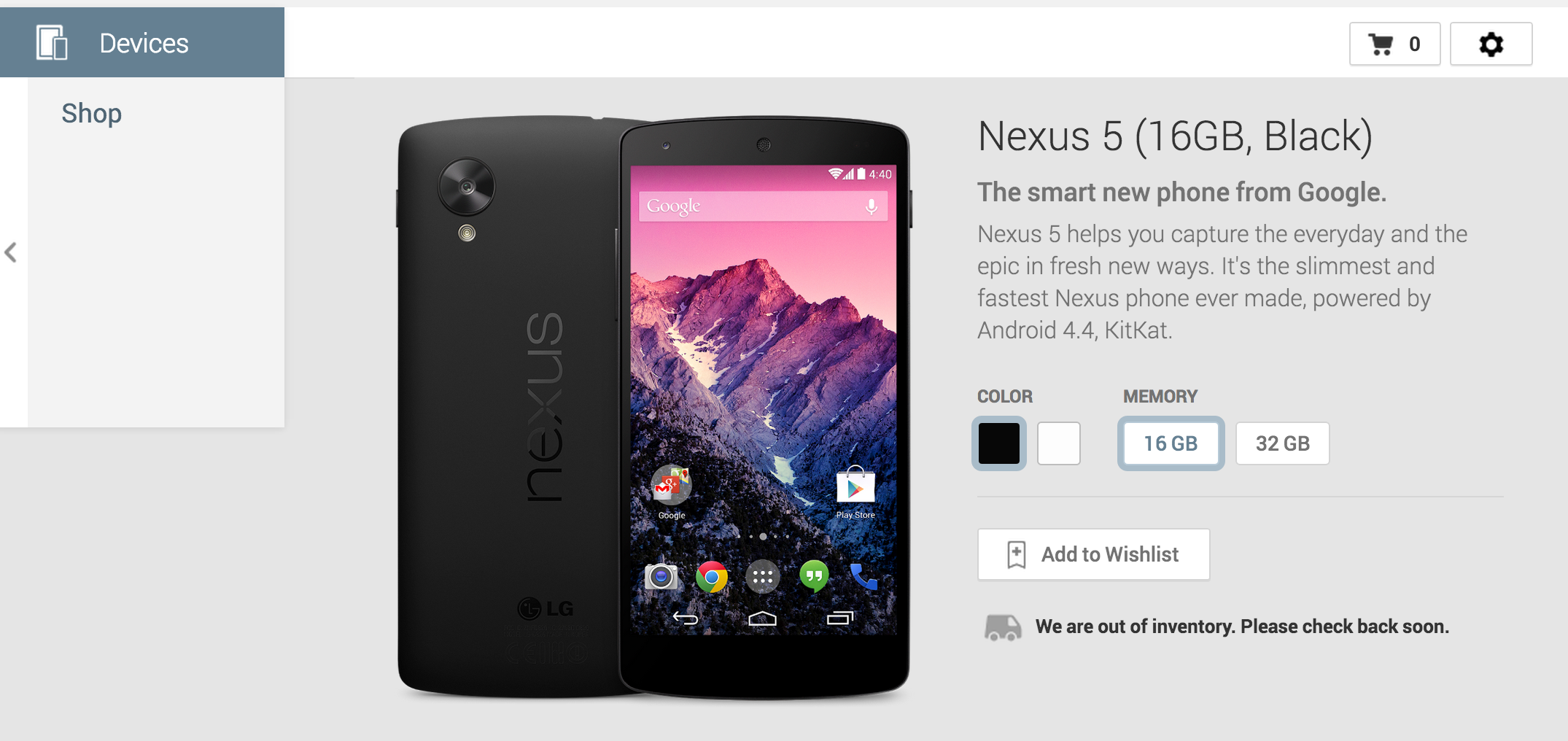
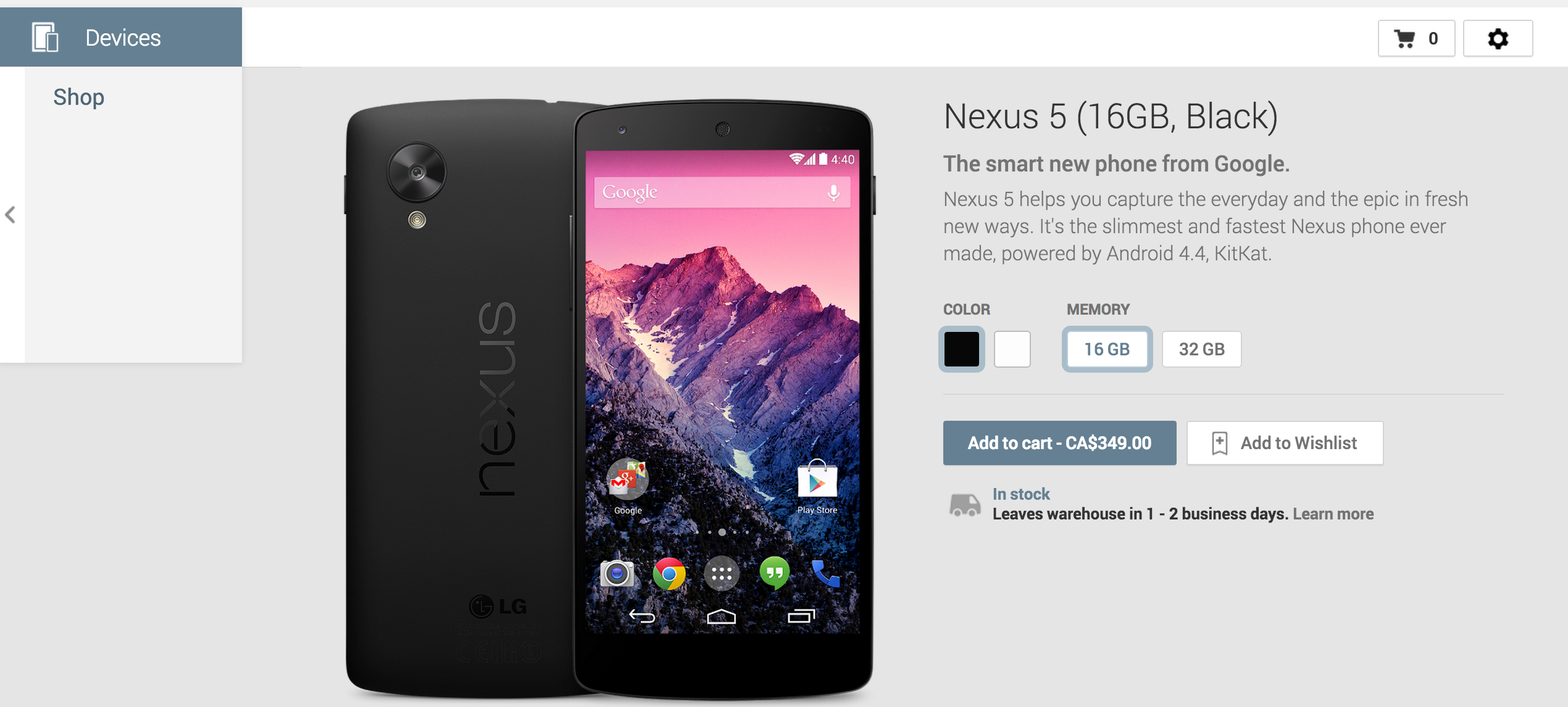
Minutes after launching on Google Play, Google’s new flagship Nexus 5 smartphone is now officially sold out for some models as shipping times continue to slip for others in at least US.

The black 16GB model is now listed as sold out on Google Play, while the white 16GB model has now slipped to Nov. 8. For the black model, Google Play says that it is “out of inventory” and to “check back soon”.

The 32GB models of the device are still listed as shipping by in 1-2 business days.  Nov. 8.

Shipping times are also slipping in other countries. All models of the device are currently listed as shipping by November 8 in Canada.
Expand
Expanding
Close

Site default logo image

Google releases Google Play Services 4.0 w/ Google Mobile Ads SDK and new APIs for devs

Screen Shot 2013-10-31 at 2.33.03 PMGoogle has decided to launch the new Nexus 5 and Android 4.4 KitKat today at a quiet press event and alongside those announcements is also releasing Google Play Services 4.0. The update to the developer services platform includes the integration of Google Mobile Ads SDK, and also offers new features for Google+, Google Wallet Instant Buy APIs, and geofencing.
Google says the new Google Mobile Ads SDK lets those using AdMob to monetize their apps provide “seamless improvements” to users. For example, pushing bug fixes automatically. The new Play Services also include new Maps and Location features:

You can save power by requesting larger latency values for notifications alerting your app to users entering or exiting geofences, or request that entry alerts are sent only after a user stays within a geofence for a specified period of time. Setting generous dwell times helps to eliminate unwanted notifications when a user passes near a geofence or their location is seen to move across a boundary. The Maps API enhances map customization features, letting you specify marker opacity, fade-in effects, and visibility of 3D buildings. It’s also now possible to change ground overlay images.

WIth Google Play Services 4.0, Google is offering Google Wallet Instant Buy APIs to everyone with a simplified API. New Wallet Objects means “you can award loyalty points to a user’s saved rewards program ID for each applicable Google Wallet Instant Buy purchase.”

The the new Google Play services SDK is available to download now for developers to start developing with the new Android 4.4 APIs. You can learn more in Google’s blog post here.

Google also noted that it’s dropping support for Froyo in this release now that “over 97% of devices now running Android 2.3 (Gingerbread) or newer platform versions.”

Google officially unveils Android 4.4 KitKat, available on Nexus 4, 7, 10, Galaxy S4 & HTC One GPE in coming weeks

Site default logo image

[youtube=http://www.youtube.com/watch?v=sONcojECWXs&list=PLWz5rJ2EKKc-2quE-o0enpILZF3nBZg_K&index=1]

Update: Google has released a full list of what’s new in Android 4.4 KitKat. We’re digging in and we’ll bring you more details as we discover them.

Alongside the official release of its new flagship Nexus 5 on Google Play today, Google is also of course officially taking the wraps of 4.4 KitKat, the latest version of Android that will ship on the new Nexus 5. When will you be able to get your hands on the new OS? Google said KitKat 4.4 updates will arrive for the Nexus 4, Nexus 7, Nexus 10, and the Galaxy S4 and HTC One Google Play Editions in the coming weeks.

Google confirmed that the update will not be coming to the Galaxy Nexus. Since it’s two years old, it now “falls outside of the 18-month update window when Google and others traditionally update devices.”

In the YouTub playlist above, Google walks through some of the new features of KitKat for developers and also highlights a number of user-facing features such as a new “immersive mode” that allows users to automatically hide onscreen controls for a truly full-screen experience. In a blog post, Google took sometime to explain the performance improvements it’s made in KitKat, noting that Android can now “run comfortably on the 512MB of RAM devices”:
Expand
Expanding
Close

Google releases Nexus 5 on Google Play for $349/$399, ships in 1-2 days

Site default logo image

http://www.youtube.com/watch?v=hQ0XTJqFLIE

As expected, the rumors indicated Google would be making a silent Nexus 5 announcement today and now the device is officially available on Google Play in the US. Lining up with previous rumors, the device will sell for $349 for the 16GB model and $399 for a 32GB model. Google is currently quoting an estimated shipping time of 1-2 business days.

Google says the Nexus 5 will officially go up for sale unlocked and without a contract in the following countries starting today through Google Play: U.S., Canada, U.K., Australia, France, Germany, Spain, Italy, Japan and Korea. It also notes that the Sprint, T-Mobile, Amazon, Best Buy and RadioShack will get carry the device soon alongside retailers in India.

Screen Shot 2013-10-31 at 2.02.50 PM

Official specs for the device right from Google Play: 4.95″ 1920×1080 display (445 ppi), Full HD IPS and Corning® Gorilla® Glass 3, a 2.3GHz Qualcomm Snapdragon™ 800 processor, an 8MP rear facing camera, and a 1.3MP front facing camera. There’s also a 2,300 mAH battery, Adreno 330, 450MHz GPU, and Wireless Charging.


Expand
Expanding
Close

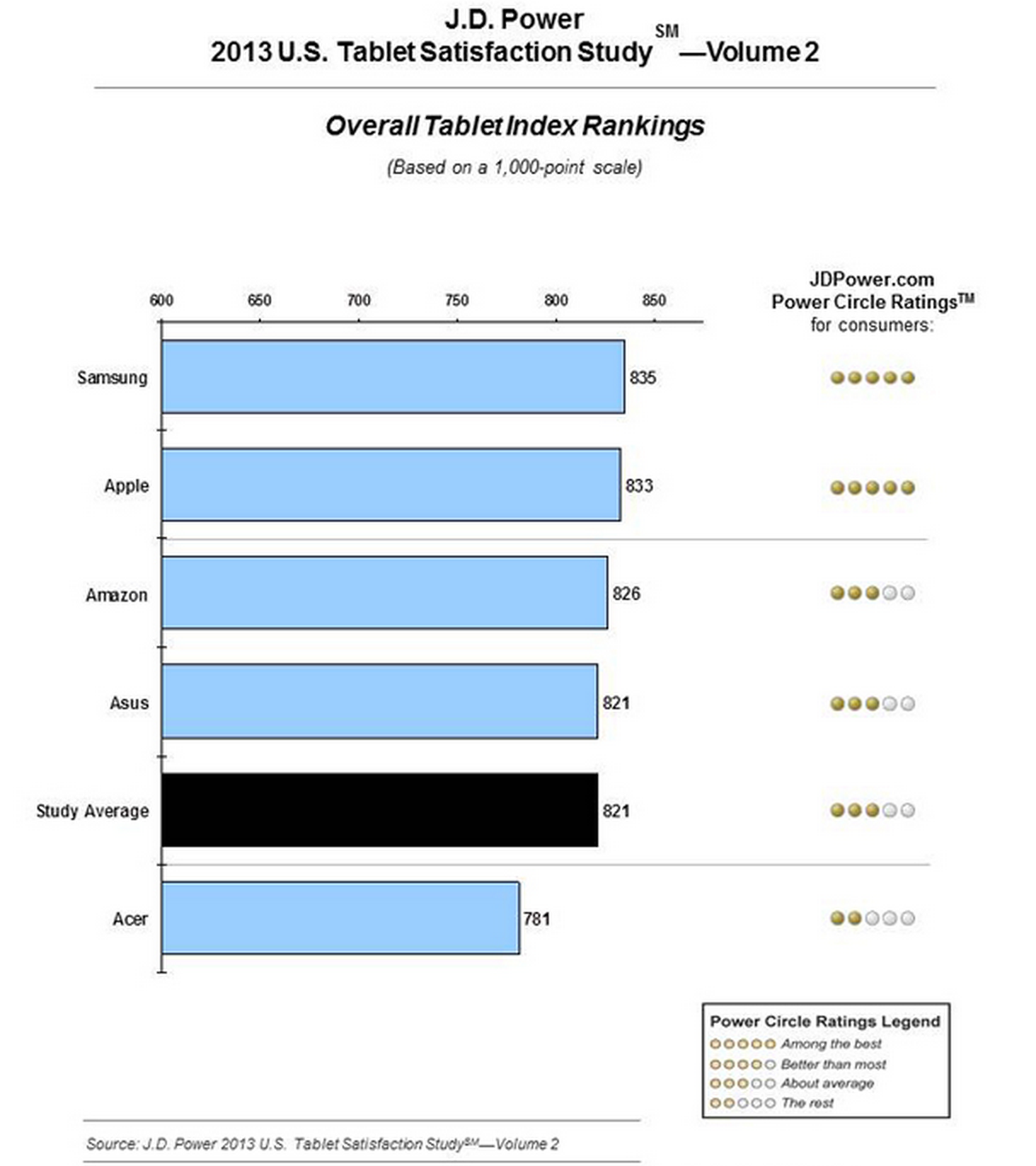
Samsung beats out iPad in J.D. Power U.S. tablet customer satisfaction study (Update: Or not …)

Site default logo image

JD-Power-tablet-customer-satification

Update: JD Power’s math seems a little off, when you delve into the scores … 

jd-detail

Samsung got 18 stars, Apple 18, with Samsung only ahead on price, yet took the overall lead.

J.D. Power has released its 2013 U.S. Tablet Satisfaction Study–Volume 2 today with Samsung edging out Apple’s iPad for the top spot. Apple has in the past ranked number one in the company’s customer stratification surveys for tablets, but this time Samsung has jumped up from number 3 in April to take the first position from the iPad.

Samsung ranks highest with a score of 835 and is the only manufacturer to improve across all five factors since the previous reporting period in April 2013. Samsung showed particularly strong improvement in the cost factor (25-point increase). Apple ranks second scoring 833 and performs particularly well in performance and ease of operation.

While Samsung only slightly beat out Apple with 835 points vs 833 points on a 1000 point scale, the outcome is quite notable for Samsung who in April ranked even lower than Amazon. The study measures customer satisfaction based on five metrics for 3,375 tablet owners: performance (26%); ease of operation (22%); styling and design (19%); features (17%); and cost (16%).
Expand
Expanding
Close

Growth of Android tablet sales in Q3 cut Apple’s market share to less than 30%

Site default logo image

IDC-tablets-Q3-2013

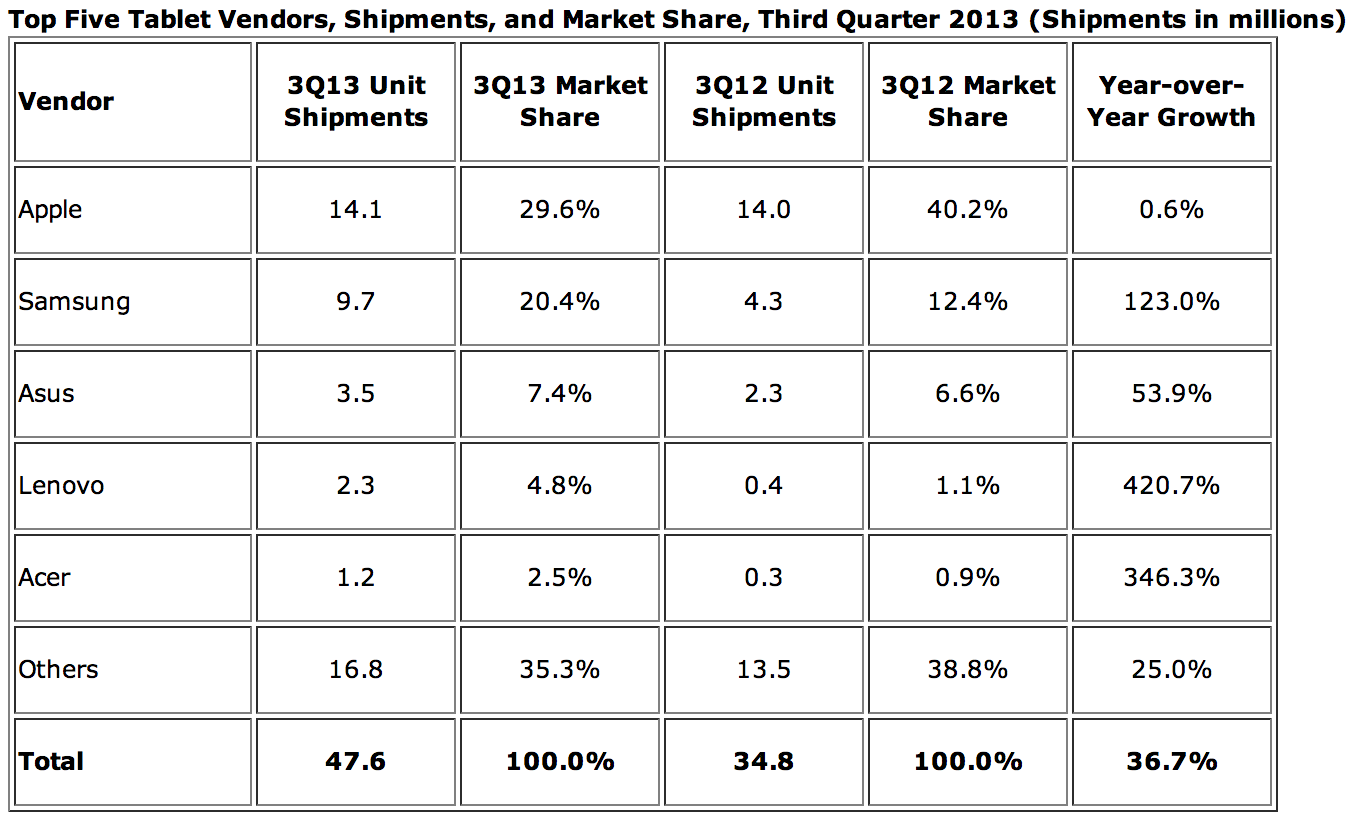
In IDC’s report released today covering worldwide tablet market for the third quarter, the research firm notes that the market as a whole continues to grow thanks to strong growth from Android tablets. Apple shipments remained steady during the quarter compared to last year at 14 million units in Q3, but its share of the market drops from 40.2% last year to just 29.6% this year as Samsung, Asus, Lenovo, and Acer all post significant growth for the quarter compared to the same quarter last year.

Samsung is up from 12.4% last year to 20.4% of the tablet market in Q3 2013 (a 123% increase), while Asus is up 53.9% to 3.5 million units, Lenovo sold 2.3m (up 420.7%), and Acer 1.2M (up 346.3%):


Expand
Expanding
Close

Site default logo image

AT&T offers free 7-inch Galaxy Tab 3 with purchase of select Samsung Galaxy phones

AT&T announced today that it’s adding a new promotion that will allow customers to get a free 7-inch Samsung Galaxy Tab 3 when purchasing selecting Samsung phones. Starting today, those who purchase a Samsung Galaxy S4, Galaxy S4 Active, Galaxy Note 3, or Galaxy Note II on contract or on AT&T Next instalment plan will get the tablet completely free. You will, however, have to activate a Mobile Share data plan for the device:

Customers interested in receiving a free** Galaxy Tab 3 can take advantage of the offer by visiting any AT&T company-owned retail store or participating dealer (or soon, online at att.com), and purchasing one of 4 eligible Samsung Galaxy smartphones with a 2 year agreement or AT&T Next installment agreement and a Mobile Share voice and data plan, and activating a Mobile Share data plan for the Galaxy Tab 3. With an AT&T Mobile Share plan, customers can add the Galaxy Tab 3 to an existing Mobile Share plan for $10 more per month. And with Mobile Share, up to 10 devices can share data without needing to purchase separate plans for each one.

Google shows off second gen Google Glass w/ mono earbud coming later this year

Site default logo image

After announcing yesterday that Google Glass hardware would be revised later this year and offered to current Glass Explorers interested in swapping to a newer unit, Google today gives us a look at the second generation Glass in the images above posted to Google+.

On top of introducing a new mono earbud instead of only the bone-vibrating speaker included in the first generation Glass, Google said the hardware revision will also make Glass compatible with new lines of sunglasses and prescription frames and Explorers will have their choice of colors when they swap sometime later this year.

Google hinted it will begin the first steps of the exchange program in November and will give users 60 days to make the swap. Explorers are still the only ones that can get their hands on the $1500 Google Glass, but Google recently started letting users invite up to three friends to join the program and will now ship Glass to those that join.

Those who purchased Glass before October 28, 2013 will be eligible for the upgrade. Google didn’t mention if there would be any fee associated with swapping to a newer unit, but it will notify those eligible automatically next month. 
Expand
Expanding
Close

Site default logo image

Facebook testing redesigned Android app with limited number of users

That redesigned Facebook app that we told you about previously? Facebook officially announced today that it is beginning to test the new Android app, which introduces a redesigned user interface and new features,  with a limited number of users.

The first notable new feature is the ability to see what friends are currently using the new Messenger app. Facebook notes that these users “will get notified instantly about your message” and you’ll know which users are using the app at a glance by a new icon next to contacts.

One highly requested new feature makes it possible to message people through the app without being friends with that person on Facebook. The redesigned app includes the ability to message contacts that aren’t your Facebook friends using only their phone number:

What about the people you text with who aren’t your Facebook friends? Now you just need a contact’s phone number to begin texting others using Messenger. To help people reach you, you’ll be asked to confirm your phone number.

The app also receives a fresh coat of paint that includes a new swipe out panel on the left for accessing recent conversations, contacts, and settings.

The redesigned app is only rolling out to a limited number of Android users, but Facebook didn’t specify how many or which users might receive the update.
Expand
Expanding
Close

Site default logo image

Google revamps its APIs Console for developers as ‘Google Cloud Console’

Google today announced it’s launching a new APIs console that replaces the old Google APIs Console it first launched back in 2010. The main purpose of the service remains the same, to provide one centralized location for developers to easily manage the over 60 Google APIs available to deploy in their apps and websites. The revamped APIs console is now called the Google Cloud Console and introduces an entirely new UI and further integration with Google’s Cloud Platform services.

You’ll notice an entirely new visual design, a hierarchical navigation, and even a friendly new URL structure.

We’ve also simplified the process of getting API credentials. Now, you can register an app on the platform you are building on, then see all the possible credential types for your application, making it easier to quickly grab the credentials you need.

Google was previously allowing some developers to opt-in to the new Google Cloud Console, but today noted that it will soon make the redesigned console default for everyone. 
Expand
Expanding
Close

Numbers from Google+ event: 540m active users, 300m active in stream, 1.5b photos upload weekly

Site default logo image

During Google’s Morning with Google+ event today, the company announced some new features coming to its Hangouts and Google+ apps, but it also gave us an update on growth in recent months since last checking in at Google I/O. Here are the notable numbers shared by Google’s Vic Gundotra during this morning’s event:

-540m active users across Google (signed in via Google+), up from 390m since Google I/O

-300m active users in the stream, up from 190m at Google+

-1.5 billion photos uploaded every week

-20x increase in video uploads

-Shipping new version of Google+ almost every day

-20 feature launches in last 4 months, 18 this morning

-1000 new terms recognized by Google’s computer vision for searching untagged photos


Expand
Expanding
Close

Google shows off new Auto-Awesome & Auto-Enhance features for Google+

Site default logo image

On top of the updates to Hangouts today, Google also announced some new features for Google+ today during its event in the form of new Auto Awesome features. As highlighted in the video above, Google’s new Auto-Awesome features include Action, Eraser, and Movie:

Auto Awesome can help bring your story to life in creative ways. Today we’re adding three new techniques:

  • Action. Maybe it’s your child’s first gymnastic meet, or you’re skateboarding with a friend. Action can take their tumble or half pipe trick, and create a strobe-effect photograph.
  • Eraser. When you’re taking pictures of landmarks, people and cars often get in the way. Eraser can take a sequence of these photos, and erase whatever’s moving to give you a “cleaner” image.
  • Movie. Movie produces highlight reels from your photos and videos—complete with effects, transitions and a soundtrack—automatically. You can share the movie as is, or dive into the editing process to customize even further.

Google also noted that its Auto-Enhance feature for photos now has low and high settings and can now be applied on an album by album basis. Lastly, it showed off a new Snapseed filter- HDR Scape- that it says is the first time anyone is offering a true HDR feature on a mobile device and also added Analog Efex Pro to the Nik Collection. Head below for a full roundup of what Google announced today:
Expand
Expanding
Close

Google adds location sharing, animated GIFs to Hangouts, integrates SMS

Site default logo image

Today during its “A Morning with Google+” event, Google announced some updates for its Google+ service on top of sharing some improvements to Hangouts. Perhaps the biggest new feature that was announced during the event this morning is the integration of SMS into the Hangouts app, something that many user have speculated would arrive in Android 4.4 KitKat, the next version of Android expected in the near future.

Another new feature that Google announced today was location sharing, which allows users to click a small icon before posting to Google+ to add their location. Finally, Google’s Vic Gundotra announced that Google+ will now support animated GIFs.

Google also announced some new features for Hangouts on Air today, including the ability to plan a future Hangout. That will give users a dedicated landing page for the upcoming Hangout in order easier promote it, and Google has new tools that allow users to manage users in an active Hangout. It also announced that it is flipping the switch on HD full screen video calls across all devices and new auto-awesome tools. Those tools will provide auto-correction features, but also creative features that allow users to flip on different filters during a live video chat.

In addition, Google noted today that it has added 1000 new terms into its deep learning algorithms that allow users to search for visual content on Google+ even when the photos or videos aren’t tagged with your specific search query. Google has a roundup of all today’s announcements on its blog here.


Expand
Expanding
Close