Apps and Updates



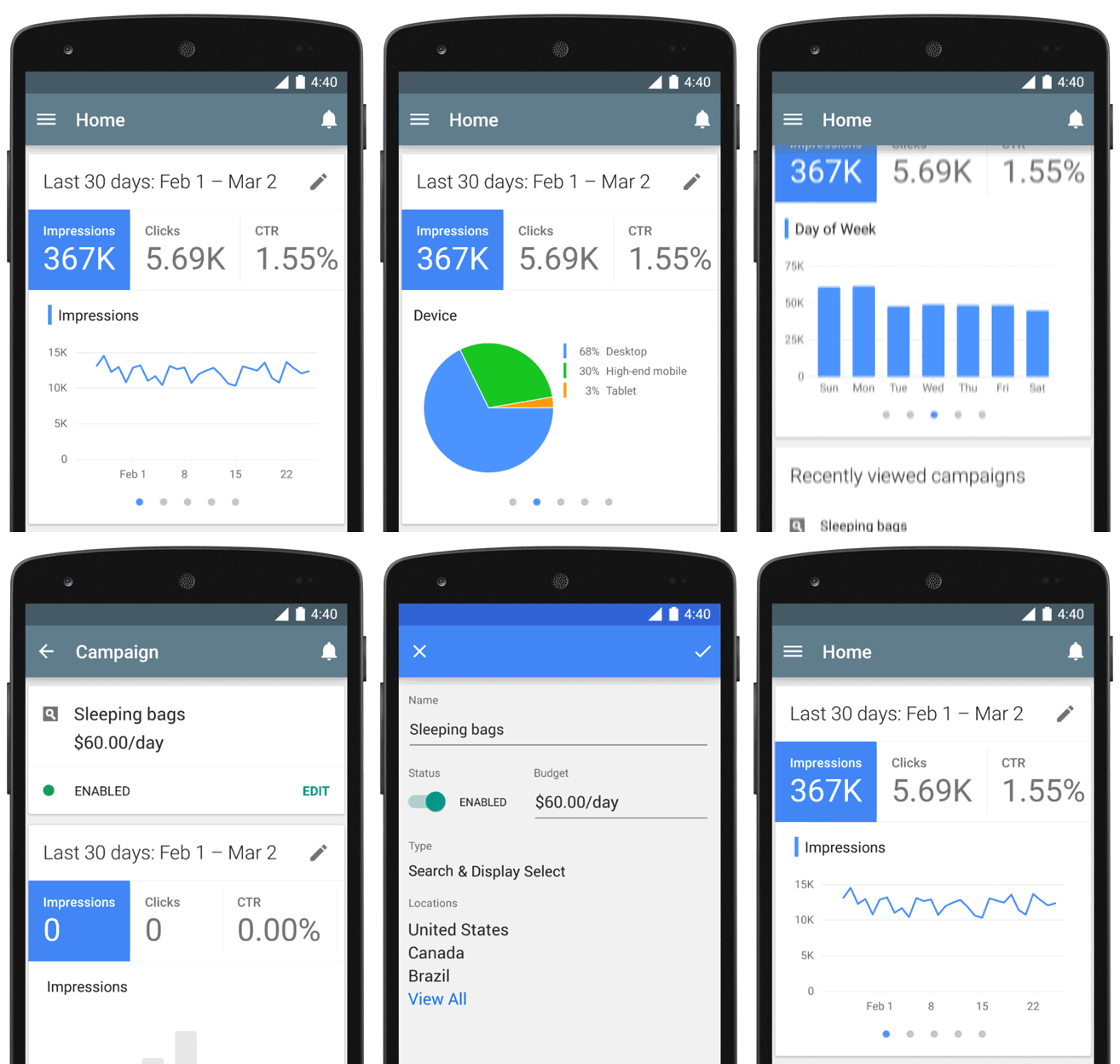
Google has just officially launched an AdWords app for Android, and it’s available starting now for all existing AdWords customers globally.
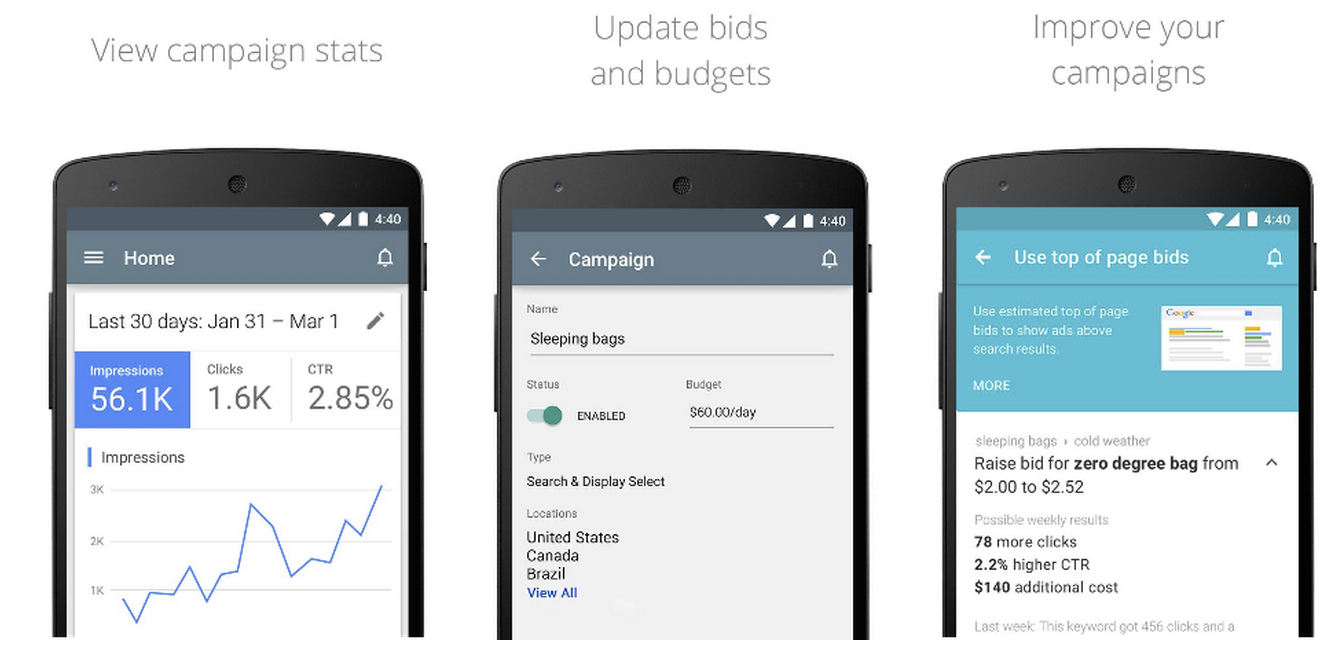
The app brings a companion experience to running AdWords campaigns on the desktop with the ability to view campaign stats, update budgets and bids, get support from Google, and more. It will also bring real-time notifications for AdWords to your Android device.
More from Google:
Whenever you open the app, you’ll see an overview of your clicks, costs, and conversions. For deeper insights, you can view metrics by ad group, day of week and device… You’ll also receive customized suggestions that you can act on immediately. For example, if there’s an opportunity to get more impressions by adjusting your bids, we’ll let you know so you can make the change right from the app.
The new AdWords app for Android is available on Google Play now for devices running Android 4.0 and up.


In honor of Update Wednesday, Google this evening has started rolling out a new version of the Drive Android app. The update bumps the app to version 2.2 and focuses on improving navigation and usability throughout the interface.
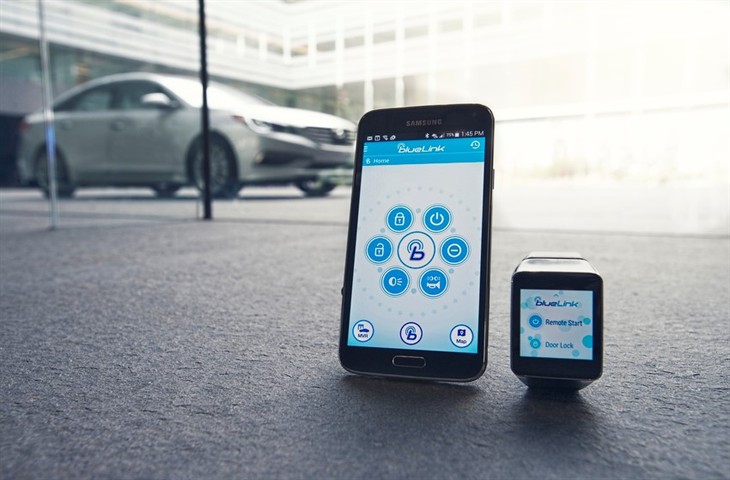
Hyundai’s previously announced Blue Link app for smartwatches arrives today to let owners of its vehicles lock, unlock, and remote start their cars. The app was previously available for smartphones, but today arrives for Android Wear devices via a new Blue Link companion app on Google Play.
Expand
Expanding
Close

Waze, the free crowdsourced navigation and traffic app, is to get AMBER alerts in the U.S., helping users look out for missing and abducted children. You’ll only see alerts for children in your local area, and for safety reasons details will only appear once your vehicle has been stationary for at least ten seconds.
AMBER alerts are created by law enforcement agencies to quickly alert members of the public to children who have been reported missing or are believed to have been abducted. Waze says the app will scan for new alerts every ten minutes, though once you’ve dismissed an alert it won’t be shown again for a further week.
Alerts will display all the information available, which will normally include a photo of the child, their name, age, description, where they were last seen, what clothing they were wearing and details of any vehicle known or believed to have been involved.
The update is expected to roll out shortly in the U.S. only. Waze is a free download from Google Play. It was reported yesterday that the app may in future be pre-installed on Android devices following its integration into Google Mobile Services.
Facebook added AMBER alerts to its mobile apps in January.

Google today announced a preview of a redesigned Google Contacts experience for the web that it says “makes it easier to keep track of the people you know and get the info you need, fast.”
Some of the new features include the ability to quickly get rid of duplicates, automatically updating contacts, and recent email/event details right in Contacts. Those are in addition to a brand new Material Design-inspired UI.
Expand
Expanding
Close
Google announced today that it’s ending Chrome support for users running Android 4.0 Ice Cream Sandwich next month. Updates for Chrome on Ice Cream Sandwich devices will officially end following the release of Chrome 42.
Expand
Expanding
Close
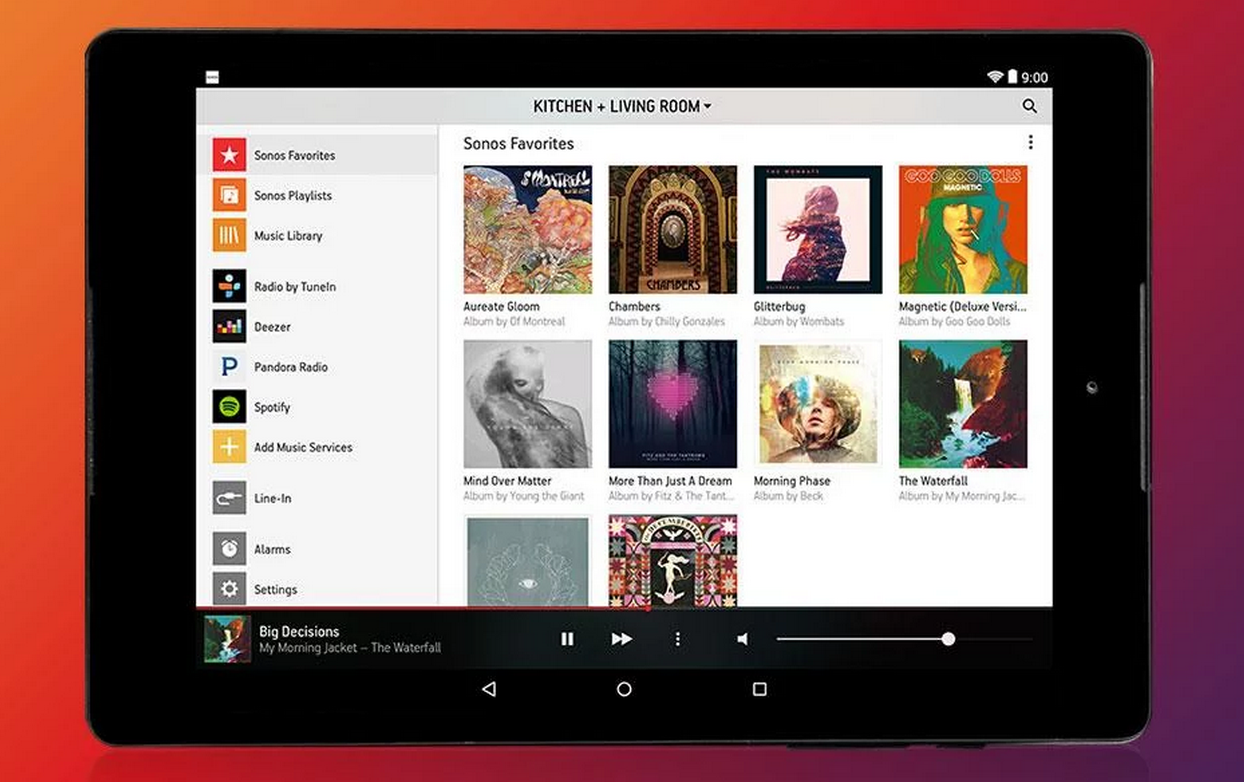
Sonos is today rolling out version 5.3 of its Sonos Controller app for Android to introduce a few new features and a tweaked user interface.
The feature being highlighted above others in the update is easier access to controlling the app’s Rooms feature: Effortlessly move your music around your home with a more accessible ROOMS menu available by tapping the top of any screen in the Sonos app. Group and ungroup rooms from the ROOMS menu to play music in perfect synchrony throughout your home.
Also new in the update is an updated user experience for tablet users that offers new, separate views for currently playing music and discovery features:
Sonos highlighted a few other new features including more readily available search and a new playback progress slider.
The updated app, version 5.3, is available on Google Play now.
What’s New
SIMPLER ROOM CONTROL AND FASTER ACCESS TO ALL YOUR MUSIC.

Ingress was launched on Android in 2012, but after its introduction made its way to a few other platforms. The app has been available on iOS for a while and had a port made for Google Glass, but now the Mountain View company’s augmented reality game is officially coming to Android Wear (via Engadget) at some point next month. You’ll still need an Android phone—as is the case with most Android Wear apps—but it won’t be long before you’ll be able to play Ingress without taking that phone out of your pocket.
It makes sense considering the nature of the game, as the basic premise is that you’re exploring the real world while creating virtual missions, and defending and attacking portals. While using the smartphone works fine, it makes a lot more sense that users would be able to simply glance down on their wrists to play the game—hence why a Google Glass version of the game was put together as well (although that version is no longer available). Head over to the Google Play store to get the latest version of Ingress.
When uploading a video to YouTube, especially from a mobile device, it’s pretty common not to want to upload a clip in its entirety. Now, Google says that it is updating the YouTube app for Android to fix this problem—you can now use a new video-trimming feature to cut off the beginning or end of your clip prior to upload.
We’re proud to introduce a new video-trimming feature and inline video previews for our app. Now you can select the exact frame where the video starts and ends, giving you precise control of your trims in a simple, intuitive way. Additionally, there is now an inline video preview before the video is uploaded. And with faster upload capability, it’s never been easier to upload your YouTube videos on-the-go!
Simply drag the frame on both ends of the video to trim it where you’d like, as you can see above, and you can touch and hold the frame to get a closer view of where the video is being trimmed. Then you can tap “got it” when you’re done, and then the app will let you preview what your video will look like prior to publish.
The latest version of the app can be downloaded from the Play Store, but it’s not actually an app update that’s bringing this feature. Users who have already downloaded the YouTube app should see the feature turned on server-side. Notably, it doesn’t look like the iOS app has this feature quite yet.
VideoLAN has today launched several updates to VLC across its apps on iOS, Android, OS X, and every other platform where the app is available, marking the first time that the company has pushed such a massive coordinated release. The new versions (with the main app numbered 2.2.0), include several features across the various platforms, and VLC says it took more than a year of volunteer work to put them together…

[youtube http://www.youtube.com/watch?v=wYM8sIzHT5g&feature=youtu.be]
Software development team Algoriddim announced today that it is launching a free version of its popular djay app for Android. The free version features full support for Spotify music imports, allowing users who subscribe to the music service to pull in tunes over-the-air.
Both the free and paid versions have also gained support for new audio capabilities on Lollipop devices. Both apps now support external USB audio devices with multiple stereo outputs, enabling separate previewing without affecting the current mix.
As seen in the video above, the apps are also now compatible with the Pioneer DDJ-WeGO3 USB MIDI controller. You can grab both apps from the Google Play Store now, for free or $4.99, respectively.
Google paid developers a total of $7B in the past 12 months from a mix of app sales and in-app purchases, the company says, closing in on the record $10B payout recently announced by Apple.
Re/code also reports that Google is testing sponsored searches in the Play Store, enabling developers to pay to have their apps show up at the top of searches. Sponsored Play Store searches will work in exactly the same way as they do in the company’s main search engine: developers bidding for keywords, with sponsored apps appearing above organic search results, flagged with a small Ad tag …
When it comes to apps that journalists and writers hold dear to their hearts, iA Writer is commonly on the list. Its simplicity, functionality, and meticulous design sets it apart from the rest, but until today, the app was only available on iOS and Mac. Now, iA Writer is coming to Android, and its maker, Information Architects (hence the “iA” in its name), says that developing for Google’s mobile platform wasn’t nearly as bad as they thought it would be.
Expand
Expanding
Close
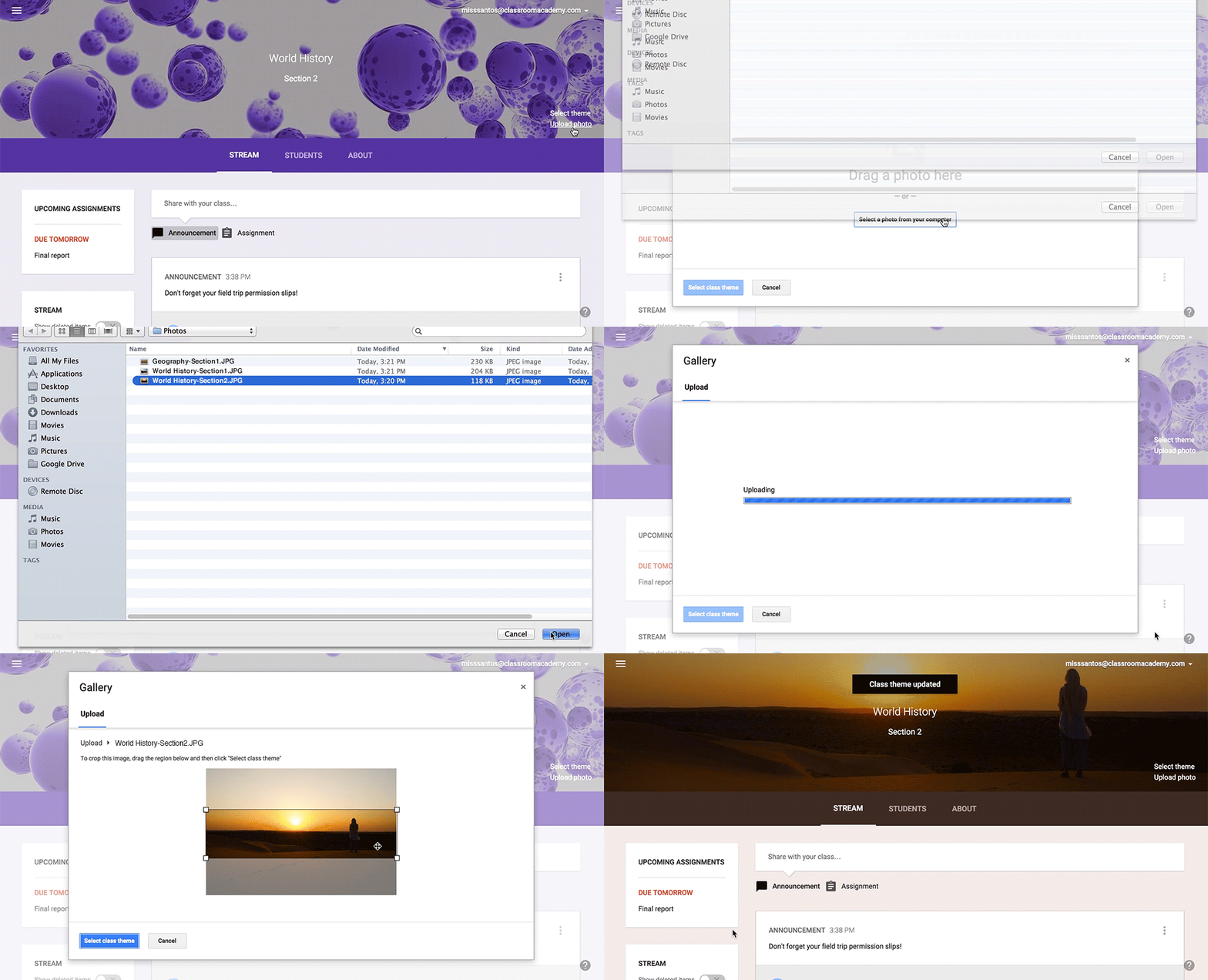
Google announced some nice updates for educators and students using its Google Classroom platform. In addition to the ability to use a custom image as a theme in Classroom, the company is rolling out an update to the iOS and Android apps to add several new features.
Expand
Expanding
Close
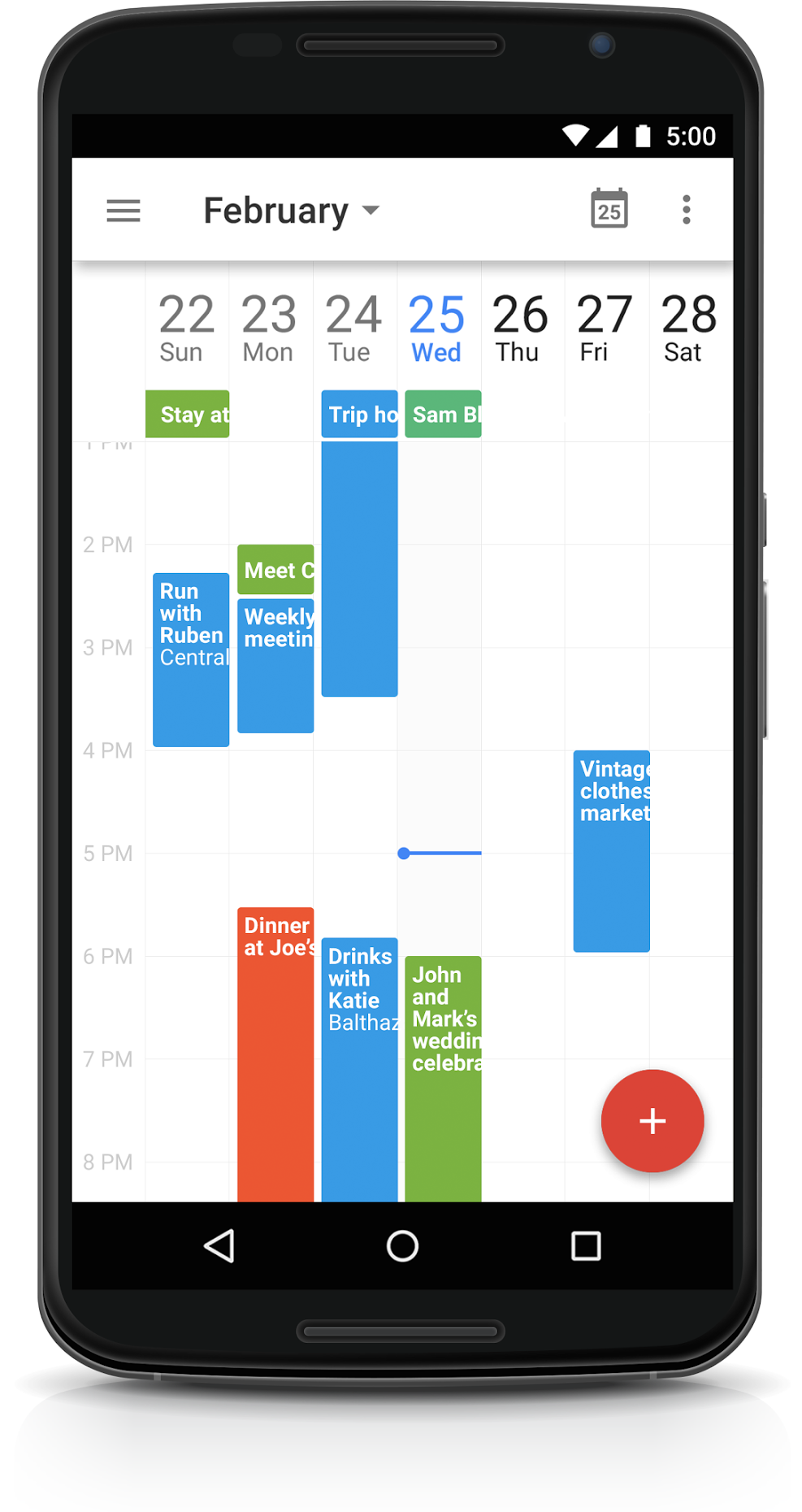
Google announced today that a number of enhancements for Google Calendar on Android will be arriving for users over the next few days. Google says the new features and tweaks (listed below) are based on early user feedback from the latest version of the app.
Expand
Expanding
Close

The FTC is fining the creators of two different smartphone apps, both of which were previously available as paid apps on Google Play and the App Store, for falsely claiming to detect symptoms of melanoma. Most versions of the apps, MelApp and Mole Detective, have long been removed from sale, although a version of Mole Detective remains on Google Play for $4.99. Apple appears to have cracked down on similar apps somewhat that were available on its store as recently as early 2014, while some apps with similar claims continue to be available on Google Play.
The Federal Trade Commission has challenged marketers for deceptively claiming their mobile apps could detect symptoms of melanoma, even in its early stages. In two separate cases, marketers of MelApp and Mole Detective have agreed to settlements that bar them from continuing to make such unsupported claims. The agency is pursuing charges against two additional marketers of Mole Detective who did not agree to settle.
It’s not the first and it likely won’t be the last time app makers face scrutiny from government officials over health care claims as fitness becomes more of a focus on mobile devices and companion wearables. As recently as November, the FTC was said to be pressing Apple on how it plans to use sensitive health related data collected from its upcoming Apple Watch launching in April.
Twitter for Android was updated tonight with support for Twitter’s “while you were away” recap feature, which surfaces tweets the app finds relevant to you when you’ve spent some time away from the microblogging service.
A lot can happen while you’re on the go. To fill in some of those gaps, we will surface a few of the best Tweets you probably wouldn’t have seen otherwise, determined by engagement and other factors. If you check in on Twitter now and then for a quick snapshot of what’s happening, you’ll see this recap more often; if you spend a lot of time on Twitter already, you’ll see it less.
The feature first rolled out to iOS users last month. You can grab the update for free from the Google Play Store.

Just days after Google’s Sundar Pichai announced the company’s new Inbox email app would arrive for Google Apps customers soon, today an invite system is launching to allow for exactly that.
Like the invite system that is currently being used to allow new users to download the Inbox email app, Google is today allowing Google Apps for Work admins to request service access for their users. Google said it will let in only select users that request access as it works to get feedback from early adopters and improve the experience:
Expand
Expanding
Close
[youtube=https://www.youtube.com/watch?v=OUmMAAPX6E8]
Google just announced that its new YouTube Kids app is available for both iOS and Android devices starting today. The new app for kids is the first of its kind for Google, but the launch follows reports that Google was preparing kid-friendly versions of YouTube, Chrome, Search and other apps.
Expand
Expanding
Close
A server-side update is rolling out the Play Store Android app that packs a pretty subtle-yet-big update to the way search works. Currently, there’s a large toolbar at the top of the app labeled “Play Store,” and searching for something means tapping the magnifying glass icon in the top-right corner. This update, which was first posted about on the Google+ page of Kirill Grouchnikov, replaces that toolbar with a much more prominent search box.
Additionally, users will notice that tapping the magnifying glass from elsewhere within the app will slide out the search box from the right. This update will bring the Play Store app more in line with the design of some of Google’s other apps, the one you’re most familiar with likely being the Google Now launcher:
According to another post on Grouchnikov’s Google+ page, the update is coming “soon”. And, as mentioned, this is a server-side update that Google will push over-the-air. Don’t bother checking the Play Store because the app is going to be updated behind the scenes. Like magic.
BlackBerry today has revealed a major software update for all of its BlackBerry 10 devices. Most notably, the update adds the ability for all BB10 devices to access Android applications. Bumping the build number to version 10.3.1, this update is rolling out to all BlackBerry 10-powered devices, including the Z10, Q10, and Z30. The company announced announced its intentions to add this feature in June of last year.
I’m a huge fan of IFTTT, the mobile app (and web app) that allows you to do really clever things completely automatically, just by creating or downloading an ‘if this then that’ rule–which IFTTT calls a ‘recipe.’ For example, if you’d like to save a copy of a photo anytime you are tagged on Facebook, there’s a recipe for that. Want to switch on a WEMO-controlled light when the sun goes down, there’s a recipe for that too. Pretty much anything you might want to automate has an existing recipe–and if it doesn’t, you can create your own.
But while IFTTT is incredibly powerful, the developers found that some people found it so overwhelming they didn’t know where to start. The company has now addressed that by creating three cut-down apps, each of which can perform only three functions: Do Button (geared for controlling hardware), Do Camera (to automatically post, share or save photos) and Do Note (to quickly write something and save it as a note, make it a calendar entry, tweet it and so on) …

Google has this morning announced that its Inbox email app experience made for Gmail is officially expanding to tablets, and both the iOS (you can read more about the iOS update over at 9to5Mac) and Android versions of the app (which actually received the update in December) are now ready to go.
Since the app was launched, its web interface was tied down to Google’s own Chrome browser. But Google announced change to that requirement today as well…
Expand
Expanding
Close
Google today has started rolling out an update to the Google Docs app on Android with a few new enhancements. First off, the update adds support for selecting, cutting, copying, and pasting text, images, tables, and charts in Office Compatibility Mode. The update also adds the ability to insert links into Google documents.
From the Google Apps blog:
A new version of the Google Docs Android app is now available on Google Play. New features include:
- Support for selecting, cutting, copying and pasting text along with images, tables, and charts in Office Compatibility Mode
- Ability to insert links in Google documents
The update is available now via the Play Store, although it is a staged rollout and may take a little while to hit your device.