Apps and Updates




Google today has announced a pair of expansions for its Play Movies and TV app. First off, the app itself has been updated with support for 40 new languages. The update has also added the ability to download movies in either HD or SD, where as downloading was previously only supported in high-definition. The full change log the app update is below:
Benin, Bolivia, Burkina Faso, Cambodia, Cape Verde, Chile, Colombia, Costa Rica, Denmark, Dominican Republic, Ecuador, El Salvador, Finland, Gabon, Guatemala, Haiti, Honduras, Ivory Coast, Luxembourg, Mali, Mauritius, Namibia, Netherlands, Nicaragua, Niger, Norway, Panama, Paraguay, Peru, Portugal, Rwanda, Senegal, Sweden, Togo, Uruguay, Venezuela and Zambia.
That is certainly a significant expansion and brings the service to millions of new people. Sadly, TV show availability remains sparse, being available only in Australia, Japan, the United Kingdom, and the United States.
Finally, Google has also expanded its Play Music and Music All Access services to Greece, Norway, Sweden, And Slovakia.


Want to stay on the dangerously cutting edge of social software on Android? Boy, does Facebook have an offer for you.
Announced today, Facebook is opening its Messenger app to beta testers on Android and looking for feedback on its user experience. The program aims to cast a wider net on catching bugs before they ship to general public. While testers will likely have a bumpier experience than users with the general release version, there’s potential to test unreleased features that might never make the public edition.
Facebook launched a similar program for its main Android app last summer.
Expand
Expanding
Close

Samsung announced today in a press release that it’s making the Tizen-based developer kit for its new Gear 2 and Gear 2 Neo wearables available to developers starting today.
Expand
Expanding
Close
Update 3, 4:30pm: Google says things are back to normal now:
[tweet https://twitter.com/google/status/445658340480151552]
Update 2: Google Docs and Sheets are also down for some users.
Update: Google is investigating issues with Hangouts and Google Talk:
Google’s chat services through the Hangouts apps on mobile, inside Gmail and elsewhere are currently experience outages for a growing number users. Google is yet to update its app status page to reflect the issues but we’ve reached out to the company about the problem and we’ll update when we know more.
 Less than two months after launching and following rumors of an outside investment, anonymous social network app Secret today officially announced it has raised $8.6 million. That’s a little bit less than the $10 million that it was rumored to be getting, but it’s also picking up some notable partners through the investments while the two co-founders, David Byttow and Chrys Bader, remain sole members of the company’s board. Part of the investment comes from Google Ventures:
This week, we brought $8.6MM of new capital into the company from a mixture of venture capital firms and angels. We received support from Garry Tan and Alexis Ohanian of Initialized Capital, MG Siegler of Google Ventures, Bing Gordon and Megan Quinn of KPCB, Chris Howard and Brad Silverberg of Fuel Capital, Vivi Nevo, SV Angel, Ashton Kutcher of A-Grade Investments, David Sacks, Bill Lee, Pete Cashmore, Joe Montana, Rob Wiesenthal, Andrew Chen, and several other secret and amazing individuals, with co-founders David Byttow and Chrys Bader as sole members of the board.
TechCrunch and others had previously reported that Secret had closed a $10m round of funding at a valuation of $50 million.
While Secret’s notable organic growth over the last 45 days has been mostly among the early adopter crowd of techies, the company thinks there is a real opportunity to grow beyond its current audience. In its blog post announcing the funding, Secret also shared some insight to how people are using the app:
We’re now halfway there and have found a direct correlation between the number of friends a user has and their engagement on Secret. Notably, 75% of people with more than 5 friends come back every day. Furthermore, 90% of users that engage in a conversation come back within the week, often several times per day. Data like this reaffirms our belief that there is opportunity to build a platform around rich and unexpected conversations.
The Secret app is available to download for free on the App Store. The company is yet to release an Android version of the app.
Google announced today on its blog that it’s lowering the monthly pricing plans it offers for users buying extra storage on Google Drive. Google attributes the changes to “recent infrastructure improvements” that is allowing it to offer more affordable storage options. Google reminds us that, as always, Drive storage purchased through the new plans counts towards storage for Drive, Gmail and Google+ Photos.
The new plans begin at just $1.99 for 100GB down from the previous $4.99 for the same amount of storage. There is also a new $10 plan for 1TB (down from $50 previously), and a 10TB and up option that starts at $99.99. Google will also continue offering the free 15GB option that comes with your Google account for Drive, Gmail and Google+.
How big is a terabyte anyway? Well, that’s enough storage for you to take a selfie twice a day for the next 200 years and still have room left over for… shall we say… less important things. Like before, storage continues to work across Drive, Gmail and Google+ Photos. And, of course, the 15GB plan remains free.
The new pricing plans for Google Drive are available now through www.google.com/settings/storage. Users that are already signed up for a monthly plan will be automatically switched to the new, better plans.
Expand
Expanding
Close
After hitting the #1 paid spot on the iOS App Store, popular puzzle game Threes! debuted today for Android users through the Google Play Store.
The game features shifting, numbered tiles with the objective of matching numbers and can go on for a really long time.
Threes! is available for $1.99 on Google Play.
Google announced today on its Google Commerce blog that it’s rolling out an update for the Google Wallet mobile apps that includes a new “Orders” feature for tracking online purchases. Google says the feature will let you stay on top of your online orders (including past purchases) as well as get notifications for status updates regarding deliveries. How will Google know what you’ve purchased? In order to track your recent online orders, the feature pulls receipts out of your Gmail account :
Once you activate Orders in Google Wallet, you’ll be able to see any receipts sent to your Gmail right in the Google Wallet app. We’ve also worked with primary package carriers in the US so that when your order status is updated, you’ll get notified of the update through Wallet. So whether your order is shipped, out for delivery, or delayed, you’ll never wonder about the status of your order.
The app also includes “products you’ve ordered, merchant contact information, and shipping details in the app” for your purchases and links to quickly contact retailers.
Google said the feature is rolling out to Android and iOS users in the US this week. You can activate Orders by tapping “Activate” under “Track your orders” or by tapping “Orders” in the app’s main menu.
In an extensive interview with Rolling Stone, Flappy Bird creator Dong Nguyen shared that it’s possible he will make the incredibly challenging iOS and Android game available for users again… but with a disclaimer.
As for the future of his flapper, he’s still turning down offers to purchase the game. Nguyen refuses to compromise his independence. But will Flappy Bird ever fly again? “I’m considering it,” Nguyen says. He’s not working on a new version, but if he ever releases one it will come with a “warning,” he says: “Please take a break.”
Expand
Expanding
Close

Instagram announced today it that it has not only refreshed the design of its Android app, but that it has cut the overall size of the app in half while making the profile screen load twice as fast. According to Instagram, the new design makes more considerations for how it presents photos with devices with smaller screens in mind as well as button placement with larger displays in mind.
Instagram 5.1 is available today on the Google Play Store.
Pebble announced today that it has updated its Pebble app for Android the smartwatch app store feature that it first rolled out for iOS users last month. The app now lets Android users browse and install apps and watch faces for Pebble:
Expand
Expanding
Close
In a string of app updates today, Google has updated the Play Music app with a useful new feature. The app now supports the ability to start radio stations based on playlists, as opposed to just artists or songs. This feature is a very welcomed addition for those who utilize Play Music’s playlist functionality.
This update bumps the app to version 5.4.1413N and should be available via the Play Store now. Google has rolled out a plethora of new features to its Play Music app recently, such as the ability to save radio stations for offline listening and create playlists based off of genres.
Google has rolled out a massive update to its Text-to-Speech Android app that includes a variety of enhancements. The update, which began rolling out to devices yesterday evening, bumps the app to version 3.0. Most notably, this update improves the voice functionality and quality. While the voice was originally rather robotic and boring, this update makes it more fluent and realistic, much like Apple did with Siri in iOS 7. The updated voice is available in several languages and both male and female varieties, but each language and style runs about 200MB, so be sure you’re on WiFi when you download them. The voices are also now available in Portugese (Brazil), and Spanish (United States).
There are some issues with the new voices, however. Android Police notes that commands that contact the Google server for a reply, such as “what is 3+2”, still use the old robotic voice. Local questions, such as “what is my next appointment”, do use the new voices, however.
The user interface has also been tweaked heavily. The voice management screen has been redesigned to show the size of each download, as well as detailed information about the voice.
The update is rolling out gradually on Google Play, so be sure to keep an eye on the Play Store for it to hit your device.

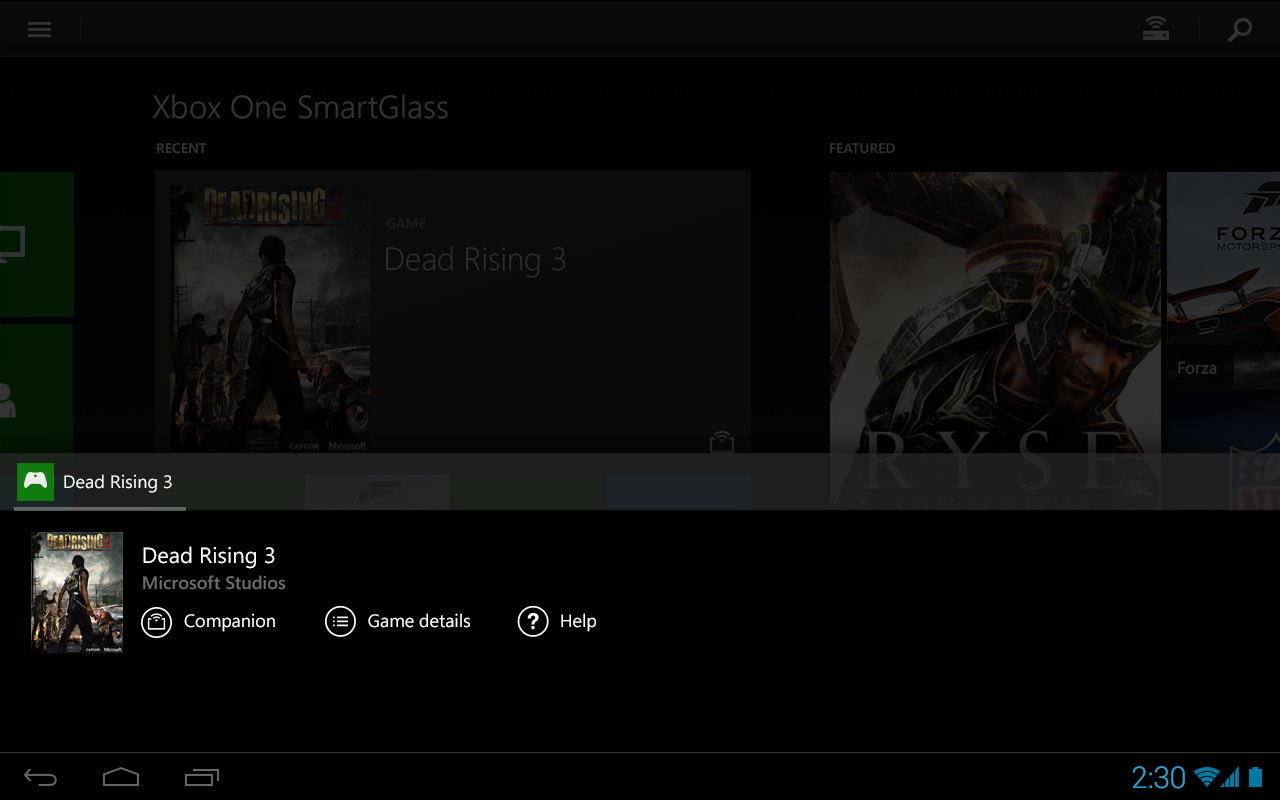
Microsoft has updated its Xbox One companion app, SmartGlass, with several new features and improvements. The first of these is a new hub for watching clips you’ve created with the Xbox’s Game DVR feature. The app will also now send push notifications for messages recieved through Microsoft’s Xbox messaging system.
Some improvements have been made to existing features as well. The friends list has a new design and makes it easier to tell which of your Xbox Live friends are available or playing a game. The app now allows you to close apps that have been “snapped” to one side of the screen on your Xbox One console.
SmartGlass is available for free on the Google Play Store.
Motorola this evening has released an update for its Touchless Control app that adds a few new features. Most notably, the update adds a new feature that allow you to ask your phone “What’s up?” to have your notifications read back to you. Simply say “Ok, Google Now, what’s up?” or “Ok, Google Now, read notifications” and the app will read your notifications back to you, allowing you to make the decision of whether they are important or not. Obviously, this is most useful while driving and can help you find out why your phone is buzzing without putting yourself or others at risk.
In addition to the “What’s up?” command, the update enhances end-of-speech detection for improved accuracy and faster responses and includes some bug fixes. The full change log is below:
What’s New
- Enhanced end-of-speech detection for improved accuracy and faster responses
- New “What’s Up” / “Read Notifications” voice command that reads out new notifications so you never miss a thing
- “What’s Up” / “Read Notifications” fully launched for U.S. English, Spanish, and Italian and in beta for other languages / regions.
- Compatible only with Android 4.4 KitKat
- Bug fixes
The update is live on the Play Store now. It’s important to note, however, that Touchless Control is only compatible with the Moto X, DROID ULTRA, DROID MAXX, and DROID Mini.
Originally released back in July, Google has just updated its Google Play Games app from version 1.1 to 1.5. The update adds some useful enhancements to help it compete with the likes of Apple’s Game Center.
First off, Play Games now supports the ability to send and view invitations to join multiplayer games. Previous versions of the app only allows you to join games from within the app and did not support invitations. Further improving the social and game discovery aspects of the app, the update has also added the ability to see what games people in your circles are playing.
A few slight interface tweaks have also been made. the settings have moved from the Action Bar to the side bar. The side bar also contains a new menu called “Matches” that allows you to manage your invitations. New “Recommended Games” and “Find Games” tabs have also been added.
The update is gradually rolling out to devices now, but if you can’t wait, head over to Android Police, where they have the download now.
The Evernote team has released an update for its Android app today that adds a few very useful features. Most notably, the updated has added support for handwriting. Evernote touts that this is more than just a handwriting add-on and that the feature is throughly integrated throughout the app. You can easily switch between typing and handwriting, which is very useful if for instance, you are taking notes during a lecture and want to draw a chart or graph. The handwriting is also searchable, assuming it’s readable, so that you can search both text and writing when needed.
The editor has also received several enhancements, including a new text highlighter, better support for notes in other formats, and the ability to edit content in tables created on other platforms. The update also adds the ability to create a note link, allowing you to quickly jump between notes, as well as the ability to duplicate a note. Finally, the camera has also received some enhancements and is easier and faster to use.
Check out the full change log below and download the update on the Play Store.
Handwriting
- Write and sketch inside your notes!
- Keep handwriting, text, photos, and files in the same note
- Choose from several colors and line thicknesses
Editor improvements
- New: Text highlighter
- Better support for notes made on other platforms
- Edit content in tables created on other platforms
Note improvements
- Create a note link to quickly jump between notes
- Duplicate a note
- Better, Faster Camera

Finally taking advantage of a rather useful technology in iOS 7, Google has released version 3.0 of its Gmail for iOS app with full support for background refresh allowing messages to download within the app as the push notification arrives.
Expand
Expanding
Close
Adobe has announced the immediate availability of its Revel photo manager for Android devices. The software allows users to not only manage their own photos, but to create group albums to be shared with others users. Group albums can be updated with new photos by any participating users, much like Apple’s Shared Photo Streams on iOS 7.
According to Adobe’s announcement, Revel will allow users to…
- Invite friends and family to join a Group Library, where you and your inner circle can create a huge collection of everyone’s photos and videos. You control who can view, add, organize, and edit the memories in a Group Library.
- Create albums to keep your photos and videos organized.
- Share albums with loved ones in private web galleries.
- Share photos and videos on your favorite social networks.
- Edit your photos to make your memories look their best.
Adobe says the new app is integrated with its latest Photoshop Elements and Premiere Elements software to enable quick photo imports.
You can grab Revel for free on the Google Play Store.
Since its initial release last year, the Chromecast has added support for a plethora of apps and services, including Plex, Vevo, Songza, and many more. Last month, Google announced the Chromecast SDK, which it said would make supporting the device even easier for developers. Online streaming video service Vudu has now announced that it too will soon support Chromecast with that SDK.
On its website Sunday, the WalMart-owned company stated that both its Android and iOS apps will soon receive updates that add Chromecast support. The company also adds that streaming will be available through Chrome on Windows and Mac, although that has been available since day one.
There are no details available as to when we can expect the Android and iOS Vudu apps to be updated, although we can’t imagine it taking too long. Rdio and Beats Music are also expected to add Chromecast support soon, so it’s clear that the SDK is going to help beef up the app selection significantly.
After a wave of updates for its Android apps yesterday, Google has just announced an update to its Hangouts for iOS app. The update brings the app version number 2.0.0 and is the first update for the app since all the way back in November.
The update adds a plethora of features and design tweaks, most notably of which is an iOS 7 optimized interface. There are aren’t a ton of changes, but everything definitely has the iOS 7 look and feel to it.Menus and buttons are now totally “flat” and much cleaner overall. The iPad app has also gotten some major tweaks, including picture-in-picture video calling. The app also now supports the ability to send video messages up to 10 seconds long, ala Snapchat.
The full changelog is below:
The update is live on the App Store now.

In a wave of updates today, Google has just announced an update to Chrome for Android. Alongside the normal bug fixes and stability tweaks that come with every update, Google is also touting some minor interface tweaks for the app.
There is now a download progress notification for file downloads, as well as a new interface for the help and feedback menus. Finally, there’s now support for the <datalist> tag.
The Chrome team is excited to announce Chrome 33 for Android. Chrome 33.0.1750.132 will beavailable in Google Play over the next few days. This release contains stability and performance improvements as well as the following improvements:
- Download progress notification for file downloads using the Chrome network stack
- Updated help and feedback UI
- Support for <datalist> tag
The update is rolling out gradually and will hit all devices within the next few days. Be sure to keep an eye on the Play Store for it to hit your device.
Google’s had a busy Wednesday in terms of app updates so far, having just released the Google Experience launcher for all Nexus devices and Play Edition devices. Now, the company has released a substantial update for the Google+ Android app. The update includes the normal group of bug fixes we’ve all come to expect, but it also includes a plethora of new features for photographers.
First off, the app now offers the ability to start editing a photo on one device, and then continue the process on another Android device. There are also a handful of new filters and editing tools, many of which we’ve seen before from Snapsneed. There are also some interface tweaks, such as a new “View All” option, which displays your entire photo library, both local photos and cloud photos, in one central interface. Finally, the update also a new option to quickly view photos by the date they were taken.
The full change log via Googler Vic Gundotra is below:
Back in 2010 the FCC launched an Android app that allowed users to test their data connection speeds. The FCC used this app to collect anonymous speed data from mobile devices. After a brief period of collecting this data, the FCC removed the software from sale.
Today the app was relaunched for modern Android devices. The data is being used to create a map of data speeds across the country. You can also review your own data from previous speed tests sorted by connection type. You can grab the app for free on the Google Play Store.