Android 6.0 Marshmallow

See All Stories

Android Marshmallow is the 6.0 release of Google’s mobile operating system.

Features |

Granular App Permissions

Following yesterday’s rumors of more granular app permissions, we received confirmation of exactly that. The new app permissions will make it faster for developers to get new users up and running in their apps by only requesting permissions as the app needs them. For users, permissions are now being simplified into several easy to understand categories like Location, Camera, Microphone, and more. Users will also be able to go into the Settings menu of their phone at any time and revoke all or specific permissions as they please.

Chrome Custom Tabs

Google is bringing the features and capabilities that users have come to love from the Chrome browser to in-app webviews. Available in the Chrome Dev Channel today and rolling out to users in Q3 this year, Chrome Custom Tabs gives users looking at a webpage through an in-app webview sign-in and caching of web services, saved passwords, autofill, and multi-process security (i.e. two-factor authentication). Developers will be able to customize the webview to their liking with buttons as well as options in an overflow menu, and also pre-fetch any links before the user clicks on them so they’ll load quickly. The company shared how Chrome Custom Tabs will work with a Pinterest integration showing off a “Pin It” button in the menu bar at the top of the webview as well as a “See related Pins” button in the overflow menu.

App Links

Following up on yesterday’s rollout of App Indexing of iOS apps in Google’s native Search and Chrome applications, Google is revamping its intents system to provide a more powerful cross-app linking capability. App developers can now add an “autoVerify” attribute to their application manifest to indicate to Android that the links they claim they support should be verified by the platform at the time of the app’s installation. Android will then make a request to the servers associated with the links and look for a file containing the name and signature of the application, and if it successfully verifies that the app owns the links it claims to, when a user with the application installed clicks on a link owned by the app, it’ll push the user to the app without opening an intents menu.

Android Pay

Following that Android Pay logo we saw this morning, Google detailed its Android Pay mobile payment service coming to Android M.

Android Pay includes the ability to pay for goods in retail stores using Android phones and NFC while users can also make payments within apps for buying digital goods. Users will be able to plug in existing debit and credit cards from supported banks, and Android Pay has carrier support to ensure Android Pay is setup on new devices sold through vendors.

Android Pay will be available through Google’s own app, and banking apps will be able to integrate the service in their own apps. Google says over 700,000 stores across the United States will be Android Pay ready in addition to many Google Play apps as well.

Fingerprint Support

Android M will include standardized fingerprint recognition support as well to leverage the fingerprint sensors that have been shipping on Android phones for years. Android Pay will use this sensor as a payment approval method as part of the mobile payment process.

Google says that at launch any app developer will be able to make use of the new fingerprint APIs in Android M to add support for fingerprint authentication to their own apps. One example the company provided of how fingerprint support might work in a third-party app was the Target app. Users will be able to, when they install the app, associate their login credentials and payment information with their fingerprint so that when they go to complete a purchase all they’ll have to do to confirm the order is place their fingerprint on the sensor.

Power & Charging

Through a new feature called “Doze,” Google is making Android smarter about managing power. Doze will use “significant motion detection” to learn when a device is being left unattended for an extended period of time, and exponentially back off background activity to go into a deeper state of sleep for longer battery life. While the device is dozing it will still be possible to trigger alarms or respond to incoming chat requests from high-priority messages.

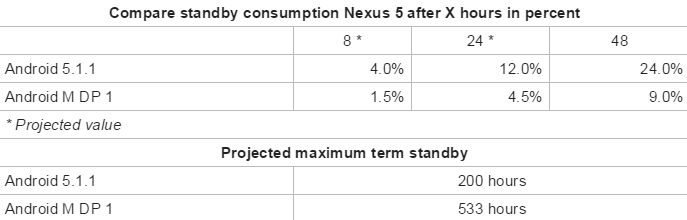
Google says they took two Nexus 9’s, putting Lollipop on one and M on the other with all the same apps installed and processes running, and found that devices on M tend to last up to 2x longer on standby.

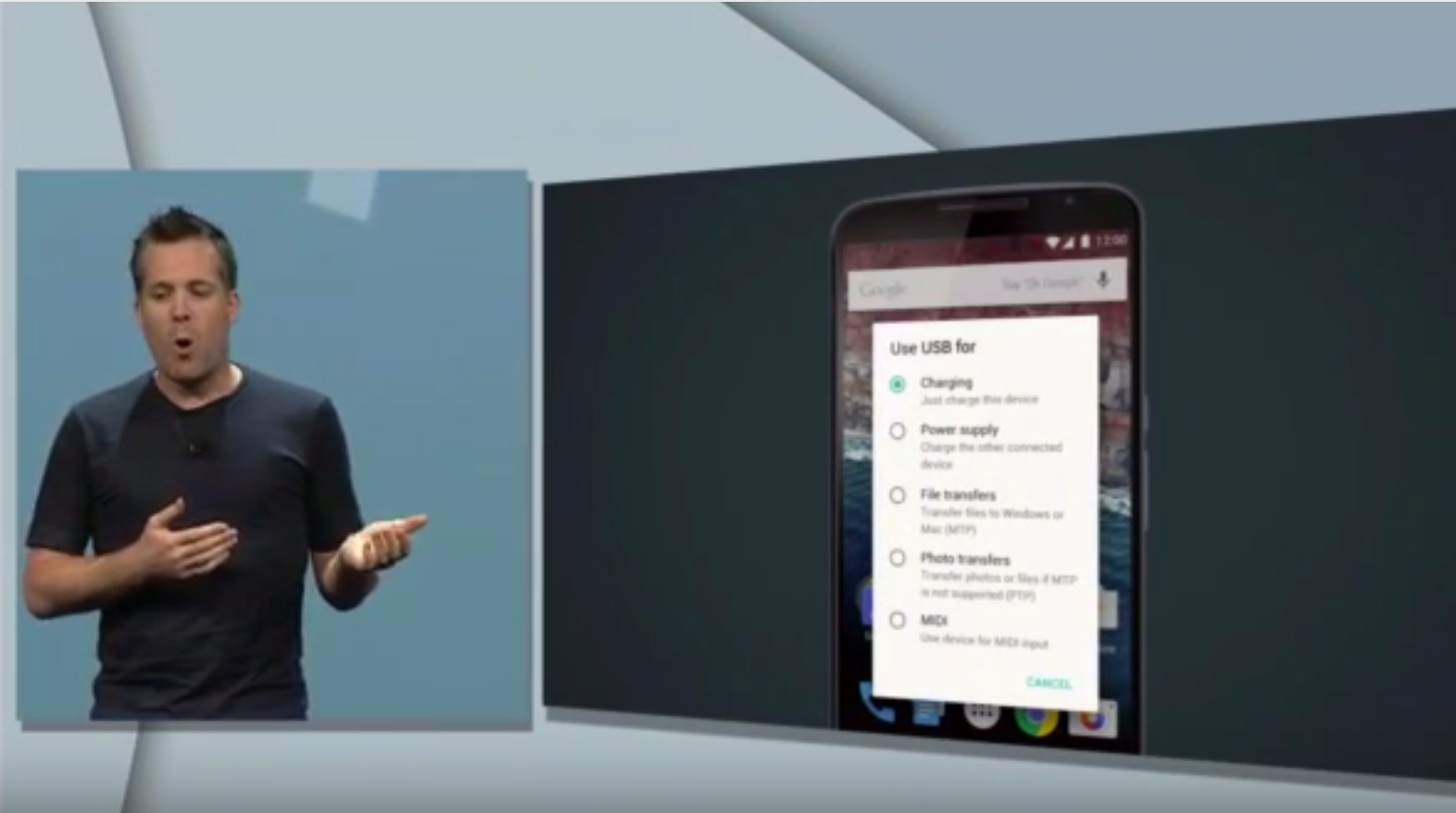
In terms of power and charging, the company also announced that they’ve been working closely with device manufacturers to bring new devices to the market which take advantage of USB Type-C for charging. Since Type-C USB cables are bidirectional, meaning you can send data or power in either direction, Android M will provide more control over what you can do with the cable plugged into your device. Instead of just charging your phone through the cable, for example, you could choose to instead send power from your phone to the charger it’s connected to.

Google “Now on Tap”

Last but most definitely not least, Google Now is getting a bit smarter at figuring out what you want more information on based on your context within the phone experience.

Coming soon to over 100 third-party apps, Google Now will proactively surface specific actions from within apps on your phone as it thinks you’ll need them. Examples they provided in the keynote include surfacing the ability to request an Uber from Now once you land at the airport or surfacing your favorite Pandora station when Now knows you’re at a public transit station.

But the company is going even further than that, and will allow you to take advantage of Google Now from wherever you are on your phone and without having to be super specific with your request. So if your friend texts you a restaurant suggestion for dinner, by tapping and holding the home button Now will figure out what you’re wanting to get more info about, in this case a certain restaurant you were texted about, and deliver a card to you from the bottom of the screen with more information on the place. The company also demonstrated this from within Spotify, with a user listening to a song from Skrillex able to ask Now “what’s the real name of this artist” and have it pull up that information without the user even needing to indicate which artist they’re even referring to, because they asked from within the app with the artist already playing. This new feature of Google Now is called “Now on Tap” and will be rolled out with Android M.

How to download |

Device compatibility |


Nexus 5 running Android M showing 2.7x greater standby time than one running Lollipop

Site default logo image


One of the major improvements found in Android M and highlighted during Google’s I/O developer conference was two new features meant to significantly increase standby times of smartphones running the OS over previous versions, and now we have some more numbers that should make the differences concrete.

For the uninitiated, the two new features meant to tackle battery life are Doze and App Standby. Doze uses what Google calls “significant” motion detection to determine when a device has been left unattended for an extended period of time, and when it does find that your device is idle, backs off background activity (like apps syncing data) to go into a deeper state of sleep and drink less power in standby.


Expand
Expanding
Close

Taking a look at all the little Android M features that really make it great [Gallery]

Android M is now available in developer preview, but only for those that own a modern Nexus device. Specifically, owners of the Nexus 5, 6, 9, and Player can grab the latest developer build of Android M, and the dozens of new visual and functional features that the operating system brings.

But while Google spent a while at I/O going over the big-picture changes it hopes to bring with M (granular app permissions, fingerprint support, better battery life, and more), there are a lot of smaller changes coming to the OS as well that reimagine how some of the most basic user-facing functions of the OS work. In many cases, these changes are more than welcome.

Google said at I/O last week that they’re putting a “big focus on quality end-to-end” with Android M, so let’s find out what that means in terms of the general user experience…
Expand
Expanding
Close

Pro tip: Chrome already has similar granular permission controls to Android M

Site default logo image

One of the big additions to Android with the unveiling of Android M last week is more granular permission controls, allowing developers to ask for access to things like the microphone or GPS only once they need them, and for users to be able to revoke one or all of these permissions when they’d like. What wasn’t discussed on the keynote stage, however, is that the Chrome browser already has these features. Here’s how to use them:


Expand
Expanding
Close

How to install Android M developer preview factory image on Nexus 5, Nexus 6, Nexus 9, and Nexus Player

Google finally introduced to the world the next version of Android, dubbed Android M for the moment, at its Google I/O developer conference in San Francisco. And while the currently-available version may be a developer preview (and those who are developers likely wouldn’t need this guide), many who aren’t as familiar with how to flash factory images might want to try the latest build of the mobile OS as well.

That’s why we made this guide. If you have the Nexus 5, Nexus 6, Nexus 9, or Nexus Player (and possibly others in the future), there’s a build of Android M available for you to install prior to the update’s official unveiling later this year. Be warned however, as this is a very early build of the OS and is riddled with bugs, glitches, and overall performance jankiness. If that doesn’t sway you, though, keep reading…
Expand
Expanding
Close

Site default logo image

Smart Lock Passwords is hitting pre-Android M devices now, web interface live

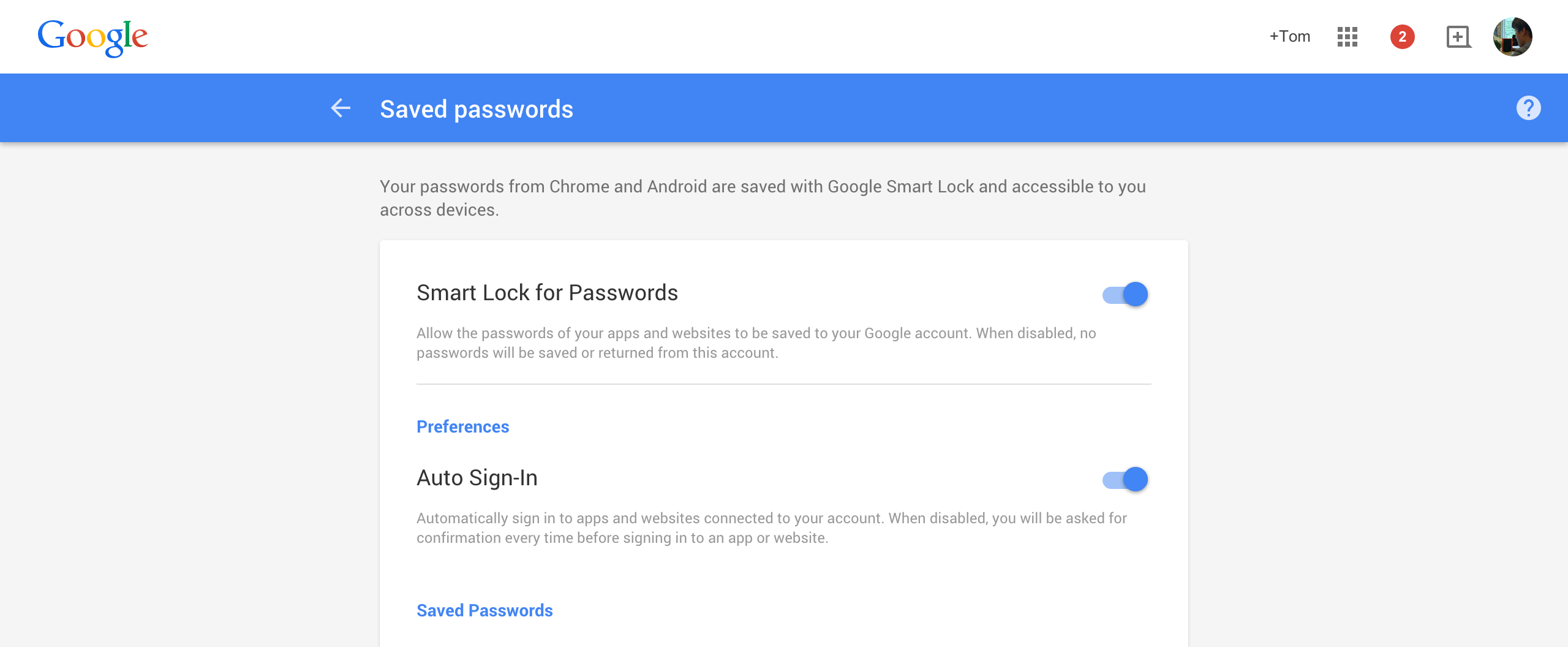
We reported earlier today that support for Smart Lock Passwords, a new cross-platform password manager tool for Android and Chrome/OS, was already beginning to hit major apps including Netflix. Now it seems that the greater rollout is pushing on quickly, with the web interface now live and reports spreading that Smart Lock Passwords is showing up in the Settings app of Android 5.1 Lollipop devices for some owners.

By visiting passwords.google.com you can toggle Smart Lock for Passwords on and off depending on whether or not you want to save app and website passwords to your Google account. The benefit of using Smart Lock for Passwords, especially if you’re a Google loyalist, is that it’s a simple, clean way to save login credentials for all the apps and websites you visit using Chrome and Android and log in automatically. I also imagine it’s a scary addition for apps like 1Password which, while now have many other features to differentiate themselves, initially built their businesses off saving login credentials in one place. Saving login credentials and not other things like credit card details and drivers license info is probably enough for the average person, too.

As mentioned above there have also been reports of Smart Lock Passwords hitting the Settings area of some Android phones running newer versions of Android 5.0 and Google Play Services. This would lead us to believe that it’s either a server-side change or Google had hidden Smart Lock Passwords in a recent version of Play Services, but it’s probably the former. Here is what that looks like courtesy of AndroidPolice:

Be sure to watch out for the change and let us know if Smart Lock Passwords hits your device.

Site default logo image

Thanks to USB Type-C support in Android M, you’ll soon be able to send power in both directions

Android VP of Engineering Dave Burke’s presentation on Android M yesterday saw quite a few huge new additions coming to the OS from granular app permissions to improved battery standby management and, of course, Android Pay (check out our roundup). But one thing that might have got lost in the noise for some of you was Google’s newfound embrace of the USB Type-C standard and what it will actually do for you in practice.

USB Type-C is both flippable and bi-directional. That first attribute means that you won’t have to fiddle in the dark with plugging the USB cable connector into your phone the right-side up, because there isn’t a right-side up with Type-C.

More interesting, though, is the bi-directional ability of USB Type-C and Android M’s new interface support for it. What this means in theory is that, while this wouldn’t be practical, you could connect your Android phone to your laptop and charge your laptop with your phone instead of the other way around. You can also send files in either direction as was obviously possible before, but the new interface you see above for managing all these abilities in one place looks quite convenient.

Finally as you might be able to make out from the image above, Google is ready to welcome in more musicians with the warm embrace of MIDI support. This is big because while because 5.0 Lollipop brought support for some audio devices like USB microphones and amplifiers, it left out a lot of musical instruments that use the MIDI standard to send data back and forth between other devices. Maybe this will encourage more musicians and music app developers to consider Android again.

Site default logo image

This is what text selection actions look like in Android M

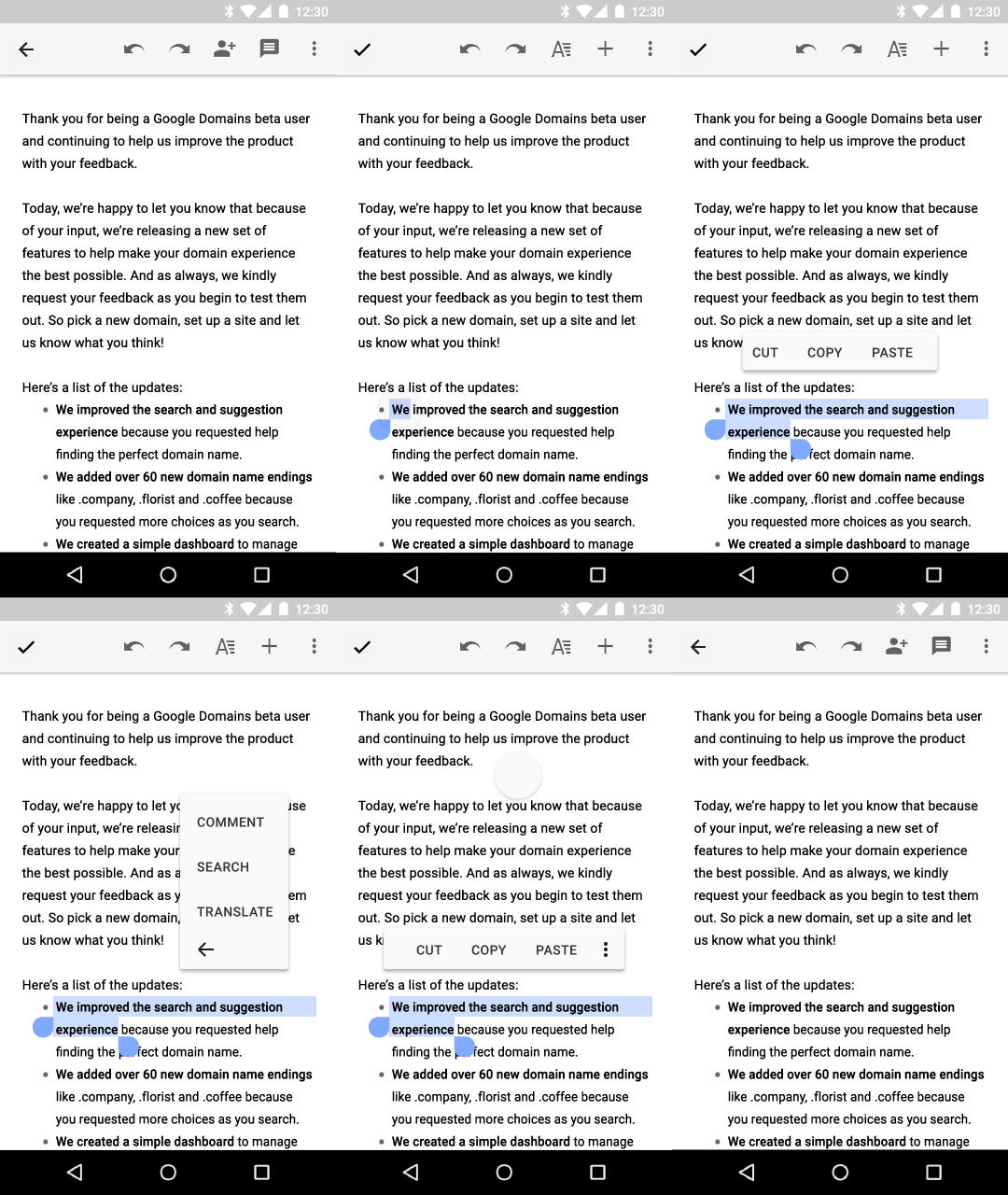
There was a lot to digest in today’s Google I/O keynote but one small, interesting new behavior change of note going into Android M is a new text selection floating toolbar, as you can see in the GIF above.

Whereas in the past primary actions of Cut, Copy, Paste, as well as other app-specific actions related to selecting text would probably be saved for a contextual action bar (an example of which is below), developers who want to keep their apps up-to-date with platform changes will now utilize this new toolbar which appears just above the text selection area. As you can see above, pressing the More icon will reveal a secondary menu where developers can add their own extra actions; the company in its design documents provides the example of Share, Search, and Translate actions appearing within the secondary menu in Gmail.

Another interesting system behavior change in Android M is a battery management tool called “Doze,” which we detailed in our Android M roundup, that disables most background activities when the OS detects that the device has gone unused for an extended period of time. The company says this has resulted in upwards of 2x longer standby time for Android devices running M versus those running Lollipop.

Android M allows Android TV developers to create channels of continuous content, users to format USB drives as internal

Site default logo image

We’ve already done a roundup of the core changes coming in the next big release of Android, simply called “M,” so you should check that out. But we haven’t yet covered what additions and changes Android M brings to Google’s Internet TV platform, Android TV.


Expand
Expanding
Close

Google announces Android ‘M’ with a focus on ‘quality end to end,’ developer preview coming soon (Update: dev preview live now)

Site default logo image

Update: Developers can find the preview images of Android M for Nexus 5 (GSM/LTE), Nexus 6, Nexus 9, and Nexus Player on the Preview SDK page. Google has said updates to the preview version will roll out regularly and that they’ll come down over-the-air, so you won’t have to flash your phone again each time it’s updated.

Google has announced the next major iteration of Android, called Android “M,” which Android VP of Engineering Dave Burke emphasized has a “focus on quality end to end.” Here are the six core changes coming to Android with this release.


Expand
Expanding
Close

Tune in live to Google’s I/O 2015 keynote starting at 9 AM PT/12 PM ET [Livestream]

Google’s annual I/O developers’ conference kicks off in San Francisco, California in just about an hour, and the Mountain View company is providing a livestream of the event to keep you in the loop on what’s being announced. As is always the case with the first day of I/O, we’re expecting a lot of announcements from the two-hour (plus) keynote, including Android ‘M’, a new Chromecast, some surprises from Google’s ATAP, Cardboard, and more.
Expand
Expanding
Close

More information emerges regarding Android M’s detailed app permission controls

Site default logo image

Earlier this year, a report emerged claiming that Google was planning on giving Android users more control over app permission settings. At the time, it was rumored that Google would add the ability to give users the ability to manually select what pieces of information to which apps have access. Android Police today corroborates the report from earlier this month and offers up a few more details…


Expand
Expanding
Close

Google’s Hiroshi Lockheimer confirms Android M for this year, talks Android and Chrome OS convergence, more

Prior to this week’s Google I/O developers’ conference in San Francisco, Google’s Vice President of Engineering for Android Hiroshi Lockheimer sat down with Fast Company to talk about the current state (and the future) of Android, Chrome OS, and more. Lockheimer confirmed the upcoming announcement of Android M, and offered much insight into where Android came from, where it’s going, and how it’s evolving in a world with more and more interconnected devices…


Expand
Expanding
Close

Google’s Android ‘M’ is codenamed ‘Macadamia Nut Cookie,’ said to focus on battery life and RAM

In just a couple of days, Google will—almost surely—be taking the wraps off the latest version of its mobile operating system, Android “M”. It’s rumored to be codenamed “Macadamia Nut Cookie” thanks to the latest versions of the Android Open Source Project sporting scattered mentions of “MNC,” and new information from Android Police suggests that this year Google is going to put a big focus on battery and RAM performance…
Expand
Expanding
Close

Google reportedly launching native fingerprint authentication w/ Android ‘M’

Google is set to launch Android ‘M’ at Google I/O next week, and now a new report from BuzzFeed News suggests that the company will be launching native fingerprint authentication features with the new version…

Google’s new mobile operating system, Android M, will include native fingerprint authentication, BuzzFeed News has learned. The new functionality will allow users to log in to all of the supported applications on their Android devices without entering a password.

The report is very light on details, but it does note that users will be able to log in to “all supported applications” on their devices without entering a password. Unless there are some unforeseen circumstances, it seems we’ll be hearing  more about the feature in just about a week…
Expand
Expanding
Close

Android Wear rumored to be getting speaker support and on-watch calling features

It wasn’t that long ago that Android Wear got its big update to Android 5.1.1, but now rumors about the next revision of the smartwatch operating system are starting to pop up. According to the well-connected Artem Russakovskii, the Android Wear team is currently cooking up support for watches with built-in speaker hardware, as well as planning to introduce on-watch calling…


Expand
Expanding
Close

Sprint’s Samsung Galaxy S4 is now receiving Android Lollipop

According to Sprint’s support website, the carrier’s Samsung Galaxy S4 should today start receiving its update to Android 5.0 Lollipop. As you likely are already aware, the update brings the famed Material Design aesthetic, changes to the OS notifications system, and other improvements.

Lollipop is still just now being pushed to various flagships across the major carriers, and this is just one more added to the list. If you’re a Verizon customer with the Samsung Galaxy S4, you should have received your update sometime in late April.

Google is set to announce the next major version of its Android mobile operating system at Google I/O at the end of this month, codenamed Android “M”. We’ll be on the ground in San Francisco during the I/O keynote to keep you in the loop on all the latest developments.

Poll: What do you think Android ‘M’ will be called?


Android ‘M’ has been basically confirmed to be coming at this year’s Google I/O (thanks to an Android for Work Session description that has since been removed from the site), but that means one big question that always plagues us before the official launch of a major Android update is now upon us.

What do you think the “M” will stand for?

What we expect to see from Google in 2015

It has been a pretty exciting year for Google in a lot of ways. Android Wear has started to ignite excitement behind the future of wearable technology, the best version of Android ever—dubbed Lollipop—was released, a couple of brand new Nexus devices (one of which we leaked) came to fruition, and the Mountain View corporation’s new Material Design language has taken the Play Store by storm. Everything that was already great was made better in 2014, and the company has been sprinkling a bunch of exciting innovations in along the way to keep things interesting—like the self-driving car, for example.

In 2015, Google is probably going to do much the same. Android “M” (milkshake, maybe?) will likely be unveiled at Google I/O this upcoming summer, we’ll probably see a round of new Nexus hardware come later in the year, Google will likely keep pushing Chromebooks in the affordable segment of the PC market, and Android Wear devices from countless manufacturers will continue to get thinner and have better and better battery life. But Google surely has some drastic innovation planned in a variety of areas, as well, with the potential return of Google Glass on the horizon and the second spiral of Project Ara to be unveiled in a couple of weeks.


Expand
Expanding
Close

Site default logo image

Reuters: Google planning new ‘Android M’ specifically for cars

Google is planning to create a version of Android that will run in cars without the need for a connected smartphone according to a new report from Reuters. The updated version of Android Auto said to include “all the features of the Internet,” such as streaming music and GPS navigation.

The software would also reportedly include the ability to use the car’s sensors (like GPS) to feed information about consumers’ driving habits to advertisers.


Expand
Expanding
Close