Google Maps



Google announced today that it’s expanding the Local Guides feature it has for Google Maps that aims to act as a community-driven virtual guide for points of interest with an integrated rewards program (which it could position as a Yelp competitor).
Among the biggest update for the expansion is new rewards for users, allowing access to upgraded Google Drive storage, early access to Google products and features, and more.
Google detailed the new rewards, which include the ability for users to earn a free 1 TB upgrade of Drive storage by accumulating a certain number of points. The top reward will make users eligible to attend Google’s inaugural summit in 2016: “… you’ll be able to meet other top Guides from around the world, explore the Google campus, and get the latest info about Google Maps. Look out for details early next year.”
Here’s a look at the new rewards:
Level 1 (0 – 4 points): Enter exclusive contests (think new Google devices!) in select countries.
Level 2 (5 – 49 points): Get early access to new Google products and features.
Level 3 (50 – 199 points): Show up in the Google Maps app with your official Local Guides badge.
Level 4 (200 – 499 points): Receive a free 1 TB upgrade of your Drive storage, allowing you to keep all the stories, photos, and videos from your travels in one safe place.
Level 5 (500+ points): The very top Local Guides will become eligible to apply to attend our inaugural summit in 2016, where you’ll be able to meet other top Guides from around the world, explore the Google campus, and get the latest info about Google Maps. Look out for details early next year.
Users can earn points by using the feature in Google Maps to do things like leaving a review, answering questions, uploading photos, and submitting fixes.
The expansion also includes an update that makes it easier for contributors to view and track local guides they’ve submitted.
[youtube=https://www.youtube.com/watch?v=puDNfWfILl4]

Google is now rolling out a major new feature to its Maps app for Android: full offline support. Google Maps has some utility already when used offline, but an update coming as soon as today will make it much more robust when used without Internet access. For example, before you could see an area on Google Maps offline but not do much else with it. With the latest version, Google will enable features including navigation and business information lookup without requiring an active Internet connection.
Expand
Expanding
Close

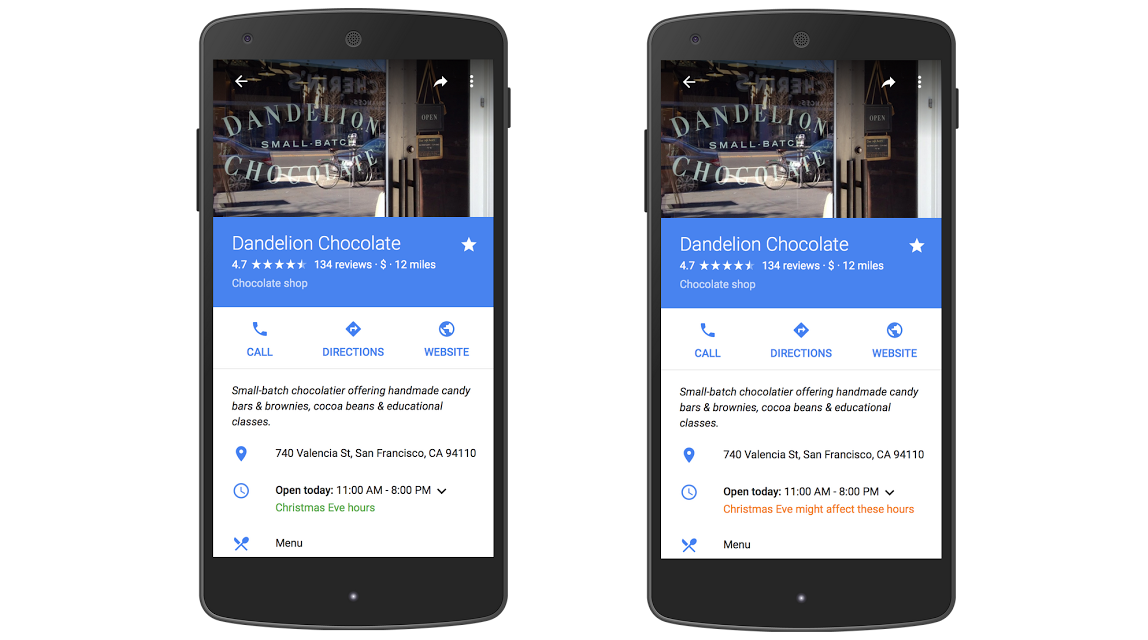
After many years of people trusting Google Maps far too much and accidentally driving across town to a store that ended up being closed, Google has finally added the ability for companies to designate holiday hours on Google Maps. Whenever you open up the Maps app and click that little drop-down to see hours for the week, you’ll now see a designated section for these special hours. And if a company hasn’t provided these, you’ll see a warning suggesting that the normal hours might not be right…
Expand
Expanding
Close


The backpack-based Google Trekker tours have taken us to some pretty spectacular places in the past, and the latest addition won’t disappoint. The Street View imagery covers seven of New Zealand’s world-famous ‘Great Walks,’ including some of the settings for the Hobbit movie trilogy …
Expand
Expanding
Close

Google today has rolled out an update its Maps application on iOS, bringing with it a pair of new features. The update bumps the app to version 4.12.0 and includes support for adding missing businesses to the app’s database and spoken traffic alerts.
The latter of the two is the far more interesting addition of this update. Spoken traffic alerts mean that Google Maps will now alert you about upcoming traffic congestion and traffic incidents as you use the Navigation feature of the app. It does so via voice so you aren’t distracted while you drive. Traffic descriptions provide the same information, but in both text and verbal forms before you start to move.
Google Maps version 4.12.0 is available via the App Store now for free. The full changelog can be seen below:
What’s New in Version 4.12.0
- Easily add new and missing businesses from the sidebar
- Spoken traffic alerts in Navigation tell you about congestion and incidents on your route and traffic descriptions give you summary of traffic before you drive
- Bug fixes


Google is rolling out an update to Maps for Android over the coming weeks that adds quick access to gas station price comparisons and other nearby points of interest when navigating. The new feature allows drivers using the app for turn-by-turn navigation to search for points of interest without having to exit the navigation screen.
When the update lands, a new magnifying glass in the upper right corner of the screen will allow users to search for the usual points of interest like gas stations, restaurants, coffee shops and more. Alongside the quick shortcuts, you’ll also see a microphone icon and search option for both voice and text searches for additional points of interest.
Google says the update is rolling out for all Maps users on Android over the next few weeks.
Over the next few weeks, we’re rolling out an update to Google Maps on Android that will make your next gas stop more convenient and affordable. Now you can check out gas prices and add detours to your route, without having to exit out of navigation… When you’re driving in navigation mode and you get that call from your spouse to pick up some more milk on your drive home or if you’re on a road trip and want to find a great restaurant option along your route, simply tap the magnifying glass at the top right corner of the screen. You’ll see a drop-down menu with helpful options, like gas stations, grocery stores, or restaurants. If the drop-down options aren’t what you need, you can always add a detour to your favorite coffee shop by tapping the search icon or by using voice commands.

Digisfera, a startup that prides itself in “photography, design, and development services for projects involving 360° images,” has been acquired by Google. Financial details of the deal haven’t been revealed, but Digisfera’s website has been updated to reflect the acquisition and states that the group is joining the Street View team at Google to “continue building great experiences using 360° photography.”
Here’s the full statement from the team:
We’re excited to share that Digisfera is joining Google. We started Digisfera almost five years ago and have had the opportunity to work in many interesting projects involving 360º photography over the years. We’re excited to join the Street View team at Google to continue building great experiences using 360° photography.
As we move on to our next adventure, it will no longer be possible for us to keep developing PanoTag, so it is being discontinued. We are planning to open-source our Marzipano viewer in the coming weeks and hope this will benefit the panoramic photography community.
The Portugal-based startup, according to reports, has been part of capturing many significant moments in panoramic photography, including Barack Obama’s inauguration, landmarks in Rio de Janeiro during the 2014 World Cup, and parts of the 2014 Winter Olympics. These skills are going to hopefully translate to making Street View a better product and it wouldn’t be far-fetched to think that Digisfera could contribute to Cardboard technology as well.
The company says it plans to open-source its Marzipano panorama viewing software.

Google looks to be rolling out a redesigned version of Google Maps on the web that introduces a tweaked user interface that in many ways mirrors its mobile app experience on both Android and iOS. As pictured above, Maps gets a redesigned menu/sidebar/search UI that is clearly inspired by Material Design and the user interface of its mobile apps.
Expand
Expanding
Close
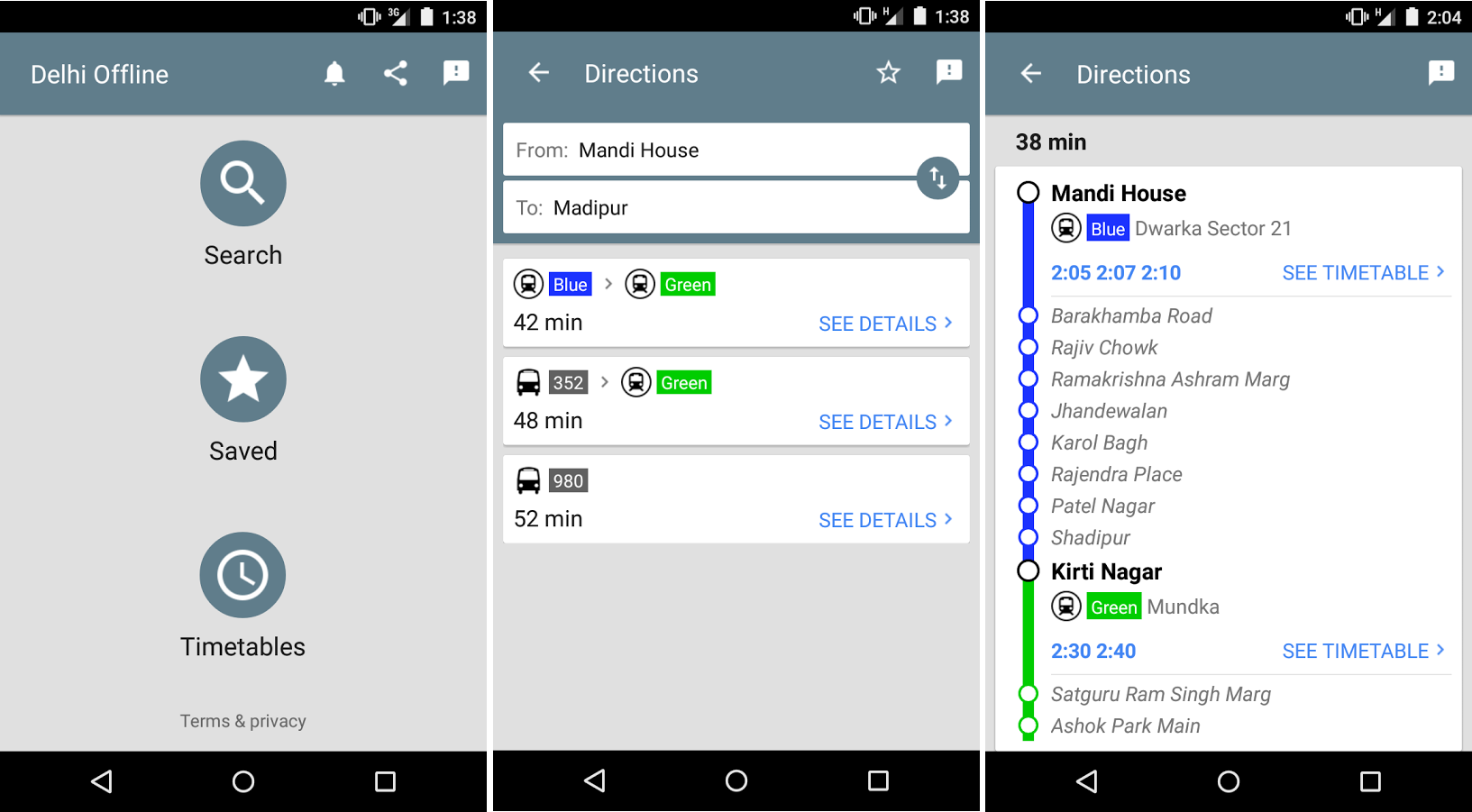
Google has today released a new app called Delhi Public Transport Offline and, well, most people probably don’t need it. But if you do happen to live in Delhi and would like a very simple app to help you get around town via public transportation, today’s your lucky day — it’s free, and it’s packed with lots of features that might make a quick download worth your time…
Expand
Expanding
Close


Google has released an updated version of its mapping application for iOS that includes several new features, including an Apple Watch app. Along with the new watch app comes the ability to compare ETAs for different modes of transportation, such as biking and walking.
An interesting project has emerged this week that uses Google Maps to plot historic data from the New York Public Library’s digital collection of photographs taken by Percy Loomis Sperr between 1931 and 1942 and various other photographers between 1870 and 1970. The photos all depict New York City’s various streets and buildings and the OldNYC project aims to integrate those images into Google Maps (via LaughingSquid).
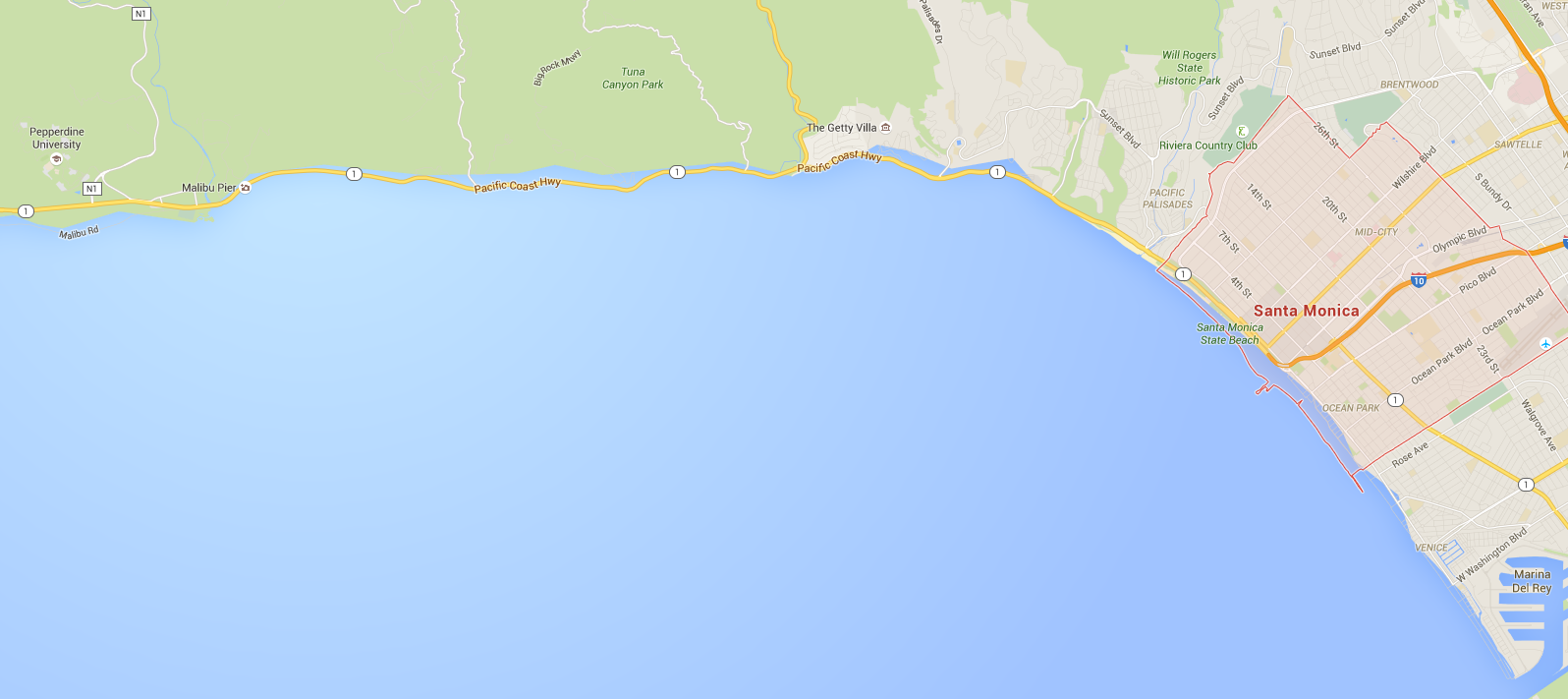
Update: Maybe not. A Google spokesperson just sent over the following information, suggesting that this might have been a glitch in the system after all.
The various types of data found in Google Maps come from a wide range of sources. Our basemap data – things like ocean, road networks, and place names comes from a combination of third-party providers, public sources, and user contributions. Overall, this provides a very comprehensive and up-to-date map, but there are occasional inaccuracies that arise from any of those sources.
Before the weekend I just happened to look up Santa Monica on Google Maps and saw that the ocean was somehow extending onto the land. Dismissing it as an old — albeit uncommon — glitch in Google’s mapping app, I went about my day. Apparently, there’s a little more to this than just programming error, and it has to do with global warming.
Sea level rise as a result of climate change could have devastating effects for low-lying coastal areas (and pretty much everyone, really), and as Mic.com pointed out on Friday, Google was showing users the potential damage of climate change by way of Google Maps — in far more areas than just Santa Monica. Other areas around LA were showing up with underwater houses and streets…
Expand
Expanding
Close
One of the standout features of Google Maps that other mapping apps just can’t compete with is Street View, Google’s feature for viewing imagery that gives you an immersive, 360-degree, street-level view of roads and retail stores. Now, Google is launching a standalone app for Street View that will let you access and contribute imagery without having to go through Google Maps:
Expand
Expanding
Close

Developers who want to do unique things with Google’s mapping technology, like plot markers on a map from a content management system, can now do it more affordably. Several Maps APIs have been moved to a payment model where you pay just for what you need.
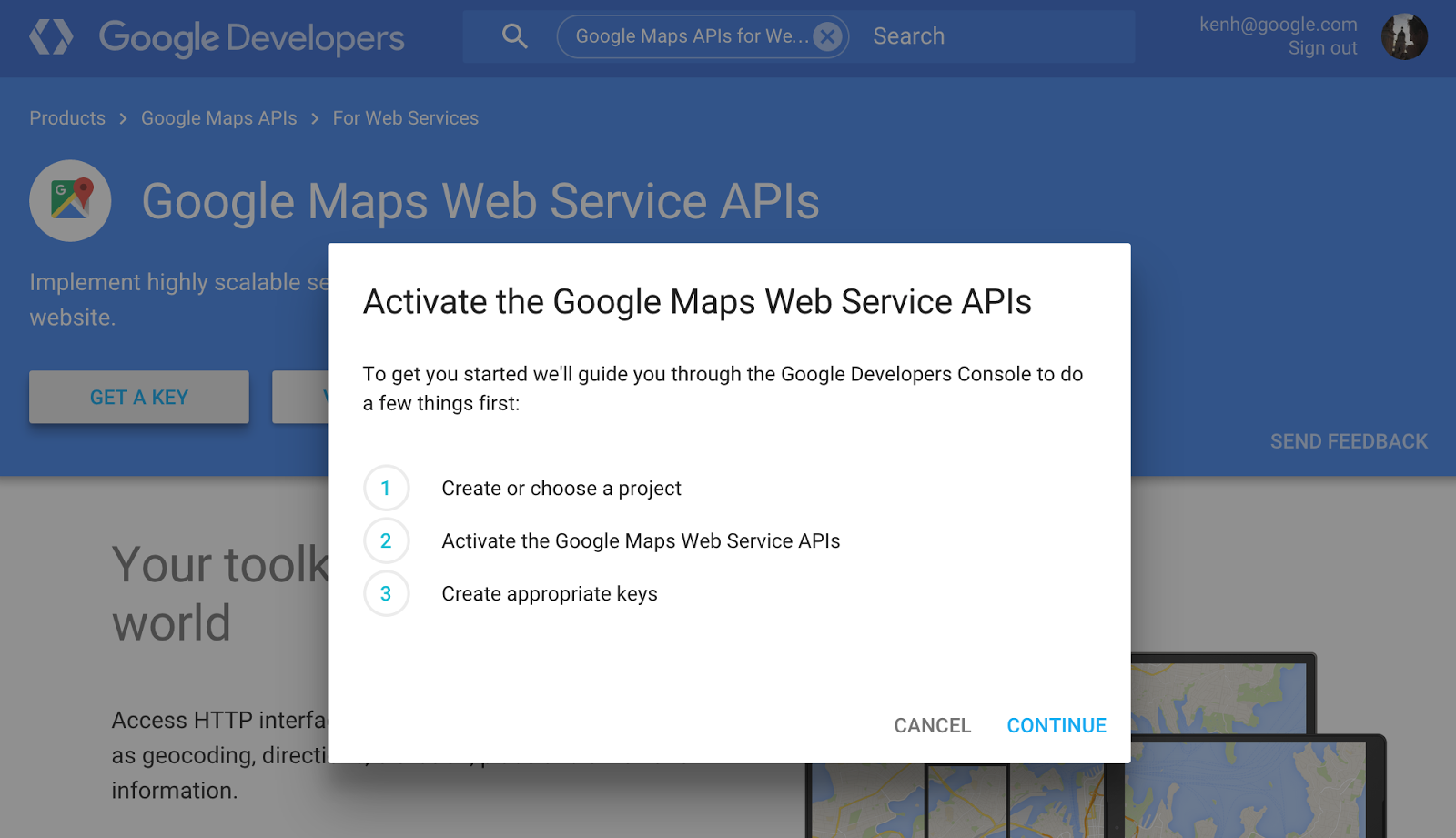
With the move, the following APIs will begin to cost $0.50 per 1,000 requests after the first 2,500 in each 24-hour period: Geocoding, Directions, Distance Matrix, Roads, Geolocation, Elevation, and Time Zone APIs. This price will stay in place until developers pass 100,000 requests per day. Beyond that large number, developers will need to contact Google to request a premium license.
Previously developers who exceeded the 2,500 per day cap had to contact Google about purchasing one of its premium Google Maps for Work licenses, now called Google Maps for Business, which has been quoted as costing as much as $10,000 per year (Google doesn’t publicly list a price). Basically the APIs are now accessible to a much larger portion of those who want to use them.
Google Maps on mobile has since last year had an Explore section where users can find the best restaurants to eat at and things to do in their area. With an update rolling out today to the Android app, it’s becoming a bit more easy to specify and narrow down exactly what you’re looking for.
Prior to today, Explore only used the inputs of distance and time of day to determine what to show you. Users can now, however, specify a nearby neighborhood, category, and type of cuisine to find, on top of the existing inputs. Tapping on a suggested place will bring up more detail like who the vibe is best, or least, suited for, and sometimes it’ll include why Google chose to recommend that place in particular.
It seems crazy to me that Explore in Google Maps was lacking this type of gradual search before, but it was. The new inputs make perfect sense, too — what if I specifically want to find a place to have drinks with friends, and also make sure it’s not too upscale of a place? You couldn’t narrow your results down that far before, but now you can. Well, that’s if you’re in the US or UK, where the Explore update is limited to for now. And if you happen to be in NYC, San Francisco or London, Google will even curate its suggestions into named sections like “Best places for classic Mission-style Mexican food.”
Aside from the new search, the UI has been updated a bit with a card-based interface for swiping through suggested places and their corresponding photos. This interface closely matches what Google rolled out to its search product on mobile for rich content results just a few days ago. Maps for Android also recently saw its directions interface updated with a similar tabbed design displaying duration estimates for every form of transportation to a given location.
Other location-based recommendation apps like Foursquare and Yelp have had what Google is rolling out now for quite a while, it’s worth noting. When I find an APK for this new update I’ll be sure to update this post.
Fortune reports that Google has abandoned plans to beam location-based retail messages to both Android and iOS smartphones, shortly before launch. The project was reportedly named Google Here, and would have used beacons in retail stores like Starbucks to display offers and reward cards on the lockscreens of smartphones when they entered the store.
Google Here worked by sending a notification to a smartphone user’s lock screen within five seconds of their entering a partner’s location. If the user clicked on the notification, a full screen HTLM5 “app” experience would launch. Google Here would know when to send the notification via Google Maps and beacons placed in the stores of participating partners …

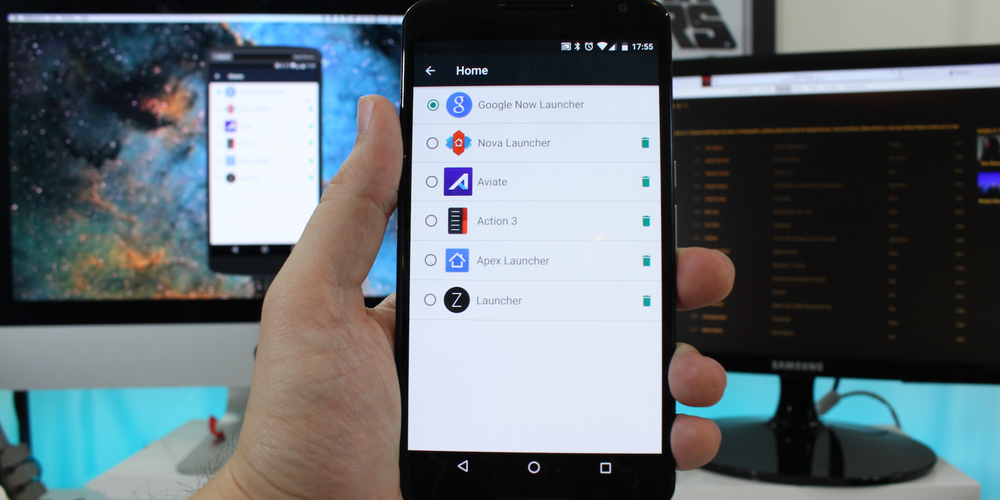
One of Android’s best features is the ability to download and install custom third-party launchers. Don’t like the way your phone home screen looks or how the apps are organized? Fine. Change it. But finding the best one, or a good one for that matter, can sometimes be a daunting challenge. And which one you think is the best ultimately depends on what you value most: aesthetics, organization or productivity? I’ve rounded up what I think are some of the best launchers out there, as well as a wild card for you to consider in your quest for the perfect Android experience.
As first spotted by AutoBlog, Google was recently granted a patent covering a system capable of detecting road quality conditions, which in theory could allow it to deliver warnings of potholes and other road quality issues to its users.
The patent describes using a number of sensors in the vehicle, in addition to potentially adding other sensors to a vehicle’s shocks and elsewhere, and transmitting the data through a mobile network. Google would in return use the data for Google Maps to improve driving directions and potentially warn users of dangerous road conditions. It’s also data that would undoubtedly come in handy for Google’s self-driving car project.
Google Maps already offers similar warnings for things like accidents, construction, road closures, and more via user submissions in the Waze mapping app it acquired along with a few other sources. But having data compiled directly from the vehicles would likely allow it to have more accurate and up to date data for much larger areas compared to user submitted data.
You can view the Google patent in full here.
Google Map Maker, the tool which allows anyone around the world to contribute information to Google’s worldwide map, has re-opened in 45 countries after going live again in 6 countries two weeks ago. The product was temporarily shut down in May after it was discovered that some nefarious edits to the map, like geographic polygons shaped to depict an Android peeing on what is ostensibly an Apple logo, were being approved.
If you’re like me, you sometimes use the Street View feature of Google Maps to see a place you’re about to visit and what its surrounding area looks like. Maybe you’re apartment hunting and want to see if the neighborhood looks safe. Regardless of why you do it, Google understands us and has made this previewing a tad easier.
Google Maps version 9.13.0 for Android places a thumbnail preview of a location in the bottom left corner of the screen for inputted addresses and places for which you’ve pressed and held on the map. It looks like this:

Tapping one of these previews brings up your standard Street View:

This version is available from Google Play, and an APK can be downloaded from APKMirror.
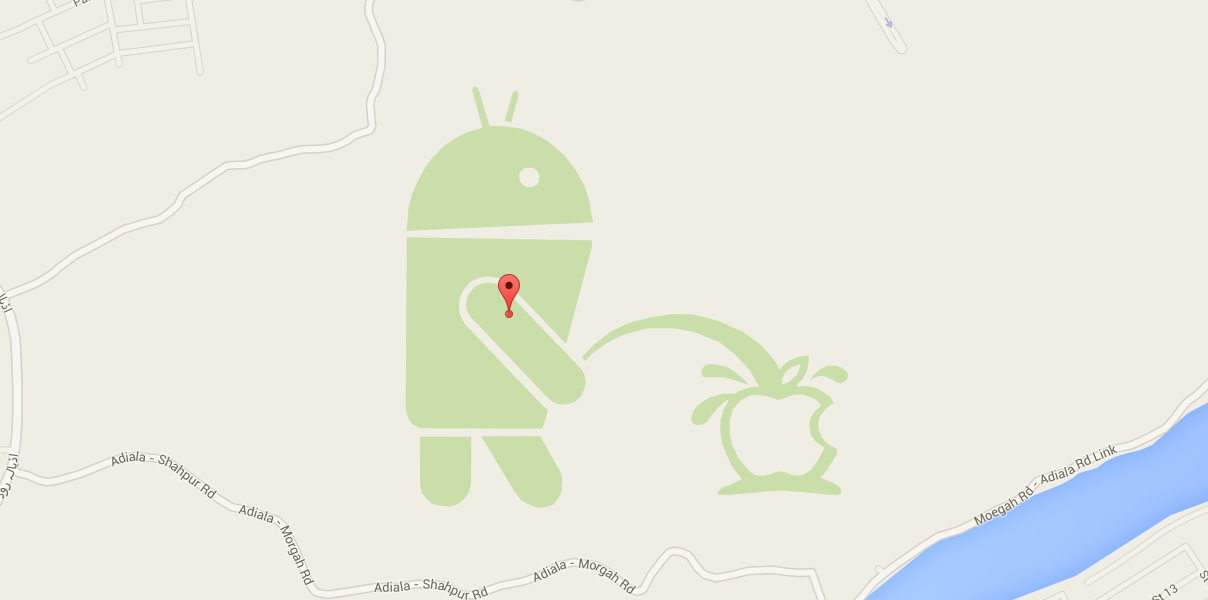
Google announced earlier this week that it will be turning its Map Maker tool back on in six countries after shutting it down due to misuse and map vandalism three months ago. Along with the relaunch of the tool, Google has implemented some new checks to ensure that the system isn’t being abused.
iOS users of Google Maps just got some new functionality that has been in the Android version for some time now. Version 4.9 (iTunes link) brings a new night mode as well as the ability to label custom places so they can be easily found on the map and in search.
Night mode does something pretty common amongst dedicated GPS navigation units: It darkens the maps on-screen while you’re navigating somewhere. The reason this matters is because distracted driving is one of the biggest causes of driving-related accidents, and the white glow of a smartphone screen directed at ones face at nighttime can most definitely make it difficult to see what’s in view of the vehicle.
The other notable addition to come with this update is the ability to label places on the map that aren’t already in Google’s own database of places and points of interest. It’s already possible for anyone to add new places to the map through the iOS app, but these were only for public places and, if approved, would be seen by everyone using the app. The new labels are private, intended to make it easier to find and navigate to places that matter to you.
Google Maps for Android already has these features, but for iOS users who still cannot stand Apple’s own mapping product, they’re surely a welcome addition.

Aclima, a startup which builds an end-to-end hardware and software solution for detecting and analyzing the health and state of varying environmental surroundings (i.e. indoors where carbon dioxide can build in meeting rooms, outdoors where vehicles can release significant carbon monoxide), has announced a new partnership with Google which will see its sensors make their way onto Google Street View cars in the San Francisco Bay Area. Street View cars are the vehicles through which Google collects street-level imagery for its Maps street view product.
The ultimate goal for Aclima with partnerships including this one is to make data on air quality as easily accessible as the weather so that communities can better understand how air pollutants in their area are affecting human health and climate change, and start a dialog on improving local air quality.

Google Maps is an very powerful tool. While parts of it are extremely helpful and practical, there are others that are just there for a good laugh. Thanks to some attentive Maps users on Reddit, it would appear that Google’s mapping service has a fun treat awaiting users when traveling to Area 51.