Apps and Updates




Hot on the heels of adding an activity feed to the web version of the Play Store, Google is now quietly rolling out a new “People” section to the Play Store app on Android. While the activity feed on the mobile app simply shows you what you’ve recently reviewed, rated, and purchased, the People section shows you what other users have recently been into.
The People feed is integrated heavily with Google+ and allows you to quickly follow users and view the their full profile. The feed shows what others have reviewed, +1’d, or shared. It includes apps, music, movies, and anything else available on the Play Store.
The People feed is rolling out now to the Play Store app. The interface is accessible via the sidebar and should appear on its own.


Yesterday we got a look at a beta version of the upcoming Gmail app for Android which includes new Travel, Purchases, and Finance categories in addition to the Social, Promotions, Updates and Forums categories currently available. Also present is a pinning feature for making emails of your choosing remain at the top of your inbox as well as a “snoozing” feature that allows you to delay an email for a set amount of time much like hitting snooze on your alarm clock. Within a slightly tweaked UI you’ll also notice a new toggle at the top of your inbox that allows you to switch between showing pinned emails and having them return to chronological order.
Our sources had previously told us about this update but without confirmation. We sat on the story. Now that we have some confirmation that this is coming, we can discuss the whole of what we’ve heard.
Expand
Expanding
Close
Following an update to Google Keep earlier this afternoon, Google is now rolling out an update to its Play Newsstand app, which was released earlier this year as a replacement for Currents. The update makes some design tweaks, as well as enhances how you can organize your sources.
First off, the My News and My Magazine categories have been merged into a new My Library section. There is also a new Read Now category bar at the top of the interface that autohides and allows you to easily swipe between categories. Finally, the action bar now changes colors depending on what section you are in (News/Business/Sports/etc).
The update is rolling out now, although it is a staged update and may take a while to hit your device. Keep an eye on the Play Store.

Google might be preparing to release a new Gmail app for at least Android devices that will introduce a few new notable features.
Geek.com got its hands on the screenshots above that is apparently a version of Gmail for Android that Google is currently testing. It includes new Travel, Purchases, and Finance categories in addition to the Social, Promotions, Updates and Forums categories currently available. Also present is a pinning feature for making emails of your choosing remain at the top of your inbox as well as a “snoozing” feature that allows you to delay an email for a set amount of time much like hitting snooze on your alarm clock. Within a slightly tweaked UI you’ll also notice a new toggle at the top of your inbox that allows you to switch between showing pinned emails and haven them return to chronological order.
There’s always a chance the features above will never make it out of testing, but there’s also a possibility Google could be planning to roll them out to users in a future update. As always, we’ll keep you updated as we learn more.
Expand
Expanding
Close

Google continued its April Fools tradition with a long list of pranks yesterday, one of which included announcing a new “Shelfies” feature for Gmail that let users snap and share selfies to use as background in Gmail. The feature, which was completely functional within Gmail yesterday, was clearly just a bit of fun for April Fools day, but Google announced today that it will actually stick around as a new custom theme sharing feature.
While Gmail has allowed users to create custom themes since 2012, it will now provide an option to “Share your theme” within settings. The Gmail team will also be sharing some of its favorite themes shared by the community through its Google+ page. Here’s how it works:
Expand
Expanding
Close

From 9to5Toys.com:
The Amazon Appstore for Android has dropped the price of Plex, the popular media server software, down to just $0.99. As a pricing comparison, it carries a list price of $4.99, which both Google Play and the iTunes App Store are currently charging. It could be a coincidence, but it’s worth noting that this discounted rate popped up on the Amazon App Store on the same day its set to unveil its long-awaited streaming media player. Plex recently added Chromecast support for all iOS and Android users. There’s no word on when this promotion will end so get downloading!
Dish and The Walt Disney company announced today that they have reached a multi-year distribution deal that will see Dish subscribers gain access to a ton of Disney content including its ABC and ESPN networks. That means if you subscribe to Dish, you’ll now be able to access the WATCH ABC, WATCH ABC Family, WATCH Disney Channel, WATCH DisneyXD and WatchESPN apps through your computer, smartphone, tablet and other connected devices like game consoles and set top boxes. The deal will also see Dish launch a number of Disney and ESPN networks while pending litigation between the two companies comes to an end:
The agreement will result in dismissal of all pending litigation between the two companies, including disputes over PrimeTime Anytime and AutoHop. As part of the accord, DISH will disable AutoHop functionality for ABC content within the C3 ratings window. The deal also provides a structure for other advertising models as the market evolves, including dynamic ad insertion, advertising on mobile devices and extended advertising measurement periods.
DISH will make available Disney Junior, Fusion, ESPN Goal Line, ESPN Buzzer Beater, as well as Longhorn Network and the upcoming SEC ESPN Network upon its launch. In addition, DISH, ESPN and ESPN Deportes customers will have access to the live and video-on-demand channel ESPN3… As part of the agreement, DISH will launch ESPNEWS, ESPNU, Disney Channel and ABC Family in high definition. ESPN Classic will be reintroduced as a video-on-demand channel.
For Android device users, the majority of the content is available through dedicated iOS and Apple TV apps including WatchESPN, WatchABC, and WatchDisneyChannel.
Expand
Expanding
Close


Adding to the catalog of Chromecast-supported content, Rdio and Crackle are both adding the ability to play more content from your smartphone, tablet, or browser to your TV today.
Crackle has refreshed its Android and iOS apps with support for Chromecast streaming. The Sony-backed content provider serves up a number of movies and TV shows for free including comedian Jerry Seinfield’s “Comedians in Cars Getting Coffee” original.
Video streaming service Vudu has also added Chromecast support in the latest versions of its Android and iOS apps. The Walmart-owned service includes HD movies and TV shows with no subscription.
Rdio announcement includes support for music streaming from its Rdio app to your TV for Google Chromecast users. That means users can control music from the Android or iOS app as it plays through the TV with the Chrome HDMI streaming stick. Rdio users can also stream to Chromecast-connected TVs with Google’s Chrome web browser.
Expand
Expanding
Close
Since its release, Google Now has added a plethora of features, such as improved traffic capabilities, voice commands, and much more. According to a new report from Android Police, the service will be receiving yet another new capability in the near-future that will help you remember to pay your bills.
According a person familiar with the matter, Google Now will soon add an interface that will remind you of upcoming bills, including how much they will be for. The feature, which will be integrated into the classic Google Now card interface, will also include a link to easily pay the bill online.
The screenshot below is a mockup of the interface based on the available information. The latest update to the Search app also includes hints at this feature, some of which were used to help make the mockup. As you can see, the card shows the amount due, the minimum payment, and any other information.
Android Police says the source for this feature is very reliable and that their “confidence level” with this report is a 9/10. It’s unclear when this feature will launch, but given that there is already code appearing the Search app, we shouldn’t have to wait too long.
 While Microsoft’s biggest news of the day might have been the debut of its Office productivity app suite for iPad, there was also news on the Android side as well.
Microsoft didn’t make dedicated apps for Word, PowerPoint, and Excel, but the company did make Office Mobile for Android free for all users. Previously, Office Mobile for Android required an active subscription to Office 365.
Just like Office Mobile for Windows Phone, we are making Office Mobile for iPhone and Android phones free for everyone. With Office Mobile, you have the ability to view and edit your Office content on the go. Office Mobile is available in the App Store and Google Play.
Now that Microsoft has moved that requirement to its dedicated iPad apps, Android and iPhone users can now enjoy Office Mobile’s full feature set without any limitations and not subscribe to the membership.
Office Mobile for Android is available for free on the Google Play Store.
Popular iOS app Timehop has finally made its way to Android today. Timehop is an app that allows you to see what you were posting on a variety of social networks exactly one, two, three, and four years ago. The app requires that you log in with your Facebook account, but can connect to Twitter, Instagram, and Foursquare to see what you were posting.
Timehop helps you celebrate the best moments of the past. What were you doing a year ago today? Two years? Three years?Timehop brings together your old photos and posts from your iPhone, Facebook, Instagram, Twitter, and Foursquare and replays your past a day at a time. You’ll quickly fall in love with checking your daily Timehop. Give it a try today!
You can only view your posts from one, two, three, or four years ago, not anyone else’s, which is somewhat disappointing. But Timehop says the point of the app is to be somewhat of a time capsule for your social networks. If you want to bask in your social network awkwardness, the app is available on the Play Store now.

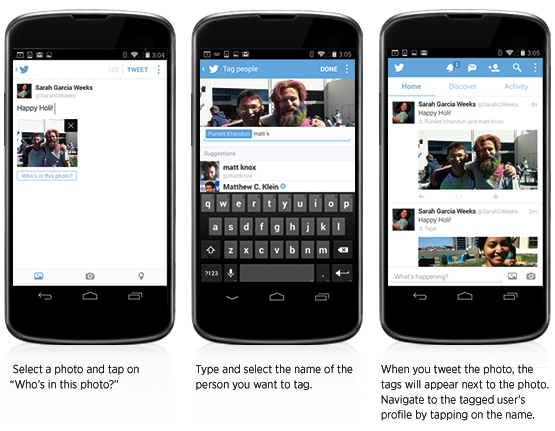
Twitter has announced a few new features for its Android app today. Users with the latest update to the Twitter for Android app will soon see the ability to select up to four photos at a time to upload when composing a tweet. These photos will be displayed as a collage on the tweet’s detail screen.
Along with the multi-photo support, users are also now able to tag other people in their photos. A new “who’s in these photos?” button allows you to add the username of other people in the picture. Photo tags won’t take up any characters in the body of the tweet, so the full character count will be available for composing a message.
Google’s Play Music service previously required installing the Music Manager app to upload music to the cloud service on Mac, Windows, and Linux. Today that changes as Google adds the ability to drag-and-drop your music collection to upload it directly through the browser within the Google Play Music web interface. It’s still in “lab” beta mode, but you can easily enable it:
Google announced today on its Google Drive blog that it’s adding new image editing features to Slides and Drawings that will allow you to perform basic editing tasks without having to leave the app. That means you can now crop, apply shape masks, and more right from within a presentation or drawing.
On top of cropping and applying masks, you’ll also now be able to add borders:
Cropping
To crop an image, select it and click on the crop image icon in the toolbar.
Then drag the corners to your desired crop size and hit enter to make the crop.
Applying masks
To crop your image to a particular shape, apply a mask from the pull-down menu next to the crop icon.
There are tons of shapes, arrows and callout designs to choose from, like the heart example below.
Adding borders
Add a border to your image by clicking on the line weight icon, and give it a little extra pop by changing the line color.
The new features will appear in the Slides and Drawings apps within Google Drive today.
After months of leaks, HTC just unveiled the new One (M8) on stage in New York City, and with it comes a bit of software news, as well. Overnight, HTC added all of its key Sense apps to the Play Store in order to make updating them easier. Motorola also did this with the Moto X and it has turned out to be a big success.
Having each individual app on the Play Store means that HTC can quickly and easily push updates without having to issue a full OTA device update, which requires carrier approval. And as we are all well aware of, it can take awhile for carriers to approve updates. HTC can now release updates just as any third-party developer would.
HTC has added the following apps to the Play Store: BlinkFeed, Gallery, SenseTV, Service Pack, and a companion app for their Fetch accessory.
Play Store links: BlinkFeed | Service Pack | Gallery | SenseTV | Fetch
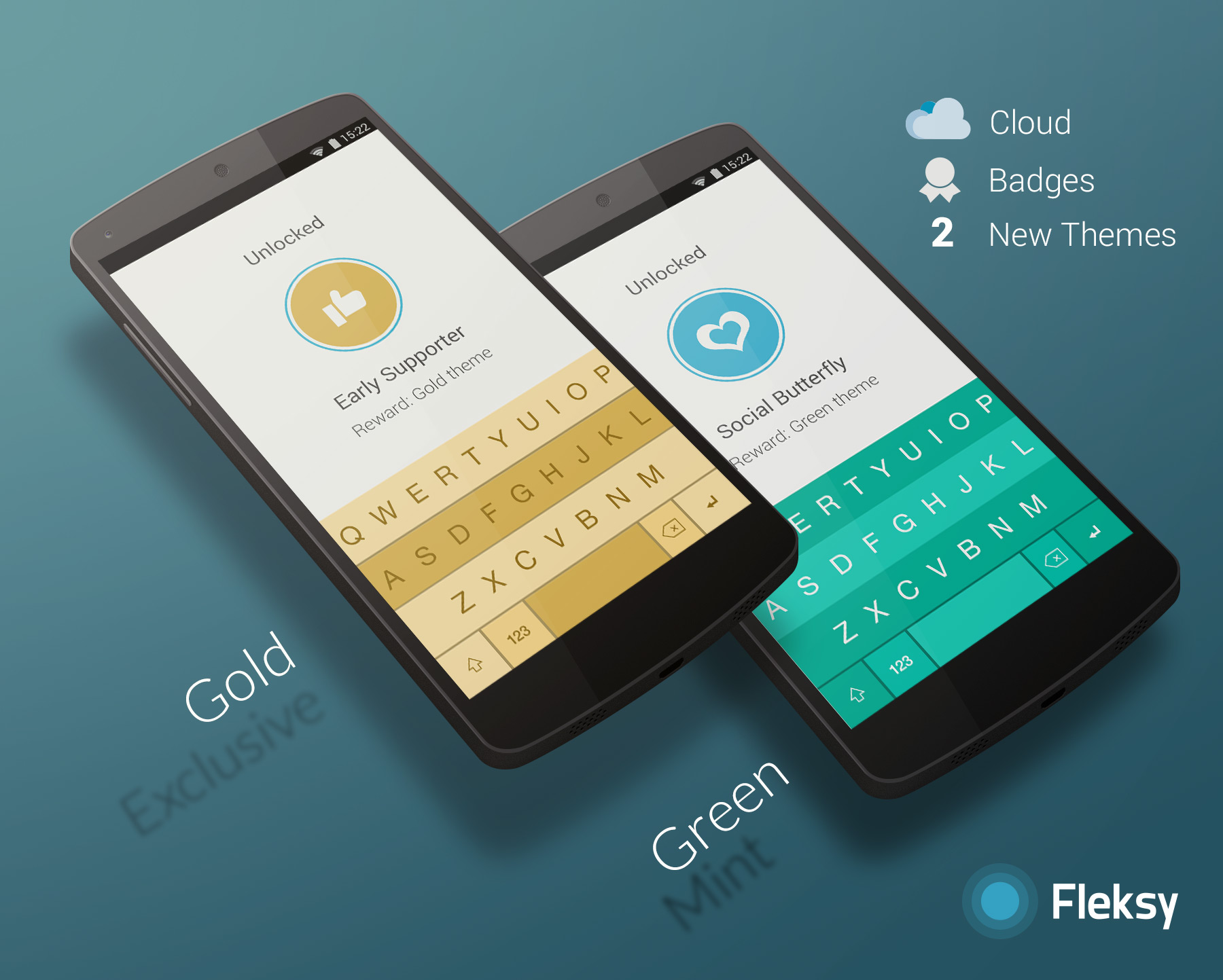
Fleksy is out today with version 2.0 of its Android keyboard bringing a new list of features with it.
My Fleksy Cloud enables Android users to sync personalization features between devices including its new language algorithm based on your writing style.
Fleksy 2.0 also introduces a new badge system for reaching achievements. The badge system offers an element of gamification to mastering the Fleksy keyboard, and achievements can unlock new themes and extend the free trial period.
Roku this afternoon has released an update for its Android (and iOS) companion remote app. The update includes quite a few tweaks and new features, and bumps the app to version 3.0. First off, the app as new, much cleaner design that Roku says is significantly faster and more easy to use. The update also now lets you control any Roku on your home WiFi network, much like Apple’s Remote app on iOS. You previously had to login into the Roku account associated with each set-top box to control it.
One of the coolest new features is the ability to search within the app for a movie, show, actor, or director. The Roku app will search within all channels and show you where you can watch the content you searched for. The new search feature for now is only supported “on US-based Roku players firmware 5.4 or later” and on all hardware except the Roku 2450x or 2500x.
- All New Visual Design – The UI features a new, modern look.
- Search on your mobile device – Enter a movie, show, actor, or director, to explore and see what’s available. Choose from the available services and jump right into the Channel, ready to watch.
- Control any Roku player on your network – Use the remote control, or play photos, music, or video with Play on Roku.
- Bug fixes and other enhancements.
The Roku app for Android is available on the Play Store now.

Adding to the capabilities of the Chromecast HDMI streaming stick, Google is out with a new app for iPhone, iPad, and iPod touch users called Photowall that lets you turn your Chromecast-connected TV into a live, interactive photo frame.
Google’s Photowall app allows you alone or a group of Photowall users to beam not just one photo, but an entire collage of images to your TV through your Chromecast. The app includes the ability to doodle or annotate images before beaming to your big display as well.
Earlier this week, Google made a backend tweak to the Google Search app for Android that added the ability to take a picture or video with Google Now by saying “Ok Google, take a photo.” This afternoon, the company has added another new voice command, this time relating to Google Music. Starting today, you can now say “Ok Google, play some music” and an “I’m feeling lucky” radio station will start to play via Google Music. The I’m feeling lucky station provides a constant stream of music based on your listening history.
Lots of driving ahead this weekend and already bored of listening to the radio? To get a surprise mix of music, just tap the mic (or say “Ok Google”) in your Google Search app and say “Play some music.” You’ll get an “I’m feeling lucky” radio station assembled based on your recent listening.
[youtube=https://www.youtube.com/watch?v=rBPmG5mqWfI]
For a long time the many augmented reality apps we’ve seen in various stages of development for Google Glass have just been a concept, but we’re now starting to see more and more of these apps actually launch and become available for users. The latest is Layar, a slick augmented reality app for Glass that overlays visual data about a user’s surroundings and just became available in beta.
Expand
Expanding
Close
Following a minor update to the Search app on Android, Google has just released a significant update to its Keyboard app. The update bumps the app all the way to version 3.0.19373 from version 2.0. The update introduces a few minor interface tweaks. For one, there is now an “ABC” button to easily switch between the emoji keyboard and letter keyboard. There’s also a new settings icon when you long press the microphone button.
The biggest addition, however, is new Personalized Suggestions. This is a new feature that tracks what you type in Google’s suite of apps, such as Gmail, Hangouts, and Search. Google will then use this data to offer improved suggestions and auto-correct within its apps. For obvious security reasons, Google has offered the ability to turn this feature off, by heading into the keyboard’s settings menu and unchecking the box next to “Personalized Suggestions.”
As with most updates nowadays, the Keyboard update is a staged rollout, so it may take a few days to hit your device. Keep your eyes on the Play Store.
Google today has released an update for its Search app on Android that adds a cool new voice command. With this update, you can now instruct your device to open the camera by simply tapping the microphone and saying “Ok Google,” then “take a photo” or “take a video.” Google says this will make it much easier to grab shots of those can’t-miss moments.
The first home run in T-ball, the surprise proposal, or just that gorgeous sunset… Sometimes the perfect photo passes you by as you fumble with your phone to open the camera app. Now with the Google Search App on Android, you can just tap the microphone or say “Ok Google,” then “take a photo” or “take a video.” Google will launch your camera app in the preferred mode. So update your app, snap those shots and don’t forget to show off your beautiful photos!
The update appears to be a staged rollout so it may take sometime to hit your device. Be sure to keep an eye on the Play Store and your Search app itself.
Expand
Expanding
Close
Skype has today had updated its Android app with a handful of new features and bug fixes. In a blog post, Skype explains that it was been working diligently over the last year to greatly improve the battery with the app, and that today’s update finally does so. The update introduces “aggressive battery savings” that will make the app have little to no effect on your device’s battery life.
The company says that it in order to improve battery life, it had to completely transform the way the Skype technology works and that this transformation is not entirely complete yet. One instance of this is that for time being, Skype has turned off instant notifications of messages in group chats. The company hopes to release another update soon that re-enable them with little battery impact. For now, however, you can enable them by going to Settings > Notifications > and choosing the “Sync group messages in the background” box. Although, this will impact your battery life.
The update also improves stability on KitKat, in addition to fixing audio and video calling on tablets without BlueTooth.
- Workaround for the KitKat bug which caused a runaway process when the camera was synced in the background.
- Fix for audio and video calling on tablets that do not have Bluetooth.
- Now lists your Windows Live Messenger contacts in the Skype (default) view, not just the All contacts view.
The update is available on the Play Store now and bumps the app to version 4.7.
Google today has announced a pair of expansions for its Play Movies and TV app. First off, the app itself has been updated with support for 40 new languages. The update has also added the ability to download movies in either HD or SD, where as downloading was previously only supported in high-definition. The full change log the app update is below:
Benin, Bolivia, Burkina Faso, Cambodia, Cape Verde, Chile, Colombia, Costa Rica, Denmark, Dominican Republic, Ecuador, El Salvador, Finland, Gabon, Guatemala, Haiti, Honduras, Ivory Coast, Luxembourg, Mali, Mauritius, Namibia, Netherlands, Nicaragua, Niger, Norway, Panama, Paraguay, Peru, Portugal, Rwanda, Senegal, Sweden, Togo, Uruguay, Venezuela and Zambia.
That is certainly a significant expansion and brings the service to millions of new people. Sadly, TV show availability remains sparse, being available only in Australia, Japan, the United Kingdom, and the United States.
Finally, Google has also expanded its Play Music and Music All Access services to Greece, Norway, Sweden, And Slovakia.