Apps and Updates




Google has updated Hangouts for iOS today with a handful of new features and what it says is an overall improved user experience. While iPhone and iPad users get the update today, Google says an Android version will arrive in the near future.
Expand
Expanding
Close


The Google app — previously known as “Search” — was updated to version 4.8 last week, and now a new teardown has revealed some interesting new details about some features that might be coming in future versions. Most notably, it looks like offline support for “OK, Google” is likely to be on the way, letting you give your device some voice commands without having a connection to the Internet…
Expand
Expanding
Close

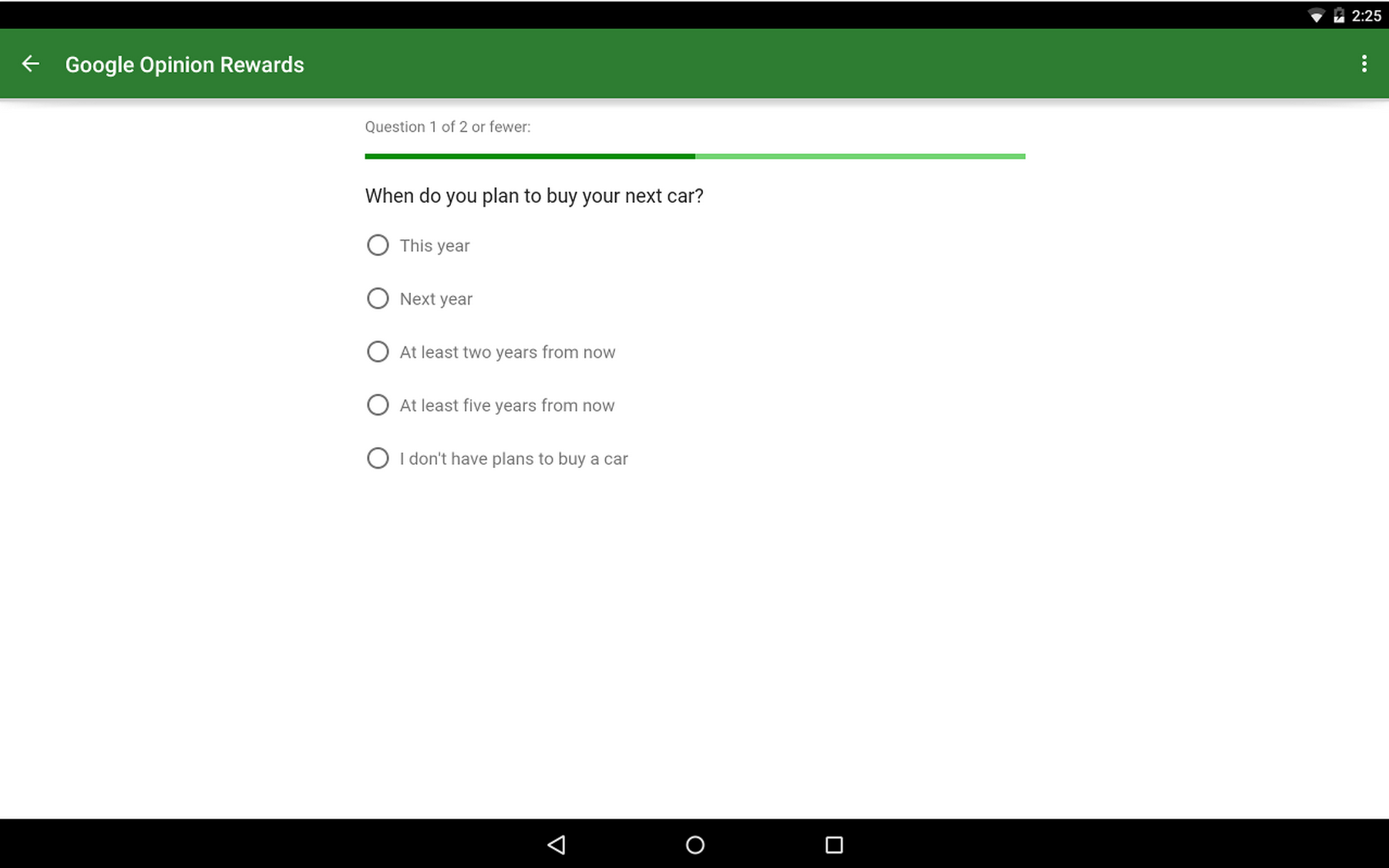
Google Opinion Rewards is a neat app through which anyone can earn credit to spend on anything in Google Play – so long as you’re in the United States, United Kingdom, Canada, Australia, Germany, Italy, Netherlands, or Japan. At least, until now. According to the changelog for an update released to the app today, now owners of Android phones in Mexico and Brazil can join in on the opportunity.
The survey questions that you may be asked to answer through Opinion Rewards, which can be alerted to you through push notifications, are sourced from market researchers who run the surveys through Google Consumer Surveys. Consumer Surveys gives these marketers some of the same tools and platform reach that those advertising products and services through Google get but to instead use to get answers to questions.
Companies who run these surveys get back anonymous and aggregated response data, so they won’t know who you are, and Google says questions that contain mature content, hateful or intolerant speech, or vulgar language are not allowed.

Meerkat, the mobile live-streaming app that competes with Twitter-owned Periscope, continues to move fast with new products that make its streams more accessible, today releasing an embeddable player.
Embeddable players allow anyone with some basic understanding of how to add HTML to a website to include widget-like objects on their sites. What this means in regards to Meerkat is that anyone who live streams using the company’s mobile app can now have their streams viewable from their own websites. We could, for example, host a 9to5 live stream on Meerkat and include the stream in this very post so you wouldn’t have to download an app to see it.
One of Meerkat’s partners with this launch is Discovery Channel, the media giant behind behind Shark Week, the annual week-long programming block all about, well, sharks. And since Shark Week starts on July 5th, the partnership includes Discovery Channel streaming clips all throughout the week of shark-based festivities from their @SharkWeek Meerkat account and through an embedded player on their website. The new embedded web player looks like this:

The player can be customized before it’s embedded – comments can be shown or hidden, there are three sizing options for the player, and if you’re not live it will show your next upcoming stream if you’ve scheduled one. Otherwise if you haven’t scheduled an upcoming stream it’ll show the stats from your last stream.
Even though competitor Periscope is owned and has its salaries paid by Twitter, who’s public market value is $22 billion, Meerkat has managed to stay nimble and ahead in the race to build out features that expand the potential audience of its streams. The company back in May released a developer platform and API upon which others could build their own Meerkat experiences – maybe a full-screen, leanback experience like YouTube TV, for example. The company also released its Android app ahead of Periscope.
The company has been fighting an uphill battle against Periscope ever since the Twitter-owned product launched, however, even though it had a month head start. In many countries including the United States, Periscope ranks much higher in overall downloads as well as in the social networking category, in both Google Play and Apple’s App Store.
It’s hard to say whether mobile live streaming is a winner-takes-all space, or both can live alongside each other in harmony. Periscope has the benefit of one today being more closely integrated with Twitter’s social network, the best in the world for following real-time news. But at the same time it only has roughly 300 million monthly actives, much less than Facebook and on-par with Instagram. How much of a competitive advantage that may be is uncertain. Only time will tell.

[youtube https://www.youtube.com/watch?v=YF3QVeR9d1Q]
Halfbrick Studios announced today that it is teaming up with YouTube to produce a new series of animated shorts centered around the characters from their hit game Fruit Ninja. The studio already has a number of clips on the video channel including trailers and gameplay clips, but says the Fruit Ninja animated series will be aimed at children age 6-10 with the YouTube Kids app in mind…
Expand
Expanding
Close
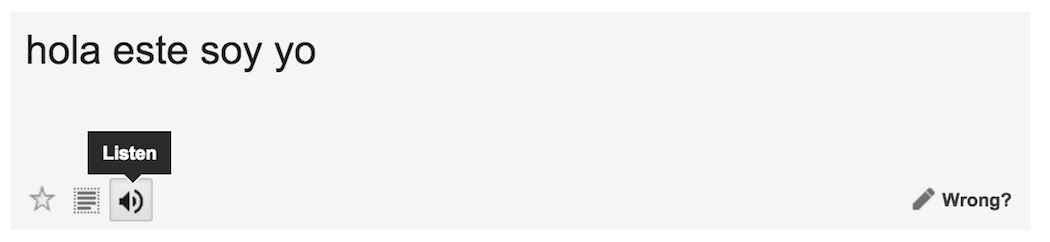
Noticed by a tipster speaking to the (unofficial) Chrome Operating System blog, Google Translate, the multilingual translation tool, has a neat way of converting text translations to speech.
Translate’s text-to-speech function can be used on both the original text and the translated version of the inputted text, which can be helpful when you’re not quite sure how to pronounce a phrase out loud. But maybe you’re trying to get the pronunciation exactly as its spoken by the text-to-speech and you’re having trouble hearing it clearly. I know I’ve experienced that before. Interestingly, the team behind the product seems to have recognized this frustration and programmed the function to slow down its enunciation when you click “Listen” a second time for the same text. Clicking it a third time consecutively will enunciate at the original speed, however.
This seems like something that would be cool to be able to explicitly toggle on and off, rather than simply alternating like it does now. A nice detail nonetheless, however.

Amazon announced today new sharing functionality for its Kindle app that’s exclusive to the Android version until later this year. The new functionality provides the ability to share quotes, highlights, and book recommendations with friends over a host of different messaging services, and instant book previews for those who are on the receiving end of these shares.
Google Drive for Android, the cloud storage service by Google, received an update yesterday that brings a helpful new improvement for those who rely on the service to access files across devices and share them with others.
Version 2.2.23, which hasn’t propagated completely in Google Play but can be pulled from APKMirror (click here), includes the ability to send and/or download multiple files at once. All you need to do to select multiple files is hold down on one file, and then a blue checkmark will appear indicating the file has been selected. After that just tap the checkmark for every file you want to include and the menu at the bottom of the screen will allow you to choose what you want to do with the selected files.
This should be useful for those who may have a lot of photos, music, and other files stored in Drive that they want to download to a new device, upload to a network like Tumblr, or whatever else. For reference, here’s what the previous version of Drive looked like when you selected multiple files:
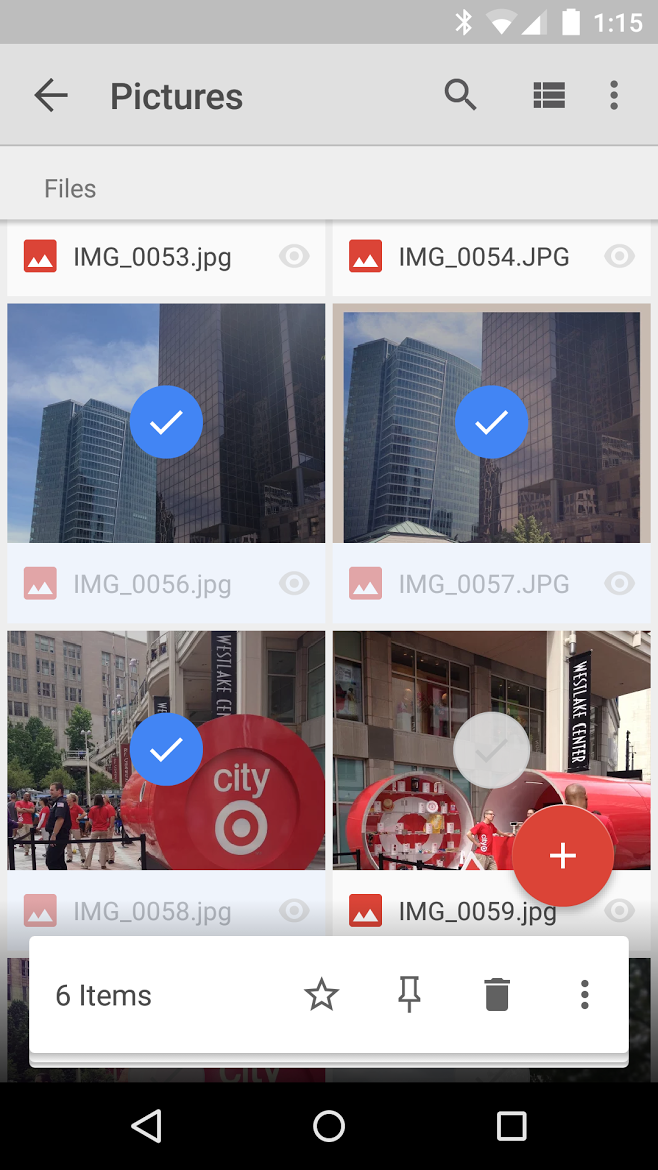
No option to download or send the files is present when multiple photos are selected (the overflow menu doesn’t include them either). To do so you had to visit the info page of each file individually and send or download from there. A nice little update that avid Drive users will surely appreciate.
Spotify told us last month that support for Android Wear was on the way, and now it looks like it’s finally here. With the latest version of the Spotify app, rolling out on the Play Store right now, you’ll be able to access new menus for controlling your music on your Android Wear device…
Expand
Expanding
Close
Hangouts, Google’s messaging platform in long need of an overhaul, has today passed 1 billion installs on the Google Play Store. The app is the 11th app to hit this milestone, followed most recently by Facebook Messenger and Google Play Books. Other than Hangouts, there are 7 apps from Google that have 1 billion, and 3 apps owned by Facebook.
Passing 1 billion installs isn’t very exciting considering the app comes pre-installed as the default messaging client on most Android phones, but it’s worth noting that not all of Google’s stock apps have come anywhere close to this milestone. Google Docs, for example, which comes shipped on all Nexus devices and others, is only in the 50-100 million range.
Meanwhile, we’re waiting patiently for the long-anticipated overhaul of Hangouts and, just as importantly, its upcoming Android Wear counterpart.
(via Android Police)
Better late than never – PC gamers will be happy to know that Android version 2.0.7 of the popular Steam social network and game distribution store brings with it a complete redesign of the app to follow Google’s Material Design guidelines.
As always, you won’t be doing any gaming from this app as Steam doesn’t sell mobile games and won’t stream desktop games to mobile devices, but you can do just about everything else; purchase games, message friends, access the Steam Guard authenticator, and more. We’ll keep you posted if we notice any other major changes.
For reference, here’s a taste of what the app looked like prior to this update:
If you’ve had any doubts about how far Android has come since 4.0 Ice Cream Sandwich, let these two (horrifying) screenshots serve as a reminder.
The update hasn’t propagated across Google Play yet, but if you head over to APK Mirror you can download it now (click here).
Google has today pushed some minor — although notable — updates to the Play Store Developer Program Policies, including some brand new policies and provisions and clarified wording for others.
Most notable (possibly added due to recent events) is a new “Sensitive Events” policy. According to the new guidelines, Google doesn’t “allow content which may be deemed as capitalizing on or lacking reasonable sensitivity towards a natural disaster, atrocity, conflict, death, or other tragic event.” Somewhat related, the new policies also clarify wording in the deceptive behavior section to more clearly lay out the expectations for apps being unique and, well, not deceptive.
The Mountain View company has also made some changes to payments policies. Language has been clarified in the payment section, and Google has also added a new provision which states that “in-app virtual currencies must only be used within the app where they were first purchased.” Among other minor changes, Google has also specified that apps should not go messing with or improperly access developer APIs.
To read the new Developer Program policies, head over to Google’s website.
Beleaguered media darling Medium, a platform for anyone to write and share stories amongst its large community, has finally released its Android app to Google Play. The app works on devices running 4.4 KitKat and above, and features all the Material Design goodness you’ve come to expect since Lollipop – so it wasn’t just a port of the company’s iOS app.
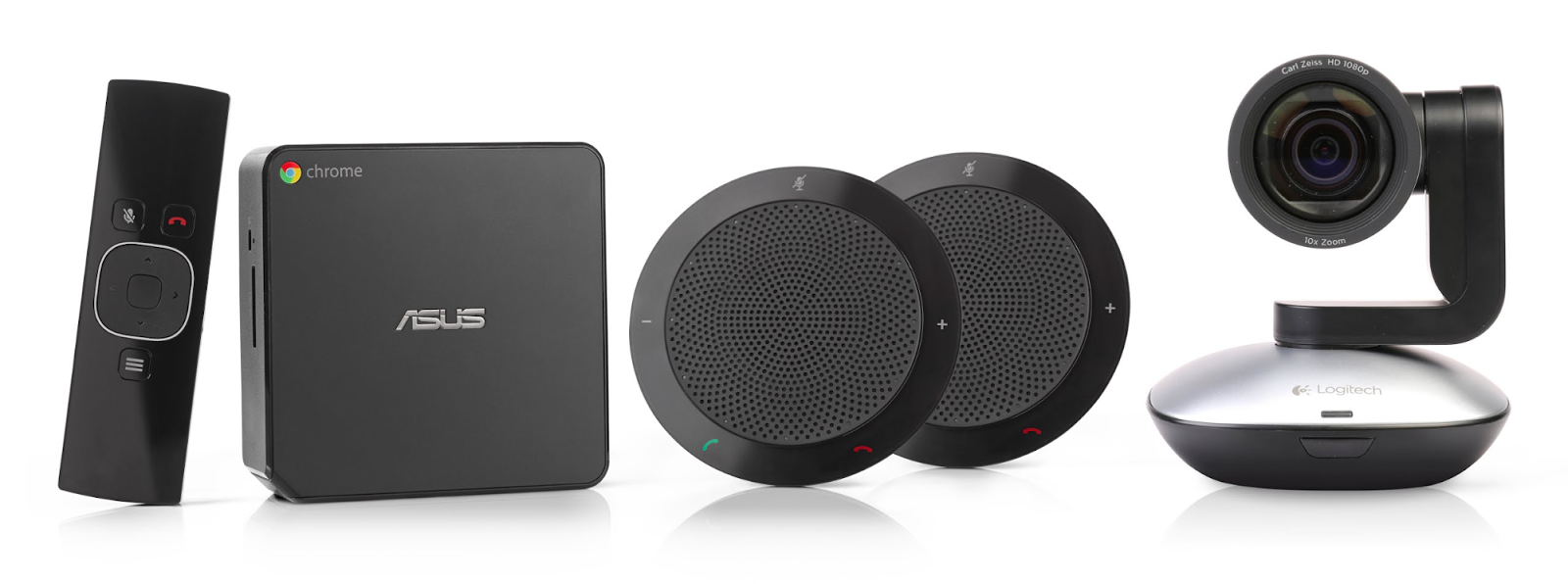
Google announced today that it’s expanding the virtual meetings it launched last year using new Chromebox hardware to allow larger groups of up to 20 people. The expanded support will accommodate larger meeting rooms with more people, but it will also require new Chromebox for meetings hardware that provides pan-tilt-zoom camera features, additional mics and speakers for the larger groups, and improved support for dual screen setups:
Expand
Expanding
Close
 Facebook Messenger is a quite well-designed messaging app available on both Android and iOS, and now you don’t even need to a Facebook account to use it.
Well this is an interesting change for Google. The company is one-by-one rolling out updates to its in-house Android apps that include splash screens. These screens (screenshots via a user on Reddit) are displayed during the 2-3 seconds between tapping an apps’ icon and the app actually loading.
[Update: The company now has a blog post up about the new channel. It adds that they’ve also made some new actions for the general Android Device Channel including one to mute your phone when you plug it in and one to get directions to work every weekday morning (weird), to name just two. The company’s Do series of apps (collection here) have received some small updates including unlimited action buttons and floating buttons that follow you everywhere on your phone, like Facebook’s floating chat heads.]
IFTTT stands for “If this, then that” and is a popular service for automating your digital life and stitching together all the disparate, disconnected apps and services you may use on a daily basis. Now the company has released a bunch of new native Android actions that will automate the management and preservation of your device’s battery life.

Spotted by a Redditor in /r/AndroidWear, we’ve learned that a recent update that we reported on to Google Play Music brought with it a nice new feature for owners of Android Wear smartwatches…
Spreadsheet warriors, your time has come – Microsoft’s Word, Powerpoint, and Excel productivity applications are now available for Android phones. Back in May, Microsoft launched a beta of the suite that anyone could try, and says that through these preview users the company managed to test the apps on over 1,900 different Android phone models in 83 countries.
These apps aren’t for creating documents, however, but rather for accessing and making quick edits to ones you’ve made from your tablet or desktop PC. Here are a few of the highlights from Microsoft’s announcement post:
Microsoft Word, Excel, and PowerPoint are each available as separate, free apps (extra features for Office 360 users, of course) in the Google Play Store as well as through the apps stores of Tencent, Baidu, Xiaomi, CMCC, and through the Samsung Galaxy Store worldwide.
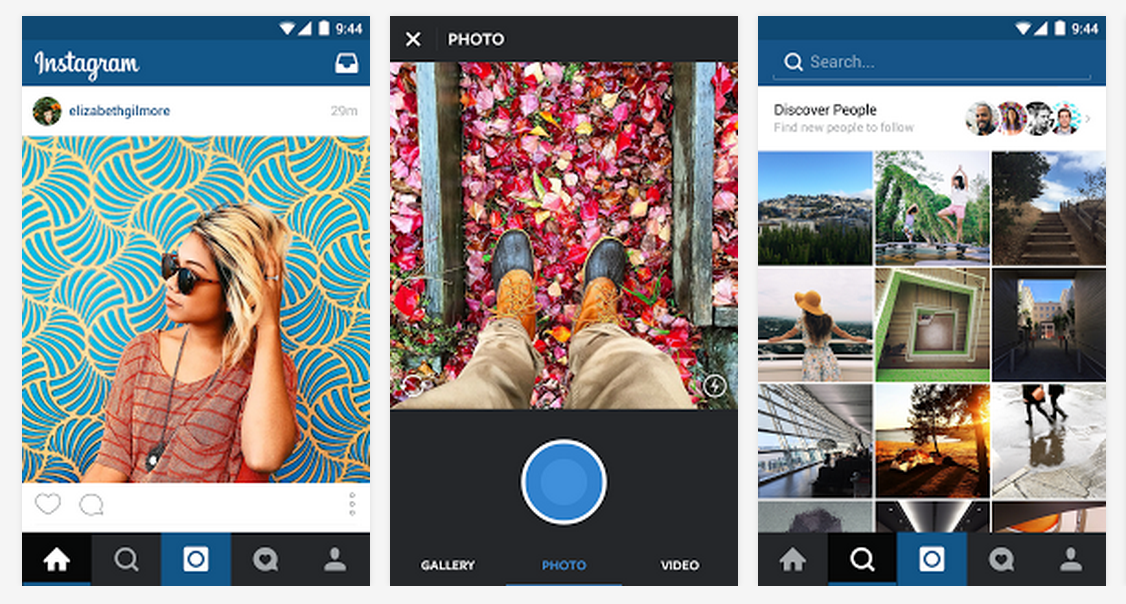
Instagram is rolling out an update today for its Android app bringing two major new features, including a redesigned Explore tab and improved search functionality. The company said the updates will “help connect our community to the world as it happens,” or in other words, a more real-time experience thanks to new trending Tags and Places within the Explore tab.
With more than 70 million photos and videos posted to Instagram every day, wherever something is happening, chances are you can see it here. Whether it’s behind the scenes at the NBA Finals, on the runway with the latest fashion trend at a favorite club with a local band, people are capturing moments large and small on Instagram. But, until now, there’s never been an easy way to find these moments.
On top of the new trending tags and places in Explore, the company said it will be adding curated collections of images based on various themes, such as specific people or places, and featuring content from across the network.
The updated Explore feature is first rolling out to users in the US as part of the 7.0 update for Android that also adds improved search functionality:
For everyone on Instagram, we’ve dramatically improved the ability to find what you’re looking for. With the new Places Search, you can now peer in at just about any location on earth, allowing you to scout out your next vacation spot in the South Pacific, get a look inside that hot new restaurant or experience your favorite music festival — even if you couldn’t make it this year. The new Top Search also lets you search across people, places and tags all at once.
You can grab Instagram version 7.0 for Android on Google Play today.
Google Calendar is out with an improved version for the iPhone today with version 1.1. The list of changes is short but the improvements should be welcome.
The update includes integration with Google Drive so users can connect files with events on your calendar. Interactive notifications now include the ability to open directions from alerts or respond to guests via email. Finally, users can now see week numbers next to the calendar and more entries using the week view.
Google Calendar for iPhone is available for free on the App Store. Version 1.1 follows the initial launch in mid-March. Full release notes below:
Expand
Expanding
Close
Partly-owned-by-Nintendo The Pokémon Company has today launched its very first Android app on the Play Store, called Pokémon Jukebox. As you might expect, this isn’t one the five actual game titles that we should expect to see from Nintendo before March 2017, but it is an official offering from The Pokemon Company and it’s available right now. With Pokémon Jukebox, you can play hundreds of sounds from a huge catalog of Pokémon games. But sadly, while the app itself is free, actually using Jukebox is far from cheap…
Expand
Expanding
Close
Google announced today that it is adding a free tier to its Google Play Music service. The new feature provides non-subscribers with what Google is describing as an ad-supported radio option with curated stations. Google Play Music’s radio option will be available for users in the United States at launch with availability on the web starting today and support on iOS and Android following soon. Similar to Apple’s approach with Apple Music, Google says it has “music experts” creating these “curated” playlists:
Expand
Expanding
Close
Dropbox fans, you’re in luck – version 3.0.0 is completely redesigned to follow Google’s Material Design guidelines.