Gmail

See All Stories

Announced on April 1, 2004 with an unprecedented 1GB of user storage, many assumed that Gmail was just one of Google’s April Fools’ pranks. For comparison, competing services only had 2 to 4MB for users to store email messages and attachments. Currently, Gmail storage is combined with that of other Google products with 15GB available for free.

Gmail was released in beta with an invite system and was not open to the general public until February 2007. In July of 2009, it finally dropped its beta status. As of February 2016, Gmail is the most widely used web email provider with 1 billion active users worldwide.

Besides email, Gmail has a number of features, including integration with Google Drive for sending large attachments and choosing images from Google Photos. Users can fully search their email with advanced spam filtering and labels to manage messages. Google also scans emails to show context-related advertisements.

Since launch, the email service has gone through a number of redesigns. Apps are available for Android, iOS, and the mobile web.


Google announces updates to Google Play developer console: beta testing & staged rollouts, app translations, more

Site default logo image

Google today announced new features coming to the Google Play Developer Console that will make it easier for developers to track and optimize apps across markets.

Perhaps one of the biggest features that will soon be available to developers is the ability to manage beta testing and staged rollouts right from within the Developers Console. The tool will allow developers to select a percentage of users for a stage rollout and easily beta test their apps among small amounts of users.

Among the new features, Google will be rolling out a new APK translation feature built into the console that allows developers to purchase translations through various providers directly through the console.

Other features headed to the developer console include optimization tips, referral tracking, and detailed revenue graphs. Check out a full gallery of the new features below:
Expand
Expanding
Close

Google announces Google Play game services coming to Android, iOS & web today

Site default logo image

We knew from leaks in the weeks leading up to I/O that Google was planning some gaming related announcements and today the company has officially announced the service in a press release ahead of its Google I/O keynote taking place now. Not only will the service allow Android developers to build in real-time multiplayer, social features, achievements, and leaderboards while storing game saves and settings in the cloud, the SDK for Google Play game services will also be available to iOS and web developers.

Google noted a few titles for Android have already been updated with the feature including World of Goo, Super Stickman Golf 2, Beach Buggy Blitz, Kingdom Rush, Eternity Warriors 2, and Osmos.

Not surprisingly, the cross-platform gaming service will also build in Google+ integration to track high scores, achievements and more:

-Achievements that increase engagement and promote different styles of play.

-Social and public leaderboards that seamlessly use Google+ circles to track high scores across friends and across the world.

-Cloud saves that provide a simple and streamlined storage API to store game saves and settings. Now players never have to replay Level 1 again.

-Real-time multiplayer for easy addition of cooperative or competitive game play on Android devices. Using G+ Circles a game can have up to 4 simultaneous friends or auto-matched players in a game session together with support for additional players coming soon.

Google’s full press release below:
Expand
Expanding
Close

Outlook adds support for Google Talk in appeal to Gmail users

Site default logo image

Microsoft is rolling out Google Talk integration to its online email service Outlook, which is something that could tempt Gmail users try out the less popular competing service.

Microsoft, which owns its own chat service by way of its Skype purchase, is using Google’s public API to include Google Talk integration on Outlook.com. The timing is interesting as we expect Google to announce its new messaging service at Google I/O this week.
Expand
Expanding
Close

Report claims Google smartwatch with Glass-like UI, updates to Gmail & Maps coming soon

Site default logo image

While the report is a little bit on the light side with specific details regarding the product, a new report from AndroidAuthority claims that a source has revealed details about a Google smartwatch as well as new updates coming to Gmail and Maps apps on Android.

According to the report, which seems to provide more questions than answers, the Android smartwatch has been floating around Google offices in Berlin, Manchester, and more recently Mountain View, which it claims signals “the watch is set for release sometime soon.” The last we heard from analysts is that Google smartwatch is scheduled for 2014 at earliest, but AndroidAuthority already claims to have details on the device:

While noting that “Functionality will be very much like Glass,” the report claims Google’s smartwatch is “not a standalone device yet” and that “It needs to be tethered to a smartphone.”

We don’t expect to see a Google smartwatch on show at Google I/O this month, and the report doesn’t offer up much in the way of confident predictions for when we might. The report added that sources say Google’s Motorola will be manufacturing the smartwatch.

Also included in the report is info on updates that are apparently coming to Google’s Maps and Gmail apps on Android devices in the near future. AndroidAuthority describes redesigned apps that will apparently borrow a lot from the most recent versions of Google’s apps on iOS:
Expand
Expanding
Close

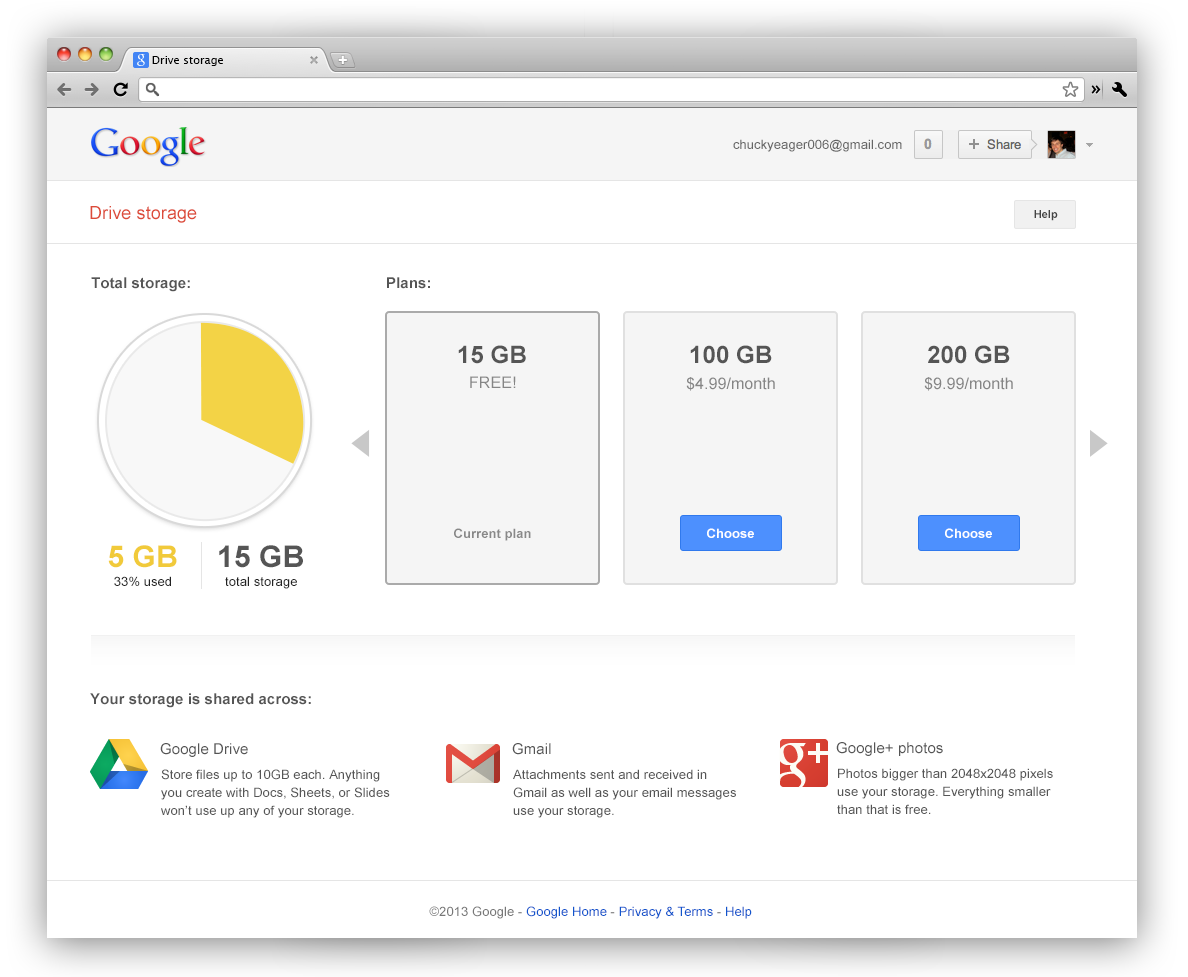
Google combines free storage across Gmail, Drive and +Photos, 15GB for consumers, 30GB for Apps

Site default logo image

A nice little pre-I/O surprise today from Google: Everyone who uses Gmail, G+ Photos and Google Drive now gets 15GB of free space across all three platforms instead of the previous 10 GB for Gmail and another 5 GB for Drive and Google+ Photos. That’s a lot of combined space

We’ll also be making updates to the Google Drive storage page, so you can better understand how you’re using storage space. Simply hover over the pie chart to see a breakdown of your storage use across Drive, Gmail, and Google+ Photos. And if you need more storage, this is your place to upgrade, with plans starting at $4.99/month for 100 GB.

Pro tip: This change means you’re no longer limited to a 25 GB upgrade in Gmail—any additional storage you purchase now applies there, too.

These changes to Google Drive storage will roll out over the next couple of weeks. Google Apps users will also be getting shared storage, so visit the enterprise blog to learn more.

Enterprise users get 30GB between the three platforms.
Expand
Expanding
Close

Boston drops Microsoft, switches 20,000 city employees to Google Apps

Site default logo image

Google has been signing up a lot of Google Apps for Government customers over the last year, including Colorado and the US Naval Academy, and today The Boston Globe reports that Boston is soon making the switch from Microsoft to a Google Apps environment for city employees.

As noted in the report, Boston was previously relying on Microsoft’s Exchange for much of its tasks and making the switch to Google will save the city around $280,000 a year:

It’s not just the gee whiz factor: It’s also a matter of money. It will cost Boston around $800,000 to move over to Gmail, Google Docs for word processing, and Google’s cloud service for storing documents. But by dropping some Microsoft products, the city government will save at least $280,000 a year.

Microsoft responded to the decision in a statement to the Boston Globe, claiming, “Google’s investments in these areas are inadequate, and they lack the proper protections most organizations require.”
Expand
Expanding
Close

New ‘Save to Drive’ code makes it easy for website owners to deliver media to readers’ Google Drive accounts

Site default logo image

Google just announced a nice bit of API code that will allow developers to to make it easy for readers of websites to download files to their Google Drive account.

Adding a Save to Drive button on your website is easy. You simply have to include the script and HTML tag below:

<script src="https://apis.google.com/js/plusone.js"></script>
<div
 data-filename="My Statement.pdf"
 data-sitename="My Company Name"
 data-src="/path/to/myfile.pdf">
</div>

It isn’t hard to see how this could come in handy.


Expand
Expanding
Close

Gmail adds ability to create Google Calendar events directly from inbox

Site default logo image

Google is beginning to roll out a new feature in Gmail today that will allow users to quickly and easily create or add an event to Google Calendar without ever leaving their inbox. Once the feature has been enabled, users will be able to click the date and time within emails to add or create an Google Calendar entry using the data from the email (as pictured above). The calendar entry  can be edited before added and will also automatically include a link back to the original email for reference:

When you click on one of these underlined dates, you’ll be able to preview your schedule for the day and change the title, date or time of the event. Clicking “Add to Calendar” will do exactly that — add the event to your calendar, and for extra convenience, the calendar event will include a link back to the original email.

Keep an eye out for the new feature rolling out to everyone using the English (US) language setting over the next week.

Site default logo image

Google acknowledges Gmail, Drive, and Docs service disruption, Admin control panel/API outage (Update: Fixed)

Update: 10:52 AM EST – Google’s status website reports that Gmail should be back online for everyone

The problem with Google Mail should be resolved. We apologize for the inconvenience and thank you for your patience and continued support. Please rest assured that system reliability is a top priority at Google, and we are making continuous improvements to make our systems better.

Update: 9:01 AM EST – Google’s status website also reports issues with Google Docs

As of 8:58 AM EST, Google has acknowledged a service disruption with Google Mail as well as Google Drive.

Google is also reporting a complete outage of its admin control panel/API.

While the outage does not seem to reach everyone, my work Gmail account has been telling me that my password is wrong all morning.

Notably, Google Calendar and Talk seem to be unaffected.

Google hiring up to 40 Glass advisors to help celebs, journalists and developers over the phone and at events

Site default logo image

Google has been hiring a group of individuals on one year contracts to help the Glass explorers with their upcoming Glasswear we’ve learned.  The employees would be based in New York or San Francisco but travel to events throughout the US and eventually overseas. These people will also be manning the retail presence that Google hopes to have in New York, San Francisco and possibly LA by the end of the year.

Glass explorer editions are to begin shipping next month after an initial run of a few thousand.


Expand
Expanding
Close

Site default logo image

Google launches Inactive Account Manager so users can plan their ‘digital afterlife’

Google today is launching a new feature for Google account holders that will allow them decide how they want Google to handle their data when they die. The feature, dubbed “Inactive Account Manager”, will allow you to specify when you want your data to be deleted or select a trusted friend to handle the data for you:

For example, you can choose to have your data deleted — after three, six, nine or 12 months of inactivity. Or you can select trusted contacts to receive data from some or all of the following services: +1s; Blogger; Contacts and Circles; Drive; Gmail; Google+ Profiles, Pages and Streams; Picasa Web Albums; Google Voice and YouTube. Before our systems take any action, we’ll first warn you by sending a text message to your cellphone and email to the secondary address you’ve provided.

You can access the Inactive Account Manager now to select how to want messages for Gmail and data for a number of other Google applications to be stored when you pass or your accounts become inactive.

Google investing $390 million to expand European data center in Belgium

Site default logo image

Google isn’t slowing down investing in new data center operations around the world. Back in January we heard that it is expanding its Berkley County data center in South Carolina with an additional $600 million investment bringing the project up to $1.2 billion total. Today, Associated Press reports that Google is set to invest $390 million in a new expansion of its European data center in Belgium.

Internet search giant Google says it is investing 300 million euros ($390 million) to expand its continental European data center. Google Inc. said Wednesday it will upgrade the facility in Belgium to meet growing demand for its online services

Back in October of last year Google opened its data center doors to all with a new project dubbed “Where the internet lives” that gives anyone a unique behind the scenes look at its facilities responsible for handling 20 billion web pages indexed per day, 3 billion daily searches, and free mail to 425 million Gmail users.

Site default logo image

Google Calendar now available in Latin American Spanish on Android & desktop

While hundreds of millions of Spanish speakers around the globe have had the option to use Gmail in Latin America Spanish since last year, a number of other popular Google services didn’t offer the Español language setting. Now, Google has announced on its Official Gmail Blog that it is expanding support for its Latin American Spanish language option to Google Calendar:

If you’re new to Calendar but already using Gmail in Latin American Spanish, just visit google.com/calendar and language settings will be ready to go. If you’ve used Calendar in the past, you’ll need to update your language settings by clicking on the gear icon in the mid-upper right of Calendar, then selecting Settings: Once in General Settings, Language you can select Español (Latinoamérica).

You’ll also be able to access the Español (Latinoamérica) setting for Calendar on Android devices through your device’s “Language Settings” within Settings.

Screenshots claim to show Gmail integration for Google’s rumored Babel service

Site default logo image

Rumors of an upcoming messaging service from Google dubbed “Babel” have been steadily popping up in recent months. We first heard back in March that the service would unify Google’s chat services such as Google Talk, Chat for Drive, Google+ Hangouts, etc, and since got a look at two different sets of screenshots showing variations of what tipsters both alleged were an Android app for the rumored service.

After a small hint at Gmail integration for Babel this morning, we now get yet another set of photos, this time reportedly showing what the service will look like inside of Gmail. TechRadar posted the images above that apparently come from an anonymous Google employee currently testing Babel.

From the screenshots we see a slightly tweaked text layout, new emoticons and the expected Google+ integration, but not much else. 
Expand
Expanding
Close

Site default logo image

Gmail’s new compose window rolling out as default for all users starting today

We told you in October that Google began to test a redesigned compose and reply window in Gmail for a number of users. Google was previously allowing users to opt in and out of using the new feature that lets users compose and reply to multiple messages at once while still navigating the inbox. The company announced today that it is beginning to roll out the feature as the default for all users:

In addition to telling us what you love about the new compose experience (like how much easier it is to multitask!) you’ve also been sending us helpful suggestions for what features you’d like to see added. As a result of your input, we’re now ready to introduce the new compose experience as the default for everyone. We’re looking forward to hearing what you think!

The new compose experience will be available as default to all users in the next few days. Google didn’t’ specify whether users will still be able to switch back to the old compose style.

Gmail app for Android updated with reply/archive/delete from notifications, faster search & more

Site default logo image

Google announced today on its Official Gmail Blog that it has released an update to the Android app for Gmail that brings new features, faster search, and other enhancements for certain users. Perhaps the most notable new feature is the ability to reply, archive, and delete from notifications with one tap—rather than having to open the app to sort and reply to mail:

You can combine this with existing notification features like the ability to customize which messages you receive notifications for and set up different sounds for individual labels. So if you filter and label all the messages from your mom, you could set a ringtone to let you know you received a new mail from her and then quickly reply (because we know what can happen when you ignore your mother!).

The feature is available to users running Android 4.1 and up, but Google is also rolling out faster search, bug fixes, and performance enhancements for Android 4.0 and up. Users on Android 2.2 and up will now have access to a “New Labels API for 3rd-party app developers” and the usual performance improvements.

The updated Gmail app for Android is available from Google Play now
Expand
Expanding
Close

Google updates Gmail web app with new UI inspired by iOS apps, improved search & Calendar integration

Site default logo image

Google announced today that it updated the mobile web app for Gmail and the Gmail Offline Chrome app with a refreshed UI and new features similar to recent enhancements to its iOS apps. On top of the redesigned visuals, Google also included improvements to search and Google Calendar integration:

Today we’re rolling out a similar refreshed look to the Gmail mobile web app as well as Gmail Offline (http://goo.gl/0f1ae) that includes many of these same changes. Try it out at gmail.com in the browser of your Android, iOS, Blackberry or Kindle Fire device.

Google noted it decided to implement a design for its web apps similar to its iOS offerings after receiving positive feedback since first launching the new iOS design in December.


Expand
Expanding
Close

Google exec Vint Cerf says real-name authentication ‘sparked intense debate’ among executives

Site default logo image

Vint Cerf, “father of the internet” and Google’s chief internet evangelist, is speaking out about Google’s decision to push users toward using their real names across services. In a recent interview with Reuters, the Google executive said the initiative to get users using their real names across profiles on various services such as Google+ and YouTube has “sparked intense debate” at the company:

Over the past year, the company has strongly encouraged users to merge their accounts on YouTube, Gmail and other Google properties into a single Google+ identity, the company’s social network offering that asks users to use the “common name” they are known by in the real world.

“Using real names is useful,” Cerf said. “But I don’t think it should be forced on people, and I don’t think we do.”

Vint said not using real names is “perfectly reasonable” in certain situations, especially in countries with governments seeking to ban anonymity:
Expand
Expanding
Close

Google exec says Microsoft’s Scroogled ads are ‘misleading and intellectually dishonest’

Site default logo image

http://www.youtube.com/watch?feature=player_embedded&v=63u-RG-31B0&list=UUal1Fb7cnd1bE9sMKdFcJcg

Microsoft’s latest smear campaign against Google services kicked into full gear earlier this month with the launch of several online video and print ads as part of its “Scroogled” campaign. Privacy is at the heart of the issues with Gmail depicted in the commercials, with the majority highlighting how Google scans the bodies of emails to serve up relevant ads in Gmail. According to a report from Datamation, Google executives commented on the claims during a panel discussion yesterday with heads from Facebook, Google, Microsoft, and Mozilla at the RSA Security conference.

Challenging Microsoft’s claims, Google’s Senior Privacy Counsel Keith Enright said the following:

Microsoft alleges that Google’s contextual ads, which show up alongside user email, is a violation of user privacy. Google does not agree. Enright noted that the use of automated algorithms is commonplace across multiple facets of technology and is not an issue of privacy. He added that automated algorithms are used to make the contextual ads more relevant. “The idea that doing that (contextual advertising) is in any way detrimental to privacy, or is antithetical to the interests of our users, I think is misleading and intellectually dishonest,” Enright said.

Enright continued:
Expand
Expanding
Close

Site default logo image

Google adds Calendar results to search with updated Gmail Search Field Trial

Google announced today on its Google+ page that it is expanding its Gmail Search Field Trial. It’s a program that lets users let upcoming features, and users who have signed up to preview new features will now be able to access Calendar results alongside Gmail and Google Drive results:

With all that you juggle every day, its easy to lose track of appointments, plans, and reminders. With today’s expansion of our Gmail Search Field Trial (http://goo.gl/dQGNs), we’ve added Calendar results to your Gmail and Drive results.

Google explained users would be able to quickly call up upcoming events from their Google Calendars by searching for [what is on my calendar today], while they’ll also be able to search for specific calendar entries with phrases such as [when am i meeting bryan]. You can sign up to access the latest and upcoming search features from Google on its Gmail Field Trial page.

Microsoft says ex-gmail users make up a third of 60M Outlook.com users

Site default logo image

http://www.youtube.com/watch?feature=player_embedded&v=63u-RG-31B0&list=UUal1Fb7cnd1bE9sMKdFcJcg

On top of officially announcing the launch of Outlook.com today, Microsoft is making the rounds with the press by offering some stats on the newly launched service. While announcing the service has grown to 60 million active users in just six months of the limited preview release, Outlook.com Senior Director Dharmesh Mehta told Bloomberg that a third of those users are ex-Gmail customers. The news follows the launch of Microsoft’s latest Google smear campaign with a series of “Scroogled” ads depicting security and privacy concerns related to Google scanning users’ email to display ads.

While free e-mail isn’t a huge money-maker — Mehta said Outlook.com carries about 60 percent fewer advertisements than Microsoft’s previous Hotmail product — the Redmond, Washington- based company considers it critical to gaining and retaining consumers. Microsoft, the world’s largest software maker, has been losing users of its Windows operating system to smartphones and tablets such as Apple Inc.’s iPad.

According to Mehta, roughly 20 million of Outlook.com’s users  have switched from Gmail and now use the service as their “primary free e-mail account.” There is of course no real way of knowing how many users have actually decided to make the switch, and how many of those users are continuing to use both accounts. As for the Scroogled campaign, Mehta shared that Microsoft is spending “tens of millions” on many TV, online print, and bus ads in the US, as well as TV ads in Europe slated to debut in the coming weeks.

Site default logo image

Google rolls out Gmail Hangouts to all users in India

After first introducing its Hangouts feature in Gmail as a replacement for the old video chat feature in July, Google announced today it is finally bringing the feature to users in India. Not only can users do the usual 1:1 video chat they are used to, but they will also now be able to chat with up to nine people and access more of the Hangouts features we are familiar with from Google+.

Over the last few months, we’ve been rolling out updates to Google+ Hangouts to make it easy for you to connect with friends and family no matter where you are.  Today we’re excited to bring Hangouts to all of our Gmail users in India… To give Hangouts a try, just click on the hangout button at the top of your chat list in Gmail. You can also schedule a hangout with Google Calendar, and use the Google+ app for Android and iOS to hang out while you’re on the go.

Google also announced (via TechCrunch) that it is rolling out a bandwidth slider for users with slow Internet connections and an audio-only mode:

1) Bandwidth slider. At the top right of every hangout is a new slider that lets you adjust your bandwidth preferences in real-time. This makes it easier to keep hangouts going, even in areas with poor connectivity.

2) Audio-only mode. Choose this mode to send and receive audio only, and thus, significantly reduce your bandwidth requirements. Other participants will only see your profile picture, but they’ll hear you loud and clear.