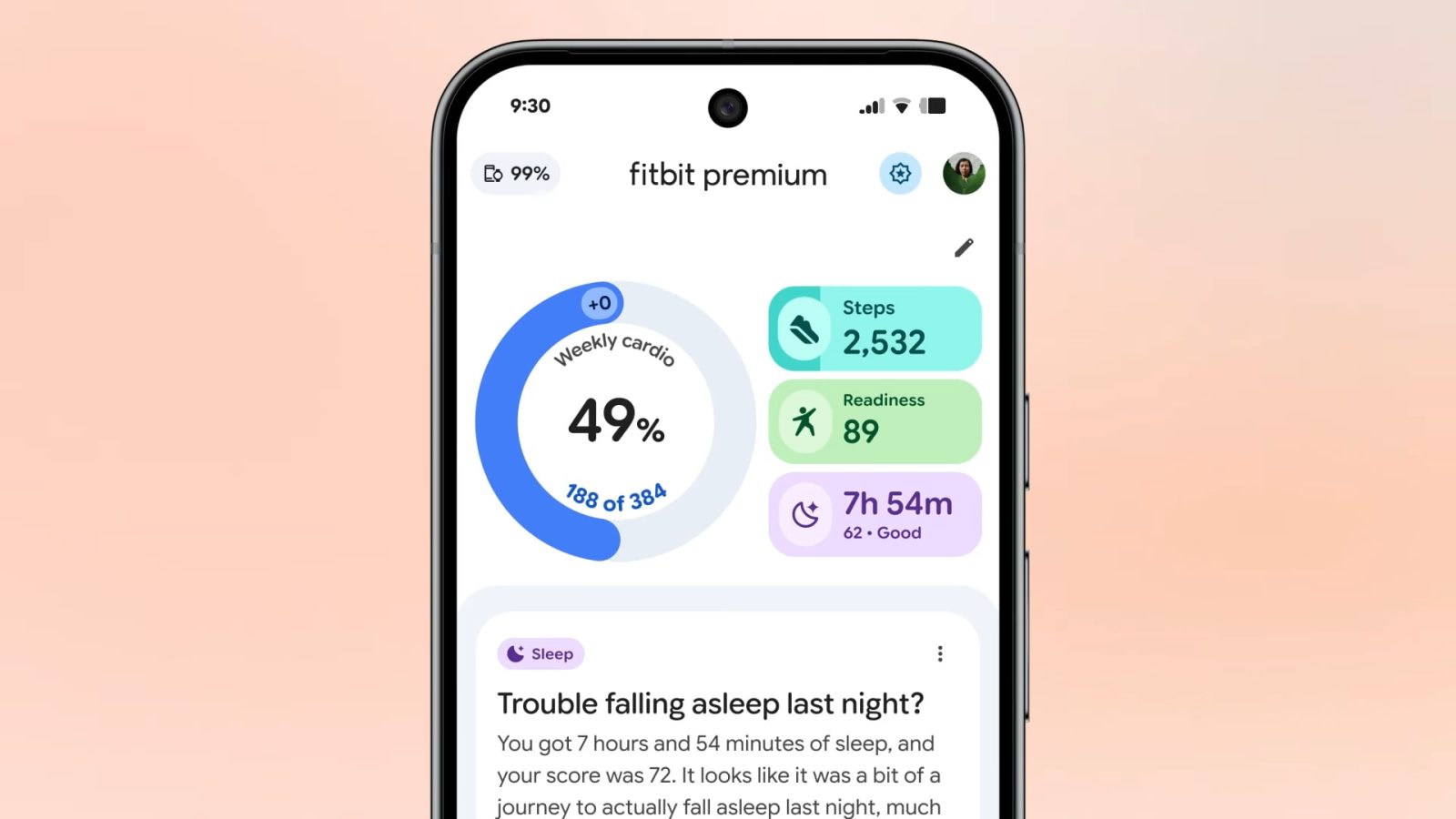
Fitbit Public Preview adds food & water logging, more as app redesign comes to free users




Navigation by smartphone is easy and convenient, and the Google-owned Waze app is the top pick for many. Now, Amazon is teaming up with Waze to promote its new show, “The Grand Tour” by adding navigation directions voiced by Jeremy Clarkson, Richard Hammond, and James May.

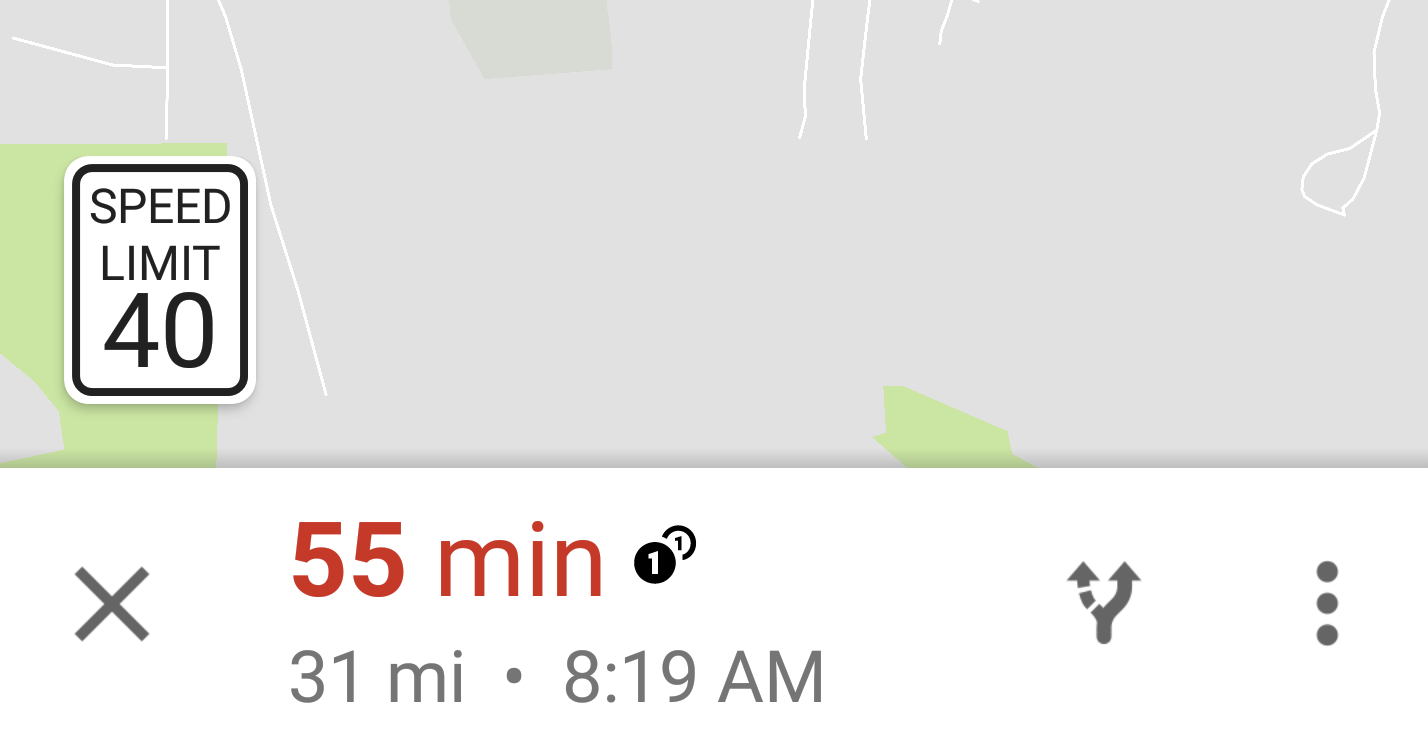
As first noticed by one user on Reddit, it seems that Google Maps has begun showing the current speed limit while using navigation. It’s something that has long been live in the Google-owned Waze navigation app, so it should be no surprise that it has made its way into Maps…


Waze is known for adding special voices to its app to help you navigate while on the road, and the latest is the addition of Shaq’s voice to commemorate the 2016 NBA playoffs. This follows the Google-owned navigation app featuring the voice of Morgan Freeman in February to mark the release of London Has Fallen…


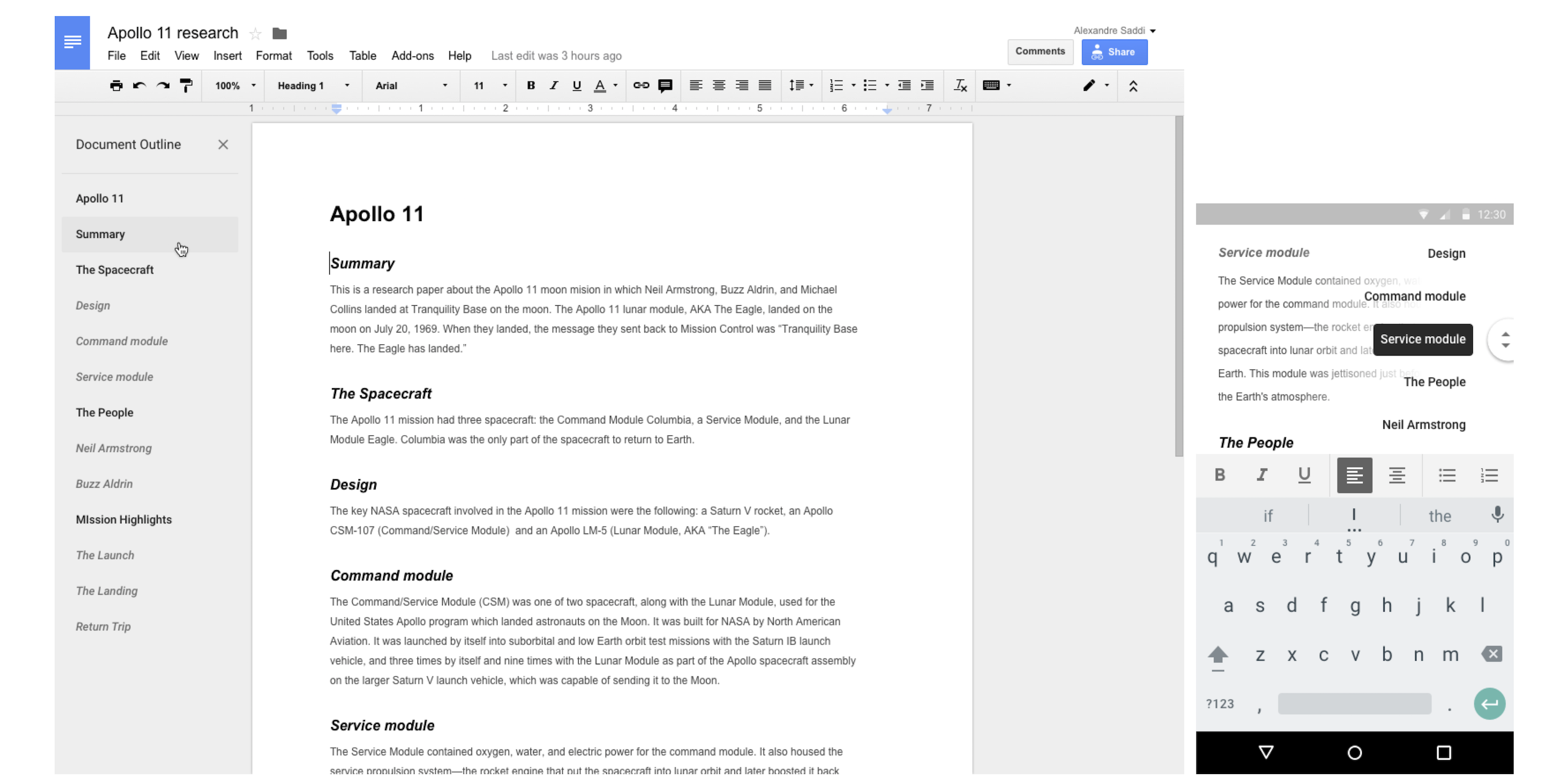
Google is rolling out a new feature for Google Docs on Android and the web today that will make navigating through long documents much easier. The new “outline tool” adds a new pane on the left of the page adds quickly links to the document’s headers so you can quickly jump to that section without having to scroll through the whole document to get there.
Displayed in a pane to the left of the page, the outline features headers for each section of your document, making it simple to quickly jump from section to section. If you haven’t manually applied headers, no worries—we’ll do it for you, intelligently detecting the logical divisions within your work. You can then edit or remove these headers as necessary.
And there’s also a second component to it that lets users scroll through documents easier with a new “navigation handle” that will appear once you start to scroll. “Touching that handle will display the entire document’s structure, allowing you quickly skip from section to section, instead of slowly swiping up and down.”
Here’s a look at the feature in action:
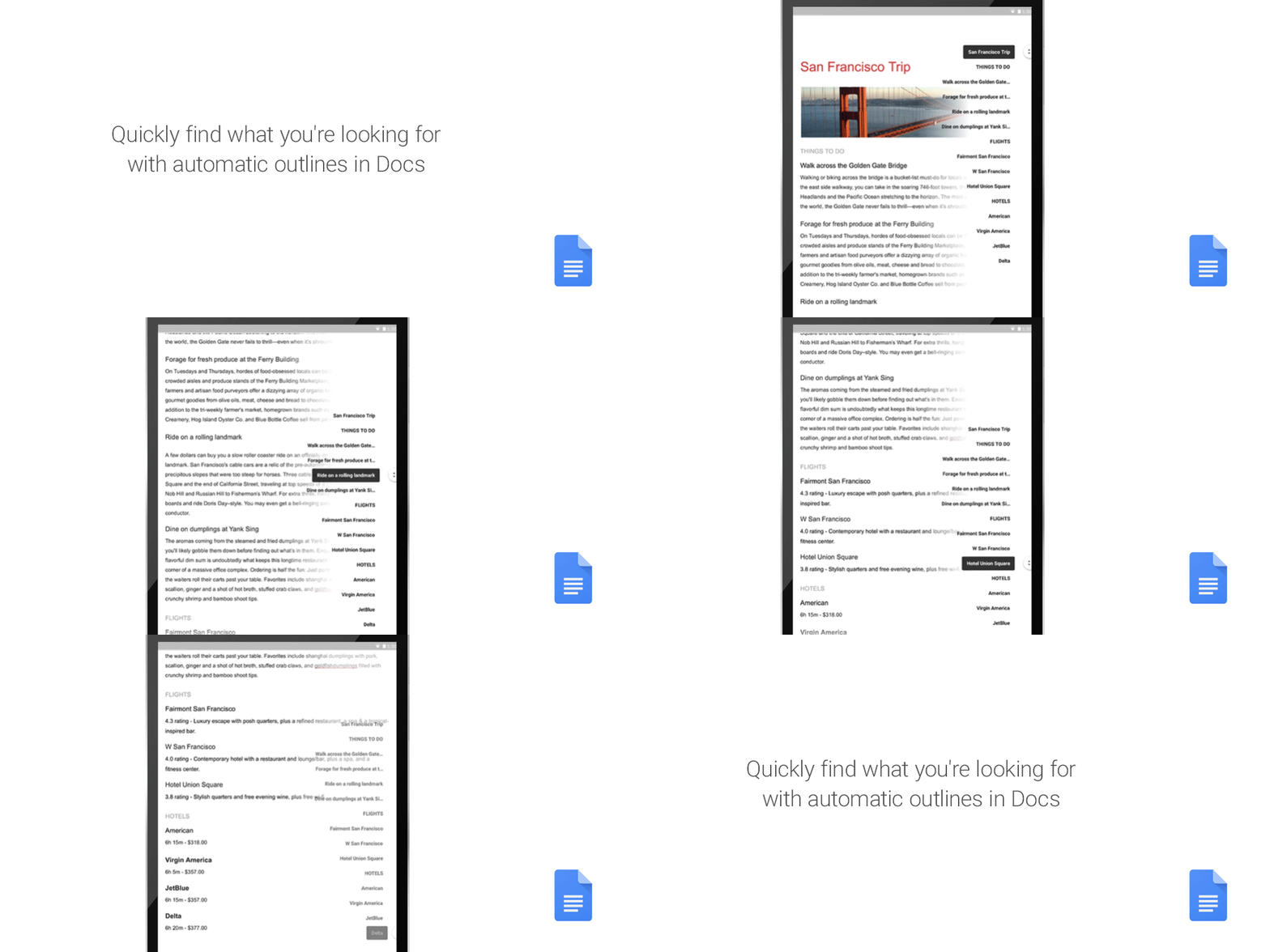
Look out for the feature in Google Docs on Android and the web starting today.
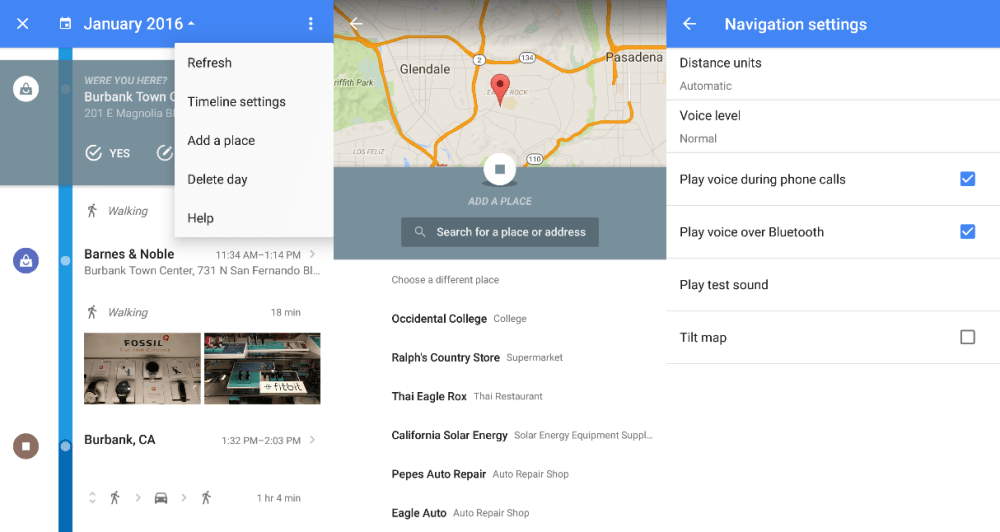
While the last update to Google Maps for Android brought a smart ‘Driving Mode‘, version 9.20 adds a slew of new minor features, including the ability to manually add places to your timeline, photos in user reviews, and more turn-by-turn navigation settings.


 From now until January 2nd, if you buy a 2015 Chromecast you also get $20 to cast TV shows, movies and more on Google Play. Factoring in the credit, that’s the lowest offer we’ve seen for the new Chromecast. After you make your purchase you can get your $20 Google Play credit here.
You can also find a 2-pack Bundle with $12 Google Play Credit at Costco for $49 shipped. Or save $5 on one at Best Buy today as well.
Enjoy a world of entertainment with Google Chromecast (2015). Just connect to your HDTV’s HDMI interface and your home Wi-Fi network to get started. You can stream your favorite apps from your compatible phone, tablet or laptop, plus use your phone as a remote to search, play and pause content.
Note: You need to wait one week after you register for the Google Play credit to appear.
Full Terms & Conditions:
Must purchase a Chromecast device and complete initial set-up between Dec 13, 2015 and Jan 2, 2016 to qualify for the promotional credit. Not reloadable; no cash value.
Credit must be added to a Google Payments account by January 31, 2016 and used on Google Play by January 31, 2017. Certain devices (including Chromecast Audio) and subscriptions excluded. Offer good in US only. Must be 13+ years old, US resident, have Internet access, and have or activate a Google Payments account. Limit one per Google Payment account.
See Promotional Balance Terms for more information.
To redeem, go to chromecast.com/offers


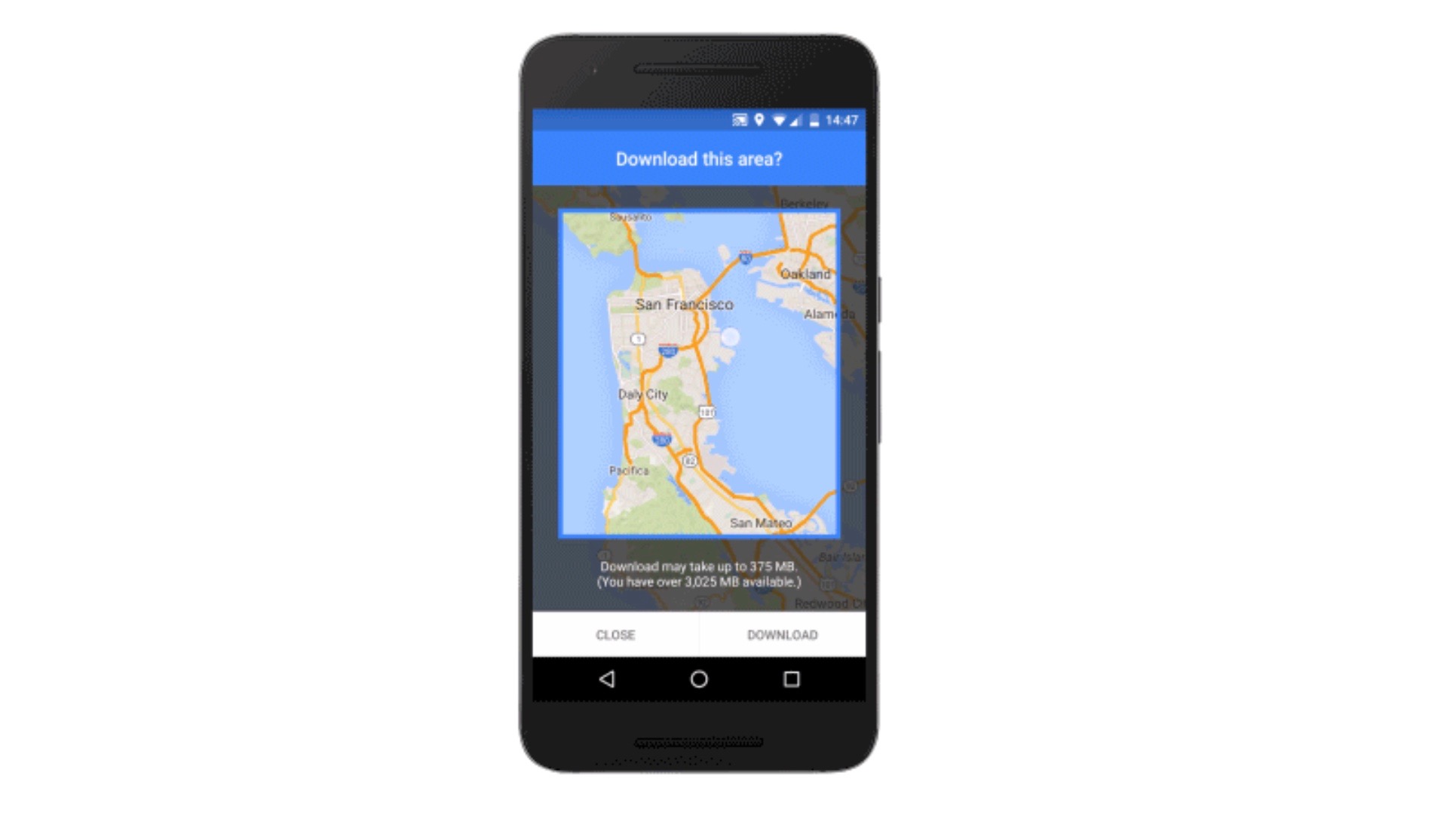
Google is now rolling out a major new feature to its Maps app for Android: full offline support. Google Maps has some utility already when used offline, but an update coming as soon as today will make it much more robust when used without Internet access. For example, before you could see an area on Google Maps offline but not do much else with it. With the latest version, Google will enable features including navigation and business information lookup without requiring an active Internet connection.
Expand
Expanding
Close


Google is rolling out an update to Maps for Android over the coming weeks that adds quick access to gas station price comparisons and other nearby points of interest when navigating. The new feature allows drivers using the app for turn-by-turn navigation to search for points of interest without having to exit the navigation screen.
When the update lands, a new magnifying glass in the upper right corner of the screen will allow users to search for the usual points of interest like gas stations, restaurants, coffee shops and more. Alongside the quick shortcuts, you’ll also see a microphone icon and search option for both voice and text searches for additional points of interest.
Google says the update is rolling out for all Maps users on Android over the next few weeks.
Over the next few weeks, we’re rolling out an update to Google Maps on Android that will make your next gas stop more convenient and affordable. Now you can check out gas prices and add detours to your route, without having to exit out of navigation… When you’re driving in navigation mode and you get that call from your spouse to pick up some more milk on your drive home or if you’re on a road trip and want to find a great restaurant option along your route, simply tap the magnifying glass at the top right corner of the screen. You’ll see a drop-down menu with helpful options, like gas stations, grocery stores, or restaurants. If the drop-down options aren’t what you need, you can always add a detour to your favorite coffee shop by tapping the search icon or by using voice commands.

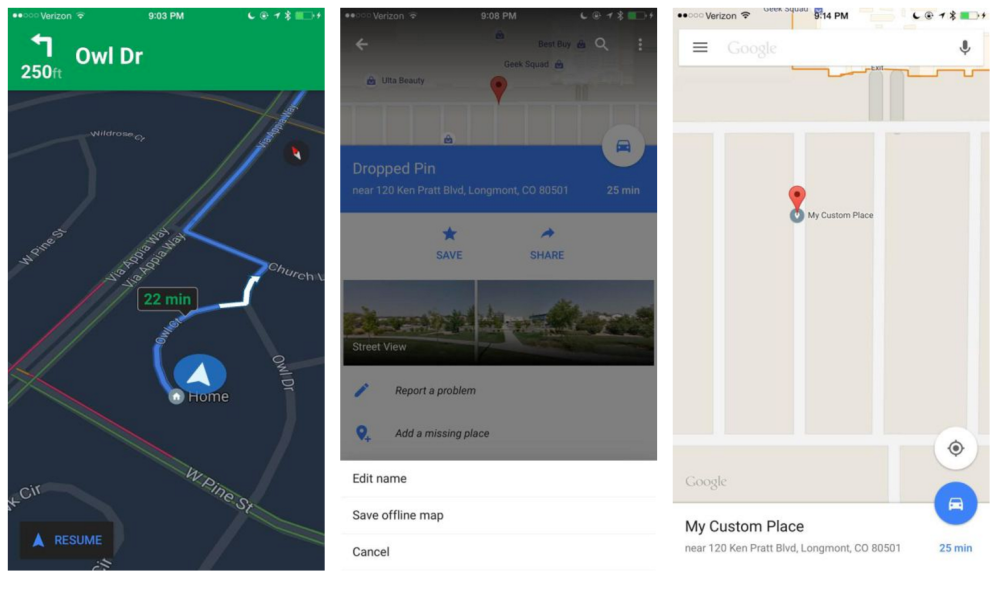
iOS users of Google Maps just got some new functionality that has been in the Android version for some time now. Version 4.9 (iTunes link) brings a new night mode as well as the ability to label custom places so they can be easily found on the map and in search.
Night mode does something pretty common amongst dedicated GPS navigation units: It darkens the maps on-screen while you’re navigating somewhere. The reason this matters is because distracted driving is one of the biggest causes of driving-related accidents, and the white glow of a smartphone screen directed at ones face at nighttime can most definitely make it difficult to see what’s in view of the vehicle.
The other notable addition to come with this update is the ability to label places on the map that aren’t already in Google’s own database of places and points of interest. It’s already possible for anyone to add new places to the map through the iOS app, but these were only for public places and, if approved, would be seen by everyone using the app. The new labels are private, intended to make it easier to find and navigate to places that matter to you.
Google Maps for Android already has these features, but for iOS users who still cannot stand Apple’s own mapping product, they’re surely a welcome addition.
Most of us have at least once in our lives driven to a place or business or to discover upon arrival that it’s closed. It sucks, and Google has decided to address this in version 9.10.1 of Maps for Android.
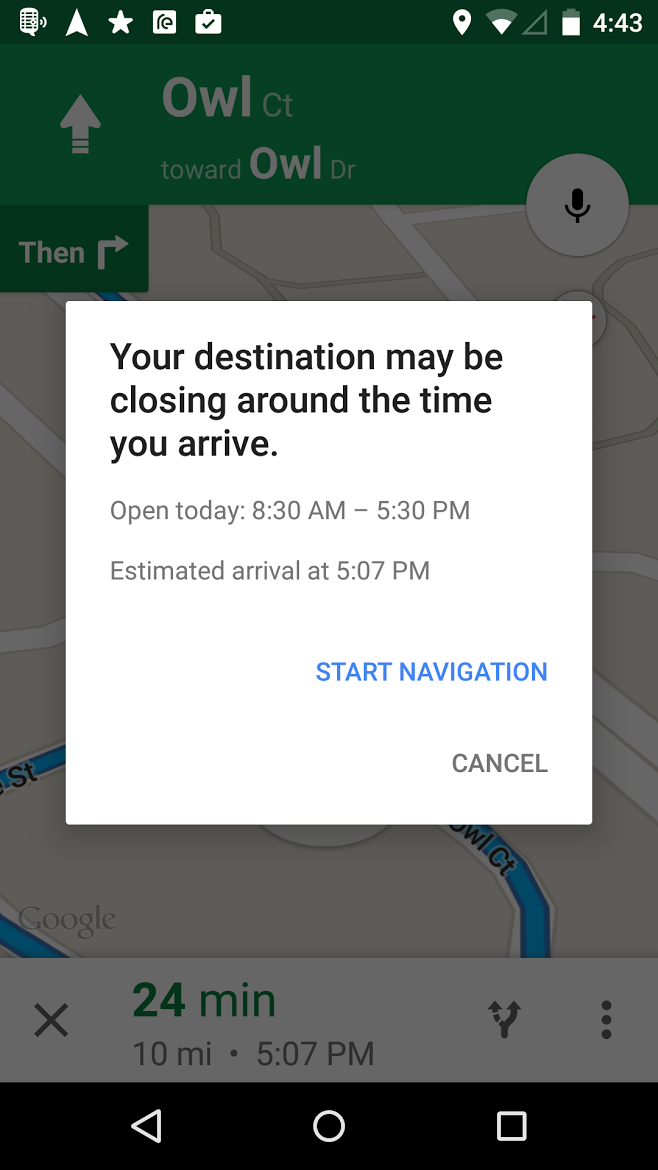
In addition to now showing you car rental reservations alongside your flights and hotels, the new version will pull data from Google’s vast places database to determine whether or not the place you’re traveling to will be closing around the time you arrive. As you can see in the image above, the place I input closes at 5:30PM and my approximate arrival time is 5:07PM, so Maps gave me a warning at the beginning of navigation so I won’t arrive too surprised. The update should be arriving for most users now through the Play Store.

As part of its Google I/O developer conference today, Google is offering some updates on its Google Places API for iOS as well as future updates arriving for its Maps app.
Expand
Expanding
Close

While those of us living at the bleeding edge of technology (aka Uber) may not have a use for this, HTC knows that many people still drive and need a safe way to get information while keeping their eyes on the road. That’s why they today released a previously HTC One-exclusive Android app called HTC Car, which turns your smartphone into an in-car dashboard, to the Play Store…

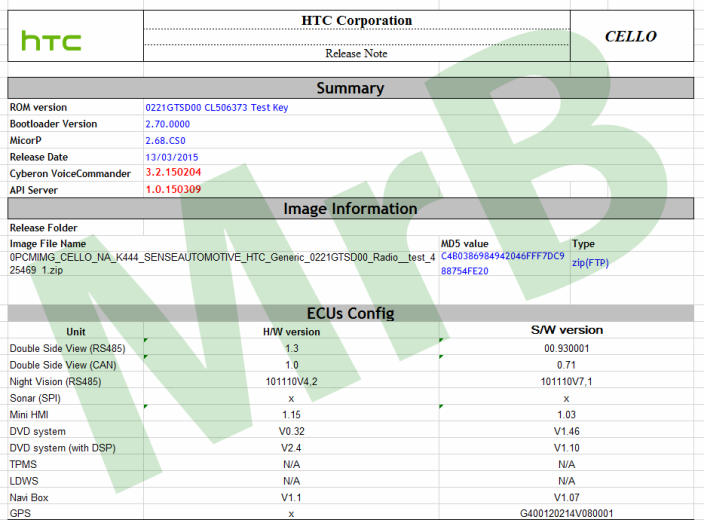
According to a post on the Android subreddit, HTC is testing its own competitor to Google’s Android Auto in-car system. The post claims that the device is named “HTC Cello” and runs a version of Sense specifically for cars, currently called Sense Automotive. Test logs from the device show that HTC is looking to integrate its device more with the car than Android Auto currently does.

After a relatively quiet Update Wednesday, Google this evening has picked things up by rolling out an update to Google Maps on Android, bumping the app to version 9.3. The update is not chock full of features, but there are certainly a few things avid users of the app will appreciate.
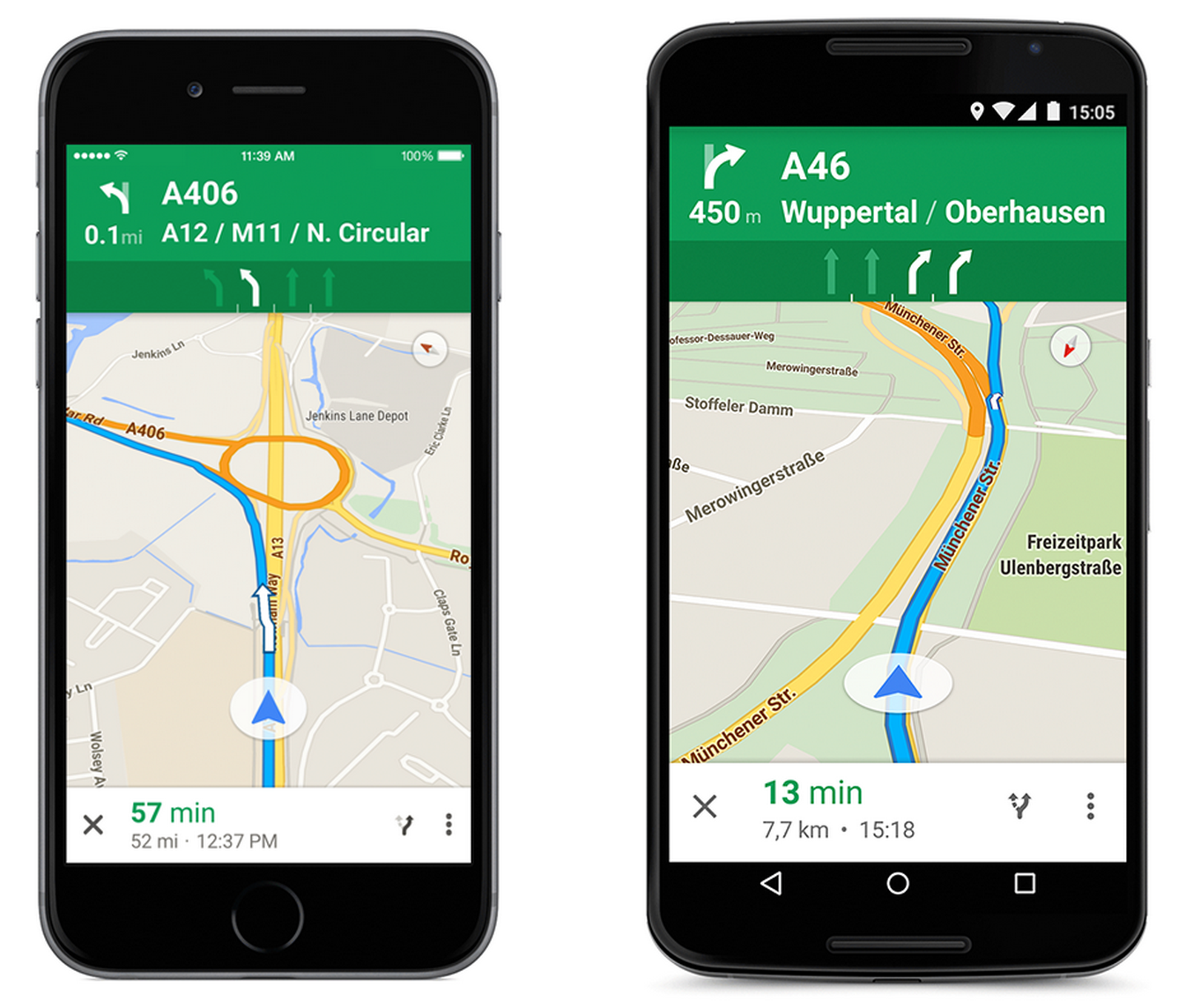
Google announced today that it’s adding the Google Maps lane guidance feature it rolled out to select locations earlier this year to additional countries just in time for the holidays. Google said today that Maps now includes lane guidance for highways in Germany, France, Italy, Spain, the UK, and Ireland.
When you’re in the turn-by-turn navigation mode, we can now make sure you don’t miss your next turn or exit by showing you which lane to stay in or move to so you’ll never find yourself darting across traffic at the last minute — or worse, driving for miles down the wrong road. When you approach a junction or exit with multiple lanes, voice guidance will suggest which lanes are best for your route. You’ll also have easy access to alternate routes while you’re navigating, so you can choose the best drive for you.
Google first announced the feature back in May, which offers real-time info to help drivers prepare for upcoming turns or necessary lane changes, and it’s been rolling out to select countries and locations since.
The lane guidance feature is available through turn-by-turn Navigation in the Google Maps app on Android and iPhone.
Google is rolling outs its Maps navigation features to 20 additional countries as confirmed on the company’s website (via AndroidPolice). That means users in the new countries will have access to turn-by-turn navigation features for walking, biking, and driving directions. The full list of countries included in the latest roll out is below:
The navigation features are available in the new countries to Google Maps users on both Android and iOS devices. Google notes that Countries marked with asterisks include limited coverage in only some regions of the country.

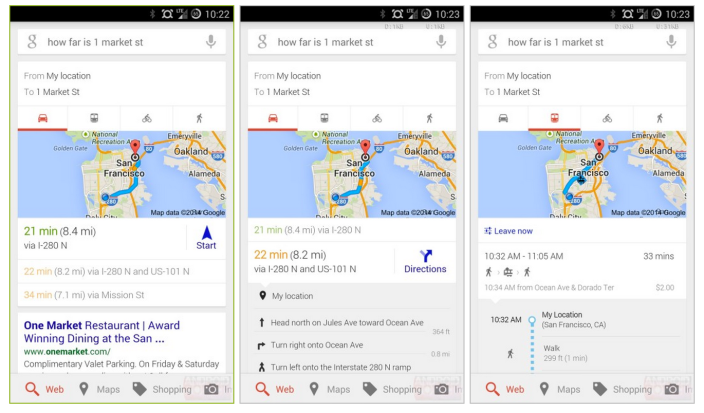
The official Google Search app for Android has been updated with navigation cards that resemble those found in Google Maps. When you search for a destination or directions between two locations, the navigation card displays a map that outlines the trip, with the approximate travel time, distance, suggested and alternative routes, desired mode of transportation and step-by-step directions, all without needing to open Google Maps.
Expand
Expanding
Close
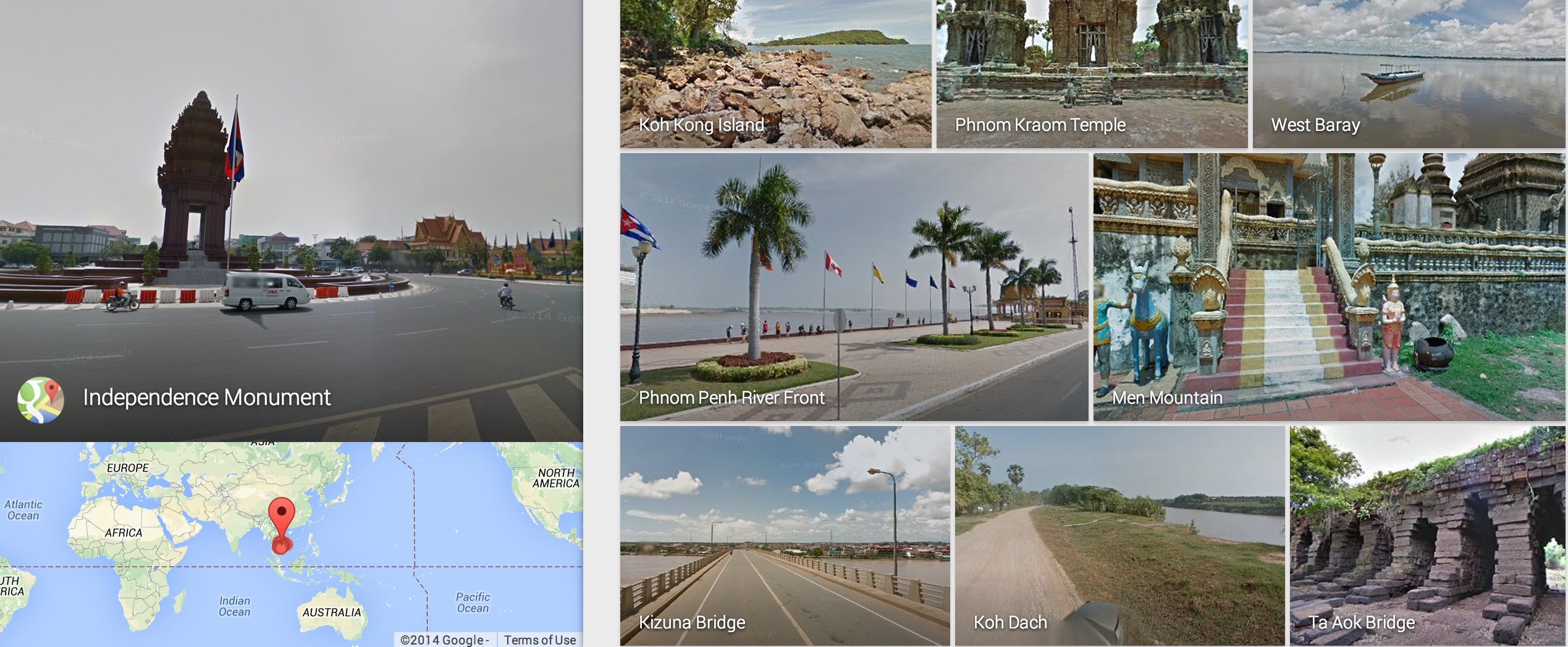
Google has announced that its Google Maps StreetView feature is now available for users in Cambodia and Indonesia.
Full support for StreetView across Cambodia comes following the launch of a StreetView tour for the thousand-year-old temples at Angkor Wat in Siem Reap, Cambodia in April. Google has put together a collection of imagery from Cambodia you can check out on its Views website.
Another Maps improvement rolling out today is support for navigation in Panama, as noted by AndroidPolice. Google also confirmed the roll out by adding Panama to the list of supported countries for navigation on its website.
The new features are available in the latest version of Google Maps for Android on Google Play.

Uber announced today that it’s added new features that will make the experience even more seamless for both users and its drivers.
We envision a day when there is no coordination necessary to take an Uber ride. Simply push the button, and the rest is essentially on cruise control: the car quickly shows up at exactly the right place and whisks you away to your destination via the best possible route. The latest rider and driver app releases take us one step closer to that world with two new features:
A new destination entry feature lets users quickly enter destination details into the Uber app that are then automatically available to the driver when they arrive. “You can literally skip the step where you tell the driver where you’re going.”
Uber has also added turn-by-turn navigation to its driver app: With one tap, the driver can enable turn-by-turn navigation to the destination you’ve provided. There’s no need to juggle multiple apps or waste time typing in an address.
Uber says the features are live now, although doesn’t list the features in the latest update that hit the app yesterday.

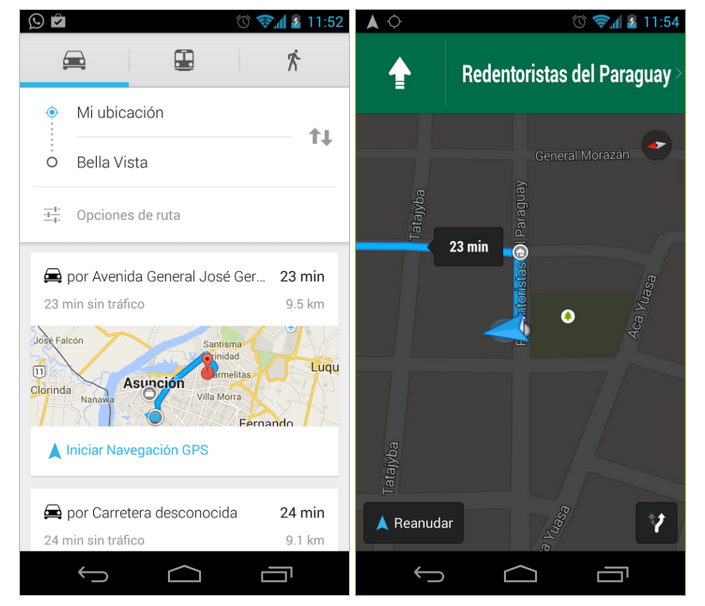
A beta for Google Maps navigation is now available in El Salvador, Libya, Nicaragua, Paraguay, and Tunisia. While some countries may take this feature for granted, other territories don’t widely have access to this type of free software. For example, residents of North Korea have combined their efforts to produce a community developed version of Google Maps.

[youtube=https://www.youtube.com/watch?v=RE1YHlI1XHo#t=56]
Google’s Project Tango 3D interior mapping technology, which will shortly be appearing in a tablet, is also taking to the air. A team from University of Pennsylvania led by Professor Vijay Kumar are using a Tango-equipped smartphone to enable a quadrocopter to navigate the interior of a building …
Expand
Expanding
Close
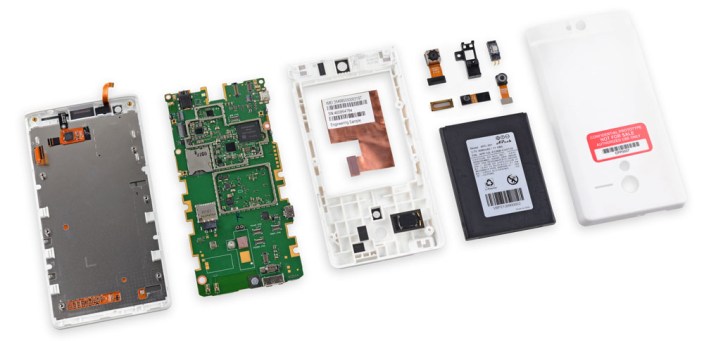
Google let iFixit open up one of its 200 prototypes of the Project Tango phone, an Android phone that uses highly-sensitive 3D motion-tracking and measurement to create automatic maps of interior locations.
The device is a really neat piece of kit, and Google believes that developers will find plenty of uses for it. For example, use the phone to scan the interior of your home before you go furniture shopping, and it will create an accurate 3D model of your home complete with measurements. Take the phone to the store with you to see exactly how furniture might fit …
Expand
Expanding
Close
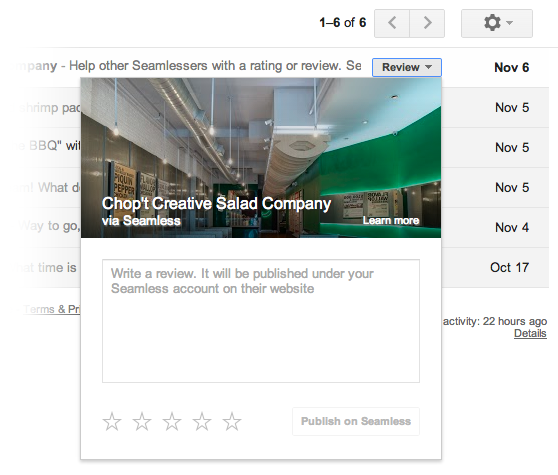
Back in May Google rolled out new contextual quick action buttons in Gmail that appeared next to messages in your inbox allowing users to, for example, quickly RSVP to an invitation or check-in to flights. Today Google announced on its Gmail blog that it’s rolling out even more quick action buttons in Gmail. One of the new buttons will allow users to rate and review restaurants and save Google Offers with a single click:
For example, you can rate and review restaurants you ordered from on Seamless and even modify OpenTable reservations—all without opening an email. And for the deal lovers out there, you can conveniently save a promotion from Google Offers with one click, making it easy to find and buy it when you’re ready.
Another new quick action button will allow YouTube and Vimeo uploaders to click a “View video” button next to emails in their inbox to jump right to viewing their finished uploads (pictured below). The same button will also appear for Dropbox, Google Docs, Sheets, and Slides.
Expand
Expanding
Close
http://www.youtube.com/watch?feature=player_embedded&v=sr1Qz63AzK8
Google announced on its Google Commerce blog today that it’s expanding the places you’ll be able to receive and save Google Offers. Previously, Google provided the deal service through its Google Offers website and the Offers and Google Wallet mobile apps, but it’s now also including Offers as ads in search results and on websites, as well as through the just released Google Maps for Android app.
If you find an offer you want, like a free appetizer at your favorite restaurant, you can easily save it to your Google account. The next time you’re at the restaurant, just show the offer on your phone screen to redeem. No need to hassle with clipping paper coupons, purchasing vouchers in advance, or forgetting your coupons at home.
Google will be making Offers available through search results and on websites through ads with a big “Get Offer” button that will allow users to save the Offer to their Google account and redeem later through the Google Offers mobile apps for iOS and Android. Offers will appear in the new Android app when searching for a restaurant or retail store:
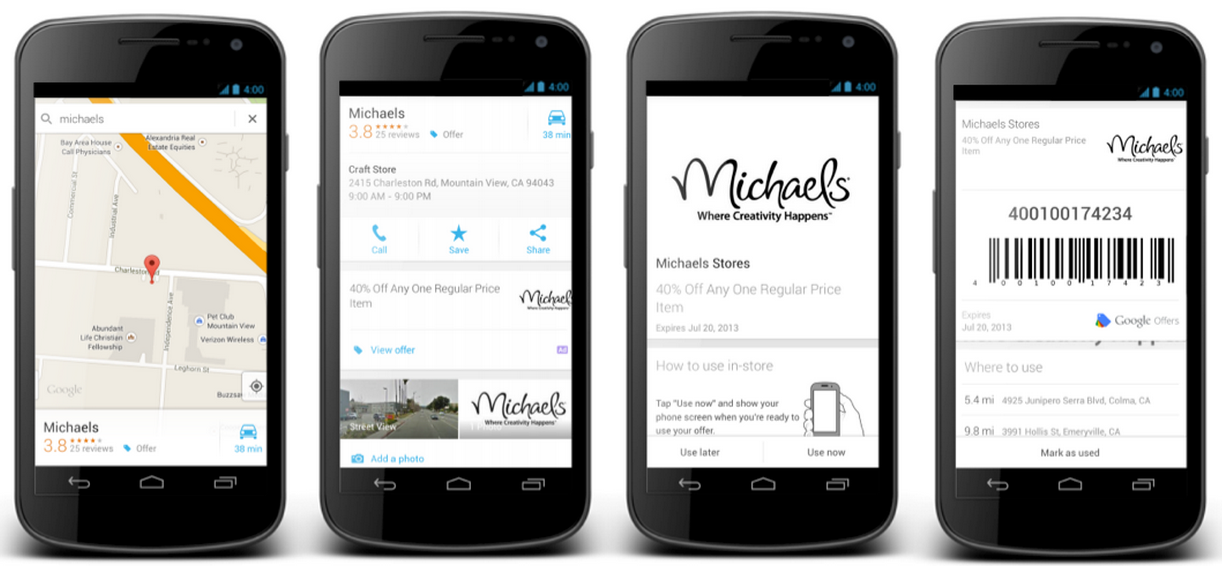
Google has already partnered with Michaels Stores, RadioShack, Red Mango, Red Robin, and Ulta Beauty for Offers, but plans to roll out Toys”R”Us, Sports Authority, BJ’s Restaurant, Macy’s, Disney Store, and Payless Shoesource in the near future.
An image showing what the new Google Offer ads will look like is below:
Expand
Expanding
Close


