Apps and Updates




Google announced today that it’s now allowing Android users to send messages via third-party services like WhatsApp and Viber using its “OK Google” voice control feature:
Expand
Expanding
Close


Fallout Shelter, a mobile game companion to the much-anticipated Fallout 4, was brought to iOS last month with no word on when it would be arriving on Android. Today, the company behind the game, Bethesda, has come out on Twitter to announce that it should be hitting Android devices in less than a month — on August 13th.
The game was met with mixed reviews despite the hype, so Android users anticipating the game became much less excited with iOS players commented on its repetitive gameplay and stability issues. That said, Fallout 4 is definitely one of the most eagerly-awaited games of the year, and until it hits in November, players will have to take Shelter for what it is.
Attention overseers: learn what's new in #FalloutShelter arriving on Android on 8.13 pic.twitter.com/pTEKrNAH6d
— Fallout (@Fallout) July 24, 2015

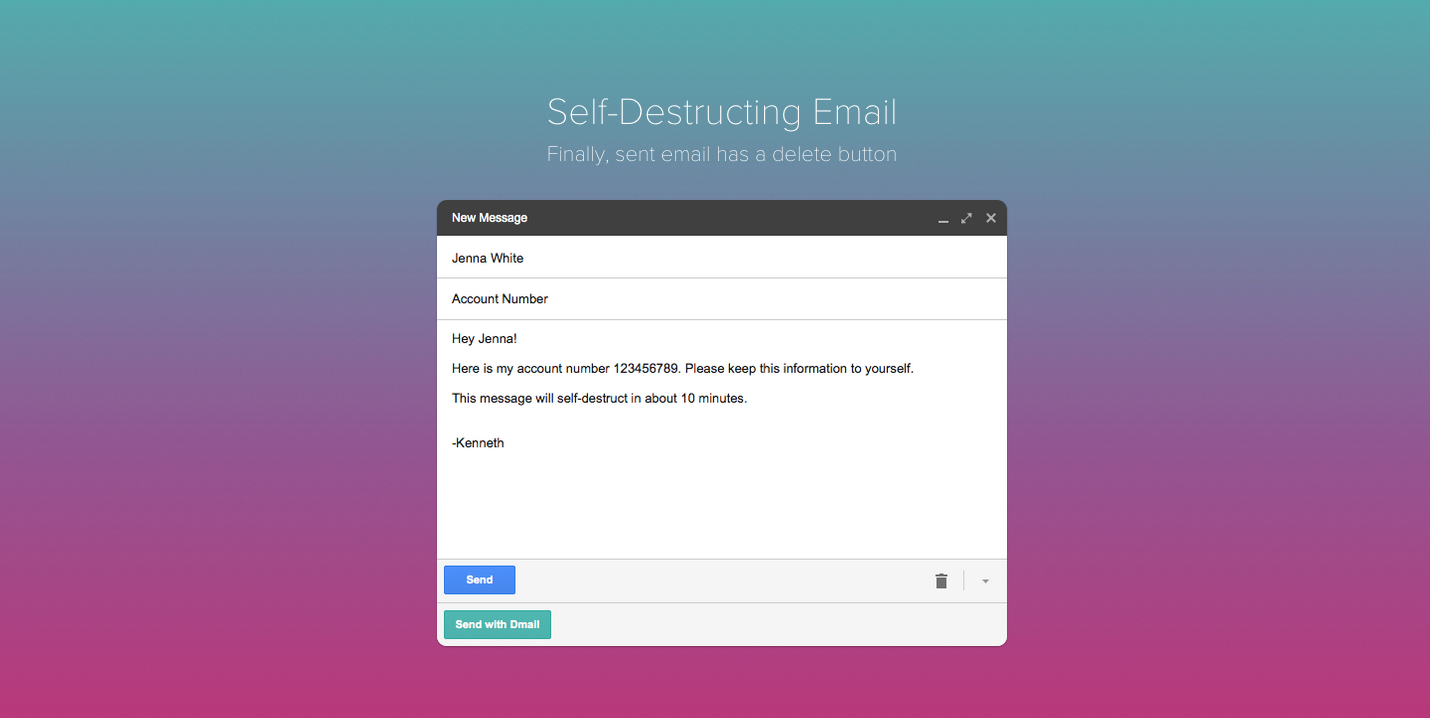
Dmail is a Chrome extension which allows you to un-send, or revoke any emails you send through your Gmail account. The service was launched by the same brainiacs that brought us the Delicious social bookmarking tool.
Self-destructing email isn’t exactly a new thing. Google itself rolled out a feature that lets you un-send a message once you’ve sent it. The only issue with Google’s built-in service however, is that you only have 30 seconds to change your mind about sending an email to someone. Dmail lets you revoke emails whenever you like. I took it for a quick spin to see what it’s like, and I have to say, it’s an incredibly convenient way to make all your outgoing communication more secure. It also happens to be ridiculously easy to use.


On the same day that Apple launched a massive iOS app sale, Google has also joined the fun. The company has discounted a plethora of apps on the Play Store to celebrate summer. The discounted apps aren’t unpopular by any stretch of the imagination and include a variety of popular games.
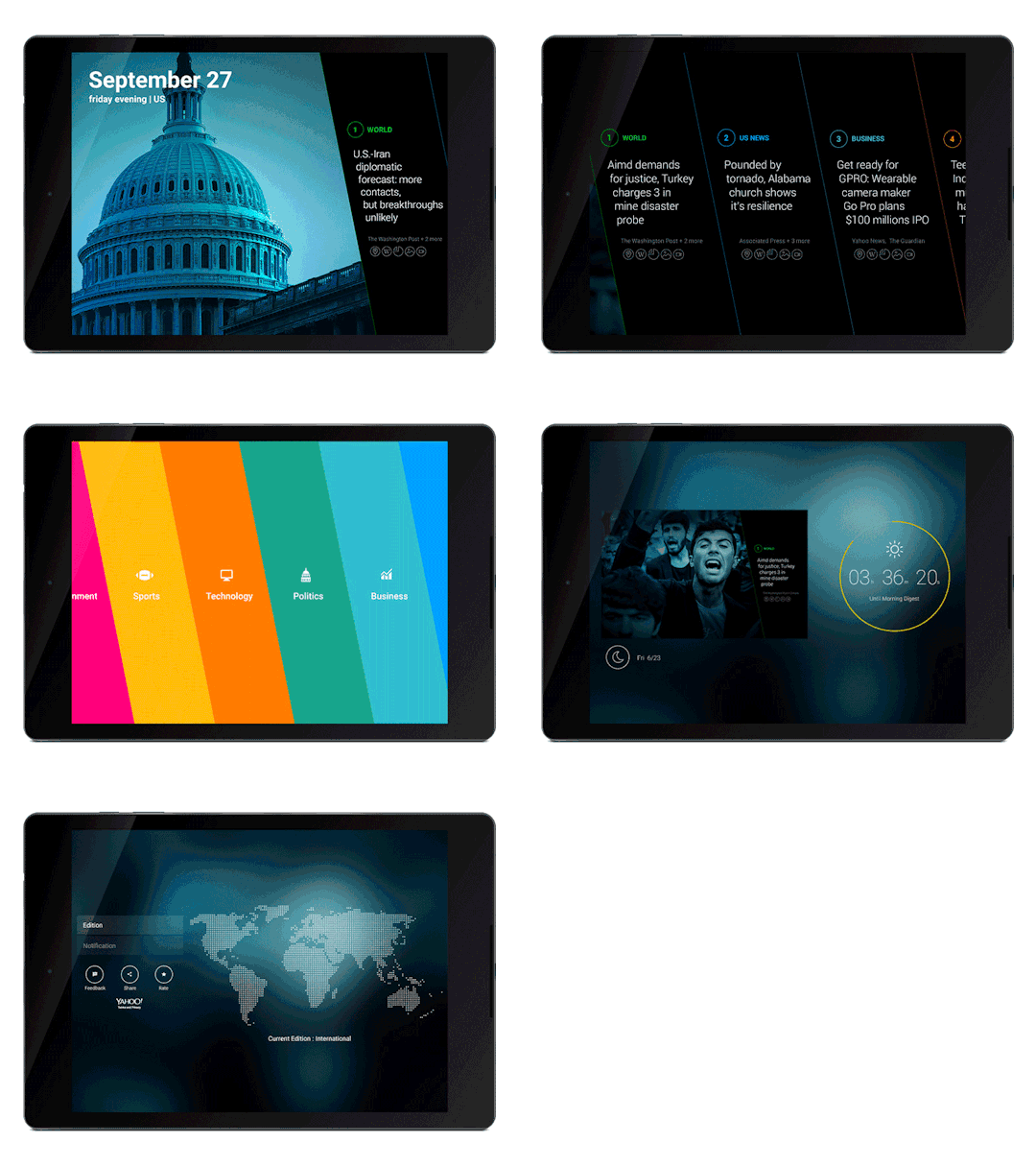
Yahoo’s News Digest app that delivers the best from Yahoo News to readers twice a day is now available for Android tablets. The app was previously only available for Android smartphones and iOS devices.
The popular app offers summaries of top stories from Yahoo News with two daily updates, once in the morning and again at night. Content is a mix of human curated stories from Yahoo’s editors and picks via its algorithms from various sources around the web:
Each story is created from multiple sources to present the essential bits and pieces of information, known as “atoms”. Atoms are key quotes, images, videos, maps, infographs, and Wikipedia excerpts among others. These atomic units provide a unique context to the news. Our stories are both algorithmically and hand curated to ensure high quality, and come with a textual summary.
The updated Yahoo News Digest app for Android with support for tabtlets is available on Google Play now.

Kamcord, a popular platform that lets game developers add gameplay recording features to their mobile apps, is today taking its first step into live streaming. The move is a notable one as competitors such as live game streaming service Twitch, now owned by Amazon, move into the mobile space and live streaming apps like Periscope and Meerkat begin to gain traction among users.
Expand
Expanding
Close

Pebble has announced today an update to the firmware of the company’s smartwatch, bringing several features that the community has oft-requested. Most notably, the new firmware brings settings for adjusting font size, backlight, and vibration. Pebble also released an updated version of the Pebble Time’s Android app counterpart, bumping it to version 3.2.0, which brings a new search bar, preserved notification preferences, and other minor changes…
Expand
Expanding
Close

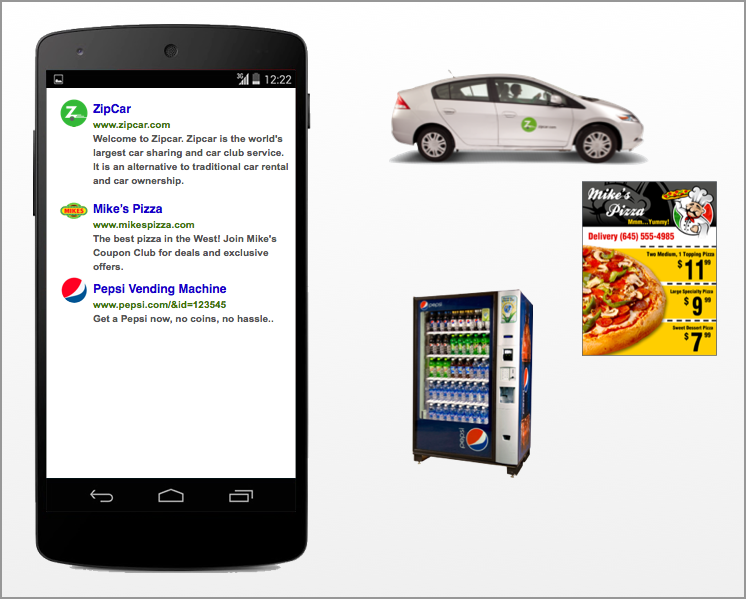
The Physical Web is an open source web specification from Google released last year with the aim to make interacting with smart devices in the real world as easy as clicking a link, just as we do on the web. Now with the company having released its Eddystone beacon technology and APIs for making this communication between devices in the same proximity easier, it’s integrating Physical Web directly into Chrome for iOS.
As more and more Internet usage shifts towards mobile, particularly to smartphones, app developers are recognizing the phone number as an ideal identifier for new users. Snapchat, WhatsApp, Facebook Messenger are just three examples of hugely popular apps which support signing up using your phone number in lieu of an email address, and which can also use the contact list to build up a network of connections within their apps. Now Amazon is jumping into the fold.
In the newest version of Amazon Shopping for Android, the company’s main mobile experience through which customers can purchase items and track orders, the onboarding flow for new customers has been updated to support signing up using just a name, phone number, and password. New customers who’d prefer to use an email address can click “Use your email instead.” The update hasn’t fully propagated in the Play Store just yet, but can be downloaded right now through APKMirror (click here). For that to work you need to visit Settings > Security on your device and toggle on “Unknown sources.”
This shift to phone number-based identification for apps makes total sense. Phone numbers are a native feature on smartphones – I like to call them an “atomic unit.” SMS and phone calls work right out of the box, whereas with email you have to launch an email app and then sign up and/or authenticate with a third-party provider, just to begin receiving messages. At the very least, by allowing onboarding with phone numbers, app developers make the onboarding process much faster, tremendously reducing the friction and bounce rate (users who download an app but leave before signing up). That’s what Amazon has done here.

Microsoft has released an updated version of Skype for Android today that delivers both a visual refresh to several parts of the app as well as performance improvements throughout.
Expand
Expanding
Close

[youtube=https://www.youtube.com/watch?v=Bt9zSfinwFA]
Update: Google has now officially announced the update, bringing three new tabs on top of vertical video support.
We all have friends who’ve done it: fail to recognize that shooting video is different from taking a photo, and end up shooting vertical video. YouTube has for some time tried to lessen their embarrassment with a pseudo horizontal view, but the latest update to the Android app takes things a stage further by acting like they didn’t do anything dumb in the first place …
Expand
Expanding
Close

Google today has started rolling out an update to its Maps application on Android that brings about several new features and changes. Most notably, version 9.12 of the app adds a new interface called “Your timeline.” On this screen, which is accessible via the slide-out navigation drawer, you can see all of the places to which you’ve been, in a comprehensive timeline-like interface.
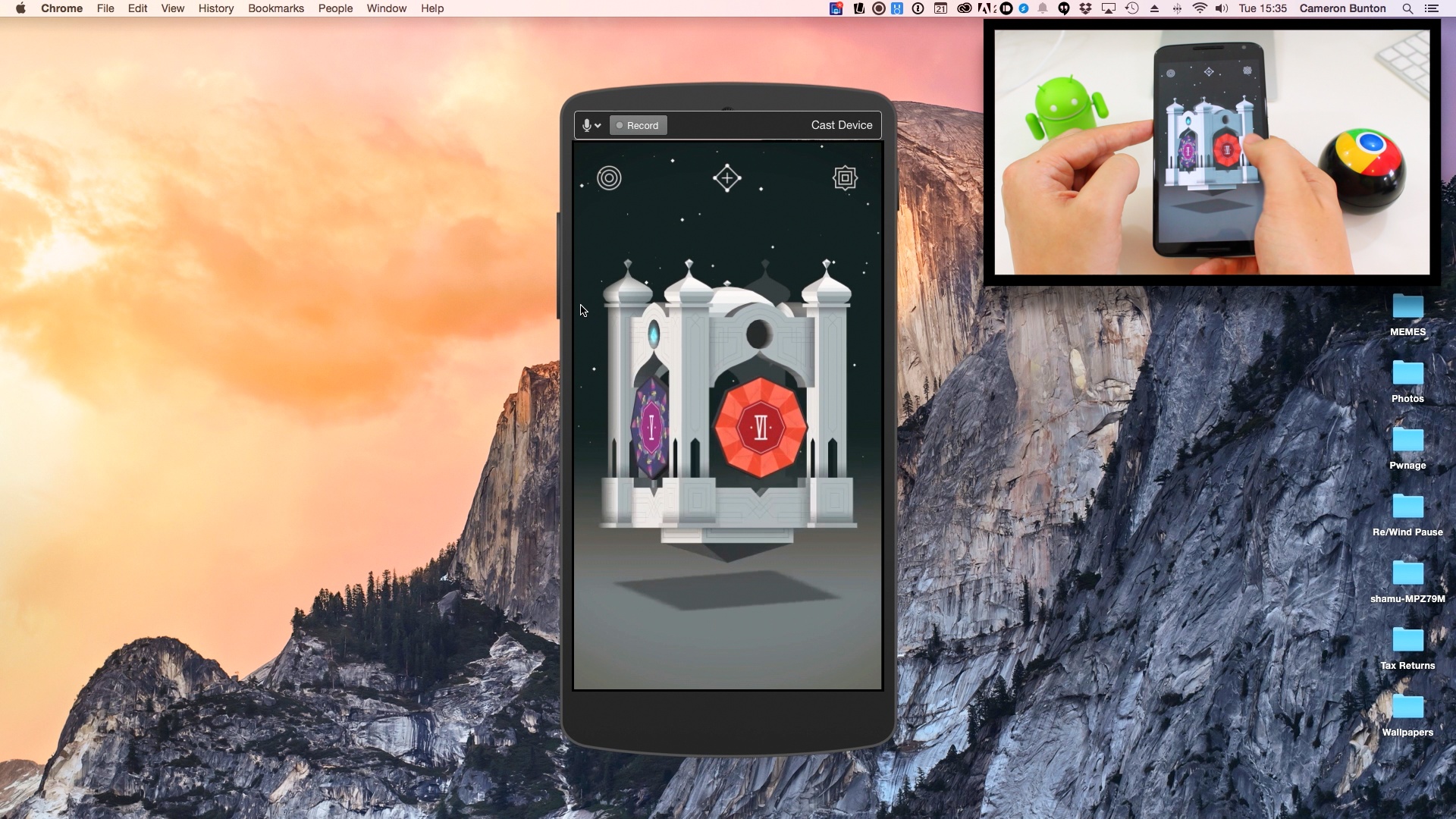
Apple and Google products don’t always play together nicely, but when they do, it’s normally because a third party has created an application or two to get them talking to each other. That’s exactly what Reflector 2 for Mac does (among many other things). If you’ve been wondering how you can get content from your Android smartphone or tablet mirrored or streamed to your Mac (and Windows PC, if you’re into that kinda thing), this is one really easy way.
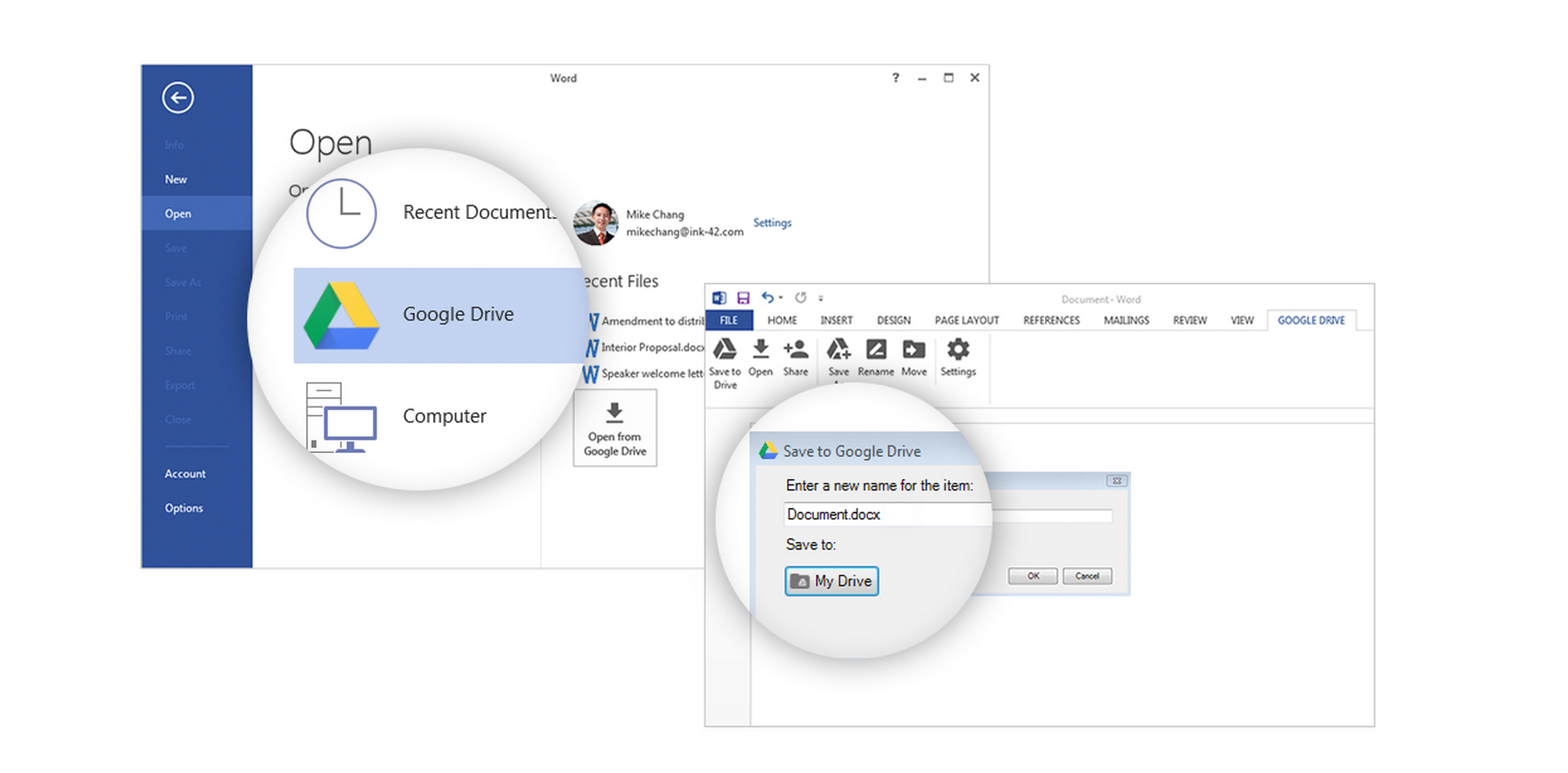
Google has a new plugin out for Microsoft Office (Windows only, for now) which makes it possible to access files stored in Drive from Office and save edits back to the cloud storage service, as well as create new files in Office and save them directly to Drive. The plugin works with Word, Excel, and Powerpoint (2007, 2010, and 2013 versions), and Office 365.
Here’s what saving a new document looks like in Word once the plugin is installed:

This plugin isn’t anything monumental, but Microsoft’s Office suite of productivity applications still has an undeniably significant hold on the corporate market. By making Drive more interoperable with the suite, Google can ease people into trying its cloud-based applications for getting work done, initially by pushing the benefit of Drive for sharing files with teams, and easily accessing files across devices. It’s a strategy Google’s competitors have claimed to use to gain a foothold in the corporate world – get enough average employees in a company using your product for some of their needs, and eventually IT will budge and consider switching over for everything. Google has a website up dedicated to the new plugin.
As we reported back in late June, the Chromium team – which creates a public, open-source browser that was forked to create the popular Chrome browser from Google, and who’s updates are regularly merged into Chrome – is working hard on a “Reader Mode” for the Android version of the browser. This mode would recognize articles and pages with lots of text, display a “Make page mobile-friendly” button and, when tapped, strip a page of all extraneous content, leaving just the page’s body text, title, and images. The feature is getting ever-closer to completion, so we’re taking another look at what has changed recently.
Google’s productivity apps have received two small updates today, one specifically for paid customers of Google Apps, the enterprise-grade version of Google’s online productivity suite for those who want to use Google products with their own domain, and the other for all users of the products. Let’s take a look.
First off, a couple products which tend to fall under the “Docs” brand have received a new UI button (pictured above) for all users which makes it clearer want kind of access you have to a document you’re viewing, and easier to request greater access. If you’re viewing a spreadsheet and have only been granted the ability to view it but not edit or add comments, for example, you’ll see a blue button which says “View only.” Clicking the downward facing arrow reveals the option to request greater access, in this case the ability to edit. Viewers with the ability to comment will see a similar button in the color green. The blue “View only” button will appear across Docs, Slides, Sheets, and Drawings, while the “Comment only” button will only appear across Slides, Sheets, and Drawings.
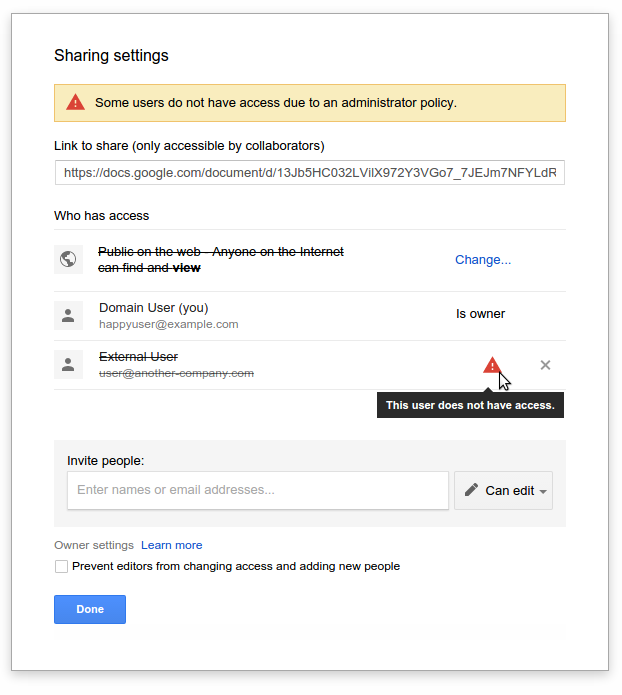
The second minor change up on the block is specifically for Apps administrators, and alerts company employees to when a document they’ve shared with someone cannot be viewed by that person for one reason or another. Oftentimes to prevent sensitive information from getting into the wrong hands, Google Apps administrators will restrict their employees from sharing files with any user of Google’s apps other than those on the same domain (i.e. tom@corpemail.com). This is what it may look like if you attempt to share a document with someone outside your corporation and sharing outside your own domain is disabled:
More information on both updates is available on the Google Apps Updates blog, here for the new Docs UI buttons, and here for the new invalid sharing settings alerts.
Au revoir, Google+ Photos. In a post to Google+, ironically enough, Google has (unsurprisingly) announced that starting on August 1st, it will be sunsetting its Google+ Photos app in favor of the recently launched Google Photos. First the Android version of the app will stop working, followed by the iOS and web apps shortly thereafter. The company says the move to axe Google+ Photos is being made in an “effort to ensure everyone has the best photos experience we can deliver.”

Today, Adobe released the latest version of its mobile Lightroom app for Android. Version 1.2 comes loaded with a handful of new features and a number of bug fixes and performance improvements. It’s available to download right now, and is the latest in a long run of awesome, recently updated Creative Cloud apps for mobile.
Microsoft recently released its Cortana digital assistant as a beta app, and we’ve been able to get our hands on the preview. Apart from its Material-like design, the app looks, performs, and acts just like the Cortana on Windows Phone. You can ask it to set reminders, give you directions and weather information, or do simple arithmetic. It has its limitations and doesn’t feel quite as intuitive or in-depth as Google Now or Siri, but it has its uses.
Google announced today that, for the first time, free apps and games are available in Google Play Store for those located in Sudan.
As part of a commitment to helping more people around the globe use technology to communicate, find and create information, we’re announcing the availability of free apps and games on +Google Play in Sudan for the first time!
It’s worth noting that Google specified free apps, meaning there’s no way for those in Sudan to yet purchase apps and games. For the full list of countries that can access Google Play, head over to Google’s support site.
We told you in May about a new app from Microsoft called “Hyperlapse Mobile” (not to be confused with Instagram’s Hyperlapse), but it was at the time only available to an exclusive set of beta testers. Now, the app is publicly available to any and all that might want to give it a try, and — aside from its horrendous icon — I’m decently impressed.
Not much has changed since it was first introduced, and it’s still a little on the buggy side according to reviews, but overall users — myself included, briefly — are satisfied with the app’s resulting video footage. You can import existing video into the app, choose between multiple speeds, create selfie hyperlapses, and more.
You can get Microsoft Hyperlapse Mobile right now on the Play Store for free.

Microsoft announced last month that its Cortana voice assistant would be coming to Android in beta at some point in July, but it looks like the APK has managed to leak out a bit early. We grabbed it as soon as we could, and decided to give it a look. And our first impression, frankly, is that there’s not really anything special about Cortana — especially when Android has Google Now, Hound, and other competitors to pick from.
VLC pushed a major cross-platform release in February, and at that point the company’s Android app finally left beta for the first time. VLC for Android has definitely been getting a lot of attention since then, though, and version 1.5 — which packs some notable improvements — was released today.
Expand
Expanding
Close


Popular iOS and Android apps from companies like Walmart, ESPN, Slack and SoundCloud have been found vulnerable to password cracking, according to a recent report from AppBugs. The security firm found that dozens of the most popular apps are lacking, in that they allow you to make any number of attempts to login without restriction. These clearly opens up a gap for attackers who have the means to guess those passwords and gain access to your accounts.