update

See All Stories
Site default logo image

Pebble 2.5 firmware lands w/ support for Emoji, new Compass app, more


Pebble has launched version 2.5 of its smartwatch firmware, packing a bunch of great new features. The company says that the firmware brings the ability for the Pebble and Pebble Steel smartwatches to display Emoji, replacing the previous small white boxes that are all too familiar across platforms without Emoji support. The company is also launching the Compass app that they promised long ago, which can be picked up on the Pebble appstore.

Additionally, the app includes some interesting new abilities for users who have recently upgraded to iOS 8. Notably, the update now allows iOS users to dismiss notifications by clicking the X button to dismiss one, and holding it down to dismiss all. Pebble also says that the app should stay live in the background more often on iOS, but the company says that users should make sure not to disable “Smartwatch Proximity.”

The smartwatch should have improved Bluetooth and notification reliability compared to previous firmware versions, and Pebble says that 2.5 also fixes a plethora of bugs.

Site default logo image

Google Maps Navigation features roll out to 20 new countries

Google is rolling outs its Maps navigation features to 20 additional countries as confirmed on the company’s website (via AndroidPolice). That means users in the new countries will have access to turn-by-turn navigation features for walking, biking, and driving directions. The full list of countries included in the latest roll out is below:

  • Angola
  • Bahamas
  • Bolivia
  • Botswana
  • Fiji
  • Guyana
  • Honduras
  • Jamaica
  • Madagascar
  • Malawi
  • Mali
  • Malta
  • Mauritius
  • Mozambique
  • Namibia
  • Nepal
  • Sri Lanka
  • Tanzania
  • Tobago*
  • Trinidad*

The navigation features are available in the new countries to Google Maps users on both Android and iOS devices. Google notes that Countries marked with asterisks include limited coverage in only some regions of the country.

Amazon announces massive Kindle refresh including new ‘Kindle Voyage’ and $99 Kindle Fire HD tablet

Site default logo image

Following a big day of Apple news, Kindle has unleashed a massive refresh of its Kindle lines, including three refreshed Kindles and—interestingly—one completely new Kindle model. The lineup includes the company’s new flagship e-reader dubbed Kindle Voyage, a new entry-level Kindle that now packs a touch screen, an updated Kindle Fire HDX, and a new Kindle Fire HD, which is starting at just $99.
Expand
Expanding
Close

Site default logo image

Shazam app adds Google Play Music streaming & purchasing options

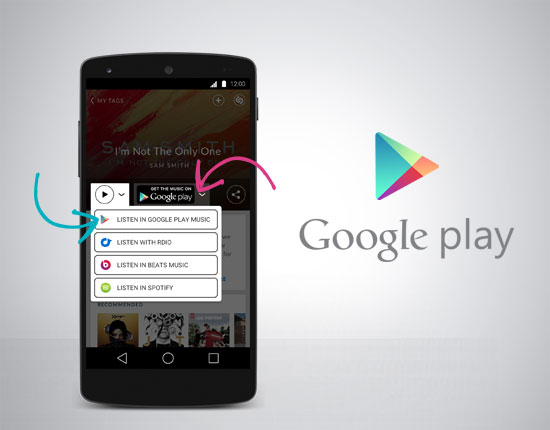
Popular song recognition app Shazam announced today that it’s integrating Google Play Music, allowing users to preview, purchase or stream the song on from Google Play Music or Google’s All Access streaming service in one tap.

Google Play Music joins the other options Shazam offers users for purchasing and or listening including Rdio, Beats Music, and Spotify.

The feature is available first to users in the Shazam app for Android and later the iOS version of the app. 

eBay for Android updated with a new design and in-app notifications

Site default logo image

If you’re eyeing a new smartphone and plan on unloading your old gear on eBay to finance your next purchase, you’ll be glad to know that the world famous e-commerce company has redesigned its Android app. Hopping on the Material Design bandwagon, version 2.7 ships with a simple, flat, sterile look that features larger photos and refined search results.


Expand
Expanding
Close

Google Hangouts for Android updated with Google Voice integration, free VoIP calls

It’s finally all coming together. As many suspected would eventually happen, Google Hangouts is finally—in an update rolling out over the next few days—going to be getting integration with Google Voice. The latter service seemed to definitely be getting neglected by Google as of late, with much of the company’s focus going to its Hangouts platform. But it appears that Voice may even moreso eventually become a thing of the past because, starting today, Google is putting it straight into Hangouts as part of a new update to its apps across Android, iOS, and the web.


Expand
Expanding
Close

Site default logo image

Google Glass XE21.0 update brings quicker Google Now updates, Waze integration

Google just announced the XE21.0 update for Google Glass and with it introduce faster Google now notifications for flights and sports and the integration of Waze data for navigation:

When looking up routes to your destination, Waze accident indicators help you avoid potential traffic.

Google announced its acquisition of mapping company Waze last year and has quickly integrated real-time traffic alerts and other features from the app into its own Maps and navigation features across platforms.

Earlier this month Google began selling its $1500 Google Glass Explorer Edition through the US Google Play Store alongside a number of accessories.

Chrome OS updated with multi sign-in support, managed bookmarks, more

Google has pushed an update to Chrome OS this afternoon, bringing a variety of interesting new features to the stable channel. Of those packed in this update include the oft-requested ability to sign in to multiple Google accounts, a new “App info” page in the OS app launcher, the separation of the Settings page into its own window, and more.


Expand
Expanding
Close

Site default logo image

Google Forms adds custom themes & new survey designs

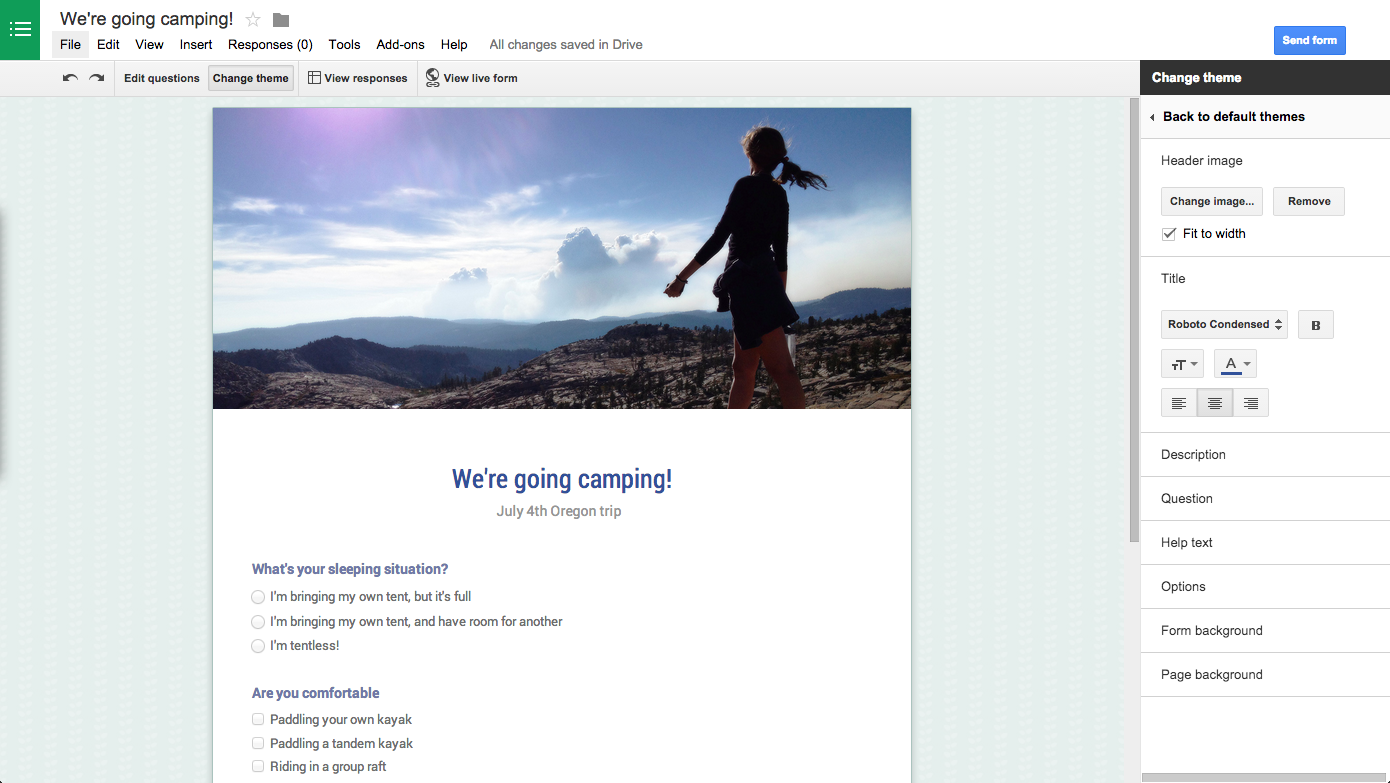
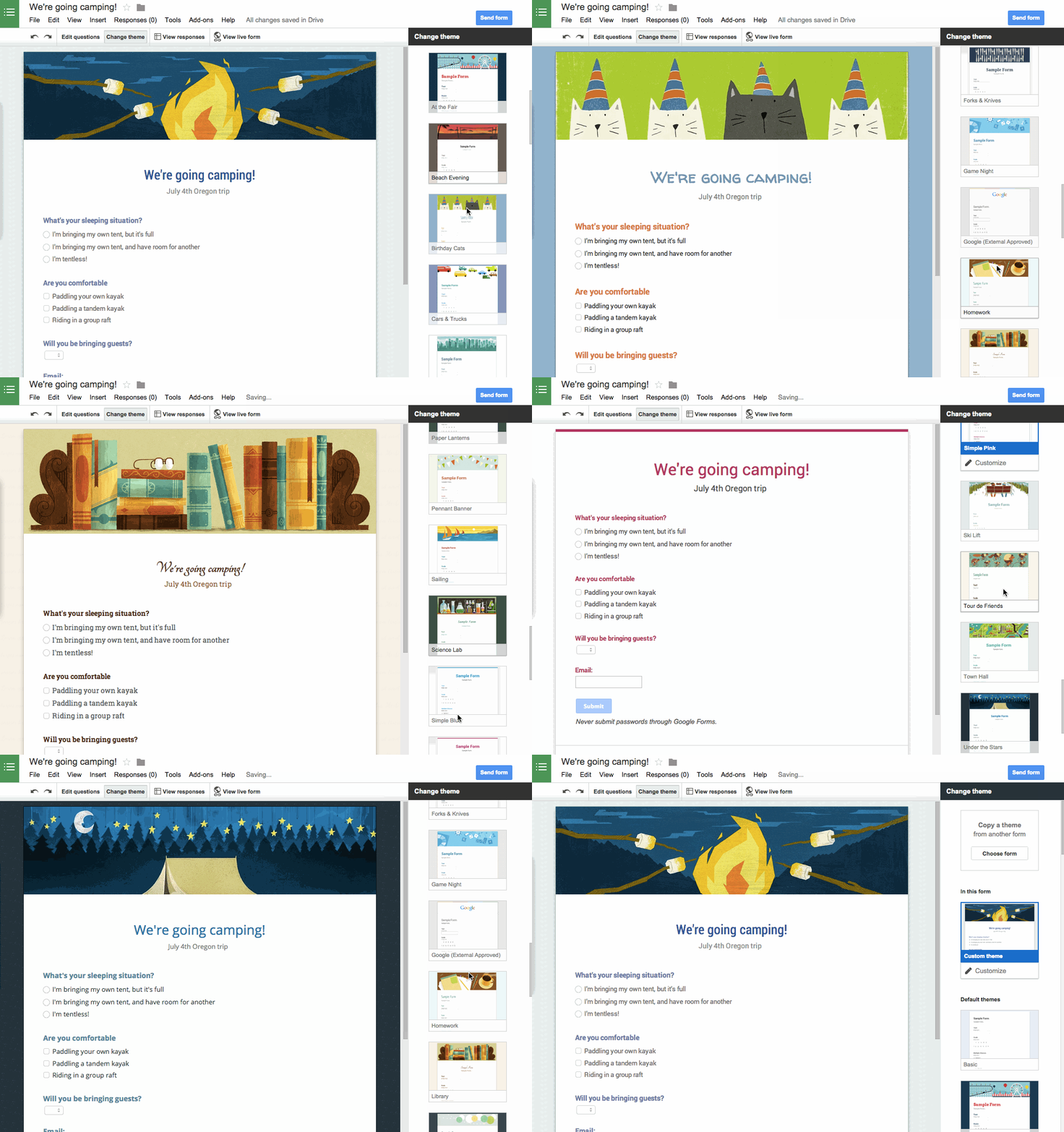
Google announced today that it’s rolling out the ability to customize themes in its Google Forms web app. It’s also adding a number of new pre-made survey designs to the current selection of templates.

One of your top requests has been the ability to add your own personal touch to forms, and starting today you can with custom themes.

You can customize a theme using a new “Change theme” button in the toolbar (pictured above). From there, you can add your own photos or logos to the header, customize fonts and colors, pick a background, and more.

Google also gave a look at some of the new themes it’s added:

More on adding custom themes in Forms here.

Site default logo image

Google News & Weather updated with new widgets and a refreshed UI

Google rolled out a new update for its News & Weather Android app today that brings a much needed facelift for the aging software. Version 2.0 introduces a new Material Design inspired setup with a card layout akin to what you’d see with Google Now that lets users navigate the app’s menu by swiping through content.


Expand
Expanding
Close

Chrome 37 goes stable, brings better font rendering to Windows, 50 bug fixes, more

Google has pushed Chrome 37 to the stable channel for Windows, Mac OS X, and Linux, with the biggest change being support for DirectWrite on Windows. From this version on, this added technology should make font rendering much better for many Chrome users on Microsoft’s operating system. But this update also packs other additions, including a variety of new app/extension APIs for developers to take advantage of. Rounding off the new features, Google says that version 37 packs the usual under the hood changes to help improve performance.

Google also says that this release fixes a total of 50 security issues, many of which have been credited by Google to external researchers in the release notes. Interestingly, many users are reporting that while the 32 bit version is out right now, the 64 bit version of this update has yet to be pushed. Both versions should be rolling out automatically to users of Chrome stable over the next few hours.

The Chrome team is delighted to announce the promotion of Chrome 37 to the stable channel for Windows, Mac and Linux. Chrome 37.0.2062.94 contains a number of fixes and improvements, including:

– DirectWrite support on Windows for improved font rendering
– A number of new apps/extension APIs
– Lots of under the hood changes for stability and performance

Secret for Android update removes ability to access photo library or post full names, adds Flickr search, polls

Site default logo image

The popular anonymous social sharing network Secret may be under fire in Brazil, but in the U.S. and abroad the software lives on, and today received a big new update on the Android platform. The new version both adds and removes several capabilities to the app.

One of the most important changes in the new build is the removal of the ability to access photos saved to a device’s photo library. The camera is still fair game, but Secret is attempting to cut down on personally-damaging photos by taking away the option to upload older images.

That’s not to say that the camera is the only way to upload photos, though. The app now supports Flickr search so users can still find just the right photo for their posts without the need to go through their photo libraries.


Expand
Expanding
Close

Latest Google Search app update brings support for multilingual voice search

Google today announced a new feature for its Google Search app for Android, catering to the billions of people in the world who speak more than one language. Previously, you had to manually switch between the language you wanted Google to recognize, but now you’re just a flick of a switch away from being able to speak in multiple languages at once—and Google will be able seamlessly switch with you.
Expand
Expanding
Close

Upcoming XE 20.1 Google Glass update brings major improvements to contacts and messaging, more

Google is getting ready to push out the latest update for Google Glass—numbered XE 20.1—and with it is coming some pretty major changes to how contacts are handled, notably allowing users to access all contacts by voice via Google Contacts. Also included in this update is the ability to actually choose which method you would like to use when sending a contact a message—Hangouts, email, or SMS.

Your entire phone address book is now available on Glass thanks to Google Contacts. You can access 20 of your most recent and starred contacts by voice and the rest are just a swipe away. Starring a contact is really easy. Just find them in your phone and click the star. If the star is filled in, then the contact has been favorited.


Expand
Expanding
Close

Site default logo image

Minuum keyboard updated with new keyboard modes, more

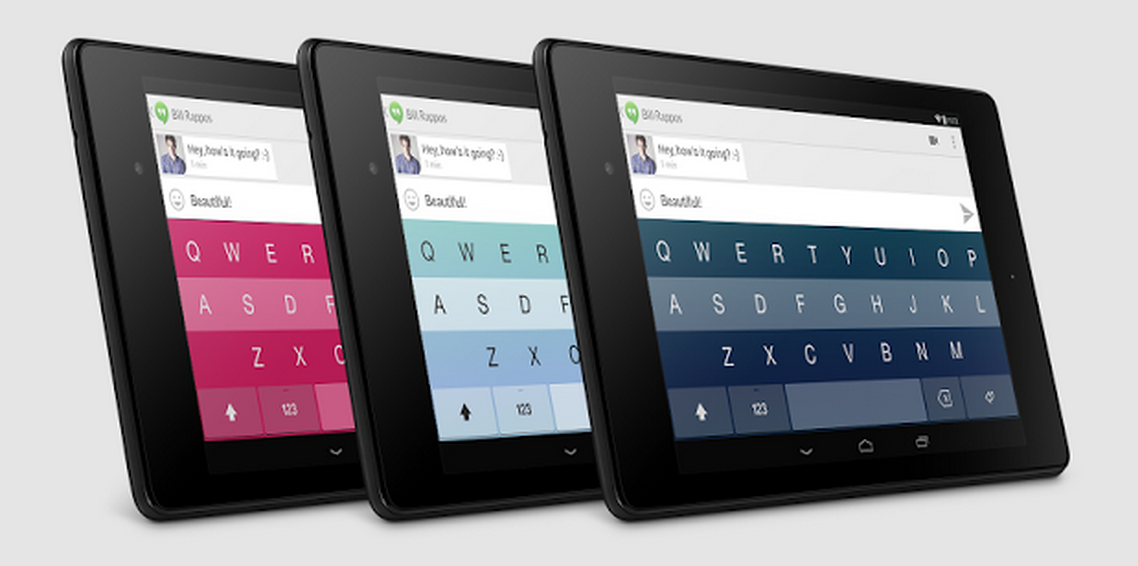
Minuum just keeps on getting better with each update, and this one—as described on the company’s blog—gives you the flexibility to move the keyboard around the screen as you please by way of a couple new keyboard modes. The first of them is called floating mode, which lets you move the keyboard around at will as you can see in the above image. Secondly, compact mode is functionally similar to floating mode, and lets you dock the keyboard to different locations on the screen. Also included in this update is the ability for users to change how periods work when double tapping the space bar. Finally, some buttons—including layer and mode—have been removed from the shift menu to reduce clutter.

You can grab the updated Minuum from the Play Store.

Pushbullet for Android updated, brings awesome new universal copy & paste feature

Pushbullet is one of the more essential utilities when it comes to making my daily workflow a breeze, and today the team behind it has announced that app has been updated to include a small but potentially game-changing feature—not just for me, but for everyone who uses an Android phone and a Windows PC. I think it’s obvious how many benefits would come from being able to quickly and seamlessly copy & paste text across platforms, and the latest version of Pushbullet for Android takes the cross-platform notification and file sharing app to the next level by letting you do just that.


Expand
Expanding
Close

Simple for Android gets redesigned from the ground up in 2.0 update

If you haven’t heard of Simple, it’s definitely one of the most 2014-friendly banks out there. Known for its excellent mobile applications, the bank works just like any bank, but gives you a plethora features in both its mobile and web applications to make banking and tracking spending much easier. Today, the company is pushing version 2.0 of the app to Android and iOS users—and the latter will be especially happy because the app still hadn’t been updated to match the iOS 7 aesthetic until today.
Expand
Expanding
Close

Site default logo image

Sony rolls out Android 4.4 KitKat update for Xperia M2 & M2 Dual

Following an update to Android 4.4 for the Xperia E1 and E1 Dual, Sony today announced the same update is now rolling out for the Xperia M2 and M2 Dual. Like the update has done for other Sony devices, Android 4.4 also brings Sony specific features including a new Status Bar and Quick Settings features, animations and live wallpapers similar to the PlayStation 4, and much more:
Expand
Expanding
Close

Site default logo image

Google Sheets gets copy & paste charts and trendlines

A couple nice new features for Google Sheets users are rolling out today including the ability to copy and paste charts and a new trendlines feature.

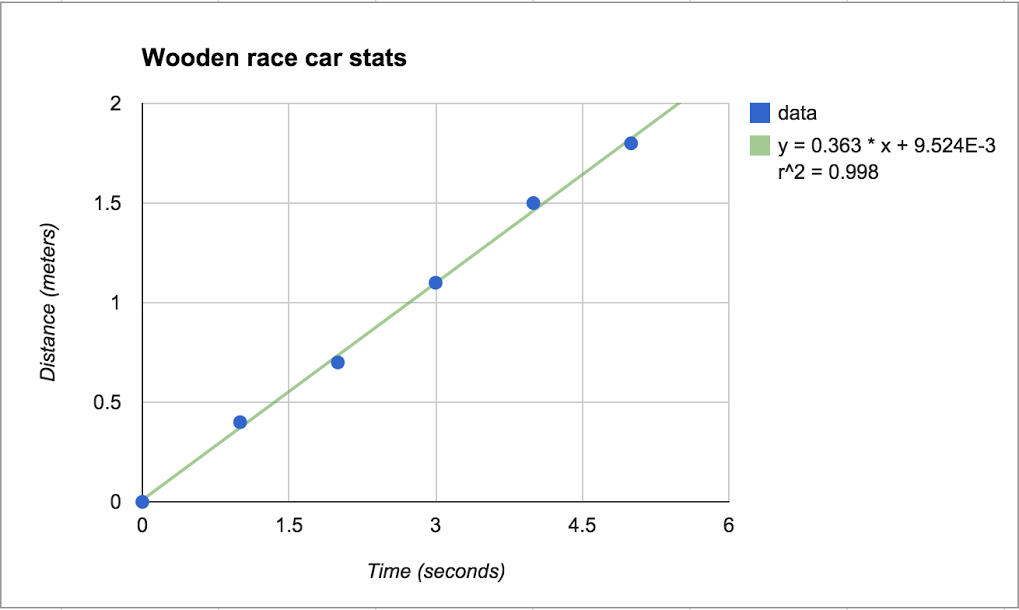
Sometimes it’s helpful to recognize and track patterns of data in your spreadsheets, so that’s why today we’re launching trendlines to scatter plot, bar, column, and line graphs in Google Sheets. Trendlines are commonly used to analyze financial and scientific data, but they can even be useful in the classroom or for personal needs like budgeting.

There are a bunch of ways to customize trendlines in Sheets, like:
-Choose between exponential or linear trendlines
-Add a variety of labeling options
-Customize your trendline

Today’s update also brings the ability to copy and paste charts in Sheets between other sheets or spreadsheets.

Google has more info on adding trendlines to charts here.

Site default logo image

Uber adds destination entry for riders & turn-by-turn navigation for drivers to mobile apps

Uber announced today that it’s added new features that will make the experience even more seamless for both users and its drivers.

We envision a day when there is no coordination necessary to take an Uber ride. Simply push the button, and the rest is essentially on cruise control: the car quickly shows up at exactly the right place and whisks you away to your destination via the best possible route. The latest rider and driver app releases take us one step closer to that world with two new features:

A new destination entry feature lets users quickly enter destination details into the Uber app that are then automatically available to the driver when they arrive. “You can literally skip the step where you tell the driver where you’re going.”

Uber has also added turn-by-turn navigation to its driver app: With one tap, the driver can enable turn-by-turn navigation to the destination you’ve provided. There’s no need to juggle multiple apps or waste time typing in an address.

Uber says the features are live now, although doesn’t list the features in the latest update that hit the app yesterday.

Latest Google+ app update lets you cast your news feed to a Chromecast

The Chromecast’s capabilities just keep expanding, and today—as a special treat for those of us who actually use Google’s social network—you’ll find that you can now cast your Google+ feed directly to a Chromecast-connected device. The app has long been able to cast your photos, but apparently you can now send your entire feed full of posts and images to your TV to be viewed in their full glory (via iTechTriad).

After selecting your destination device, the app can automatically pan through all of your posts and you can just sit back and watch. But of course, if you’d rather have control, you can also flip through posts at your own pace. The updated app is supposedly being pushed through Google Play, but it appears that the feature is being flipped server-side. But once it’s on for you, you’ll be able to view photos, videos, and text via Chromecast at the tap of a button.

Site default logo image

Yelp for Android update with Bing-powered review translation feature coming soon

Yelp announced today that it would be updating its Android application “soon” with a new feature that automatically translates reviews in 15 different languages. According to a Yelp blog post:

The translation feature works for all 15 officially supported Yelp languages: English, Czech, Danish, Dutch, Finnish, German, Spanish, Italian, Norwegian, French, Polish, Portuguese, Swedish, Turkish, and Japanese.

An exact date for the feature on Android has not been announced yet. The Yelp app is free on the Google Play Store.