Latest

Wear 5-TILES is a text messaging app with a keyboard for your Android Wear watch

https://www.youtube.com/watch?v=6tWsehRHHaw

You know what I haven’t once thought since purchasing my ASUS ZenWatch? “Man, I wish this thing had a software keyboard!” Nope, not even once. But someone clearly has, as the developers behind the 5-TILES keyboard for Android smartphones have brought their signature tile-based keyboard to Android Wear users in the form of a messaging app, called Wear 5-TILES.


Expand
Expanding
Close

Site default logo image

Microsoft introduces ‘Tossup’ Android app to make scheduling outings with family & friends easier

Microsoft today has introduced a new app for iOS and Android that makes it considerably easier for friends and family to make plans while on the go. Dubbed Tossup, the app was developed by the Microsoft Garage, which means it implores new ideas and thinking that the company hopes will catch on to the masses.


Expand
Expanding
Close

Site default logo image

Pushbullet for Android update makes pushing files easier with less taps

pushbullet

After a major update just last week that saw Pushbullet on Android and several other platforms receive an overhauled design and rethinking of how its messaging works, the company has made a small update to its Android app based on community feedback. It’s available in Google Play or you can get the APK from APKMirror.
Expand
Expanding
Close

Swappa releases app to quickly evaluate the value of your phone or tablet

Swappa is a relatively small player in the online marketplace space, only dealing in mobile phones and tablets, but it’s quite popular in the Android community and has a new app out that should make it even easier to decide whether or not now is the right time to buy or sell a device.
Expand
Expanding
Close

Player FM integrates Subscribe on Android for easily subscribing to podcasts

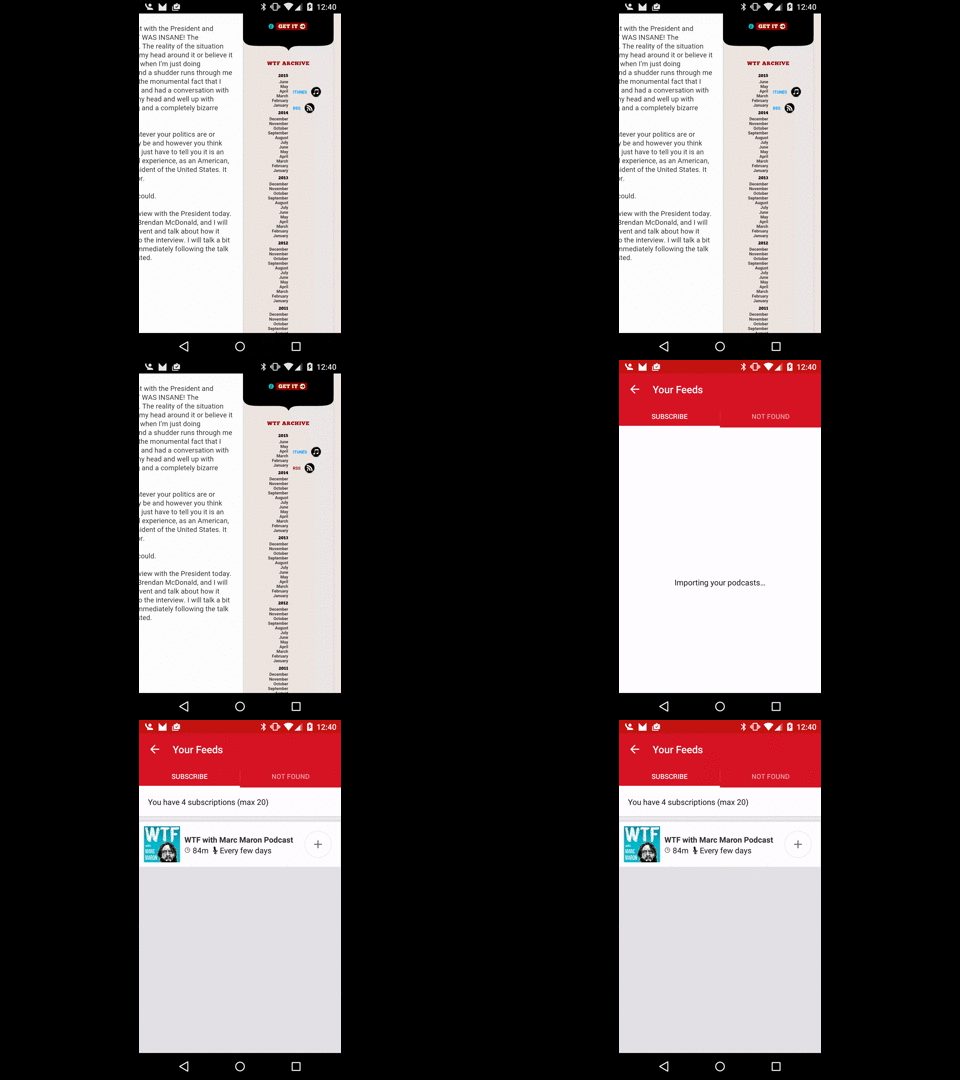
Player FM released version 2.6.4 of its podcast player to Google Play today, bringing with it integration of the Subscribe on Android protocol. The protocol was created to “give Android listeners the same One Click subscription experience that iOS and iTunes users have.” Basically, once you have Player FM installed, any raw XML podcast feed URLs you click will launch to Player FM where you can then subscribe to the podcast to get new episodes automatically downloaded as they’re published. It’s basically like deeplinking but works with far more URLs than deeplinking traditionally can, and is less convenient than Android app intents.

wtfpod

Deeplinking is a way through which constellations of apps can become more interconnected by quickly and seamlessly moving users between one another when specific links are pressed. And while Android M is bringing with it improved app linking so links from anywhere, not just from within a developer’s own apps, can launch to an app without needing to open the intents menu, this won’t work for URLs that aren’t owned by the developer. Feed URLs for podcasts found from around the web won’t just seamlessly open to your favorite podcast app, but with an app that uses Subscribe on Android like Player FM, they can. Mostly, at least, as Feedburner podcast feeds don’t seem to work.

You can get Player FM on the Play Store for free.

Snapchat for Android moves away from press and hold to view Snaps and Stories

snapchat-logo_thumb800

Snapchat, the don’t-call-it-a-sexting-app picture and video communication app of youth ages 14-35, has received a major update today which will include a change in the mechanism for viewing content, as well as a new way to add friends. There’s also a fun—but less functional—change to Snapcodes, those QR codes that make it easy to add friends using just your camera…


Expand
Expanding
Close

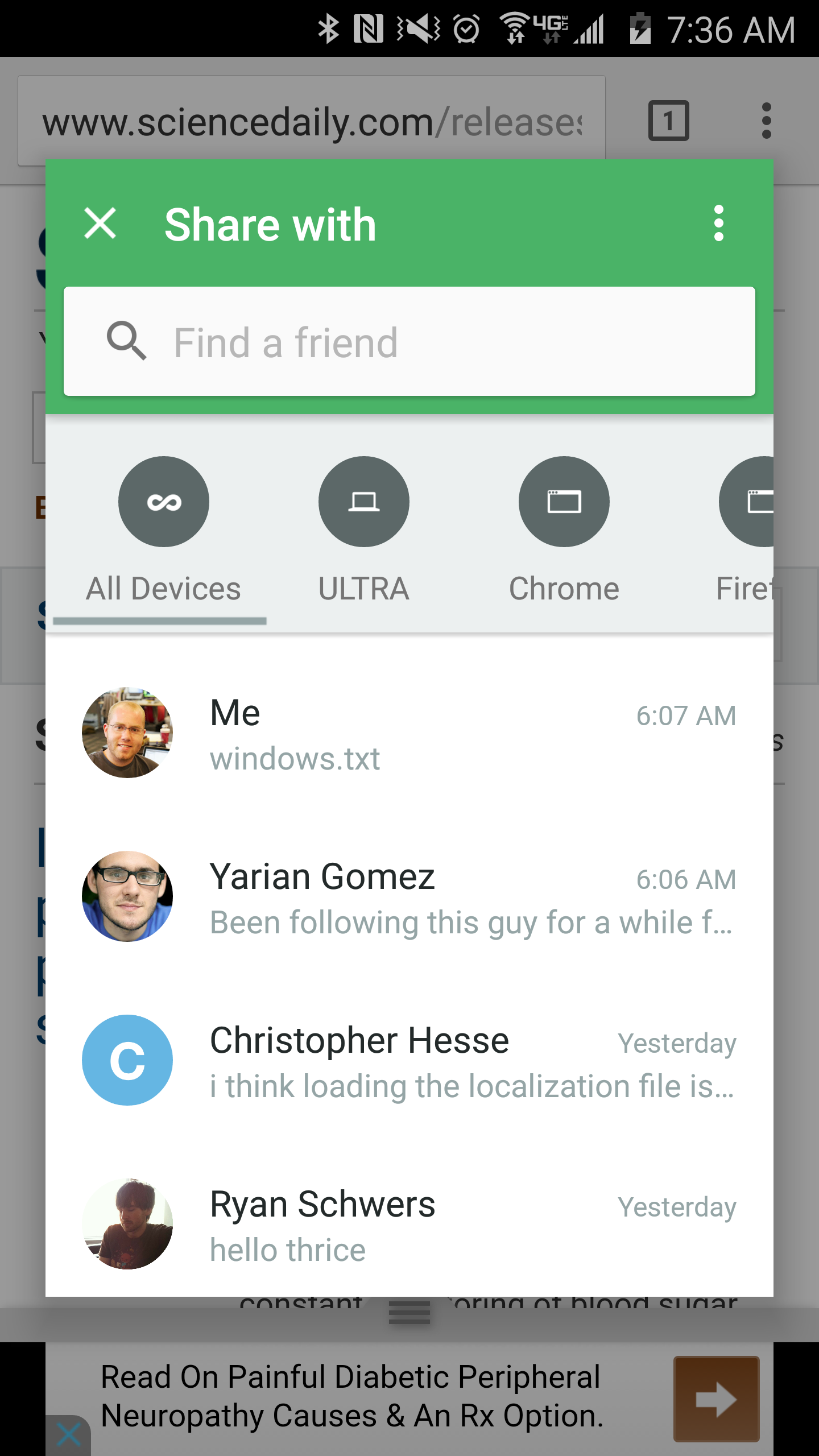
Pushbullet for Android gets updated with rethought interface, more

Pushbullet has redesigned their app a bunch of times since the service launched, and now they’re pushing yet another big update. With the latest version of Pushbullet, things have been reorganized to be split between three distinctive categories: friends, me, and following….

We’ve completely reorganized our app, putting things where you expect them to be. Instead of a big chaotic list of messages, they’re now categorized based on where they came from. The most important category is Me, which are things you’ve shared between your own devices.

The company has also completely re-thought how messaging with friends works. Instead of a confusing list of all the pushes you’ve received, messaging friends looks a lot more like… well, messaging. You can tap any friend, see your messaging history with them, and quickly send a message or file.

This move toward the Pushbullet app being more similar to any other messaging client is odd to me, as it makes the app seem parallel with other —more popular — offerings such as Facebook Messages and Hangouts. But Pushbullet makes sure to note the difference here: “They’ll receive your message on whatever device they happen to be using, whether phone, tablet, or computer.”

The company’s Chrome, Safari, Firefox, and Opera extensions have also been updated, along with the Pushbullet desktop client for Windows and the company’s web interface. The Windows app in particular has some nice features, including real Facebook-inspired chat-heads for messaging.

Head over to the Play Store to grab the Android client update for free.

Site default logo image

Hangouts for iOS gets Material Design UI tweaks, multiple photo attachments, Android update incoming

Google has updated Hangouts for iOS today with a handful of new features and what it says is an overall improved user experience. While iPhone and iPad users get the update today, Google says an Android version will arrive in the near future. 
Expand
Expanding
Close

Google’s Contact Migration tool enables easy contact importing for Apps admins

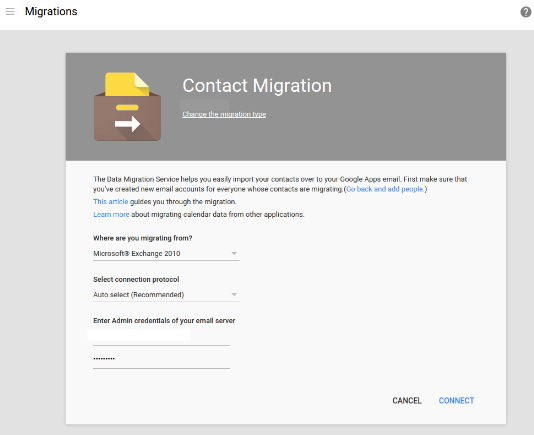
Contact Migration

Google is making it easier for businesses to switch to its Apps for Business productivity suite from Microsoft’s Exchange and Office 365 services. The company today added a new migration tool to the Apps admin console that makes bringing over employees’ contacts as easy as filling out a form, according to its blog post.


Expand
Expanding
Close

Spotify updated with support for Android Wear, here’s how it looks [Gallery]

Spotify told us last month that support for Android Wear was on the way, and now it looks like it’s finally here. With the latest version of the Spotify app, rolling out on the Play Store right now, you’ll be able to access new menus for controlling your music on your Android Wear device…
Expand
Expanding
Close

Google Play Music on Android updated w/ free ad-supported streaming radio, interface tweaks

Site default logo image

After introducing a new free tier of Play Music radio this morning, Google is now rolling out an update to the Play Music Android app to add support for the feature. As we reported this morning, Google’s new free streaming radio feature is supported by ads and they are now present in the Android app with this update.


Expand
Expanding
Close

Site default logo image

Google Calendar for iPhone adds Drive integration, new interactive notifications, more

Google Calendar is out with an improved version for the iPhone today with version 1.1. The list of changes is short but the improvements should be welcome.

The update includes integration with Google Drive so users can connect files with events on your calendar. Interactive notifications now include the ability to open directions from alerts or respond to guests via email. Finally, users can now see week numbers next to the calendar and more entries using the week view.

Google Calendar for iPhone is available for free on the App Store. Version 1.1 follows the initial launch in mid-March. Full release notes below:
Expand
Expanding
Close

Google Play Music adds free, ad-supported radio feature ahead of Apple Music launch

Site default logo image

Google announced today that it is adding a free tier to its Google Play Music service. The new feature provides non-subscribers with what Google is describing as an ad-supported radio option with curated stations. Google Play Music’s radio option will be available for users in the United States at launch with availability on the web starting today and support on iOS and Android following soon. Similar to Apple’s approach with Apple Music, Google says it has “music experts” creating these “curated” playlists:
Expand
Expanding
Close

Swarm for Android updated, mayorships and bragging rights in tow

Site default logo image

Avid Foursquare junkies (myself included), rejoice – mayorships are back, just now in the Swarm app. You can become the mayor of a place by checking into it more than anyone else in the last 30 days, and only one check-in per day counts towards your rank.


Expand
Expanding
Close

Site default logo image

Spotify 3.1 beta for Android arrives with new Running feature, audio/video shows, and more

Spotify-Beta-3.1

After first announcing a handful of new features and redesigned apps last month for iOS users, today most of those features are arriving for the Spotify beta for Android ahead of a public release. The highlight changes include Spotify’s new Running feature that automatically detects an ideal tempo to creates playlist based on your running pace, more content, and a redesigned Now start page.

The update, version 3.1, also brings audio and video shows that were first introduced to web and iOS users last month in addition to other new content and UI tweaks throughout the app. The new content includes videos and podcasts from ABC, BBC, Comedy Central, Condé Nast Entertainment, ESPN, Fusion, Maker Studios, NBC, TED, Vice News, and more.

The new features are currently only available to users in the US, UK, Sweden and Germany, and will likely roll out to all users beyond Spotify’s beta channel in the near future.

(via AndroidPolice)

Sonos beta for Android now includes a bunch of Spotify discover options

Site default logo image

I don’t own a Sonos speaker – I used to, and an update today to the Sonos Controller really makes me wish I still did: Spotify users now get access to a ton a great discovery features that were previously missing.


Expand
Expanding
Close

Site default logo image

Burner 3.0 introduces unified inbox, Material Design, Android Wear app

Burner, the popular app for creating throwaway phone numbers that can be used for making calls and sending text messages, has received a large update to its Android app today. The new app has three key additions, so let’s go through them.

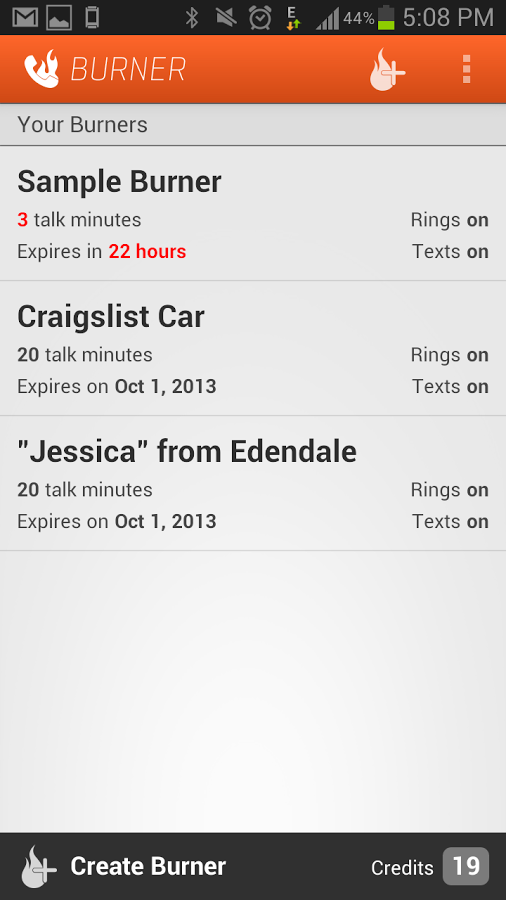
The first major change you’ll notice upon updating the app is that it’s been completely redesigned. FABs (floating action buttons), new colors, transitions – the app now adheres to Google’s Material Design guidelines. You can see what the new app looks like above, but here’s a taste of what the app looked like before today’s update:

unnamed

The next big change is the addition of unified inboxes. These will come in handy for Burner users who have more than one number in the app, placing all messages and missed calls into one inbox with color-coding so as you scroll through all your calls and messages or start replying to one, you’ll know which Burner number the message came through.

Finally, there’s now also an Android Wear app. But don’t worry, there’s no keyboard access – the app allows you to view notifications and messages, and reply using voice commands.

The company behind the app says that this update was built upon the feedback they’ve received from users, and that this is just the beginning of “a ton of new features that will be coming to Android.”

Google releases stock Android Clock app on the Play Store

Google has today released its stock Android Clock app on the Play Store, providing a new avenue to update it on devices that include it. The app is following in the footsteps of many other Google apps and services that have made their way to the Play Store, and — as is the case with the rest of them — the app is completely free.

Also, as you may already know, this means that those with devices that don’t ship with this app can simply download it from the Play Store. It’s well-regarded as being one of the best Clock apps available, sporting the ability to set alarms and timers, add cities to the World Clock, and connect with Android Wear for alarm snoozing.

It seems that the app is the same as the version currently available, albeit with a minor upgrade to version 4.0.1.

Google is using Androidify to hold a global online Pride parade (Update: video)

unnamed


Update: Google has uploaded a video to its Android YouTube account, embedded at the bottom of this post, to formally announce the campaign, which it’s calling “And Proud,” with lots of people on Twitter using the #andproud hashtag to share their Android.

Androidify, the cutesy undercover app part of Google’s “Be together, not the same” campaign, has received a small update today — but only in terms of its download size. The update brings a lot of LGBT pride focused clothing and moves that you can add to your custom Android character. The update seems to align well with the annual San Francisco Pride Parade, held on June 28th, at which Google employees make a regular appearance. And if you create a Pride-themed character and share it to the Androidify.com website by June 27th, your character will be a part of Google’s “global online Pride parade,” being held on the same day.

Google is well known for its efforts to support diversity both inside and outside of the company through initiatives like covering the health benefits of LGBT couples and Made with Code, a program to get more young girls learning how to code. You can get the update via APKMirror right now, but if you aren’t quite familiar with manually updating and installing apps, the update to version 4.0 (from 3.0) should be rolling out via the Play Store to your device at some point over the next 24 hours.

Google traditionally participates in LGBT Pride month in a variety of ways, with one of the most notable being its redesigned search results page for several LGBT queries.

https://www.youtube.com/watch?v=dXf3cAhoqQE#t=45

Vessel launches Android beta to give you early access to YouTube content

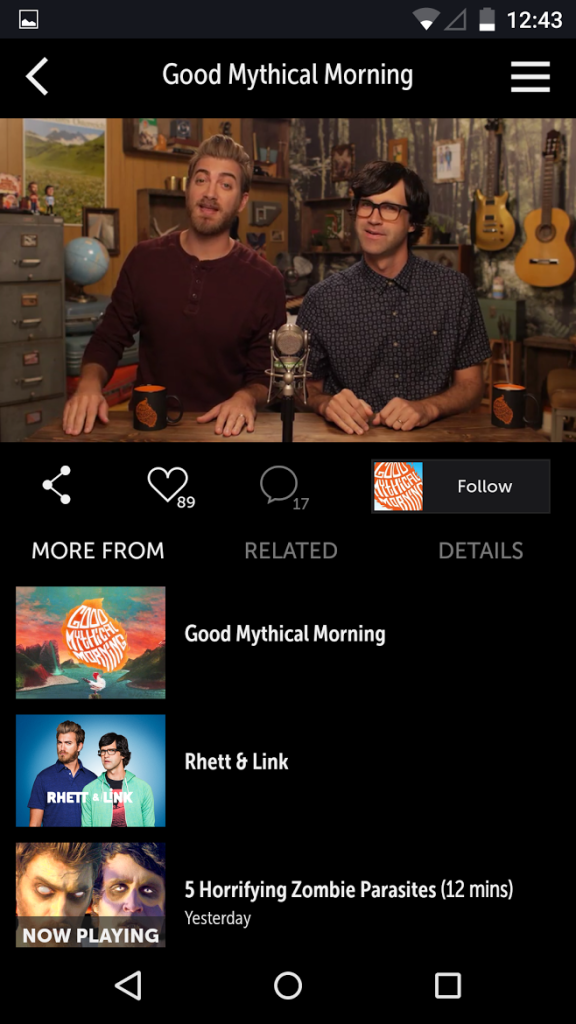
unnamedVessel, the monthly subscription service that provides early-access to content from some of the biggest channels on YouTube, has today released its app for Android under the “beta” moniker.
For the uninitiated, Vessel is part of a trend recently of online content creators seeking out new ways to monetize their content and make money beyond the traditional display and pre-roll video advertisements that you see around videos and other web content. Vessel charges $2.99 per month and in return gives you access to videos from popular YouTube talent including Rhett & Link and Marcus Butler, among others, several days before the videos go live on YouTube. There’s also a free version, but it doesn’t provide these exclusives and there are ads so it’s essentially the same thing as just watching them on YouTube.

The company claims to have over 130 creators uploading to the platform so far, and hopes that releasing an app for Android will expand its subscriber base greatly. Since the app is in beta, the company is hoping users will submit feedback and feature suggestions. It’s available in the Play Store, so no Google+ communities trick necessary here.

Pushbullet’s new ‘Portal’ app lets you move files from your computer to your smartphone effortlessly

Introducing Portal, WiFi file transfers made easy - YouTube 2015-06-16 12-02-00

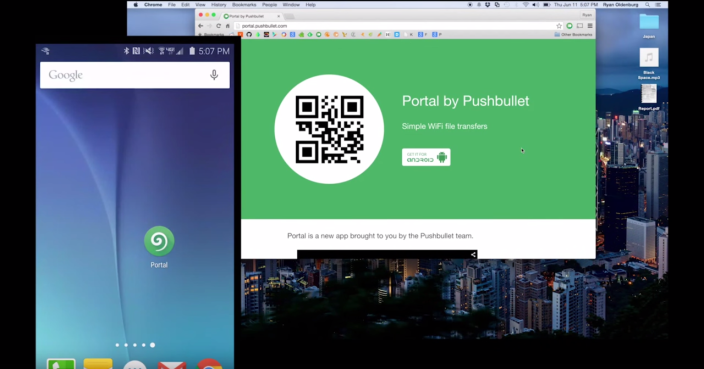
Pushbullet is an essential part many an internet user’s every day routine, and now the company behind the cross-platform file moving app has released a new — and yet very old — way of transferring files from one device to another. The company’s new app, called Portal, lets you effortlessly transfer files from your computer to your smartphone or tablet directly over your local WiFi connection. It’s simple and lightweight, but that’s what makes it powerful.
Expand
Expanding
Close

Site default logo image

Facebook Moments app makes it easier to exchange photos with friends

Screen Shot 2015-06-15 at 11.19.05 AM

Facebook has today unveiled a new app called Moments from its Creative Labs division that makes it easier to exchange pictures amongst friends who were together at an event or place, all documenting it through their own photos. Here’s how Facebook describes the problem they’re solving:

It’s hard to get the photos your friends have taken of you, and everyone always insists on taking that same group shot with multiple phones to ensure they get a copy. Even if you do end up getting some of your friends’ photos, it’s difficult to keep them all organized in one place on your phone.

Through the use of location and facial-recognition data (both areas where Facebook has invested heavily), Moments groups photos together and then asks if you’d like to share them with the people it has recognized, and vice-versa. It’s very reminiscent of the now-defunct Color, although that app was more real-time and ephemeral (Moments allows you to collect and sync photos with friends after an event is over), and wasn’t integrated closely with Facebook’s 1 billion plus user base.

https://vimeo.com/130380325

It’s available now in the iOS App Store and on Google Play, so you’ll be able to share with your friends even if they’re on a different platform.