Google Play

See All Stories
google play store

Before the unified Play branding, Google had the Android Market, Google Music, and Google eBookstore. Google decided to merge and rebrand its individual digital offerings into the Play Store in March of 2012.

The Play Store is now the default place to purchase apps, movies & television, music, books, and news subscriptions for all Android devices. The latter four offerings having their individual Android and iOS apps to watch, listen, and read purchased content. Most content can also be accessed through the web.

In April of 2016, the suite of icons were redesigned in a similar style to provide a consistent look across all devices and the web.

Site default logo image

Google Play Music app now allows you to edit & share playlists; Rdio gets gapless playback

Two Android music apps have received small but useful updates. Google Play Music now allows you to edit the name and description of your playlists, and to share them with others, you can now do this from within the app rather than having to login to the website. You can also pin subscribed playlists and dismiss items from Listen Now, and the Thumbs Up playlist is sorted by recency.

Rdio, meantime, gets gapless playback – a feature many had requested for live concerts, classical music and comedy shows. Some UI improvements have been made along the way.

Both Google Play Music and Rdio are free downloads from Google Play.

Google Play will no longer accept legacy AdMob apps on August 1st

Site default logo image

Google announced today that it has finished the rollout of its new AdMob to more than 200 countries and as a result the company will stop accepting apps into Google Play based on its old SDK on August 1st. Following this initiative, the search giant will sunset AdMob’s legacy platform on August 31st. After this, legacy ad units will stop working and the outdated AdMob UI will no longer be accessible.


Expand
Expanding
Close

Google Camera for Android updated w/ new cropping options, picture timer

Site default logo image

Google has just released an update to its Camera app on Android, as part of its “Update Wednesday” regiment. The update bumps the app to version 2.2 and adds several new features. One of the biggest new features is the ability to shoot photos in either 4:3 or 16:9 cropped resolutions. Although, it’s important to note that the cropping affects the total resolution of the image. So if you were to shoot in 16:9 on a Nexus 5, the resolution maxes out a 6MP. This changes depending on the phone you’re using, of course.

Google has also added the timer feature back to its Camera app with this update. The company removed it earlier this year, for some odd reason. The picture timer allows you to choose either 3 and 10 second timings for taking an image.

The update also adds new modes for shooting panoramas, including a fisheye setting. There’s also now a small settings icon on the first launch.

Google’s Camera update is available on the Play Store now.


Expand
Expanding
Close

Google to run live Play Music ad on UK television

Site default logo image

Google has a creative way of advertising its products and its latest effort is quite a doozy. On May 30th at 10:45pm (local time) the company will air a live music performance by Sam Smith from London’s Roundhouse venue that will broadcast across a full ad break on the UK’s Channel 4. So what’s with the quickie concert? It’s an advertising platform for Mountain View’s digital music service.


Expand
Expanding
Close

Google’s Text-To-Speech app updated with support for Indian-English, Polish, Dutch, and Russian

Site default logo image

Google this afternoon released a small update to its Text-To-Speech app on Android. The update bumps the app to version 3.1, and while it may not be the biggest update, it certainly packs some useful changes for a handful of users. The update adds support for selecting and speaking text in Polish, Dutch, and Russian. It also improves its already existing support for some English dialects spoken in India.


Expand
Expanding
Close

Google tells the SEC it could soon be serving ads on thermostats and other devices (Update: Google says no ad-based Nest)

Site default logo image


Those who expressed concern about Google’s acquisition of Nest may have have been right: the company has told the Securities and Exchange Commission that it may choose to serve ads on “refrigerators, car dashboards, thermostats, glasses, and watches, to name just a few possibilities.”

The WSJ reports that Google made the statement in support of its contention that it shouldn’t have to break out ad revenue from mobile devices … 
Expand
Expanding
Close

Chrome for Android updated with undo tab close, Chromecast video, multiwindow support, & more

Site default logo image

Just a short while after releasing an update to Chrome OS, Google is now pushing out an update to the Chrome browser on Android. Although minor, the update does include a few improvements. The update bumps the app to version 35.0.1916.122, as well.

With this update, the app now has an undo tab close button, which allows you to undo closing a tab, should you have done it by accident. The app also now supports fullscreen video with subtitles and HTML5-based controls. Google also notes that Chrome now has support for some multi-window devices, as well as support for casting “some” videos with Chromecast. It’s unclear, however, what devices and videos this update adds support for. Nevertheless, casting videos with Chromecast is a great addition. Most of these features have been in beta for about a month now.

  • Undo Tab Close
  • Fullscreen video with Subtitles and HTML5 controls
  • Support for some multi-window devices
  • Support for casting some videos with Chromecast
  • Other bug fixes

The update to Chrome for Android is available on the Play Store now, although it appears to be a staged rollout and may take a little while to hit your device. 


Expand
Expanding
Close

Google Play Store updated with interface tweaks, PayPal billing support

Site default logo image

Earlier this afternoon Google announced that it was making several improvements to the billing capabilities of the Play Store, and now the company has updated the entire Play Store app to go along with it. Pushing the version number to 4.8.19, the update adds a few interface tweaks to the app, in addition to the billing capabilities previously announced.


Expand
Expanding
Close

Site default logo image

Flappy Bird creator teases new game in screenshot

Just a day after Flappy Bird creator Dong Nguyen told CNBC his hit mobile game would return in August, today the developer is teasing a new game currently in development.

Despite reportedly confirming Flappy Bird would make a return, Nguyen’s tweet about his new game reads, “I am making a new game. So people can forget about Flappy Bird for a while.” 

There aren’t any other details on the game or a timeframe for release, but Nguyen did provide the screenshot above which appears to show similar gameplay to Flappy Bird.

Google Play Music iPad app hidden inside iPhone version, public release likely soon

We’re hearing that Google Play Music for iPad is getting close to release and a tipster has sent in a couple of videos showcasing what he/she claims is a pre-release of the new app. We’ve heard independently that Play Music for iPad was getting close to delivery and our tipster says this is a development build (see update below). The app will function similarly to the iPhone version, but redesigned for iPad.

We are still somewhat skeptical of the screenshots below, but the app’s functionality (shown in the videos) seems to be very similar to the iPhone version and it would make sense for Google to release it for iPad. Though we’re still unsure if the update will arrive as a universal build or if Google will have separate versions available in the App Store.


Expand
Expanding
Close

Yahoo launches its News Digest app on Android, adds international & Canadian editions

Site default logo image

Following confirmation during an interview with Marissa Mayer at the TechCrunch Disrupt event this week, a version of Yahoo’s popular News Digest app is now available to Android users. Yahoo made the announcement on its blog today where it also noted that new international and Canadian editions of the app have arrived.

Mayer noted in the interview this week that News Digest was one of the company’s mobile apps that its most proud of. The app, which offers users a daily dose of news in a concise format, has been experiencing impressive engagement among users on iOS since launching last year.

Here’s a breakdown of what you’ll get where in terms of the new editions in each country:
Expand
Expanding
Close

Parody Google Nest site plays on privacy concerns with fake services, including a “personal drone”

Site default logo image

Anyone who has followed Google over the past few years knows that it has had more than its fair share of privacy issues. The company’s had run ins with the UK governmentUS government, and others about privacy concerns, in addition to facing criticism over Google Glass. Microsoft has also mocked Google for its privacy issues as part of its “Scroogled” ad campaign. Now, a German activist group that calls themselves Peng Collective has launched a new website that parodies Google, its privacy issues, and apparent need to know everything about everyone.


Expand
Expanding
Close

Site default logo image

Google Camera app update brings back photo capture while recording video

Last month Google released a new Camera app for Android and while we enjoy most of its new bells and whistles, the price of progress came at the expense of a beloved feature. Absent from Mountain View’s new photo taking software was the ability to snap a picture while recording a video. Today, however, the search giant has made amends in the form of an update for its camera app that brings back this highly requested feature.

An update with today’s date is listed in Google Play, but its changelog has yet to be added. The folks at Android Police have already dissected the app and the returning photo feature is all they’ve found so far, but there could possibly be a few minor performance tweaks lurking in this new release.

Site default logo image

D-Link’s new Wi-Fi Smart Plug offers full Android control over electronics w/ energy monitoring & thermal safety features

https://www.youtube.com/watch?v=kX8FE8q-Bjw

D-Link has just launched its new Wi-Fi Smart Plug designed to offer users full control over their electrical outlets via the free mobile apps. The small adapters communicate with any existing WiFi network and plug into any electrical outlet. The user can then control power to any of the devices plugged into the adapter.

They come with a few handy features along with basic on/off control. You can create custom schedules for particular outlets and monitor your energy use on connected devices.

You can set device schedules so that you walk into a brightly-lit home every day after work with your favorite song playing and the AC exactly where you want it.

The system also includes a thermal protection system that allows you to manually shut down power on an outlet and includes a thermal sensor that will automatically turn off over heating appliances.

The D-Link Wi-Fi Smart Plug comes in at a slightly lower price tag than the popular $60 WeMo options from Belkin. D-Link is launching its smart plug at $49.99 right now (temporarily out of stock on Amazon) and the mydlink Smart Plug apps for Android and iOS can both be downloaded for free via Google Play and the App Store . 

Google opens Play Store merchant registration to eight new territories

Site default logo image

Today, Google opened Google Play merchant registration for eight new territories. Developers residing in Greece, Luxembourg, Romania, Saudi Arabia, Slovakia, Turkey, Ukraine and Vietnam can now apply for a merchant account with Google Play, which will allow them to collect money for paid apps in local their local currency.


Expand
Expanding
Close

Sony Z Ultra Google Play edition discounted to $450

Site default logo image

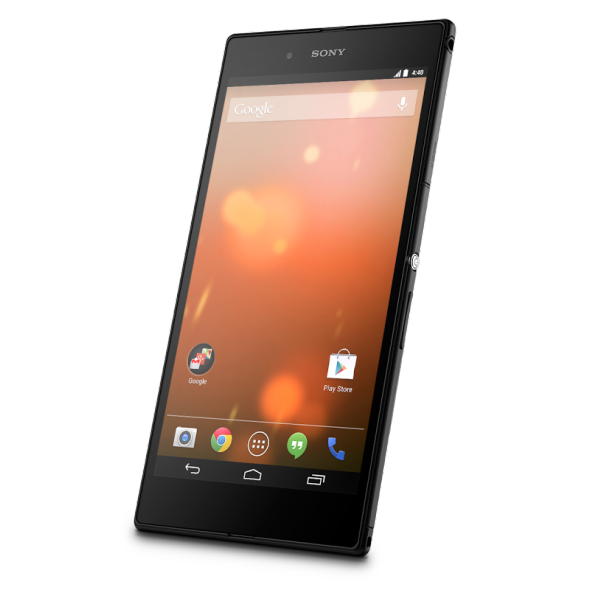
If you’ve been flirting with the idea of buying a gigantic phone or a small tablet with a vanilla Android experience but your cash flow is low, look no further than the Sony Z Ultra Google Play edition. Typically priced at $650, Mountain View has knocked $200 off the phone-tablet hybrid’s asking price. In addition to a shrunken premium, Google Play is offering free ground shipping with a standard warehouse departure time of 1-2 business days.


Expand
Expanding
Close

Nest Thermostat now available from Google Play

Site default logo image

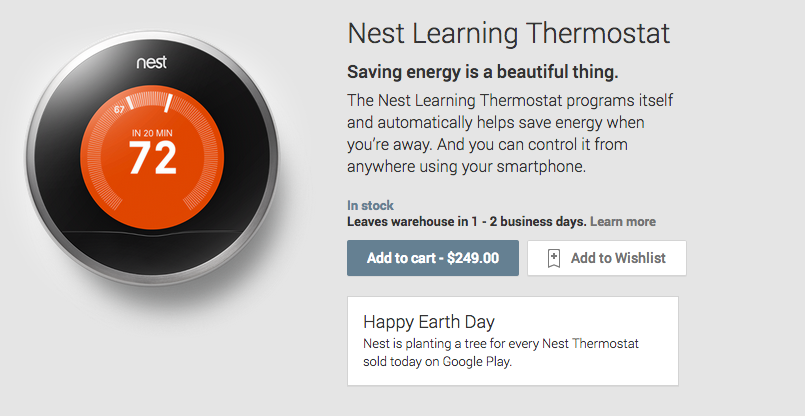
Yesterday, Google’s newly acquired thermostat system made an appearance on a Play Store support page. This led many to believe that the search giant would soon offer its smart climate controller at its online marketplace, alongside its other in-house products. Today, the company has made things official and the Nest Thermostat is now available from Google Play for $250 with an estimated 1-2 day warehouse departure.


Expand
Expanding
Close

Nest Thermostat appears on Google support page, coming to the Play Store soon?

Site default logo image

Earlier this year, Google acquired smart thermostat maker Nest for the huge sum of $3.2 billion. This led to speculation that the two companies would work together, with Google using its online retail outlet to boost sales of product. Since the acquisition, however, nothing has come to fruition between the companies, with both continuing business as normal. It looks like, however, that Google may soon start to sell the Nest thermostat via the online Play Store.


Expand
Expanding
Close

MLB At Bat iOS and Android apps add Chromecast support for Premium subscribers

Site default logo image

Google announced today on its Chrome blog that Major League Baseball is adding support for its $35 Chromecast streaming stick through the MLB At Bat app for Android and iOS. That means that users with the app and an MLB.TV Premium subscription will be able to stream live and on-demand video content from the app (or from a browser tab in Chrome through MLB’s site) to a Chromecast connected TV. You’ll also be able to use the phone or tablet you’re streaming from as a second-screen experience to “check scores, stats and news” while watching the game on the bigger screen:

MLB.TV is the latest live streaming service to come to Chromecast, so now MLB.TV Premium subscribers can invite their friends over to watch live, out-of-market games. While casting a game to the big screen, use your phone or tablet to check scores, stats and news from around the league. You can even choose between home or away broadcasts to steer clear of the opposing team’s announcers when your guys are on the road.

The updated apps are rolling out today for the MLB At Bat app for Android and iOS on Google Play and the App Store, but the Chromecast feature will require an MLB.TV Premium subscription to get started. Those cost $129.99/year or $24.99/month in comparison to the regular $19.99/season or $2.99 month At Bat subscription and offers “every 2014 Regular Season out-of-market game LIVE or on-demand in HD” across platforms. 


Expand
Expanding
Close

Site default logo image

Android will soon continually scan for malicious apps even after installation

Google just made some announcements about how it’s beefing up security on Android. In a post on the Official Android blog, Android Security Engineer Rich Cannings announced Google is introducing improvements to how the “Verify apps” process works. While Android already scans apps at the time of installation, even ones outside of Google Play, it will soon continually scan devices to keep an eye on apps that after installation. 
Expand
Expanding
Close

Google expands ability to access app content in Search to 24 new apps

Site default logo image

In December, Google announced a new feature that further integrated Android apps into its Search products by showing links directly to apps in search results. For instance, if you searched for a movie to see, you had the option of opening the results in the IMDB app if you already had it installed on your phone. Basically, if you had an app installed all you had to do was click “Open in app” on the search results page and you’d go right to the relevant app. If a search included relevant apps from inside Google Play, you’d be able to quickly go to the Play Store and download it.

Today, Google has announced that it is further expanding this feature to support even more apps. Starting today, you have the ability to directly from search results into the following apps:

500px, AOL, BigOven, Bleacher Report, Booking.com, Eventbrite, Glassdoor, Goodreads, Huffington Post, Merriam-Webster, Pinterest, Realtor.com, Seeking Alpha, TalkAndroid, TheFreeDictionary, The Journal, TripAdvisor, Tumblr, Urbanspoon, Wattpad, Yellow Pages, Zagat, Zappos and Zillow.

The feature is being updated over the air, meaning that no app update is required and you should start to see changes in these search results very soon.


Expand
Expanding
Close

Google Play Store adds ‘People’ feed that shows what others are downloading

Site default logo image

Hot on the heels of adding an activity feed to the web version of the Play Store, Google is now quietly rolling out a new “People” section to the Play Store app on Android. While the activity feed on the mobile app simply shows you what you’ve recently reviewed, rated, and purchased, the People section shows you what other users have recently been into.

The People feed is integrated heavily with Google+ and allows you to quickly follow users and view the their full profile. The feed shows what others have reviewed, +1’d, or shared. It includes apps, music, movies, and anything else available on the Play Store.

The People feed is rolling out now to the Play Store app. The interface is accessible via the sidebar and should appear on its own.


Expand
Expanding
Close

Google Play Newsstand updated with interface tweaks, new My Library section

Site default logo image

Following an update to Google Keep earlier this afternoon, Google is now rolling out an update to its Play Newsstand app, which was released earlier this year as a replacement for Currents. The update makes some design tweaks, as well as enhances how you can organize your sources.

First off, the My News and My Magazine categories have been merged into a new My Library section. There is also a new Read Now category bar at the top of the interface that autohides and allows you to easily swipe between categories. Finally, the action bar now changes colors depending on what section you are in (News/Business/Sports/etc).

The update is rolling out now, although it is a staged update and may take a while to hit your device. Keep an eye on the Play Store.


Expand
Expanding
Close