Stay up to date on news from Google headquarters. Be the first to learn about plans for Android, Google Plus, Google Apps, and more!
Stay up to date on news from Google headquarters. Be the first to learn about plans for Android, Google Plus, Google Apps, and more!


Google’s share of the US search market has fallen to its lowest level since at least 2008 following the deal in which Mozilla switched the default Firefox search engine from Google to Yahoo in November. Yahoo saw its share increase from 8.6% to 10.4% in the one month since the deal was signed.
The figure was revealed by StatCounter, who said that Firefox users represented just over 12% of US Internet users as of last month …
Expand
Expanding
Close

The Google app on Android has received an update today, as part of the company’s Update Wednesday regimen. The update bumps the app to version 4.1.21.1657903 and includes a handful of notable new features, including new Google Now card settings and “Ok Google” setting tweaks.

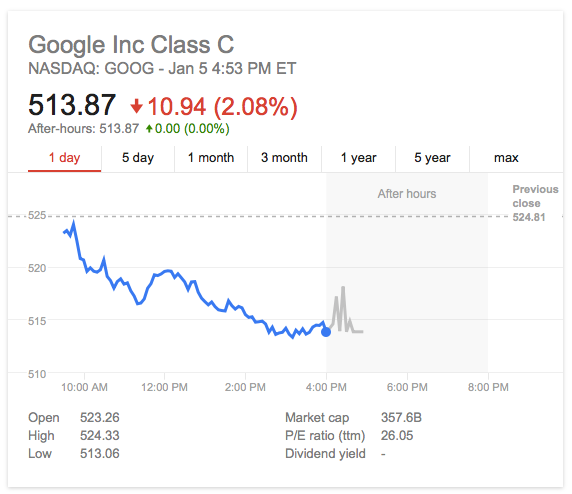
$GOOG on January 5, 2015
Google announced today that it will share its Q4 2014 financial results on Thursday, January 29th, 2015. Following the financial report, Google will host its quarterly conference call with investors and analysts to discuss its reported results. The call will take place at 4:30 PM EST, 1:30 PM PST, with a webcast available online at investor.google.com/webcast.html. 9to5Google will bring you full coverage of both the financial results and the conference call on that date.
Google previously reported its quarterly earnings on October 16th.

https://www.youtube.com/watch?v=8q0yZomXuSw
Google today announced Google Cast for audio, which the company says takes advantage of Chromecast tech to send audio to third-party hardware like speakers, A/V receivers, and sound bars. The feature will allow users to tap a “cast” button from within music and radio apps on Android, iOS and the web to stream audio to Google Cast enabled speakers.
Expand
Expanding
Close
Nest’s smart thermostat is getting smarter, thanks to a number of new additions to the Works With Nest connectivity program, ranging from your car to your washing-machine.
Some of the applications are obvious, such as your August smart door lock setting the heating or cooling to Away mode when you leave the house. The Kevo lock goes one better, letting Nest who is home and away, so that their preferred temperatures can be used …
Expand
Expanding
Close

It has been a pretty exciting year for Google in a lot of ways. Android Wear has started to ignite excitement behind the future of wearable technology, the best version of Android ever—dubbed Lollipop—was released, a couple of brand new Nexus devices (one of which we leaked) came to fruition, and the Mountain View corporation’s new Material Design language has taken the Play Store by storm. Everything that was already great was made better in 2014, and the company has been sprinkling a bunch of exciting innovations in along the way to keep things interesting—like the self-driving car, for example.
In 2015, Google is probably going to do much the same. Android “M” (milkshake, maybe?) will likely be unveiled at Google I/O this upcoming summer, we’ll probably see a round of new Nexus hardware come later in the year, Google will likely keep pushing Chromebooks in the affordable segment of the PC market, and Android Wear devices from countless manufacturers will continue to get thinner and have better and better battery life. But Google surely has some drastic innovation planned in a variety of areas, as well, with the potential return of Google Glass on the horizon and the second spiral of Project Ara to be unveiled in a couple of weeks.
Google has updated its homepage today with a cute little doodle for New Years Eve, and is paying homage to a slew of notable trending topics and human achievements from 2014. Of the most interesting things that happened this year (according to Google trends at least) were the ALS Ice Bucket Challenge, Flappy Bird, landing on an comet, amongst many others.
Expand
Expanding
Close
Google Glass may seem to be essentially on the brink of death, but Google focusing on Android Wear for the time being doesn’t necessarily mean that the Mountain View company is done pursuing the area of smart glasses. In fact, Google’s Eric Schmidt recently said that it plans to bring Glass—described as if it’s going to see some kind of 2.0 rebirth—to the consumer market “soon,” but only “when it works.”
Google Glass has most definitely had a hard time capturing the imagination of the public (and the government), been met with countless criticisms thanks to its privacy implications, and generally created an image around itself that has made the device in its current form rather socially unacceptable to wear. But all this aside, Google X “moonshot” head Astro Teller says that it’s only a matter of time before glasses are the portal to our digital world.
Google’s Francois Beaufort has revealed in a post on Google+ that Chrome OS users can now run Linux on their machines in a desktop window. This means that developers don’t have to switch back and forth between operating systems, but rather can run them side by side. This capability is made possible by the Crouton Chrome extension, which is available on the Chrome Web Store for free.
Roboto tends to be Google’s font of choice across many of its services and software, but some of the company’s websites—like YouTube—use the more common and standard Arial by default. That doesn’t mean Google hasn’t thought about using Roboto, though, as Google Operating System has noticed. As you can see in the screenshot above, Google’s in-house designed font looks pretty snazzy on the ubiquitous video sharing website.
Update: It looks like Google has killed this little hidden experiment for now. It worked fine this morning, but it doesn’t look like users have the ability to play with YouTube’s font anymore (at least via this method).
Update: The FT reports that access has been restored for now at least, with a slight pickup in Google’s stats appearing to confirm.
China has tightened its firewall blockade of Google services, reports Re/code and the WSJ, with email apps no longer able to access Gmail via IMAP, POP3 or SMTP. While web access to Gmail has been blocked since June – believed related to the 25th anniversary of the Tiananmen Square massacre – users had remained able to access mail using email apps like Apple Mail and Outlook until Friday …
Expand
Expanding
Close

It may or may not surprise you to find out that Google has a name for its little notification bell in Google+. Surprisingly, not only does Mr. Jingles have a name, but he has an official Google+ page dedicated just to him. And while Mr. Jingles spends most of the year in his normal bell-like state, he occasionally dresses up to share some holiday spirit on Google’s social network.
Here’s a look at some of Mr. Jingles’ previous costumes, spanning celebrations for fall, New Years Day, Valentine’s day, and Christmas 2013:

This year, Mr. Jingles wanted to make sure that Santa would be able to find him, so he dressed up with some Christmas lights:
To see Mr. Jingles, just open up your notifications pane in Google+ and click the button in the top right corner to clear all of them. You should see the above Christmas 2014 version of Mr. Jingles, Christmas tree lights and all.
Google today has updated its Play Store guidelines with yet another restriction on what developers can put in the descriptions of their apps. With today’s update, developers are now forbidden to include user testimonials in their app’s description. Any developer who breaks this rule could see the app in question pulled (via Android Police).
Every once in a while, we get a new feature added to Google’s Knowledge Graph (the smart results that appear at the top of the search page). Today, Google has added the handy ability to see results for song lyrics right on the search page (via TechCrunch), meaning that websites focusing solely on providing lyrics and fighting for the top of Google’s results in this category might see a bit of a downturn in traffic…

[youtube https://www.youtube.com/watch?v=SjDd0rkHAuA]
Google has announced a new feature for its Google+ Auto Backup system that will automatically enhance the quality of videos taken on mobile devices. The feature works by analyzing videos that have been backed up to Google+, then present users with the option of applying color, stability, or audio quality fixes.
You can then view a before-and-after example of the changes, then choose whichever version you like best. An example is embedded above. These changes can also be applied to any older videos through the Google+ website. The company says that a speech enhancement option will be added in the future.
It doesn’t look like the 2012 model of the Nexus 7 is ever going to get updated to 5.0.1, as today Google has updated its factory image download page with a previously unseen build of Android—version 5.0.2. Not much is known yet in regards to what the update packs, or whether or not all devices will be getting it at some point, but it’s likely this is just an additional build (LRX22G) Google is pushing to fix some bugs specific to the Nexus 7.
In this case, the update is for the “nakasi” Wi-Fi model of the Nexus 7 (2012). To get your hands on the update, head over to Google’s factory image download page. And if you’re not quite sure what to do with that factory image, we have a convenient guide written up just for you—although it’s best for those who aren’t as experienced to just wait for the OTA as it will surely be dropping relatively soon.


The story of Goliath continues today, and this time it looks like Google is going on the offensive. The Verge is reporting that Google has today filed a lawsuit against one Mississippi State Attorney General Jim Hood, who has largely been at the center of the Goliath controversy. He has recently been facing scrutiny over his deep involvement with the MPAA’s efforts to take a stand against Google, and now Google is taking a stand of its own.
The current version of the Play Store
Some have started to notice yesterday and this morning that Google has apparently begun testing a new layout for app pages on the Play Store (via Android Police), and the new look seems to do away with the full-width layout of old, replacing it with a more traditional 3-column look. I don’t see the new version of the Play Store when using the latest stable build of Chrome, but when using the latest Beta, it pops right up.
Here’s what it looks like:
A newer version being seen by some
The new looks compacts some of the previous information into a thinner middle column, making room for a new column on the right that offers suggestions for similar apps. In addition to apps that are simply similar, there’s also a new section that shows apps that were created by the same developer. I haven’t noticed any other changes to the Play Store after clicking around for a little bit, but if you notice something else, feel free to let us know in the comments below.
The world’s cheapest virtual reality headset may be just a bit of fun by Google, but the company hasn’t just put it out there and forgotten about it. An easter egg in Google Maps for Android lets you use Google Cardboard to take a virtual reality tour of places like the world’s tallest building – Dubai’s Burj Khalifa.
Double-tap the navigation icon bottom-right to activate VR mode, then view through Google Cardboard.
Google recently announced that half a million people are using Cardboard as it offered new SDKs to software developers and opened a dedicated section of the Google play store for cardboard apps.
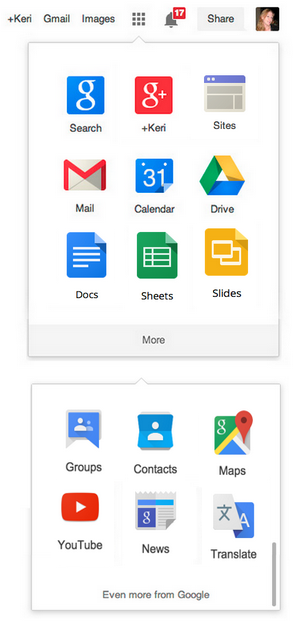
Google today announced that it’s adding new shortcuts for its Google Drive web apps— Docs, Sheets, and Slides— to the App Launcher feature accessible from the upper right corner of most its web services (pictured right). The new shortcuts join services like Search, Mail, Calendar, and Drive that were previously accessible from the App Launcher.
For regular users, Google is adding Docs to the main section of the App Launcher and making Sheets and Slides shortcuts available by opting in when visiting the apps:
And the next time you visit sheets.google.com or slides.google.com, you’ll see the option to add Sheets and Slides to the launcher as well. Remember that you can always rearrange the icons to your liking by just clicking and dragging them around… One note–if you’ve already customized the arrangement of your icons, you’ll need to visit docs.google.com and click “Add a shortcut” in the App Launcher to get the Docs icon to appear.
For Google Apps users, Google will put Docs, Slides, and Sheets shortcuts in the App Launcher by default and bump Groups and Contacts into the “More” section of the launcher.
Apps users can expect the change to kick in early next month.
Spanish newspaper websites have seen their web traffic drop by an average of 10-15% after a law they lobbied for drove Google News out of the country. The figures were shared with GigaOM by web analytics company Chartbeat, which tracks around 50 Spanish news sites.
The law required Google to pay a fee for every story excerpt it displayed in search results, leading to the company – which generates no income from the ad-free Google News service – to close the service in Spain. Publishers clearly realized the implications right away, making a forlorn plea for the Spanish government to somehow ‘force’ Google to re-open the service …
Expand
Expanding
Close
Google this evening has announced that Play Store gift cards are now available in six new European countries. Previously these countries were listed as coming soon, but Google has since updated its support page for Play Store gift cards to announce that they are now available.
One area in which Google Play Music has continually been lacking is its support for listeners outside of the United States. International use with Google Play Music got a little better tonight, however, as Google has revealed that it is bringing its Songza-powered automated playlist generation feature to listeners in the UK (via TechCrunch).
Google has decided to mix up the way it handles Google+ notifications, and you may have noticed the beginning of this shift yesterday afternoon when the design of the normal notification button changed suddenly. Previously a simple bell, the new button has a smaller bell within a circle (see above)…
Expand
Expanding
Close