Stay up to date on news from Google headquarters. Be the first to learn about plans for Android, Google Plus, Google Apps, and more!
Stay up to date on news from Google headquarters. Be the first to learn about plans for Android, Google Plus, Google Apps, and more!



Google’s handy Chromecast dongle is to go on sale in “many more countries” in the next few weeks, according to an SXSW keynote speech by Sundar Pinchai reported by TNW.
The speech seemingly majored on ‘vague,’ with no specific countries listed and U.S. sales of the $35 device described only as in the millions.
Google announced a month ago that the UK would be the second market to get access to Chromecast, going on sale in the electrical retail chain Currys at or around the beginning of this month. At the time of writing it was not yet showing up in a search on the company’s website.
Once it does go on sale, buying one is pretty much a no-brainer if you own both a television and an Android device. Chromecast support is available in a wide range of apps, that include YouTube, Netflix, HBO GO, Hulu Plus, Pandora, Plex and many others – with more likely to be joining the list thanks to a Chromecast SDK, making it easier for developers to add support.

Today during a talk at a SXSW Interactive event, Google’s Android and Chrome chief Sundar Pichai apparently announced that a new Android SDK for developers interested in developing wearables will arrive in the next two weeks (via TheVerge). While Google isn’t announcing any specific products, Pichai made it clear that Google will be approaching Android on smart watches and wearables much like on smartphones. With the new SDK, Sundar said the company plans to “lay out a vision for developers as to how we’ll see this market working.” Pichai also hinted that the new Android SDK for wearables will incorporate wearables beyond simply smartwatches.
“We want to develop a set of common protocols by which they can work together,” Pichai said, “they need a mesh layer and they need a data layer by which they can all come together”… “when we say we say wearables, we are thinking much more broadly”
9to5Google first reported that Google was working on a smartwatch that would rely heavily on Google Now-like features. There have been unconfirmed reports recently that Google as well as some of its close partners like LG have been developing smart watches and wearables running Android. Google also picked up WIMM Labs late last year for its Android smartwatch/wearble platform and SDK and the most recent report claimed that a Nexus smartwatch announcement could come as soon as this month.
Expand
Expanding
Close
[youtube=https://www.youtube.com/watch?v=KYRSrvetPMI]
A Google doodle appearing on the company’s homepage in some countries (though not yet the U.S.) celebrates tomorrow’s International Women’s Day, leading to a video when you click on it.
The video features brief clips of women from all around the world, in support of the United Nations theme that “Equality for Women is Progress for All.” The doodle is likely to appear on the U.S. site at some point today.
The full message from UN Secretary-General Ban Ki-moon appears below.
This International Women’s Day, we are highlighting the importance of achieving equality for women and girls not simply because it is a matter of fairness and fundamental human rights, but because progress in so many other areas depends on it.
Countries with more gender equality have better economic growth. Companies with more women leaders perform better. Peace agreements that include women are more durable. Parliaments with more women enact more legislation on key social issues such as health, education, anti-discrimination and child support.
The evidence is clear: equality for women means progress for all.
This simple truth must be central as we work to accelerate progress towards the Millennium Development Goals by next year’s deadline and craft an agenda for the years beyond 2015.
Important gains have been made in access to primary education for girls and political representation by women. But progress remains far too slow and uneven.
A baby girl born today will still face inequality and discrimination, no matter where her mother lives. We have a common obligation to ensure her right to live free from the violence that affects one in three women globally; to earn equal pay for equal work; to be free of the discrimination that prevents her from participating in the economy; to have an equal say in the decisions that affect her life; and to decide if and when she will have children, and how many she will have.
I have a message for every girl born today, and to every woman and girl on the planet: Realizing human rights and equality is not a dream, it is a duty of governments, the United Nations and every human being.
I also have a message for my fellow men and boys: play your part. All of us benefit when women and girls – your mothers, sisters, friends and colleagues — can reach their full potential.Together, let us work for women’s rights, empowerment and gender equality as we strive to eliminate poverty and promote sustainable development. Equality for women is progress for all!
Via Mashable


In a string of app updates today, Google has updated the Play Music app with a useful new feature. The app now supports the ability to start radio stations based on playlists, as opposed to just artists or songs. This feature is a very welcomed addition for those who utilize Play Music’s playlist functionality.
This update bumps the app to version 5.4.1413N and should be available via the Play Store now. Google has rolled out a plethora of new features to its Play Music app recently, such as the ability to save radio stations for offline listening and create playlists based off of genres.

Google has rolled out a massive update to its Text-to-Speech Android app that includes a variety of enhancements. The update, which began rolling out to devices yesterday evening, bumps the app to version 3.0. Most notably, this update improves the voice functionality and quality. While the voice was originally rather robotic and boring, this update makes it more fluent and realistic, much like Apple did with Siri in iOS 7. The updated voice is available in several languages and both male and female varieties, but each language and style runs about 200MB, so be sure you’re on WiFi when you download them. The voices are also now available in Portugese (Brazil), and Spanish (United States).
There are some issues with the new voices, however. Android Police notes that commands that contact the Google server for a reply, such as “what is 3+2”, still use the old robotic voice. Local questions, such as “what is my next appointment”, do use the new voices, however.
The user interface has also been tweaked heavily. The voice management screen has been redesigned to show the size of each download, as well as detailed information about the voice.
The update is rolling out gradually on Google Play, so be sure to keep an eye on the Play Store for it to hit your device.


Happy (belated) Birthday, Google Play! It was two years ago that Google rebranded the Android Market to Google Play, and little did we know that it would take off to become what it is now. Not only are great apps and games made available from this vast repository of digital goodness, but you can also buy the latest Nexus devices, Google Play Experience devices, Chromecasts and accessories, books, movies, TV shows, music and so much more.
Just like last year, to celebrate you can grab the following movies and music to exclusive offers on apps, games and e-books:
Expand
Expanding
Close


Our mentor and life coach (and Google chairman) Eric Schmidt is back to enlightening us as only he can. While both exciting the geek in us and deeply concerning the sci-fi movie watcher among us, Schmidt spoke yesterday about Google’s work on automation and experimenting with technology to replace common, repetitive behaviors. You know, like in The Jetsons. Per Bloomberg‘s report of his discussion at the Oasis: The Montgomery Summit, Schmidt shared his vision for the future: “Robots will become omnipresent in our lives in a good way.”
Since its release, CyanogenMod developer Koushik Dutta has been at the forefront of expanding the Chromecas’s capabilities. He first released his AllCast app that allowed users to beam a variety of content to their Chromecast, and now, he’s updated his Mirror for Android app with a few big new features. In a post on Google+, Dutta announced that Mirror for Android has been updated with the ability to mirror your Android device’s screen to a Chromecast or a Chrome browser. Dutta has been teasing this feature for a while, but he finally released it tonight, albeit in a very early beta.
The feature works just as you expect. After installing the app and going through the set-up process, you have the option to mirror your entire Android device’s interface to your Chromecast, Chrome browser, or even Apple TV. Mirror also allows you to create a video recording of your Android screen.
Mirror lets you:
- Create a video recording of your Android
- Mirror your Android screen to Chromecast (Nexus 5 only)
- Mirror your Android Screen to Chrome (Nexus 5 only)
- Mirror your Android screen to an Apple TV
Of course, there are some bugs given that it is still in an early beta. Chromecast and Chrome mirroring is also only supported on the Nexus 5, as it’s the only device that has the required hardware video decoder for the app. You also must have root-access to your device and have the SuperUser app installed.
If you meet all of these qualifications, head over to Dutta’s Google+ page where you can sign-up for the beta and get access to the Mirror for Android app. Dutta hopes to release it, without root required, to the Play Store officially soon. Check out the video demo up above.
Motorola this evening has released an update for its Touchless Control app that adds a few new features. Most notably, the update adds a new feature that allow you to ask your phone “What’s up?” to have your notifications read back to you. Simply say “Ok, Google Now, what’s up?” or “Ok, Google Now, read notifications” and the app will read your notifications back to you, allowing you to make the decision of whether they are important or not. Obviously, this is most useful while driving and can help you find out why your phone is buzzing without putting yourself or others at risk.
In addition to the “What’s up?” command, the update enhances end-of-speech detection for improved accuracy and faster responses and includes some bug fixes. The full change log is below:
What’s New
- Enhanced end-of-speech detection for improved accuracy and faster responses
- New “What’s Up” / “Read Notifications” voice command that reads out new notifications so you never miss a thing
- “What’s Up” / “Read Notifications” fully launched for U.S. English, Spanish, and Italian and in beta for other languages / regions.
- Compatible only with Android 4.4 KitKat
- Bug fixes
The update is live on the Play Store now. It’s important to note, however, that Touchless Control is only compatible with the Moto X, DROID ULTRA, DROID MAXX, and DROID Mini.
Originally released back in July, Google has just updated its Google Play Games app from version 1.1 to 1.5. The update adds some useful enhancements to help it compete with the likes of Apple’s Game Center.
First off, Play Games now supports the ability to send and view invitations to join multiplayer games. Previous versions of the app only allows you to join games from within the app and did not support invitations. Further improving the social and game discovery aspects of the app, the update has also added the ability to see what games people in your circles are playing.
A few slight interface tweaks have also been made. the settings have moved from the Action Bar to the side bar. The side bar also contains a new menu called “Matches” that allows you to manage your invitations. New “Recommended Games” and “Find Games” tabs have also been added.
The update is gradually rolling out to devices now, but if you can’t wait, head over to Android Police, where they have the download now.

Finally taking advantage of a rather useful technology in iOS 7, Google has released version 3.0 of its Gmail for iOS app with full support for background refresh allowing messages to download within the app as the push notification arrives.
Expand
Expanding
Close
Since its initial release last year, the Chromecast has added support for a plethora of apps and services, including Plex, Vevo, Songza, and many more. Last month, Google announced the Chromecast SDK, which it said would make supporting the device even easier for developers. Online streaming video service Vudu has now announced that it too will soon support Chromecast with that SDK.
On its website Sunday, the WalMart-owned company stated that both its Android and iOS apps will soon receive updates that add Chromecast support. The company also adds that streaming will be available through Chrome on Windows and Mac, although that has been available since day one.
There are no details available as to when we can expect the Android and iOS Vudu apps to be updated, although we can’t imagine it taking too long. Rdio and Beats Music are also expected to add Chromecast support soon, so it’s clear that the SDK is going to help beef up the app selection significantly.
Back in January Google announced a new Open Automotive Alliance that would see the company work with automakers to bring Android-based entertainment systems to vehicles. We’ve seen hints of those partnerships start to trickle out and the latest comes from Mercedes. Following a job listing from Mercedes last week looking for a software engineer to work on a “Google Projected Mode” that would integrate content from Android devices into an in-car system, the company has once again mentioned using Android in a press release today.
While announcing that Apple’s just announced CarPlay feature for iOS would be demoed on a new Mercedes-Benz C-Class at the Geneva Motor Show, the company also said it would offer Android support as “as soon as Google brings its own in-car infotainment system to market.”
Expand
Expanding
Close

Samsung’s new Chromebooks leaked a little bit last week and again over the weekend, but now they are official. The biggest upgrades include the form factor featuring the faux leather stitching made famous by its Galaxy Note 3 and a new 1080P 13-inch display on the higher end $399 model. Both still use Exynos 5 Octocore processors that lack a little bit of the oomph of Haswell Intel processors, but they compete very well in battery life (8.5-9 hours claimed by Samsung). These machines also have wake times of less than one second and cold boots in less than ten.
Another prime area of improvement is the Hangouts video chat experience enhance by a 720P front side camera paired with improved mic and 2x 2W speakers.
Expand
Expanding
Close
[youtube=http://www.youtube.com/watch?v=TN0WrJGKNk4]
Google has announced an experimental feature in the developer version of Chrome OS that allows you to access more than one user profile at the same time, easily flicking between them, as well as passing both tabs and files back-and-forth between profiles.
Switching profiles is as easy as clicking on the profile picture in the system tray popup. […] One nice thing, but still highly experimental, is that you can move windows to different profiles with a simple right click in the window top bar. As you can see in the video, even the Files App even supports this feature.
To access the feature in the Chrome OS dev channel, enter the following line:
chrome://flags/#enable-multi-profiles
If you’re not currently using the dev channel, you can find instructions for switching here, but note that by definition you can expect to experience some glitches. The stable channel is always recommended when working on anything important.

Earlier this week, a report emerged claiming that Ferrari, Volvo, and Mercedes are going to unveil the first iOS in the Car integrated vehicles this week. iOS in the Car was first announced by Apple at WWDC in June, though the company has been rather quiet since then. Now, it appears as if Google is getting ready to take a stab at an in-car technology system.
According to a job posting, first spotted by German site Mobi-flip.de, Mercedes-Benz’s parent company Daimler is looking for a software engineer who can help implement Google’s in-car system. The in-car interface will reportedly be called “Google Projected Mode” and will allow users to “seamlessly integrate” Android devices into a dashboard’s head unit.

It’s not just fictitious towns you have to look out for on Google Maps: Microsoft engineer and former Marine Bryan Seely demonstrated to ValleyWag how he was able to exploit the open nature of the product to intercept phone calls to both the FBI and Secret Service.
[soundcloud url=”https://api.soundcloud.com/tracks/136881011″ params=”color=ff5500″ width=”100%” height=”166″ iframe=”true” /]
The technique Seely used was incredibly simple … 
Expand
Expanding
Close
After a wave of updates for its Android apps yesterday, Google has just announced an update to its Hangouts for iOS app. The update brings the app version number 2.0.0 and is the first update for the app since all the way back in November.
The update adds a plethora of features and design tweaks, most notably of which is an iOS 7 optimized interface. There are aren’t a ton of changes, but everything definitely has the iOS 7 look and feel to it.Menus and buttons are now totally “flat” and much cleaner overall. The iPad app has also gotten some major tweaks, including picture-in-picture video calling. The app also now supports the ability to send video messages up to 10 seconds long, ala Snapchat.
The full changelog is below:
The update is live on the App Store now.

Search for Agloe, NY, in Google Maps and the small town will duly appear. Which is odd, as Agloe doesn’t exist, and never has.
BigThink reports that Agloe was one of a number of ‘paper towns,’ places that were invented by early map-makers back in the 1930s in order to catch out rival companies who stole their work.
How do you prove someone stole your map, if that map accurately reflects reality? The answer: add fantasy! Mapmakers had been able to take their competitors to court by pointing out fake places (a.k.a. paper towns) on their maps that were copied from their original work! For this reason, fictitious roads are often called trap streets: because they entrap the company copying them onto their own maps …
Expand
Expanding
Close
In a wave of updates today, Google has just announced an update to Chrome for Android. Alongside the normal bug fixes and stability tweaks that come with every update, Google is also touting some minor interface tweaks for the app.
There is now a download progress notification for file downloads, as well as a new interface for the help and feedback menus. Finally, there’s now support for the <datalist> tag.
The Chrome team is excited to announce Chrome 33 for Android. Chrome 33.0.1750.132 will beavailable in Google Play over the next few days. This release contains stability and performance improvements as well as the following improvements:
- Download progress notification for file downloads using the Chrome network stack
- Updated help and feedback UI
- Support for <datalist> tag
The update is rolling out gradually and will hit all devices within the next few days. Be sure to keep an eye on the Play Store for it to hit your device.
Google’s had a busy Wednesday in terms of app updates so far, having just released the Google Experience launcher for all Nexus devices and Play Edition devices. Now, the company has released a substantial update for the Google+ Android app. The update includes the normal group of bug fixes we’ve all come to expect, but it also includes a plethora of new features for photographers.
First off, the app now offers the ability to start editing a photo on one device, and then continue the process on another Android device. There are also a handful of new filters and editing tools, many of which we’ve seen before from Snapsneed. There are also some interface tweaks, such as a new “View All” option, which displays your entire photo library, both local photos and cloud photos, in one central interface. Finally, the update also a new option to quickly view photos by the date they were taken.
The full change log via Googler Vic Gundotra is below:
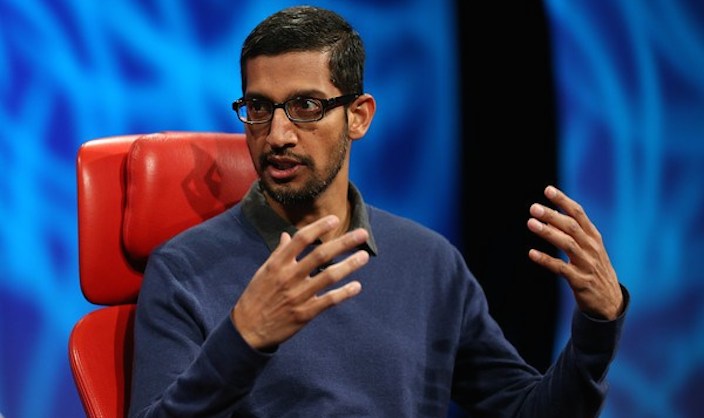
Sundar Pichai at D: All Things Digital conference
Despite widespread reporting that Google bid and failed to purchase WhatsApp ahead of Facebook’s $19 billion acquisition of the messaging platform company, Google SVP Sundar Pichai went on the record during a panel discussion at Mobile World Congress to put that claim to bed, The Telegraph reports.
“Whatsapp was definitely an exciting product,” he said. “We never made an offer to acquire them. Press reports to the contrary are simply untrue.”
The source of the reports that Google attempted to pick up WhatsApp for $10 billion source back to a report by Fortune citing “two separate sources” claiming Google had previously underbid Facebook.
Expand
Expanding
Close
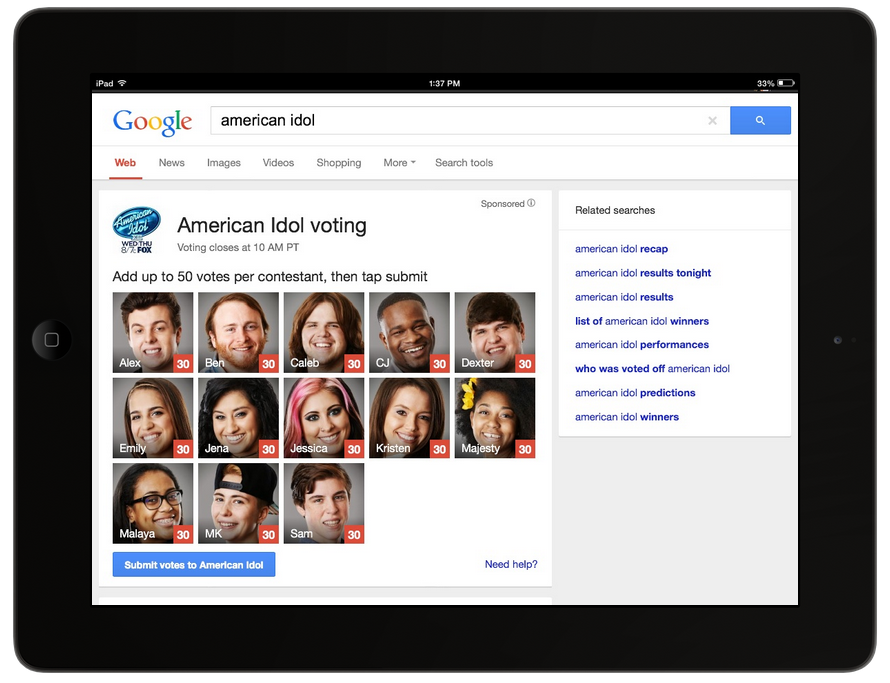
Planning to watch American Idol tonight and vote on your favorite performers? Google is making voting through its Search apps possible through a partnership with FOX. As the live finalist performance shows debut, American Idol is allowing viewers to vote through Google.com and Google’s Android and iOS Search apps.
Voting through Google allows you to cast up to 50 votes for each contestant as the new voting system is piloted. Simply search american idol or idol during voting hours and cast your votes!
Google Search for Android is available for free from the Google Play Store.
A day after Motorola revealed that it is working on a smartwatch for release later this year, Android Police posted low-resolution photos of what it says is an early prototype from some point last year. The unnamed source claims that the watch was code-named Gem but known to the development team as the Google Watch.
With Motorola having now parted company from Google, and Google believed to be working on an LG-made Nexus-branded smartwatch to be announced next month and launched at Google I/O in June, the one certainty is that this device won’t be launched as the Google Watch …
Expand
Expanding
Close