update

See All Stories

Gmail gets ‘block sender’ and ‘unsubscribe’ features on Android & web

Site default logo image

Google is rolling out a couple notable new features for Gmail, starting today with a new “block sender” feature on both the web and Android and a unsubscribe button coming to the Gmail app for Android.
Expand
Expanding
Close

Latest Google Photos update hints at album collaboration, people labeling, Chromecast support, more

Google released version 1.5 of Google Photos for Android last week, and there weren’t any notable user-facing features. But that doesn’t mean that there aren’t any additions at all in the new app — these updates very often lay the groundwork for features set to launch in the near future. Cody Toombs pulled this update apart himself, revealing that Photos is preparing for quite a few new additions including album collaboration, people labeling, Chromecast support, and more…
Expand
Expanding
Close

Exclusive: Google updating Chromecast app w/ ‘What’s On,’ suggested apps, more

As we told you yesterday, Google is preparing several big Chromecast announcements for its September event later this month. According to the internal documents that 9to5Google has obtained, the company is planning to launch not only brand new Chromecast hardware and Spotify support, but an updated companion app for the streaming device as well. The new app seems to build on the previous, packing suggested content features, a new design, and more…
Expand
Expanding
Close

Exclusive: Google and Spotify launching Chromecast support later this month

While Chromecast has long supported Google Play Music, Netflix, Pandora, and other subscription services, Spotify — one of the most popular music streaming services — has long been left off the list. According to leaked internal documents that 9to5Google has seen, Google is preparing a slew of Chromecast announcements for later this month, one of which being Spotify support for Chromecast…
Expand
Expanding
Close

YouTube Gaming will soon let you broadcast straight from your Android phone

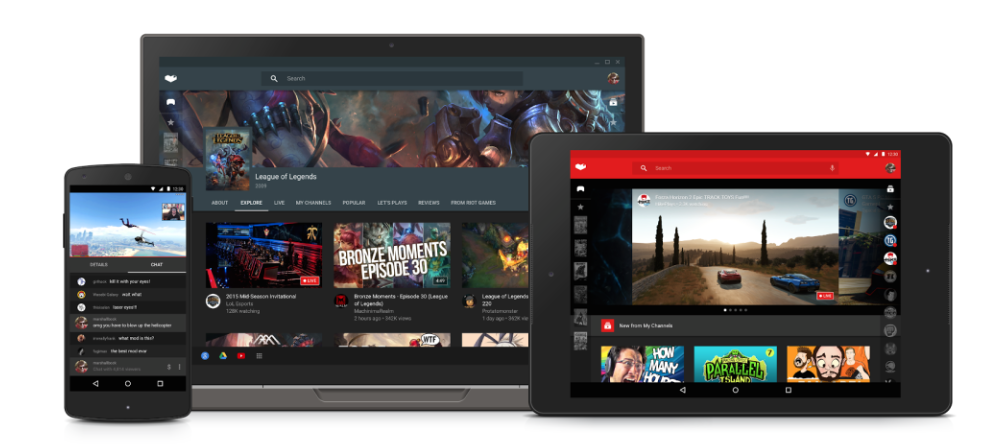
The YouTube Gaming app launched on Android about a month ago, but now we’re already hearing about a significant update that’s on the way. As was first revealed in a teardown done by Android Police earlier this month, Google has now confirmed that it is preparing to introduce Android game broadcasting straight from the app itself…
Expand
Expanding
Close

Google app 5.3 update rolling out with ‘Now on Tap’ feature for Dev Preview 3 users

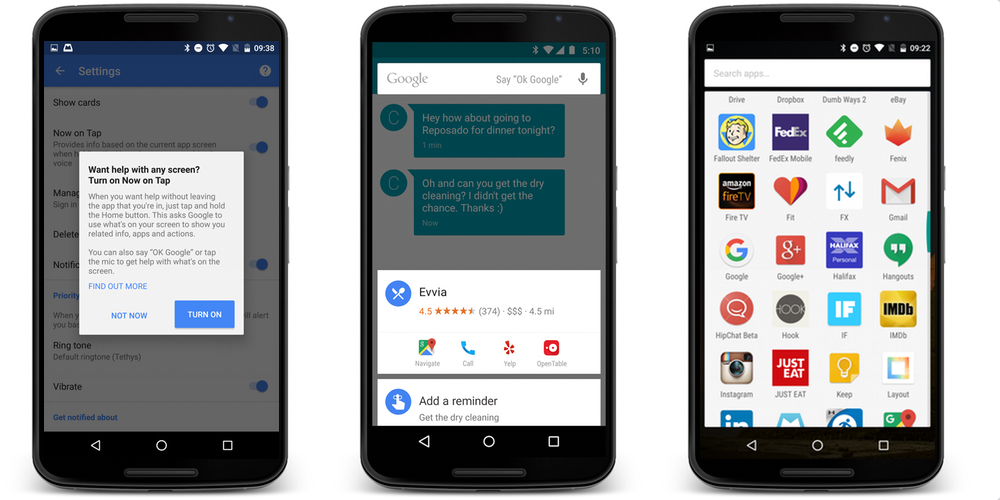
Google is rolling out an update to its self-titled app for Android, bringing it up to version 5.3. It’s available to download for free for anyone running Android 4.4 or later, bringing a fresh look to the standard Google Launcher. For those running Android ‘M’ Dev Preview 3, the update also brings one of Marshmallow‘s most exciting features: Now on Tap…

Expand
Expanding
Close

Google Slides on Android updated w/ interactive lock screen notifications

Earlier this year, Google Slides on Android was updated with support for presenting slide shows over both the Chromecast and Apple TV and today the company is expanding on that capability and making it easier for presenters to stay engaged with the audience. With today’s update, presenters can now control their slide shows directly from the lock screen of their Android device.


Expand
Expanding
Close

Latest Nova Launcher beta arrives w/ icon normalization, more features

In case you’re uninitiated in third party launchers (which you shouldn’t be, considering Cam’s recent deep dive), Nova Launcher is definitely one of the most popular. The latest version of Nova Launcher beta is now available, and of the many new features that this version brings, the most notable is a new tweak allowing the normalization of icon sizes…
Expand
Expanding
Close

Spotify’s Running feature lands on Android after 3 months in beta

Spotify Running, which originally launched on iOS a whole 4 months ago, has finally made it to Android. From today, Android users will be able to fire up the Spotify app, open the Running feature, and have the music streaming service find music that matches tempo with the pace of their jog…

It’s yet another example of Android support getting put on the back burner, but at least it’s here, right?

As per the official Spotify blog:

Since the launch of Spotify Running, millions of you have laced up and hit the road together with the best musical motivation out there.

Today we’re thrilled to be bringing the same great experience to our Android users.

With Spotify Running, we’ve combined the best music on the planet with recommendations based on your listening history, multiple-genre playlists as well as original running compositions.

Simply select your tempo and start running. We’ll match the perfect music in time to your step to help you go the extra mile.

Spotify Running has been available in the beta version of the Spotify app on Android for a few months now — it’s somewhat odd that it took that long for the feature to be graduated to the full version of the app. Nonetheless, users of the main Spotify app should start seeing the feature roll out today.

https://www.youtube.com/watch?v=0fZBqV_yMq4

Google AdSense for iOS hits 3.0 w/ iPhone 6 & 6 Plus support, Material Design, more

Google has this morning pushed an update to AdSense for iOS, bringing many features that other apps in the Mountain View company’s catalog received months ago. While it may not be the most popular app outside of publishing and creative circles, the AdSense app has today been updated with support for Native iPhone 6 and 6 Plus resolution, Material Design, and more.

Rounding out the update is support for Hindi and Malay, a new icon for the Home Screen, more metrics, and a today center widget. The last of these, in case you aren’t aware, is a new widget for the Today section of Notification Center. On it, you’ll find four metrics for quick access: Today so far, Page views, Clicks, and Page RPM. It also tells you when the widget was last updated.

While Google’s apps for iOS have always been known for being well-polished (and sometimes just generally better than their Android counterparts), they usually come at a much slower pace. AdSense 3.0 for Android with many of the same new features was released on Android four weeks ago, and you can read more about that update here.

Here’s the full change log:

What’s New in Version 3.0

This time we’re bringing you:
– Support for Hindi and Malay;
– Native iPhone 6 and 6+ resolution;
– A today center widget;
– Our lovely new AdSense logo;
– More metrics!
– A little something we like to call Material Design.

Head over to the App Store to grab the latest version for free.

Google Play Newsstand get sports information in latest update

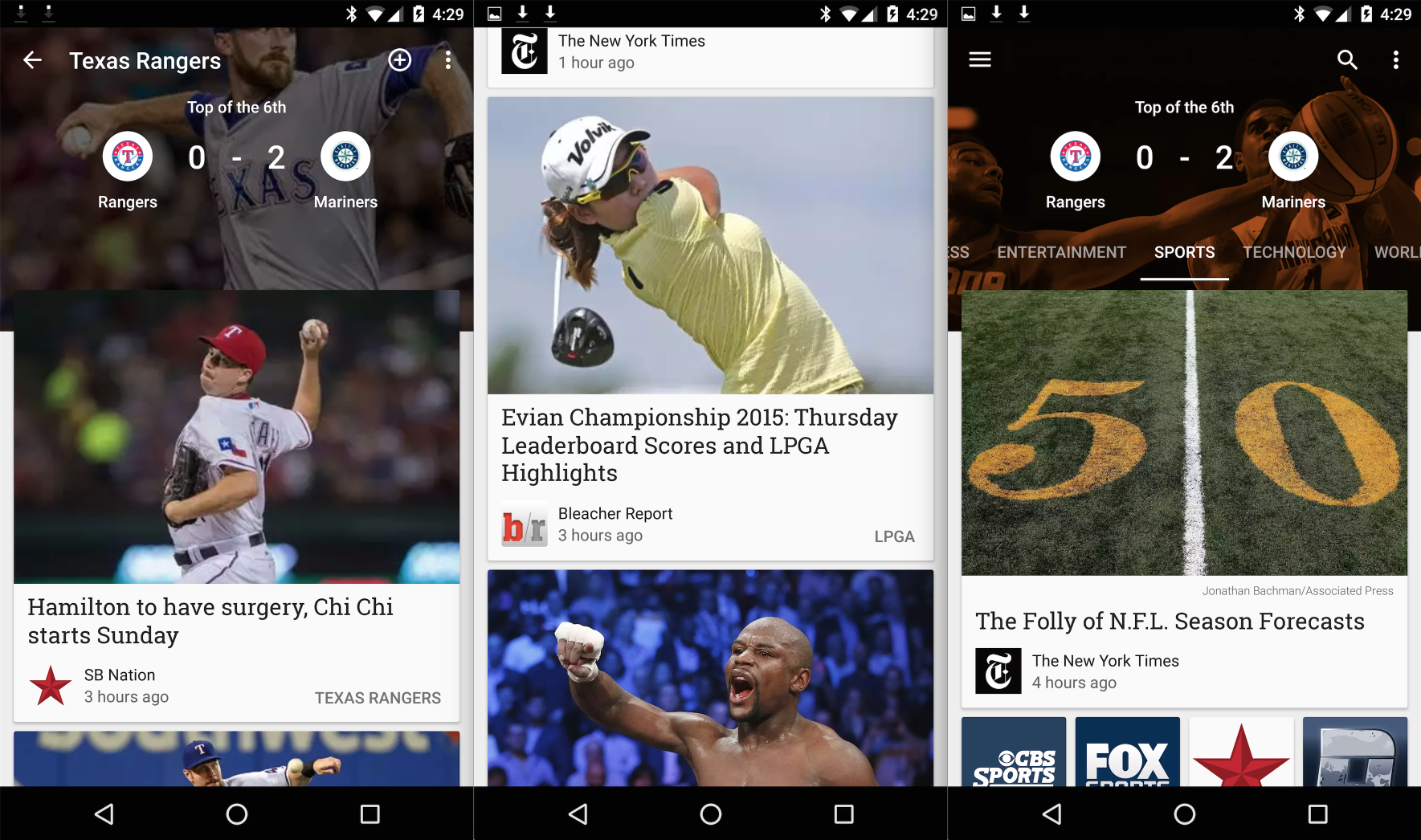
Google Play Newsstand is definitely my least used Google Play app. That’s not saying much, though, because Google Play Music is really the only one that I use. Play Books, Play Games, and Play Movies might as well not exist in my eyes. That said, if you do use Newsstand, you might be interested in today’s new update. Within, you’ll find new support for sports scores for your favorite NFL, NBA, NHL, and MLB teams…
Expand
Expanding
Close

Google posts LMY48M factory images w/ security fixes for Nexus 4, 5, 6, 7, 9, and 10 [Update: Player, more Nexus 6 images]

Update: Google has now uploaded the LMY48N (Note: Not M) image for the Nexus Player.

Update 2: Google has now uploaded LYZ28K and LVY48F images for the Nexus 6 on T-Mobile and Project Fi, respectively.

As we told you yesterday, Google is pushing out one of its monthly security updates to the spectrum of still-supported Nexus devices. While you should start seeing the update — with build number LMY48M — showing up on your carrier Nexus devices over-the-air, Google has now uploaded the update to its Nexus factory image page for the Nexus 4, 5, 6, 7, 9, and 10…
Expand
Expanding
Close

Play Store updated w/ support for uninstall manager, fingerprint sensors, and more

Ahead of the release of Android 6.0 Marshmallow, Google has updated the Play Store app to version 5.9 with a handful of new features and hints at future features and capabilities. First off, apps are now beginning to display popups that ask for permissions the first time they are opened after being downloaded.


Expand
Expanding
Close

Google preparing to release another security update for Nexus devices today

It was about a month ago that Google announced that it would begin pushing security updates to Nexus devices on a monthly basis, and now it looks like the second of those is about to be released. The Nexus factory images page hasn’t been updated yet, but several software update pages on T-Mobile’s website say that Google is pushing out a mandatory update today with “Android security enhancements” and “minor bug fixes”…

There’s definitely not much to see here, and this update doesn’t even go as far as to patch any specific vulnerabilities (in contrast to last month’s update, which very clearly intended to patch the vulnerability in Stagefright. We’ll update this post as soon as Google uploads the images, but you can also just keep up to date by checking your device for an OTA. Many of the updates sport build LMY48M, and range between 7 and 30 MB.

Google Drive for iOS update brings multiple file select, quick sharing, and more

A new update to Google Drive for iOS brings a couple notable, highly-requested features to the app. Included in the update, users will now be able to select multiple files at once in order to perform an action like saving for offline, adding a star to important files, or rearranging and organizing. The new feature is something that has long been requested by users and makes managing and sharing multiple files at once much easier than in the past.

In addition, the update includes the ability to share, rename or view file details much quicker with new quick share buttons when tapping on a file.

And lastly, Google says the updated app will include the usual performance improvements.

The updated Google Drive app for iOS is available on the App Store now.

Viewing websites in Chrome should now use 10% less memory on average [Video]

Following the public release of Chrome 45 a couple of days ago, Google yesterday detailed an important new feature for mobile: Chrome Custom Tabs. Now, Google is showing off more of the performance improvements that the company has introduced in the latest version, allowing Chrome to use less memory and power on the desktop. In one example, it seems Google has managed to reduce the memory footprint of most sites you visit through the browser…
Expand
Expanding
Close

This is Motorola’s answer to the ‘Moto 270’ jokes

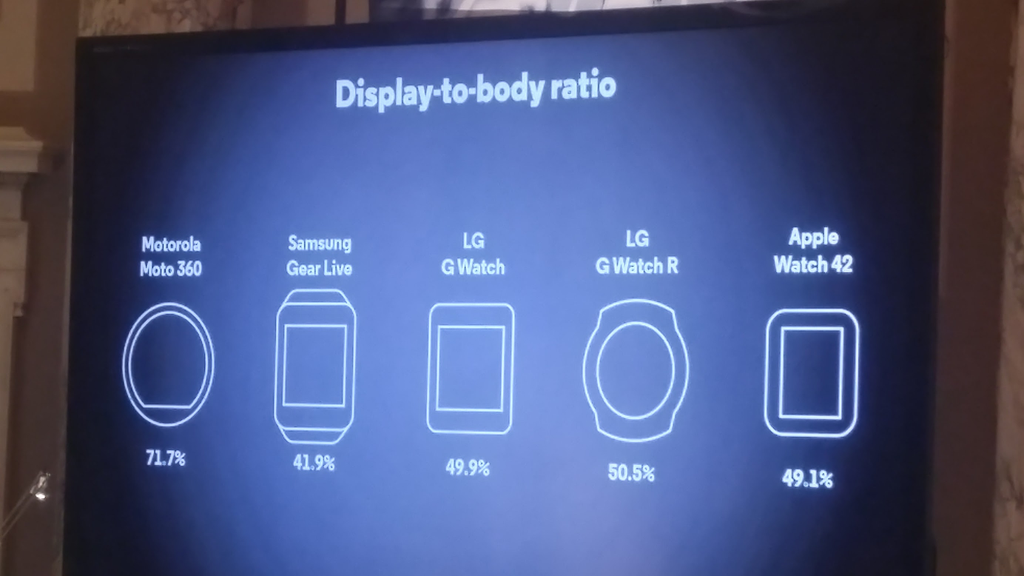
The new Moto 360 is surely right around the corner, but one thing doesn’t seem to have changed. The 2nd generation Moto 360 — which was just made official — still hasn’t managed to get rid of the dreadful “flat tire.” But according to a very informative slide snapped by our own Seth Weintraub at Lenovo’s press event yesterday, Motorola is having none of the criticism and jokes. Comparing the 360 to the Samsung Gear Live, the G Watch, and the Apple Watch, the Moto 360 wins in display-to-body ratio.

As you can see, at least according to Moto’s data, the 360’s screen has 71.7% of the front face of the watch, while the Apple Watch — probably the 360’s biggest competitor — has a measly 49.1%. Both of LG’s recent offerings come in at around the same number as the Apple Watch, but other competitors, like the Gear Live, are as low as 41.9%. With the flat tire, which sadly makes the 360’s screen a not-so-perfect circle, Motorola can achieve a much better ratio. Oddly missing, however, is the Huawei Watch…

IFTTT’s powerful DO Button app adds Android Wear support

The DO Button is a great accessory app to the powerful “If This Then That” service, and now you can use the app with your Android Wear device. Thanks to an update that’s rolling out (via Android Police) on the Play Store right now, you’ll be able to control hundreds of IFTTT-compatible apps — like Tumblr, Drive, Evernote, and more — from your wrist…

DO Buttons are simplified, quick one-tap access to your IFTTT recipes. For example, paired with a Nest thermostat, you can create a recipe that sets your home’s temperature to 72 degrees. These have long been accessible via the Android and iOS apps, but today’s update will put them on your watch. Also, the update packs support for new channels.

Here’s the full change log:

Introducing DO Button for Android Wear!
Designed for simplicity and ease of use, DO for Android Wear places the control of hundreds of apps right on your wrist.
+ New Channels include: Adafruit, Amazon Cloud Drive, Camio, dondeEsta Family, iSecurity+, Wattio, Wolfram Data Drop
+ A few wrinkles were ironed out
—The IFTTT Team
If you want to grab the update, just keep your eye on the Play Store listing. The app is free, of course, and the update should be rolling out now.


Google begins updating Android apps with its new logo

Earlier today Google officially unveiled its playful new logo and began replacing the classic logo with the new one around the web and at brick-and-mortar locations. Now, the company is rolling out updates to its Android apps with the refreshed logo.

Google has updated Maps, Translate, and Search on Android with the new logo. The Search update also included a handful of other changes, which we told you about earlier today. The Maps update also includes the ability to more easily compare ETAs across driving, transit, walking, and biking.

Google will undoubetedly continue to rollout updates to its other Android apps with its revised logo and if the speed at which its been updating the logo in other places in any indication, it won’t take long before the classic logo is entirely phased out.

The updates to Maps, Translate, and Search are rolling out now via the Play Store, but as usual, they may take a few days to hit every device. In the meantime, you can download the APKs from APKMirror at the links below:

Google rolls out visual tweaks to Search on mobile, Google Now on Android

In addition to unveiling its all new logo today, Google has announced some changes coming to its Search experience on mobile devices and its Google Now homepage on Android. Google notes that it’s made the search results page for mobile devices easier to navigate with a new swipeable and tappable UI. Google offered a look at the new UI for images, videos and news stories in the video below.
Expand
Expanding
Close

GoPro app for Android gets smart editing feature to create & share clips

The official GoPro app for Android gets an update today which brings a new smart editing feature to let users create and share clips instantly from within the app. Previously users resorted to third-party apps for similar functionality with GoPro camera hardware.

The new feature will let users instantly create edited versions of their videos that come in at 5, 15, or 30 seconds. You’ll be able to drag the timeline to select what 5, 15, or 30 second portion of your video you want to isolate. Once you’ve selected your clip, you’ll be able to instantly share to Facebook, YouTube, Instagram and other social sharing options available in the app.

The updated app, version 2.9, also receives an “improved camera software update process” and a number of bug fixes and other improvements.

You can grab the updated app for Android on Google Play

Google’s logo has a new look, and it’s really playful and cute

Update: Google has published an article outlining the changes and the ideology that inspired them.

Update 2: Yep, Google has already updated their brick-and-mortar logos.

Today, Google has announced that it’s introducing a brand new look and brand identity for the company. Gone is the logo based on the Catull serif type face, as the Mountain View company introduces a new, more playful, logo that looks made with a font similar to the “LTCircular” face used on the Alphabet announcement page
Expand
Expanding
Close